





服务简介
几乎每一个操作系统都有一种在系统启动时刻启动进程的机制,这些进程提供了一些不依赖于任何用户交互式的服务。在Windows中,这样的进程成为服务。在桌面Windows系统中,服务程序由三个组件构成的:服务应用、服务控制程序(SCP)和服务控制管理器(SCM)。(以上参见《深入解析Windows操作系统》第四版第四章第二节。)
桌面系统的服务机制是非常复杂的,至少看的我现在还在晕。在嵌入式系统中,当然不会如此复杂。
Windows CE 5.0服务程序在系统架构中的位置如下图,Services.exe是作为服务DLL文件的宿主,提供开始、暂停和停止服务的能力。服务和驱动(主要由Device.exe加载)有个很有意思的关系,从本质上说它们是一回事。 
下图是Windows Mobile 6.0 Professional模拟器Services.exe和Device.exe进程加载的DLL文件的截图: 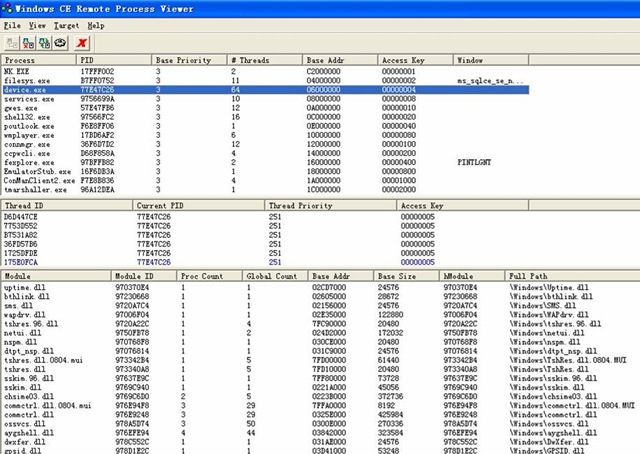
![clip_image002[6]](http://images.cnblogs.com/cnblogs_com/wangkewei/WindowsLiveWriter/WindowsMobile_14554/clip_image002%5B6%5D.jpg "clip_image002[6]")
Windows CE 6.0服务程序在系统架构中的位置,微软把驱动分为用户模式和内核模式: 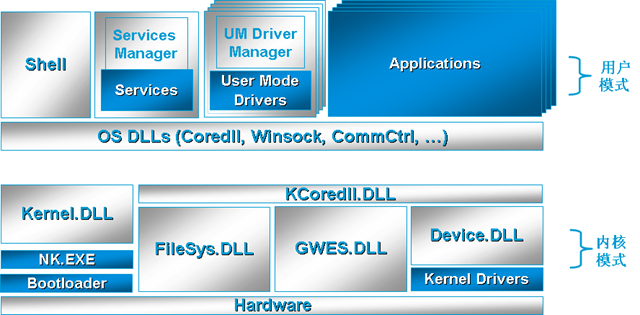
进一步详细的看下Windows CE 6.0的用户态: 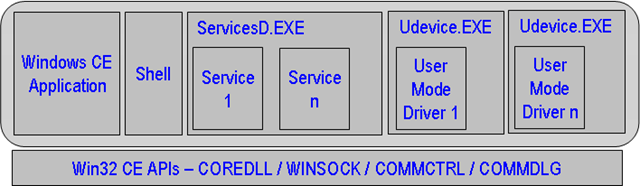
ServicesD.EXE用于服务的宿主,UDevice.EXE用于用户态驱动的宿主。
"ServicesD.exe is a process that supplements the Udevice.exe process. ServicesD.exe provides enhanced loading capabilities such as support for starting, pausing, and stopping services. The programming model for writing services and writing device drivers is very similar in Windows Embedded CE. You can develop a server that runs on Udevice.exe rather than on ServicesD.exe, with identical code, provided that your server does not require advanced features offered by ServicesD.exe. “
再详细看一下Windows CE 6.0的内核态: 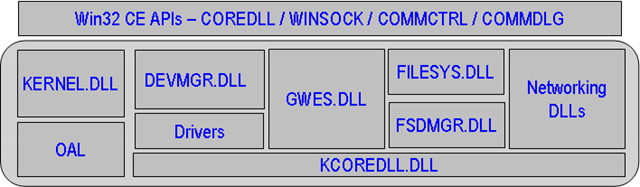
"DEVMGR.DLL is the Device Manager that is loaded by the kernel, it runs continuously, and it manages loaded device drivers and their interfaces. When the Device Manager loads, it also loads the I/O Resource Manager to read a list of available resources from the registry. “
动手在WM 6.0 Profession系统下写一个服务
第一步,在def文件中添加导出函数,xxx即是注册表里指定的前缀:
EXPORTS
; Explicit exports can go here
xxx_Close
xxx_Deinit
xxx_Init
xxx_IOControl
xxx_Open
xxx_Read
xxx_Seek
xxx_Write
第二步,实现函数,xxx即是注册表里指定的前缀:
/***************************************************************************
*
* Function Name: DllMain
* Purpose: service entrance
* Input:
		hinstDLL: Handle to the DLL.
		dwReason: Specifies a flag indicating why the DLL entry-point function is being called.
		lpvReserved: Specifies further aspects of DLL initialization and cleanup.
* Output:none
* Return:TRUE
***************************************************************************/

BOOL APIENTRY DllMain( HANDLE hinstDLL, DWORD  dwReason,  LPVOID lpvReserved)
{
	switch( dwReason )
	{
		case DLL_PROCESS_ATTACH:
		g_hInst=(HINSTANCE)hinstDLL;
		break;

		case DLL_PROCESS_DETACH:
		{
			//..
			break;
		}
	}
	return TRUE;
}


/***************************************************************************
*
* Function Name:xxx_Close
* Purpose: This function is implemented by a service and will be called by Services.exe.
* Input:
	dwData:Specifies the value returned by xxx_Open (Services.exe) for the given service instance.
* Output:none
* Return:TRUE indicates success. FALSE indicates failure.
* Remarks:This function is called when a service instance is closing during an application's call to CloseHandle.
***************************************************************************/
BOOL xxx_Close(DWORD dwData)
{//.. //return FALSE; } /*************************************************************************** * * Function Name:xxx_Deinit * Purpose: This function is to be implemented by a service and will be called by Services.exe. * Input: dwData:Specifies the value returned by xxx_Init (Services.exe) for the given service instance. * Output:none * Return:TRUE indicates success. FALSE indicates failure.
* Remarks:This function is called during an application's call to DeregisterService.
***************************************************************************/
BOOL xxx_Deinit(DWORD dwData)
{
//.. //return FALSE; } /*************************************************************************** * * Function Name:xxx_IOControl * Purpose: This function is used to send a control code to a service. * Input: dwData: Specifies the value returned by xxx_Init (Services.exe) for the given service instance. dwCode: Specifies the control code for the operation. pBufIn: Pointer to a buffer that contains the data required to perform the operation. dwLenIn: Specifies the size, in bytes, of the buffer pointed to by pBufIn. dwLenOut: Specifies the size, in bytes, of the buffer pointed to by pBufOut. * Output: pBufOut: Pointer to a buffer that receives the output data from the operation. pdwActualOut:Pointer to a variable that receives the size, in bytes, of the data stored into the buffer pointed to by pBufOut. * Return:TRUE indicates success. FALSE indicates failure.
* Remarks:The control code specifies the action that the driver is to perform. For example, a control code can ask a service
to return information or direct the service to carry out an action. Windows Embedded CE. NET provides a number of
           standard control codes. In addition, a service can define its own service-specific control code.
***************************************************************************/
BOOL xxx_IOControl(
			DWORD dwData,
			DWORD dwCode,
			PBYTE pBufIn,
			DWORD dwLenIn,
			PBYTE pBufOut,
			DWORD dwLenOut,
			PDWORD pdwActualOut)
{
         //..
	//return TRUE;
}

/***************************************************************************
*
* Function Name:xxx_Open
* Purpose: This function is to be implemented by a service and will be called by Services.exe.
* Input:
	dwData:Specifies the value returned by xxx_Init (Services.exe) for the given service instance.
	dwAccess :Specifies the type of access to the object.
	dwShareMode:Specifies how the object can be shared.
* Output:none
* Return:TRUE indicates success. FALSE indicates failure.
* Remarks: This function is called during an application's call to CreateFile. The values for the
          dwAccess and dwShareMode parameters are passed directly from the call to CreateFile.
***************************************************************************/
BOOL xxx_Open(
		DWORD dwData,
		DWORD dwAccess,
		DWORD dwShareMode)
{
//.. //return FALSE; } /*************************************************************************** * * Function Name:xxx_Read * Purpose: This function is to be implemented by a service and will be called by Services.exe. This function need
           only be implemented by a streaming service.
* Input:
		dwData:Specifies the value returned by xxx_Open (Services.exe) for the given service instance.

		dwLen:Specifies the number of bytes to be read.
* Output:
		pBuf:Pointer to the storage location for the data that is read.
* Return:Returns the number of bytes read.
* Remarks: This function is called by Services.exe as a result of an application's call to ReadFile.
***************************************************************************/
DWORD xxx_Read(
			   DWORD dwData,
			   LPVOID pBuf,
			   DWORD dwLen)
{
         //..
	//return 0;
}


/***************************************************************************
*
* Function Name:xxx_Seek
* Purpose: This function is to be implemented by a service and will be called by Services.exe.
This function need only be implemented by a streaming service. * Input: dwData:Specifies the value returned by xxx_Open (Services.exe) for the given service instance. pos:Specifies the number of bytes to move the file pointer. pos is a 32-bit signed value. type:Specifies the starting point for the file pointer move. * Output:none * Return:Returns the current location of the file pointer.
* Remarks: This function is called by Services.exe as a result of an application's call to SetFilePointer.
***************************************************************************/
DWORD xxx_Seek(
		DWORD dwData,
		long pos,
		DWORD type)
{
         //..
	//return 0;
}

/***************************************************************************
*
* Function Name:xxx_Write
* Purpose: This function is to be implemented by a service and will be called by Services.exe.
                Only streaming services need to implement this function.
* Input:
	dwData:Specifies the value returned by xxx_Open (Services.exe) for the given service instance.
	dwInLen:Specifies the length of data in the buffer to be written.
* Output:
	pInBuf: Pointer to the buffer containing data to write.
* Return:Returns the number of bytes actually written.
* Remark: This function is called by Services.exe as a result of an application's call to WriteFile.
***************************************************************************/
DWORD xxx_Write(
DWORD dwData,
LPCVOID pInBuf,
DWORD dwInLen)
{//.. //return 0; } /*************************************************************************** * * Function Name:xxx_Init * Purpose:This function is to be implemented by a service and will be called by Services.exe. * Input: dwData: Specifies the service-supplied data. * Output:none * Return:Returns a value to be used in calls to xxx_Open (Services.exe).
* Remarks: This function is called during RegisterService, in which case dwData will be the fourth parameter
to RegisterService. It is also called during Services.exe initialization, in which case dwData
           is the DWORD value set in the registry value HKEY_LOCAL_MACHINE\Services\Service\Context, or zero if this value is not set.
***************************************************************************/
DWORD xxx_Init(DWORD dwData)
{
	//..
	//return 1;
}
第三步,添加注册表:
当系统启动的时候,Services.exe会遍历HKEY_LOCAL_MACHINE\Services注册表位置下子键,每个子键代表一个服务,Services.exe按照对应键值初始化服务,并且按照键值指定的顺序。
HKEY_LOCAL_MACHINE\Services\<Service Name>下的键值的说明:
Context : REG_DWORD类型 Specifies the initial value that is passed into the initialization routine.
Description : REG_SZ Description of display service.
DisplayName : REG_SZ Display service name.
Dll : REG_SZ Dynamic-link library (DLL) file to be loaded.
Flags : REG_DWORD Specifies a set of flags used to modify the behavior of the ActivateService function. The following list shows the valid flags:
Index : REG_SZ Service index.
Keep : REG_DWORD If Keep = 0, the DLL will be unloaded immediately after initialization.
Order : REG_DWORD Order in which Services.exe will load each service. The service with the lowest order is loaded first.
Prefix : REG_SZ Prefix of the DLL.(3个英文字符。为什么?看看文档里介绍的Service.exe在调用上面这些函数时做的操作。)
一个具体例子:
[HKEY_LOCAL_MACHINE\Services\MySevice]
"Description"="MySevice"
"DisplayName"="MySevice"
"Prefix"="OBX"
"Dll"="mysevice.dll"
"Index"=dword:0
"Keep"=dword:1
"Order"=dword:9
第四步,代码签名,不签名的服务DLL不会被加载的,这也服务运行失败的常见原因。
签名工具在此。
SDK自带的一些证书,在模拟器上实验是可以的:
![clip_image002[1]](http://images.cnblogs.com/cnblogs_com/wangkewei/WindowsLiveWriter/WindowsMobile_14554/clip_image002%5B1%5D.jpg "clip_image002[1]")
此内容由惯性聚合(RSS阅读器)自动聚合整理,仅供阅读参考。 原文来自 — 版权归原作者所有。