





使用asp.net mvc 调用Action方法很简单。
一、无参数方法。
1、首先,引入jquery-1.5.1.min.js 脚本,根据版本不同大家自行选择。
<script src="@Url.Content("~/Scripts/jquery-1.5.1.min.js")" type="text/javascript"></script>
2、在Controllers中书写前台Ajax需要调用的Action,比如:
public ActionResult test1()
        {
            return Content("返回一个字符串");
        }
这个Action返回了一个字符串。注意这里的返回,不是return View();
3、我们回到前台,假设我的功能是当页面中1个按钮单击时调用后台的Action并返回1个字符串。
<input type="text" id="txt1" name="txt1" />
<input type="button"  id="btnSub" name="btnSub" value="调用Action" />
如上,我的界面里放了1个文本框和1个按钮。那下面我们来实现当按钮单击时候调用后台方法返回字符并赋值给文本框的。

<script type="text/javascript" language="javascript">
    $(document).ready(function () {
        $("#btnSub").click(function () {
            $.ajax({
                type: "POST",
                url: "/Home/test1",
                data: "",
                success: function (sesponseTest) {
                    $("#txt1").val(sesponseTest);
                }
            });
        });
    });
</script>
很简单,下面大概介绍下用到的各个属性和方法。 $(document).ready(function () {}; -------类似我们原来写的<body onload="loat();"> 页面加载方法。但是也有区别,具体请参考官方说明。
$("#btnSub").click(function () {}; -------按钮的单击事件。此处根据各自需要自行修改了。比如($("#btnSub").focus(function () {}……))等等。
$.ajax({}); -------ajax方法。
type: ------- 类型,此处为“POST” 还有 "GET"类型。
url: ------- 调用的Action 书写格式 /controller/action
data: ------- 参数,因为此处没有,所以我们为""
success: function (sesponseTest) {} ------- 回调函数,就是当我的Action 执行完后,执行的方法。sesponseTest为Action返回的内容。
$("#txt1").val(sesponseTest); ------- 把返回的字符串赋值给文本框。
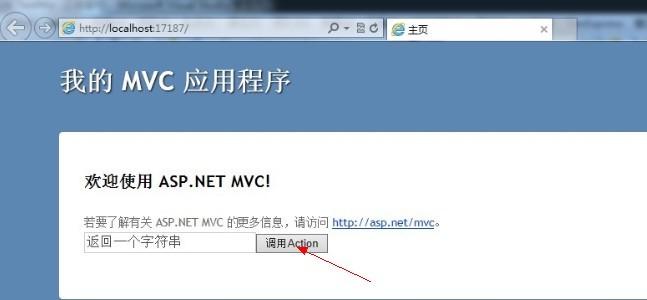
4、下面就是我们最终实现效果:当我们单击按钮的时候,通过Ajax调用了后台的1个Action 并返回一个字符串给文本框赋值了。
二、带参数方法。
我们实际项目中可能经常会遇到界面中需要传递1个或多个参数给Action,最终返回结果给界面的情况。那接下来我们就来看下带参数的调用方法。
1、在原来的Action基础上我们稍作改动。
 public ActionResult test1(string id)
        {
            return Content(id + "返回一个字符串");
        }
这个Action需要一个参数id ,最后还是返回了一个字符画。
2、界面上我们再添加1个文本框。
<input type="text" id="txt1" name="txt1" /><br/>
<input type="text" id="txt2" name="txt2" /><br/>
<input type="button"  id="btnSub" name="btnSub" value="调用Action" />
此处有2个文本框,我将实现:点击按钮的时候把文本框1中的内容传递到Action进行处理,最终把返回结果显示在文本框2中。
<script type="text/javascript" language="javascript">
    $(document).ready(function () {
        $("#btnSub").click(function () {
            var tvalue=$("#txt1").val();
            $.ajax({
                type: "POST",
                url: "/Home/test1",
                data: "id=" + tvalue,
                success: function (sesponseTest) {
                    $("#txt2").val(sesponseTest);
                }
            });
        });
    });
</script>
细心的大家可能会发现,和上面无参数的就是多了点点改动。 这里的data: "id=" …… 带上了1个参数。id 就是我的Action 的参数的名称 id 。 然后把文本框1的值作为参数传递给Action.
多个参数呢,data的每个参数请用&&分开,如(data: "id=12345&&str=test",)……
注意这里的参数名称要和Action 的参数名称相同。
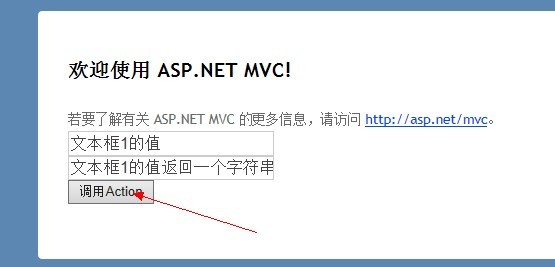
4、我们来看下最终效果。我们在文本框1中先输入内容,然后点击按钮,给文本框2赋值。
此内容由惯性聚合(RSS阅读器)自动聚合整理,仅供阅读参考。 原文来自 — 版权归原作者所有。