


惯性聚合 高效追踪和阅读你感兴趣的博客、新闻、科技资讯
阅读原文 在惯性聚合中打开

推荐订阅源

Forbes - Security
Forbes - Security
GbyAI
GbyAI
OSCHINA 社区最新新闻
OSCHINA 社区最新新闻
S
SegmentFault 最新的问题
Y
Y Combinator Blog
Recorded Future
Recorded Future
博客园 - Franky
I
InfoQ
T
The Blog of Author Tim Ferriss
Recent Announcements
Cyber Security Advisories - MS-ISAC
博客园_首页
阮一峰的网络日志
阮一峰的网络日志
T
Tailwind CSS Blog
Cyberwarzone
Cyberwarzone
The Register - Security
H
Hackread – Cybersecurity News, Data Breaches, AI and More
Threat Intelligence Blog | Flashpoint
雷峰网
雷峰网
P
Palo Alto Networks Blog
G
GRAHAM CLULEY
Cloudbric
Cloudbric
CTFtime.org: upcoming CTF events
MongoDB | Blog
MongoDB | Blog
F
Full Disclosure
Google DeepMind News
Recent Commits to openclaw:main
C
Check Point Blog
爱范儿
爱范儿
The GitHub Blog
The GitHub Blog
cs.AI updates on arXiv.org
W
WeLiveSecurity
T
Threat Research - Cisco Blogs
U
Unit 42
N
Netflix TechBlog - Medium
The Cloudflare Blog
Spread Privacy
Spread Privacy
Microsoft Azure Blog
美团技术团队
T
Troy Hunt's Blog
Engineering at Meta
Engineering at Meta
H
Heimdal Security Blog
TaoSecurity Blog
TaoSecurity Blog
C
Cybersecurity and Infrastructure Security Agency CISA
T
Tenable Blog
B
Blog
S
Securelist
H
Hacker News: Front Page
Google Online Security Blog
G
Google Developers Blog

博客园 - 蒋雷军

在2015中使用V12版本的ReportView控件,会导致winform窗体不能正常打开 小心DriveInfo类IsReady属性的较大延迟问题 Overloads和Overrides在元属性继承上的特性 无法将类型为“System.__ComObject”的 COM 对象强制转换为接口类型,原因为没有注册类 引用账户当前已锁定,且可能无法登录”--问题的解决方法(转载) win7访问windows server 2003服务器出现未知的用户名或者错误的密码(转载) NewRowNeeded和UserAddedRow事件以及RowsAdded的区别使用 TabControl控件中TabPage的显示和隐藏 参数计数不匹配,未处理System.Reflection.TargetParameterCountException 设定了自定义属性,来控制控件的宽度或高度,但数据会不正常 如何使一个你没有源代码的DLL文件变为强命名的DLL Windows 7如何限制运行特定的应用程序(转载) 怎么通过应用程序控制策略限制软件运行?(转载) 32位程序在64位电脑下运行, 如何让圆珠笔起死回生 密度采集调整 MIME类型大全 C# 构造函数如何调用父类构造函数或其他构造函数 结合RibbonControl设计MDI窗体,在子窗体关闭后,顶部显示额外的控制栏残影
如何使rdlc报表的表头在每一页都显示
蒋雷军 · 2016-01-14 · via 博客园 - 蒋雷军

想要使表格的表头在每一行都显示,直接在表格的属性设置界面中设置是无效的,应该算是一个BUG,如图:
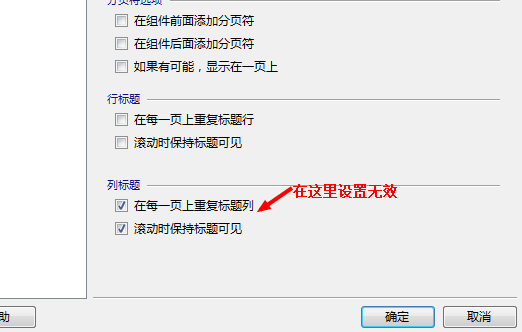

但还是可以实现的,实现方法如下,这个实现方法从网上得到

开发工具: Visual Studio 2010

Report 版本: Report 2010

1. 首先使用Visual Studio 打开你的rdlc文件。 你会看到RowGroups 和 Columns Groups, 如下图:

操作: 选择 Columns Groups 右边的下拉按钮,选择 Advanced Mode.

2.等Static成员列出来之后。

操作: 选择 Row Groups 中的 Static 成员, 并且打开属性窗口查看属性。如下图:

操作: 将ReportOnNewPage设置为True.

3. 保存并重新编译项目。