惯性聚合 高效追踪和阅读你感兴趣的博客、新闻、科技资讯
阅读原文 在惯性聚合中打开

推荐订阅源

Forbes - Security
Forbes - Security
OSCHINA 社区最新新闻
OSCHINA 社区最新新闻
P
Palo Alto Networks Blog
Martin Fowler
Martin Fowler
T
Threatpost
D
Docker
S
Schneier on Security
M
MIT News - Artificial intelligence
G
Google Developers Blog
L
LINUX DO - 热门话题
J
Java Code Geeks
月光博客
月光博客
博客园 - 三生石上(FineUI控件)
IT之家
IT之家
博客园 - Franky
C
Cyber Attacks, Cyber Crime and Cyber Security
K
Kaspersky official blog
Google DeepMind News
N
News and Events Feed by Topic
V
Vulnerabilities – Threatpost
CTFtime.org: upcoming CTF events
人人都是产品经理
人人都是产品经理
Spread Privacy
Spread Privacy
T
Tailwind CSS Blog
爱范儿
爱范儿
阮一峰的网络日志
阮一峰的网络日志
U
Unit 42
C
CERT Recently Published Vulnerability Notes
The GitHub Blog
The GitHub Blog
Simon Willison's Weblog
NISL@THU
NISL@THU
MongoDB | Blog
MongoDB | Blog
Application and Cybersecurity Blog
H
Heimdal Security Blog
Recorded Future
Recorded Future
云风的 BLOG
云风的 BLOG
SecWiki News
SecWiki News
P
Privacy International News Feed
P
Proofpoint News Feed
O
OpenAI News
B
Blog
腾讯CDC
F
Full Disclosure
Apple Machine Learning Research
T
Tor Project blog
H
Hacker News: Front Page
Project Zero
Project Zero
Hugging Face - Blog
Hugging Face - Blog
C
Cisco Blogs
S
Security Affairs

博客园 - givebest

Glarity Summary - 利用 ChatGPT为Bilibili及YouTube视频内容生成摘要 (免费无广告) Nodejs CMS——基于 NestJS/NuxtJS 的完整开源项目 Vee-validate 父组件获取子组件表单校验结果 Vue.js + Nuxt.js 项目中使用 Vee-validate 表单校验 又拍云 Node.js 实现文件上传、删除 Docz 用 MDX 写 React UI 组件文档 - givebest Mac 远程连接 Windows - givebest 更优雅的方式: JavaScript 中顺序执行异步函数 Node.js 上传文件 - givebest - 博客园 JavaScript 排序算法(JavaScript sorting algorithms) JavaScript addEventListener 第三个参数 webpack 实现的多入口项目脚手架 Kindle电子阅读器收不到个人文档推送解决方案 纯CSS3大转盘抽奖(响应式、可配置) - givebest - 博客园 JavaScript简单分页,兼容IE6,~3KB 原生JavaScript实现hasClass、addClass、removeClass、toggleClass - givebest - 博客园 JavaScript闭包(Closure) GitHub Pages 绑定二级域名 - givebest HTML5 Canvas绘制转盘抽奖 - givebest - 博客园
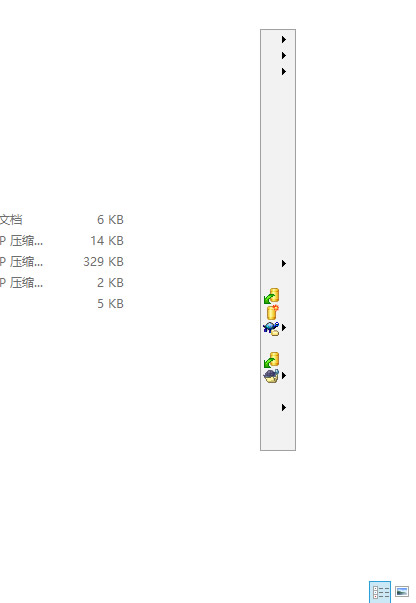
win10 系统右键菜单不显示文字(只有小图标)修复方法
givebest · 2017-12-29 · via 博客园 - givebest

如下图,win10点击鼠标右键调出菜单时,看不到菜单的文字,只显示了小图标。

解决方法:

  1. Cortana 搜索 cmd ,看到 命令提示符,右键,选择 以管理员身份运行
  2. 在命令提示符里输入以下命令,然后按回车键:
DISM/Online /Cleanup-image /Scanhealth
  1. 在命令提示符里输入以下命令,然后按回车键:
DISM/Online /Cleanup-image /Restorehealth
  1. 在命令提示符里输入以下命令,然后按回车键:
Sfc /scannow
  1. 等待命令完成 100%,重启电脑即可。

感谢亲的光临,如果亲感觉这篇文章还不错或对亲有帮助,欢迎在下面“推荐”点个赞或者随意金额打赏,亲的支持是我最大的动力。

  • 支付宝扫一扫 支付宝扫一扫打赏
  • 微信扫一扫 微信扫一扫打赏

欢迎打赏

  • 支付宝扫一扫 支付宝扫一扫打赏
  • 微信扫一扫 微信扫一扫打赏

posted @ 2017-12-29 09:48  givebest  阅读(9190)  评论(0)    收藏  举报