惯性聚合 高效追踪和阅读你感兴趣的博客、新闻、科技资讯
阅读原文 在惯性聚合中打开

推荐订阅源

Cyber Security Advisories - MS-ISAC
Webroot Blog
Webroot Blog
U
Unit 42
A
About on SuperTechFans
宝玉的分享
宝玉的分享
月光博客
月光博客
C
CERT Recently Published Vulnerability Notes
P
Privacy International News Feed
Microsoft Security Blog
G
Google Developers Blog
P
Privacy & Cybersecurity Law Blog
cs.CL updates on arXiv.org
奇客Solidot–传递最新科技情报
奇客Solidot–传递最新科技情报
S
Securelist
CTFtime.org: upcoming CTF events
Spread Privacy
Spread Privacy
L
Lohrmann on Cybersecurity
Apple Machine Learning Research
K
Kaspersky official blog
Hugging Face - Blog
Hugging Face - Blog
B
Blog
I
Intezer
Last Week in AI
Last Week in AI
T
Threat Research - Cisco Blogs
V
V2EX
L
LangChain Blog
AI
AI
G
GRAHAM CLULEY
T
Tor Project blog
人人都是产品经理
人人都是产品经理
D
Docker
WordPress大学
WordPress大学
Google DeepMind News
I
InfoQ
Y
Y Combinator Blog
C
Comments on: Blog
GbyAI
GbyAI
www.infosecurity-magazine.com
酷 壳 – CoolShell
酷 壳 – CoolShell
T
Tailwind CSS Blog
aimingoo的专栏
aimingoo的专栏
钛媒体:引领未来商业与生活新知
钛媒体:引领未来商业与生活新知
腾讯CDC
N
News and Events Feed by Topic
MyScale Blog
MyScale Blog
H
Help Net Security
Vercel News
Vercel News
T
Tenable Blog
博客园 - 三生石上(FineUI控件)
爱范儿
爱范儿

博客园 - 技术商业梦

项目型公司的核心竞争力是什么? 技术变现,到底怎么变?本文或能成为你的“点金石” 如何判断一个人的能力 极端开放的头脑 | 《原则》 为什么程序员需要知道互联网行业发展史 做一名「技术掮客」去变现自己的技术 C#使用Dotfuscator混淆代码以及加密 项目管理的“六拍” 对职业生涯的思考 人生何处不选择 思维的惰性 论演员的自我修养2 职场有影帝出没,屌丝们请当心! 论演员的自我修养 道与术 关注细节但不陷入细节 关于加班的看法 wkhtmtopdf--高分辨率HTML转PDF(二) wkhtmtopdf--高分辨率HTML转PDF(一)
wkhtmtopdf--高分辨率HTML转PDF(三)
技术商业梦 · 2014-02-09 · via 博客园 - 技术商业梦

代码篇

浏览了很多实例,总找不到既能把HTML保存为PDF,同时实现流抛出的,所以自己琢磨了许久,终于实现了这样两个需求的结合体,下面来贡献一下吧~~

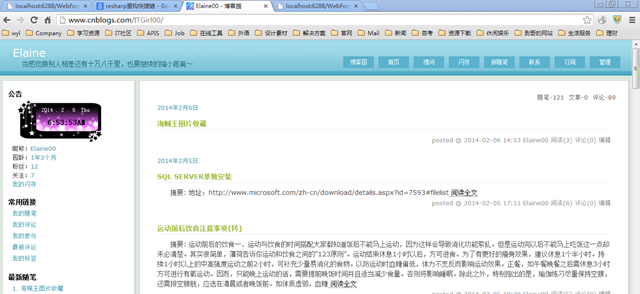
下面我们来选择一个网页打印下,保存为PDF,而且实现流抛出保存,假设我们选择“http://www.cnblogs.com/ITGirl00/

页面截图如:

image

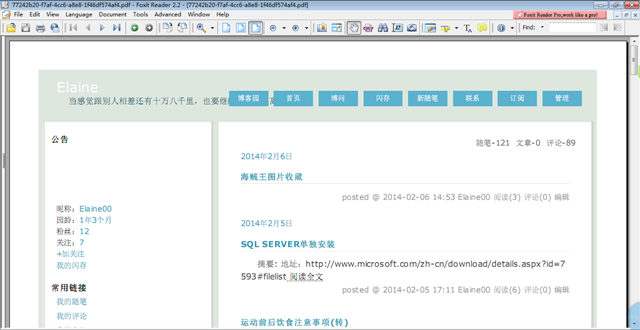
目标:我们需要做出上面这个效果的PDF。

1.步骤

  • 首先新建一个项目HTMLtoPDFOutPutStream
  • 新建目录output;作为临时输出目录
  • 新建resoure目录,用于保存wkhtmltopdf.exe等各个组件
  • 接着添加一个WebForm1.aspx,在页面上添加一个按钮
  • 最后在按钮的点击事件上写代码

2.按钮的点击处理代码:

  string fileName = Guid.NewGuid().ToString();
            string outputPath = Server.MapPath("output");
            string savepath = string.Format(outputPath + "\\" + fileName + ".pdf");//最终保存
 
            string url = "http://www.cnblogs.com/ITGirl00/";
 
            try
            {
                if (!string.IsNullOrEmpty(url) || !string.IsNullOrEmpty(savepath))
                {
                    Process p = new Process();
                    string resource = HttpContext.Current.Server.MapPath("resoure");
                    string dllstr = string.Format(resource + "\\wkhtmltopdf.exe");
 
                    if (System.IO.File.Exists(dllstr))
                    {
 
 
                        p.StartInfo.FileName = dllstr;
                        p.StartInfo.Arguments = " \"" + url + "\"  \"" + savepath + "\"";
                        p.StartInfo.UseShellExecute = false;
                        p.StartInfo.RedirectStandardInput = true;
                        p.StartInfo.RedirectStandardOutput = true;
                        p.StartInfo.RedirectStandardError = true;
                        p.StartInfo.CreateNoWindow = true;
                        p.Start();
                        p.WaitForExit();
 
                        try
                        {
                            FileStream fs = new FileStream(savepath, FileMode.Open);
                            byte[] file = new byte[fs.Length];
                            fs.Read(file, 0, file.Length);
                            fs.Close();
                            Response.Clear();
                            Response.AddHeader("content-disposition", "attachment; filename=" + fileName + ".pdf");//強制下載
                            Response.ContentType = "application/octet-stream";
                            Response.BinaryWrite(file);
                        }
                        catch (Exception ee)
                        {
 
                            throw new Exception(ee.ToString());
                        }
 
 
                    }
                }
 
 
            }
            catch (Exception ex)
            {
                throw new Exception(ex.ToString());
            }

3.效果图
image

===小小提示===

(1)使用wkhtmltopdf时,PDF保存的文件夹不能有非Ansi字符,如中文、日文等,且转换gb2312、韩文charset、日文charset等非utf-8\ansi等网页时,会出现乱码

(2)网页上图片无法正确显示是由于图片有链接