





最经遇到一个需要批量修改已经做好的prefab的问题,查了一些资料最终实现了但是还是不够完美,通过学习也发现unity的编辑器功能还是非常强大的。废话不多说直接上代码:
 1 [ExecuteInEditMode]
 2     [MenuItem("Tools/RecordPoint Add Flame")]
 3     private static void RecordPointAddFlame()
 4     {
 5         GameObject twoSphere = AssetDatabase.LoadAssetAtPath("Assets/Resources/Prefabs/TwoSphere.prefab", typeof(GameObject)) as GameObject;
 6
 7         string[] ids = AssetDatabase.FindAssets("t:Prefab", new string[] { "Assets/Resources/Prefabs" });
 8         for (int i = 0; i < ids.Length; i++)
 9         {
10             string path = AssetDatabase.GUIDToAssetPath(ids[i]);
11             Debug.Log(path);
12             if (!path.Contains("TwoCube"))
13             {
14                 continue;
15             }
16             GameObject originTwoCube = AssetDatabase.LoadAssetAtPath(path, typeof(GameObject)) as GameObject;
17             GameObject twoCube = PrefabUtility.InstantiatePrefab(originTwoCube) as GameObject;
18
19             foreach (Transform item in twoCube.transform)
20             {
21                 if (item.FindChild("TwoSphere") == null)
22                 {
23                     GameObject ts = PrefabUtility.InstantiatePrefab(twoSphere) as GameObject;
24                     ts.transform.parent = item;
25                 }
26             }
27
28             var newprefab = PrefabUtility.CreateEmptyPrefab("Assets/Resources/Prefabs/TwoCube.prefab");
29             PrefabUtility.ReplacePrefab(twoCube, newprefab, ReplacePrefabOptions.Default);
30         }
31
32         AssetDatabase.SaveAssets();
33         Debug.Log("Done");
34     }
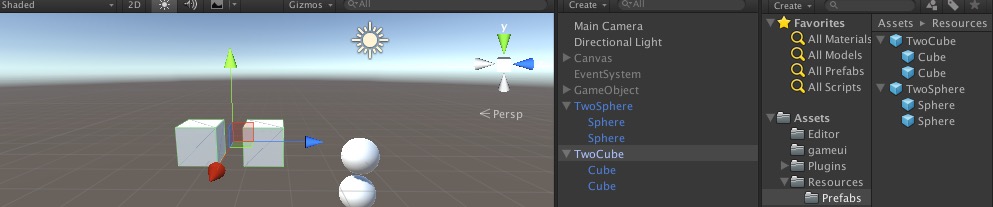
这段代码的功能是在TwoCube这个prefab的两个子对象cube上挂一个名为TwoSphere的prefab。如图
最终结果如下:
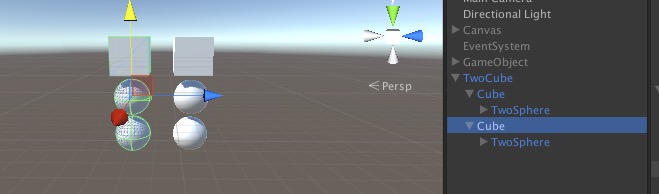
代码中为什么要使用PrefabUtility.InstantiatePrefab和PrefabUtility.ReplacePrefab,这是因为上述例子有一点比较特殊的地方,就是是一个prefab中嵌入另一个prefab。如果单纯的只是操作一个prefab是没有必要这样做的。
此内容由惯性聚合(RSS阅读器)自动聚合整理,仅供阅读参考。 原文来自 — 版权归原作者所有。