
惯性聚合 高效追踪和阅读你感兴趣的博客、新闻、科技资讯
阅读原文 在惯性聚合中打开

推荐订阅源

Attack and Defense Labs
T
Threatpost
C
Cybersecurity and Infrastructure Security Agency CISA
H
Hackread – Cybersecurity News, Data Breaches, AI and More
I
Intezer
C
Cyber Attacks, Cyber Crime and Cyber Security
The Register - Security
量子位
Security Latest
Security Latest
奇客Solidot–传递最新科技情报
奇客Solidot–传递最新科技情报
大猫的无限游戏
大猫的无限游戏
小众软件
小众软件
Exploit-DB.com RSS Feed
C
CXSECURITY Database RSS Feed - CXSecurity.com
MyScale Blog
MyScale Blog
J
Java Code Geeks
Apple Machine Learning Research
Google DeepMind News
WordPress大学
WordPress大学
Spread Privacy
Spread Privacy
Jina AI
Jina AI
博客园 - 【当耐特】
P
Palo Alto Networks Blog
Last Week in AI
Last Week in AI
SecWiki News
SecWiki News
Threat Intelligence Blog | Flashpoint
cs.AI updates on arXiv.org
G
GRAHAM CLULEY
宝玉的分享
宝玉的分享
Hacker News - Newest:
Hacker News - Newest: "LLM"
T
The Blog of Author Tim Ferriss
V
Vulnerabilities – Threatpost
有赞技术团队
有赞技术团队
T
Tor Project blog
H
Hacker News: Front Page
A
Arctic Wolf
NISL@THU
NISL@THU
A
About on SuperTechFans
云风的 BLOG
云风的 BLOG
Engineering at Meta
Engineering at Meta
V
V2EX
N
News and Events Feed by Topic
Webroot Blog
Webroot Blog
Know Your Adversary
Know Your Adversary
P
Privacy International News Feed
I
InfoQ
D
Docker
L
LINUX DO - 最新话题
K
KPMG report finds enterprise disconnect between AI and its ROI | CIO
U
Unit 42

博客园 - 在天空飞翔

asp net core 跨平台初体验 获取图片的主色调 U盘启动安装 window server 2003 简单的中文姓名生成器 扩展 DataGridView 的功能(五) WebBrowser - 想说爱你不容易 表白 天涯宝盒-天涯看贴脚本-只看楼主-自动翻页 使用 asp.net 编写的一些大中型的网站 PrecompiledApp.config 的惨剧 [音乐] the dream catcher csv 文件的读取 扩展DataGridView 的功能(四) 三八节快乐 将MP3文件嵌入到exe中并播放 [音乐] 下个路口见 雷人的面试 发现不明飞行物 扩展 DataGridView 的功能(二)
扩展 DataGridView 的功能(三)
在天空飞翔 · 2008-10-08 · via 博客园 - 在天空飞翔

国庆长假过得真快啊, 真希望能。。。。。。。。(喂,快醒醒。。。) 

下面这个是DataGrid 的分组显示, 先放一个效果图
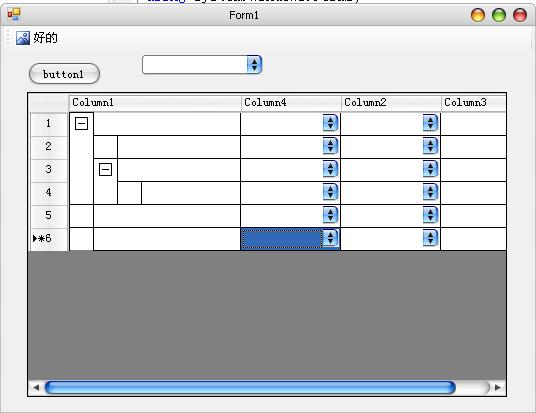

其实这个没什么难的, 因为 DataGridView 已经提供了很多功能了, 我们只需要将某些功能再封装一下即可。

比如分组显示的话就利用了原控件的一个重要属性 DataGridViewRow.Visible ,来控制行的显示与隐藏。

想像一下, 当将 group 折叠起来的时候, 实际上就上将它的 child rows 隐藏,

           当将 group 展开的时候, 也就是将它所有的 child rows 的 Visible 属性设为 True 即可

原理弄懂了, 要实现起来就比较容易了, 无非就是控制 rows 的 Visible 属性,以及通过单元格的自绘来画出“加号”和“减号”即可

好了, 这次我们不需要修改 DataGridViewEx 类, 而是从 DataGridViewTextboxColumn 和 DataGridViewTextboxCell 中继承两个新类

他们分别表示 DataGridView 的“列”和“单元格”

    /// <summary>
    
/// 可分组的列 (该列必须是 Grid 的第一列)
    
/// </summary>
    public class DataGridViewGroupColumn : DataGridViewTextBoxColumn

    /// <summary>
    
/// 可分组的单元格
    
/// </summary>
    public class DataGridViewGroupCell : DataGridViewTextBoxCell

主要的代码在 DataGridViewGroupCell 中, 

ShowChild

画+和-

最后来一段调用的代码, 运行后即产生本文开头的图片中的效果

调用运行

代码下载