


What is CI/CD?
Continuous Integration (CI) and Continuous Delivery (CD) are software development best practices. CI automates integrating code changes from multiple contributors into a single software project, providing rapid feedback via unit and integration tests and early detection of issues.
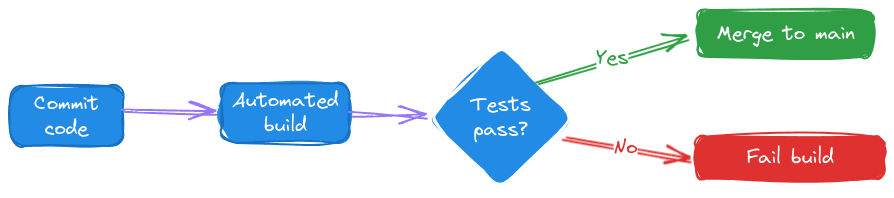
A continuous integration workflow
CD extends this automation, promoting code through all stages of the production pipeline to enable quick and reliable releases.
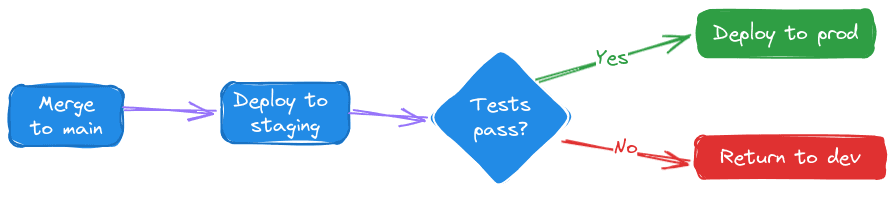
These practices enhance developer productivity and satisfaction and decrease the number of defects in production.
This chapter offers practical recommendations for managing CI/CD pipelines with cloud-based vector databases like Pinecone.
Challenges testing cloud-based managed services in CI/CD pipelines
There are a number of challenges that arise when testing cloud-based services in CI/CD, including keeping test jobs originating from the same monorepo isolated, testing non-local services that can’t be containerized, and ensuring that tests running concurrently in a busy environment do not interfere with each other by reading from or writing to a common data source.
We’ll consider each of these challenges in turn, alongside its solution, using our open-source example repository that smoothly manages CI/CD with Pinecone’s cloud-native vector database. You can fork, clone, and use our starting point and GitHub actions to quickly set up a similar workflow for your organization.
This chapter and companion repository uses GitHub, but the same principles we’re examining here apply to other version control and CI/CD systems.
Managing monorepo complexity in CI/CD
Challenge: the monorepo pattern complicates development by multiple teams, leading to potential conflicts at runtime
A common scenario complicating CI/CD tasks is the monorepo owned by several development teams. In our example repository, imagine that team A is responsible for the recommendation service, while team B is responsible for the question_and_answer service.
The monorepo pattern has a number of advantages, but it complicates concurrent development by multiple teams, as overlapping CI/CD processes can interfere with each other.
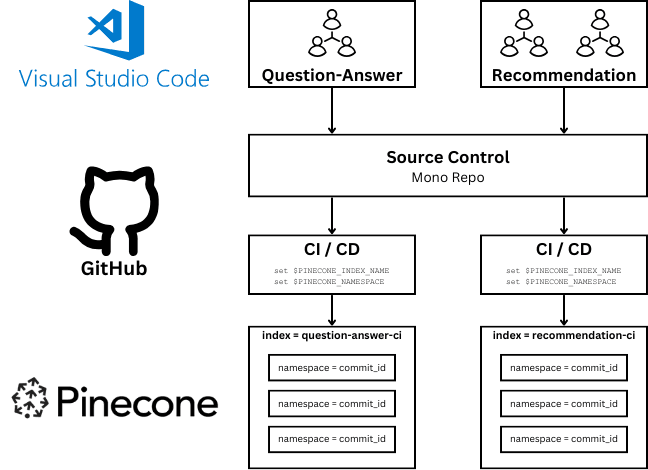
Each team's updates can trigger CI/CD processes that need to be isolated yet efficient.
Solution: Create separate GitHub Actions workflows triggered by changes in specific file paths
We define CI/CD processes that trigger based on changes in specific directories. This ensures that only relevant tests and deployments are triggered, preventing unnecessary builds and conserving resources.
In our sample repository, the .github/workflows/github-actions-recommendation.yaml file specifies the recommendation subdirectory in its paths array, telling the GitHub Actions service to only run this workflow if the file at that specific path has changes:
name: CI/CD - Recommendation
run-name: Recommendation - ${{ github.actor }} - ${{ github.event_name }} - ${{ github.sha }}
on:
  push:
    paths:
      - 'recommendation/**'


... remainder of workflow follows ...
We do the same thing for the question_and_answer CI/CD workflow in its respective file. We run the Question-Answer workflow whenever the question_answer directory changes.
name: CI/CD - Question-Answer
run-name: Question-Answer - ${{ github.actor }} - ${{ github.event_name }} - ${{ github.sha }}
on:
  push:
    paths:
      - 'question_answer/**'

... remainder of workflow follows ...
Each development team now fires only its own jobs by working on their area of responsibility.
Effective testing of Cloud-based services
Challenge: Non-local cloud services prevent traditional mocking and containerization strategies
Managed cloud services offer many advantages, including ease of use, reliability, and ongoing security maintenance.
Everything in engineering is a trade off, and one of the difficulties of using managed cloud services is that you cannot easily replicate the service within a container or software mocks in your pipeline.
In a traditional CI/CD context, the fact that Team A’s job is running in a container is the boundary that provides strong isolation guarantees. How can we accomplish something similar when every team needs to hit the same cloud API?
Solution: Dynamically provision resources for testing, and scope jobs to specific resources
In a typical CI/CD environment, it’s common to see multiple concurrent test runs, especially when the repository triggers tests for every pull request, every new commit on a branch and every merge to main and release.
We can create the cloud resources necessary for testing at the beginning of our test runs. In our companion repo, https://github.com/pinecone-field/cicd-demo/blob/main/setup.py demonstrates how to provision four Pinecone indexes that will serve as our testing resources:
question-answer-cirecommendation-ciquestion-answer-productionrecommendation-answer-production
You could either run this script manually when setting up your project or programmatically as part of your setup workflow. We’ll use these four indexes in future tests and allow separate teams to read and write from them as needed, providing high-level isolation between tests.
Note that both the workflows above set their own value for the Pinecone index they’re using: PINECONE_INDEX_RECOMMENDATION and PINECONE_INDEX_QUESTION_ANSWER.
To further scope down CI/CD jobs to ensure they’re not interfering with our partner teams’ jobs, we can use environment variables to ensure jobs only interact with their designated resources.
The CI/CD jobs set two environment variables to ensure that all unit tests run in a dedicated CI index with a unique namespace in Pinecone. This ensures each job’s runtime and test data are isolated.
In addition, each workflow creates a brand new Pinecone namespace, within their respective index, mapped to the commit ID of the current run, ensuring isolation from past and future runs:
PINECONE_NAMESPACE: ${{ github.sha }}Here’s what this flow looks like at runtime, when a developer pushes a new commit:
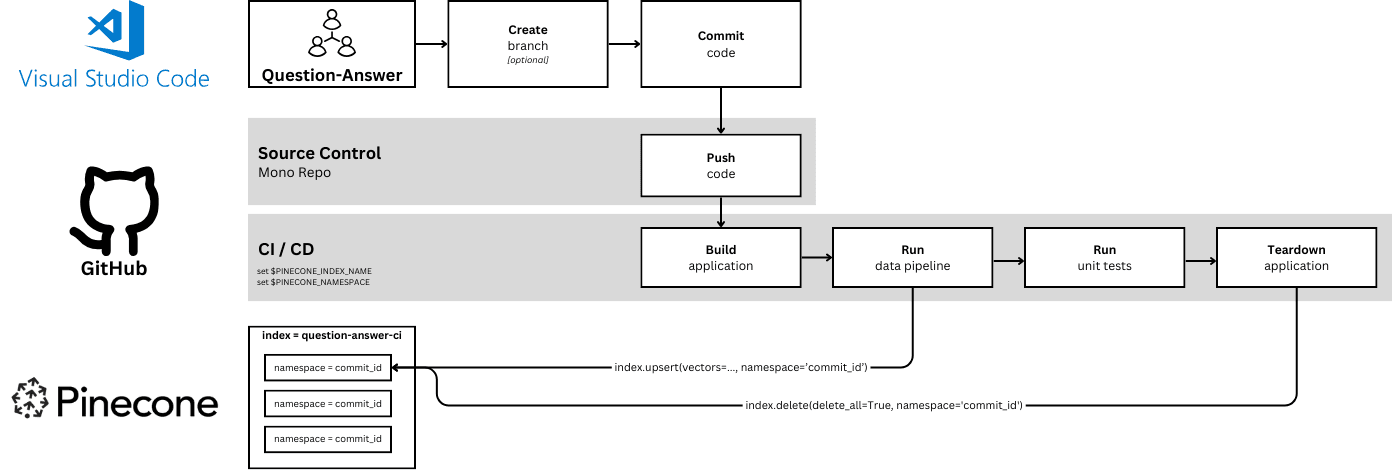
When code is committed to the “question_answer” sub-folder the “CI/CD - Question-Answer” job executes in its private index and within a new namespace unique to that run.
When code is committed to the “recommendation” sub-folder the “CI/CD - Recommendation” job executes in the same way.
When the namespace is allocated, the job takes care of upserting a sample set of vectors to test against.
Optimizing resource management and cost control
Challenge: Failing to clean up cloud resources leads to higher cloud bills at the end of the month
When it’s time to tear down, the namespace is cleaned up and deleted:
jobs:
  Build-RunDataPipeline-RunTests-Teardown:
    runs-on: ubuntu-latest
    steps:
      - name: Checkout code
        uses: actions/checkout@v2
      - name: Install dependencies
        run: pip install -r requirements.txt
      - name: Run data pipeline - upsert
        run: python question_answer/data_pipeline.py upsert
      - name: Run question_answer tests
        run: python -m unittest question_answer.test
      - name: Run data pipeline - delete
        if: always()
        run: python question_answer/data_pipeline.py delete
Note that each workflow’s last job is set to run `always` - meaning that it will execute the teardown operation at the end of each test run by calling the delete method within the data_pipeline.py file, which uses the same environment variables from earlier steps to clean up the test namespace.
This teardown process addresses our cost requirement as well. By ensuring that test resources are cleaned up at the end of every test run, we decrease the chances of a surprise on our cloud bill.
Was this article helpful?