



惯性聚合 高效追踪和阅读你感兴趣的博客、新闻、科技资讯
阅读原文 在惯性聚合中打开

推荐订阅源

The Cloudflare Blog
U
Unit 42
OSCHINA 社区最新新闻
OSCHINA 社区最新新闻
腾讯CDC
罗磊的独立博客
博客园 - 聂微东
博客园_首页
雷峰网
雷峰网
云风的 BLOG
云风的 BLOG
Jina AI
Jina AI
奇客Solidot–传递最新科技情报
奇客Solidot–传递最新科技情报
D
DataBreaches.Net
The GitHub Blog
The GitHub Blog
人人都是产品经理
人人都是产品经理
Y
Y Combinator Blog
量子位
Microsoft Azure Blog
阮一峰的网络日志
阮一峰的网络日志
小众软件
小众软件
月光博客
月光博客
T
The Exploit Database - CXSecurity.com
Google DeepMind News
H
Help Net Security
O
OpenAI News
Blog — PlanetScale
Blog — PlanetScale
S
Security Affairs
S
Security @ Cisco Blogs
Microsoft Security Blog
T
The Blog of Author Tim Ferriss
AI
AI
MongoDB | Blog
MongoDB | Blog
G
Google Developers Blog
MyScale Blog
MyScale Blog
Cyber Security Advisories - MS-ISAC
D
Docker
Hugging Face - Blog
Hugging Face - Blog
D
Darknet – Hacking Tools, Hacker News & Cyber Security
S
Schneier on Security
Cloudbric
Cloudbric
H
Heimdal Security Blog
J
Java Code Geeks
N
News and Events Feed by Topic
Hacker News - Newest:
Hacker News - Newest: "LLM"
宝玉的分享
宝玉的分享
有赞技术团队
有赞技术团队
S
SegmentFault 最新的问题
让小产品的独立变现更简单 - ezindie.com
爱范儿
爱范儿
I
Intezer
GbyAI
GbyAI

Pinecone

Pinecone Assistant: A Managed Knowledge Layer for Production AI Applications Multi-domain RAG in n8n: why one knowledge base is not enough Allspice Transforms the Culinary Experience with Semantic Search Powered by Pinecone | Pinecone Building RAG workflows in n8n: choosing the right Pinecone node Knowledge needs a meta-knowledge layer Garbage Day: How Pinecone Safely Deletes Billions of Objects at Scale When "Performance" Means Two Different Things Pinecone BYOC: Pinecone in your AWS, GCP, or Azure account, no vendor access True, Relevant, and Wrong: The Applicability Problem in RAG Use the Pinecone Plugin for Claude Code to develop AI Applications Faster Millions at Stake: How Melange's High-Recall Retrieval Prevents Litigation Collapse Powering High-stakes Patent Search at Scale: How Melange Built a Reliable AI System on Pinecone | Pinecone Pinecone Assistant Node in n8n: Turn Any Data Source Into Knowledge RAG with Access Control Pinecone Dedicated Read Nodes are now in Public Preview Inside Pinecone: Slab Architecture New Bulk Data Operations: Update, Delete, and Fetch by Metadata The Hidden Cost of Building: Lessons from Aquant Simplifying Vector Embeddings with Pinecone Integrated Inference Capabilities Pinecone joins Microsoft Marketplace as a Launch Partner GTM Engineering: Clay + Pinecone for AI-powered Sales Outbound Build an AI knowledge assistant with Google Docs and Pinecone Moving Pinecone forward with Ash Ashutosh as CEO and Edo spearheading our growing AI ambitions as Chief Scientist Pinecone Founder Edo Liberty to Spearhead Pinecone’s Growing AI Ambitions; Appoints Ash Ashutosh as CEO to Expand Vector Database Market Leadership Fast, Accurate Retrieval for Creators at Scale: Delphi’s Path Toward a Million Conversational Agents with Pinecone | Pinecone Announcing Pinecone Pioneers: A Program for Builders, Organizers, and Community Leaders What is Context Engineering? Chunking Strategies for LLM Applications Beyond the hype: Why RAG remains essential for modern AI Obviant Makes 30% More Accurate Defense Acquisition Recommendations Combining Sparse and Dense Retrieval with Pinecone | Pinecone Build more knowledgeable AI applications with new LLMs and greater control in Pinecone Assistant #NYTECHWEEK 2025 Retrieval-Augmented Generation (RAG) Accurate and Efficient Metadata Filtering in Pinecone’s Serverless Vector Database | Pinecone Terminal X AI Agents, Powered by Pinecone, Turn Complex Financial Data Into Production-grade Insights at Scale | Pinecone Aquant Delivers Scalable, Expert-level Service Intelligence with Pinecone | Pinecone Cascading retrieval with multi-vector representations: balancing efficiency and effectiveness Vector databases aren't just for large-scale enterprise AI Unveiling DIME: Reproducibility, Scalability, and Formal Analysis of Dimension Importance Estimation for Dense Retrieval | Pinecone Fast and Effective Early Termination for Simple Ranking Functions | Pinecone Domain-specific AI Agents at Scale: CustomGPT.ai Serves 10,000+ Customers with Pinecone | Pinecone Using Pinecone asynchronously with FastAPI A Flexible Resource for Top-Weighted Comparisons Between Sets and Rankings | Pinecone Build secure, scalable agentic AI workflows with Rubrik Annapurna and Pinecone Tool up: Pinecone’s first MCP servers are here Add context to your agent with Pinecone Assistant MCP remote server E2Rank: Efficient and Effective Layer-wise Reranking | Pinecone ColBERT-serve: Efficient Multi-Stage Memory-Mapped Scoring | Pinecone Efficient Constant-Space Multi-Vector Retrieval | Pinecone How Vanguard Worked with Pinecone to Boost Customer Support with Faster Calls and 12% More Accurate Responses | Pinecone Pinecone Named to Fast Company's Annual List of the World's Most Innovative Companies of 2025 Launch Week: Pinecone for agents, search, recommendations, and more Optimizing Pinecone for agents (and more) Retrieval Inference for scale and performance How 1up Turns Sales Reps Into Product Experts with Pinecone | Pinecone Don’t be dense: Launching sparse indexes in Pinecone Unlock High-Precision Keyword Search with pinecone-sparse-english-v0 Evolving Pinecone's architecture to meet the demands of Knowledgeable AI Pinpoint references faster with citation highlights in Pinecone Assistant Bringing the leading vector database to your cloud Getting started with llama-text-embed-v2 Natural Language Counterfactual Explanations for Graphs Using Large Language Models | Pinecone Easily build knowledgeable chat and agent-based applications in minutes with Pinecone Assistant, now generally available How to build an agentic, chat or RAG knowledge system using Pinecone Assistant Real-time RAG with Pinecone and Estuary Flow BigQuery to Pinecone in Real-Time with Estuary Flow Stravito Turns Market and Consumer Data Into Actionable Insights with Pinecone Inference | Pinecone Accelerate prototyping and development with Pinecone Local First-of-its-kind Pinecone Knowledge Platform to Power Best-in-class Retrieval for Customers Introducing integrated inference: Embed, rerank, and retrieve your data with a single API Strengthening security and increasing control with CMEK and API key roles Introducing Pinecone Rerank V0 Introducing cascading retrieval: Unifying dense and sparse with reranking From Idea to Action: How Pinecone Assistant Meaningfully Accelerates AI Business Building AI apps on Azure with Pinecone just got a lot easier Building a reliable, curated, and accurate RAG system with Cleanlab and Pinecone Four features of the Assistant API you aren't using - but should Deploying Pinecone with Infrastructure as Code (IaC) Streamlining CI/CD with Pinecone Local September 2024 Product Update Results of the Big ANN: NeurIPS'23 competition | Pinecone Introducing import from object storage for more efficient data transfer to Pinecone serverless Simplify, enhance, and evaluate RAG development with Pinecone Assistant, now in public preview Vectors and Graphs: Better Together August 2024 Product Update Pinecone Helps Deep Talk Deliver World-Class AI Assistants with Lower Engineering Overhead | Pinecone Assembled Delivers Better, Faster AI- Driven Support with Pinecone | Pinecone Llama 3.1 Agent using LangGraph and Ollama Build knowledgeable AI with Pinecone serverless, now generally available on Microsoft Azure Pinecone serverless is now generally available on Google Cloud, adding knowledge to AI assistants and other applications Accelerating Legal Discovery and Analysis with Pinecone and Voyage AI Bridging Dense and Sparse Maximum Inner Product Search | Pinecone Refine Retrieval Quality with Pinecone Rerank Introducing reranking to Pinecone Inference to simplify building accurate AI July 2024 Product Update Connect to Pinecone within your platform to enable a seamless AI development experience Introducing Pinecone API Versioning RAG Brag with Inkeep Co-Founder Nick Gomez LangGraph and Research Agents Introducing Pinecone Inference to streamline your AI workflow
Streaming Embedding Generation with Databricks and Pinecone
Roie Schwaber-Cohen · 2023-06-30 · via Pinecone

Real-time data has become commonplace in many organizations, and with it, the ability to quickly process and store vector embeddings has become increasingly important. However, generating and storing these embeddings at scale in real-time scenarios can be challenging.

Real-time processing is challenging due to several reasons:

  • Data quality and consistency: Ensuring the quality of the data is crucial for accurate analysis and decision-making in real time environments.
  • Resource intensity: Large data volumes require significate resources and could incur sustainable cost, making efficient resource allocation critical.
  • Continuous data management: We need to constantly process and store incoming data. That means our system must be robust and resilient, regardless of what anomalies may exist in the data or how throughput may fluctuate.
  • Error sensitivity: Small errors can quickly propagate throughout the system, leading to inaccuracies that may impact the overall performance of the system
  • Technical complexity: Setting up and maintaining the necessary hardware and software for real-time pipelines can be intricate and challenging.

On top of all of these difficulties, adding vector embeddings to the pipeline makes the process even more complex and resource intensive.

Combining Databricks and Pinecone provides us with the perfect pipeline to answer these challenges. Databricks offers Structured streaming and Delta Live Tables as means to create a streaming pipeline. Pinecone provides the best solution for storing the embeddings produced in Databricks for consumption by downstream applications.

Architecture

Here’s a general overview of the pipeline’s architecture:
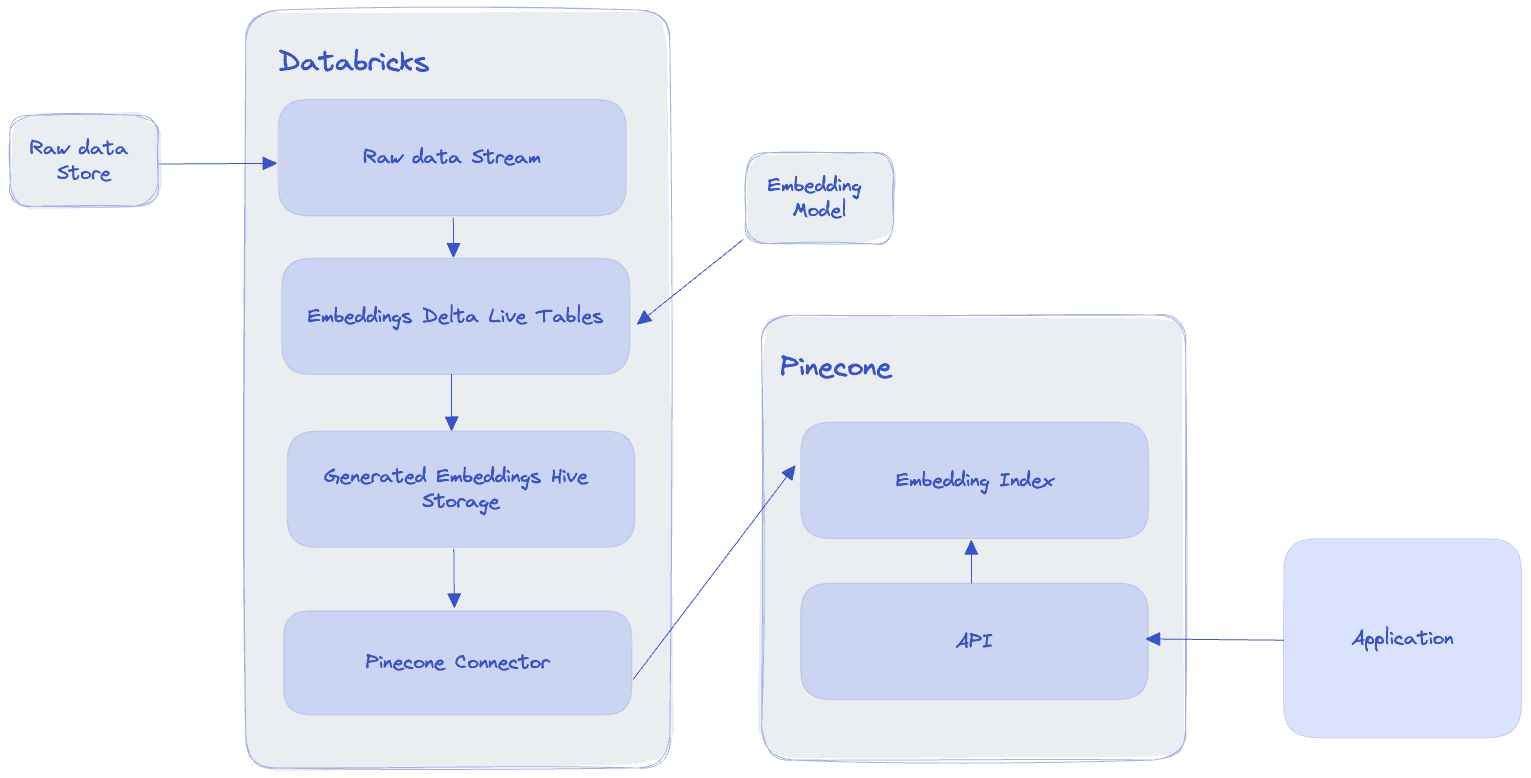
Architecture

Databricks’s Delta lake architecture guides us to think of our data pipeline as having three tiers:

  1. Bronze: Raw data ingestion - This tier is the initial stage where raw data is ingested into the system. It contains raw, unprocessed, and unfiltered data from various sources, including databases, logs, streams, and third-party APIs. Data in the Bronze tier is typically stored in its native format without any transformations.
  2. Silver: Clean and enriched data - In the Silver tier, data is cleaned, processed, and enriched. Data quality issues, such as missing values, duplicates, and inconsistencies, are addressed. Data may also be enriched by adding additional attributes or combining datasets. The Silver tier usually contains data in a structured format, such as Parquet or Avro, optimized for analytics.
  3. Gold: Aggregated and ready for consumption - The Gold tier contains data that has been further transformed and aggregated, making it ready for consumption by end-users, reports, machine learning models and other downstream applications.

In our pipeline, here’s how the tiers manifest:

  1. The bronze layer includes the raw data from our store, which could be stored anywhere, for example an S3 bucket. In the example shown below, we use a Hive table to stand in place of this initial raw data.
  2. The silver layer would include the steps to clean the data, split sentences and generate embeddings
  3. The gold layer will be the final table where the generated embeddings are saved.

After the streaming process concludes, we pick it up with a separate job that will read the gold tier table and write it into Pinecone. From there, our downstream applications can interact with Pinecone via the Pinecone API to query the embeddings and modify them as needed.

Code

You can jump directly into the code or follow a step by step walkthrough below.

Install dependencies

To generate the embeddings, we’ll be using HuggingFace’s transformers. torch and senetencepiece are also dependencies that aren’t directly installed by transformers but are also required.

%pip install torch>=1.9.0
%pip install transformers>=4.15.0
%pip install sentencepiece

Import dependencies

We import dlt which allows us to decorate our functions with the @dlt decorator. This way, Databricks can pick up the functions and combine them in our Delta Live Tables pipeline.

import dlt
import pandas as pd
import numpy as np
from pyspark.sql.functions import *
from pyspark.sql.types import *
from typing import Iterator,Tuple
from transformers import AutoTokenizer, AutoModel

Bronze tier - reading the data

In this example, reading the data is straight forward - we simply consume a Hive table using the “delta” format. The “delta” format is the format used by Databricks’ Delta lakehouse.

# Read from our data source. This could be an S3 bucket, a Hive table etc.
@dlt.table
def raw_stream():
    return spark.readStream.format("delta").table("multi_news")

Silver tier - cleaning and preparing the data

Next, we add an “id” column with random uuids, and we drop the “summary” column that won’t be used for our embeddings. You can think of this as our “cleaning” step.

# Generate an ID for each document
@dlt.table
def documents():
    return (dlt.readStream("raw_stream").withColumn("id", expr("uuid()")).drop("summary"))

Our table includes a set of documents, which we want to break into sentences. We use the explode function to create a new column with the new split values. Then, we rename the old “id” column to “doc_id” and add a new “id” column with random values. This way, our sentences have a unique identifier, but also an identifier that ties them to the original document they came from.

# Read from "Document", split on ".", explode the table, rename the "id" column as doc_id and generate new IDs for each sentence
@dlt.table
def sentences():
    return (dlt.readStream("documents").withColumn("sentence", explode(split(col("document"), "\."))).withColumnRenamed("id", "doc_id")).withColumn("id", expr("uuid()"))

Gold tier - generating the embeddings

Next is where the heavy lifting happens: we define a Pandas UDF (User-Defined Function) to create embeddings for text data using a pre-trained Transformer model from the Hugging Face library. The UDF takes a Pandas DataFrame with sentences as input and outputs a DataFrame with the embeddings, namespace, and metadata for each sentence.

# Create the embeddings `
udf_result = StructType([
  StructField("id", StringType()),
  StructField("vector", ArrayType(FloatType())),
  StructField("namespace", StringType()),
  StructField("metadata", StringType())
])

@pandas_udf(udf_result, PandasUDFType.GROUPED_MAP)
def create_embeddings_with_transformers(pdf: pd.DataFrame)-> pd.DataFrame:
    # pdf is a pandas.DataFrame with one column "sentence"
    features = pdf.sentence
    tokenizer = AutoTokenizer.from_pretrained("sentence-transformers/all-MiniLM-L6-v2")
    model = AutoModel.from_pretrained("sentence-transformers/all-MiniLM-L6-v2")
    text = str(features)
    inputs = tokenizer(text, padding=True, truncation=True, return_tensors="pt", max_length=512)
    result = model(**inputs)
    embeddings = result.last_hidden_state[:, 0, :].cpu().detach().numpy()
    lst = embeddings.flatten().tolist()
    return pd.DataFrame({"id": pdf["id"].values, "vector": [lst], "namespace": "minilml6", "metadata": "{ \"original_doc\": \"" + pdf.doc_id + "\" }"})

Let’s break this down a bit:

  1. udf_result defines the schema of the output DataFrame with four columns: id, vector, namespace, and metadata (using the StructType and StructField classes)
  2. @pandas_udf(udf_result, PandasUDFType.GROUPED_MAP) is a decorator provided by PySpark to define a Pandas UDF with a specific output schema (udf_result) and UDF type (PandasUDFType.GROUPED_MAP). PandasUDFType.GROUPED_MAP is an enumeration value provided by PySpark to specify the type of a Pandas User-Defined Function (UDF). Pandas UDFs are a feature in PySpark that allows you to write UDFs using Python and pandas, leveraging the power and flexibility of pandas to process data within Spark DataFrames.
  3. def create_embeddings_with_transformers(pdf: pd.DataFrame) -> pd.DataFrame: defines the UDF function that takes a pandas DataFrame pdf as input and returns a pandas DataFrame as output.
  4. Inside the function, the features variable is assigned the values in the “sentence” column of the input DataFrame.
  5. tokenizer and model are created using the Hugging Face library’s AutoTokenizer and AutoModel classes. They are initialized with a pre-trained Transformer model called “sentence-transformers/all-MiniLM-L6-v2”.
  6. The text variable is created by converting the features (the sentences) to a string. If this conversion is not performed, we may encounter issues when passing the input data to the tokenizer, since it expects text data in the form of a string or a list of strings.
  7. The inputs variable is created by tokenizing the text using the tokenizer. Padding, truncation, and max_length are set to ensure the input is in the correct format for the Transformer model.
  8. The result variable is created by passing the inputs to the model. This step generates the embeddings for the input text.
  9. The embeddings variable is created by extracting the last hidden state of the Transformer model’s output, which corresponds to the embeddings for the input text. The embeddings are then detached from the model’s computation graph and converted to a NumPy array.
  10. The lst variable is created by flattening the embeddings array and converting it to a list.
  11. The function returns a pandas DataFrame matching our schema. The id and vector columns contain the original id and embeddings for each sentence. The metadata column contains a JSON string with the doc_id of the original document.

Next, we simply create a table that will run this UDF and store its results.

@dlt.create_table(comment="extract text embeddings",
                  schema= """
                  id STRING,
                  vector ARRAY<FLOAT>,
                  namespace STRING,
                  metadata STRING
                  """)
def embeddings():
    return (dlt.readStream("sentences").groupby("id").apply(create_embeddings_with_transformers))

Running the pipeline

To start the DLT pipeline, we’ll need to first set it up. In the “Workflows” tab, navigate to the “Delta Live Tables” tab and click “Create pipeline from an existing notebook”.
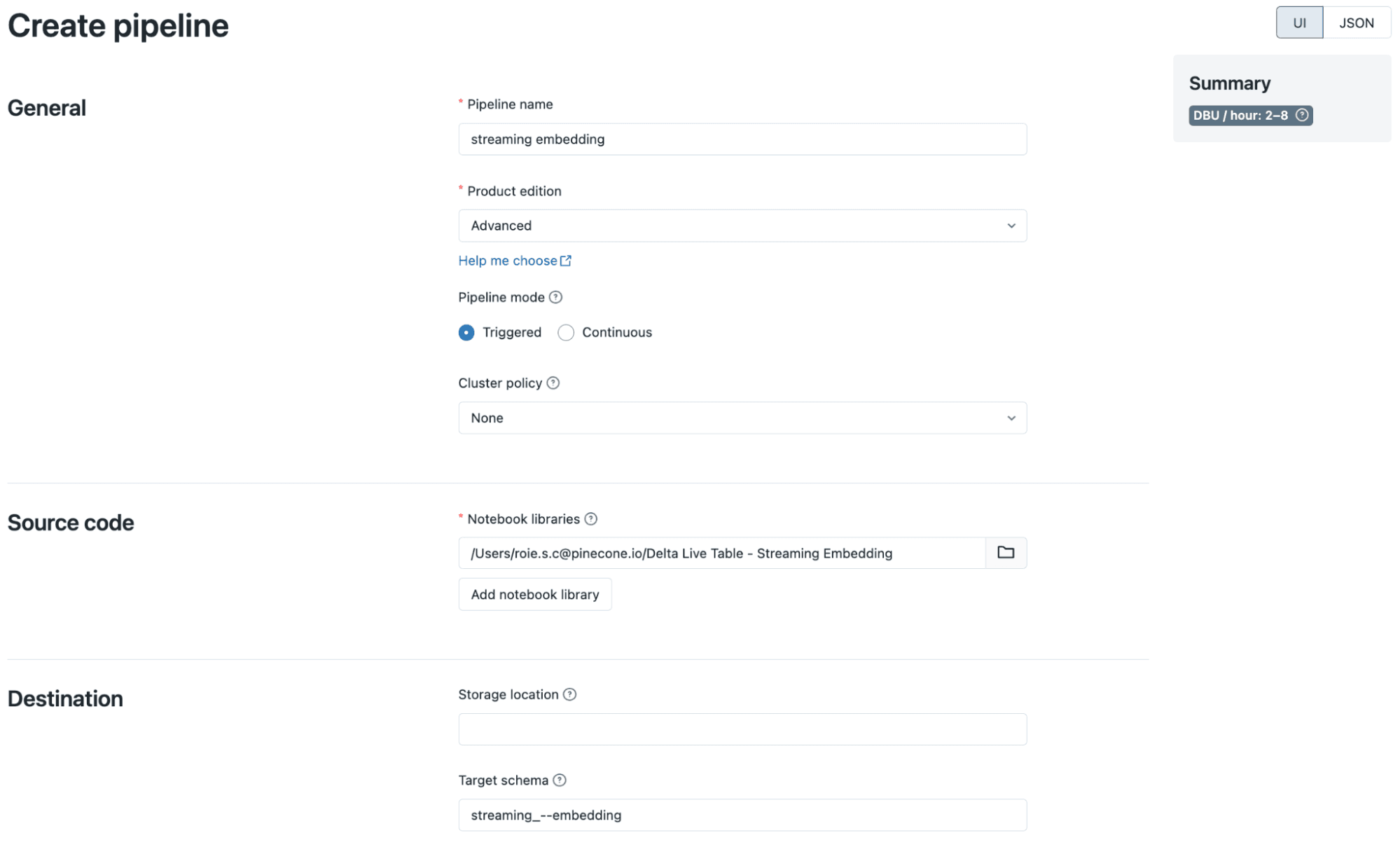
Create Pipeline

You’ll then be able to run the pipeline and inspect the execution of each step.
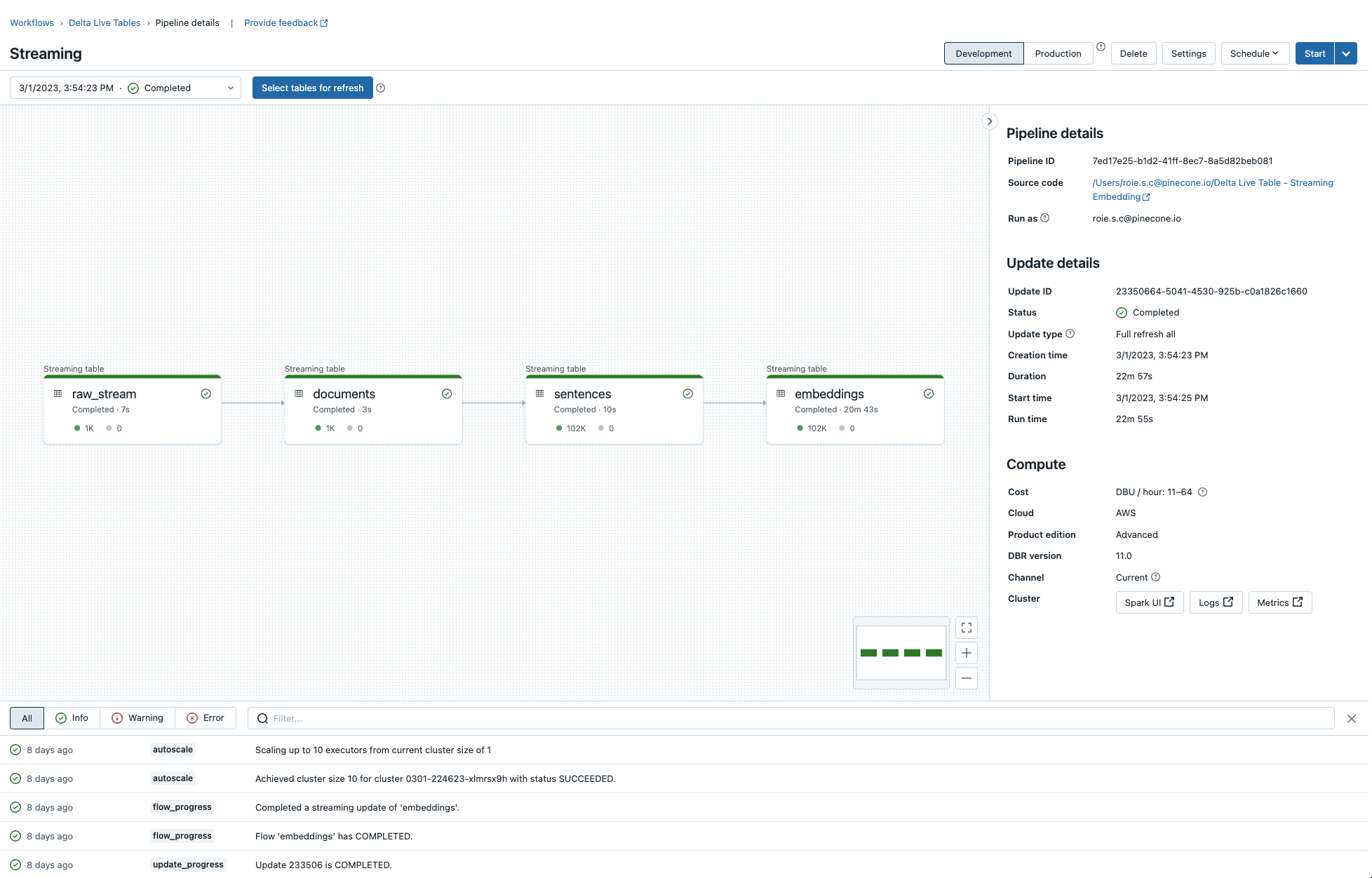
Target Pipeline

Writing the embeddings to Pinecone

After we are done with creating the embeddings, we’ll write them to Pinecone. Due to the current limitation on Delta Lake, Maven dependencies can’t be added to the pipeline, which is why we’ll use a scheduled job instead of another step in the DLT pipeline.

You can follow the instructions for setting up the cluster for this job with the necessary dependencies, and then run the following to write the embeddings into Pinecone:

df = spark.read.table("streaming_embedding.embeddings")
df.write
 .option("pinecone.apiKey", "YOUR_PINECONE_API_KEY")
 .option("pinecone.indexName", "YOUR_INDEX_NAME")
 .format("io.pinecone.spark.pinecone.Pinecone")
 .mode("append")
 .save()

Final Thoughts

In the context of real-time data processing for AI, Databricks and Pinecone provide a powerful and efficient solution for generating, processing, and storing vector embeddings at scale. The three-tier Delta lake architecture (Bronze, Silver, and Gold) provides a well-structured approach to data processing, ensures quality and consistency. Databricks Delta Live Tables and Structured Streaming work together to create a seamless and scalable pipeline for real-time data processing, while Pinecone enables downstream applications to easily query and manipulate those embeddings. The real-time processing approach is already being widely applied in the realms of big data, and now we’re seeing how it can connect with the world of AI.

Thank you to Nitin Wagh, Avinash Sooriyarachchi and Sathish Gangichetty from Databricks for their contributions to this post.