
惯性聚合 高效追踪和阅读你感兴趣的博客、新闻、科技资讯
阅读原文 在惯性聚合中打开

推荐订阅源

Vercel News
Vercel News
Recorded Future
Recorded Future
CTFtime.org: upcoming CTF events
The GitHub Blog
The GitHub Blog
Application and Cybersecurity Blog
Google DeepMind News
cs.AI updates on arXiv.org
Microsoft Azure Blog
K
KPMG report finds enterprise disconnect between AI and its ROI | CIO
M
MIT News - Artificial intelligence
云风的 BLOG
云风的 BLOG
Y
Y Combinator Blog
N
News | PayPal Newsroom
freeCodeCamp Programming Tutorials: Python, JavaScript, Git & More
Help Net Security
Help Net Security
博客园 - Franky
SecWiki News
SecWiki News
Recent Announcements
T
Troy Hunt's Blog
The Register - Security
The Last Watchdog
The Last Watchdog
Webroot Blog
Webroot Blog
S
Security Affairs
博客园 - 司徒正美
S
Schneier on Security
I
InfoQ
博客园_首页
www.infosecurity-magazine.com
T
Threat Research - Cisco Blogs
Forbes - Security
Forbes - Security
腾讯CDC
N
Netflix TechBlog - Medium
N
News and Events Feed by Topic
Cloudbric
Cloudbric
T
The Exploit Database - CXSecurity.com
P
Proofpoint News Feed
A
About on SuperTechFans
Engineering at Meta
Engineering at Meta
Recent Commits to openclaw:main
B
Blog
V
Vulnerabilities – Threatpost
C
Check Point Blog
Google DeepMind News
Google Online Security Blog
C
Cyber Attacks, Cyber Crime and Cyber Security
Hacker News - Newest:
Hacker News - Newest: "LLM"
C
Cisco Blogs
Schneier on Security
O
OpenAI News
K
Kaspersky official blog

Pinecone

Pinecone Assistant: A Managed Knowledge Layer for Production AI Applications Multi-domain RAG in n8n: why one knowledge base is not enough Allspice Transforms the Culinary Experience with Semantic Search Powered by Pinecone | Pinecone Building RAG workflows in n8n: choosing the right Pinecone node Knowledge needs a meta-knowledge layer Garbage Day: How Pinecone Safely Deletes Billions of Objects at Scale When "Performance" Means Two Different Things Pinecone BYOC: Pinecone in your AWS, GCP, or Azure account, no vendor access True, Relevant, and Wrong: The Applicability Problem in RAG Use the Pinecone Plugin for Claude Code to develop AI Applications Faster Millions at Stake: How Melange's High-Recall Retrieval Prevents Litigation Collapse Powering High-stakes Patent Search at Scale: How Melange Built a Reliable AI System on Pinecone | Pinecone Pinecone Assistant Node in n8n: Turn Any Data Source Into Knowledge RAG with Access Control Pinecone Dedicated Read Nodes are now in Public Preview Inside Pinecone: Slab Architecture New Bulk Data Operations: Update, Delete, and Fetch by Metadata The Hidden Cost of Building: Lessons from Aquant Simplifying Vector Embeddings with Pinecone Integrated Inference Capabilities Pinecone joins Microsoft Marketplace as a Launch Partner GTM Engineering: Clay + Pinecone for AI-powered Sales Outbound Build an AI knowledge assistant with Google Docs and Pinecone Moving Pinecone forward with Ash Ashutosh as CEO and Edo spearheading our growing AI ambitions as Chief Scientist Pinecone Founder Edo Liberty to Spearhead Pinecone’s Growing AI Ambitions; Appoints Ash Ashutosh as CEO to Expand Vector Database Market Leadership Fast, Accurate Retrieval for Creators at Scale: Delphi’s Path Toward a Million Conversational Agents with Pinecone | Pinecone Announcing Pinecone Pioneers: A Program for Builders, Organizers, and Community Leaders What is Context Engineering? Chunking Strategies for LLM Applications Beyond the hype: Why RAG remains essential for modern AI Obviant Makes 30% More Accurate Defense Acquisition Recommendations Combining Sparse and Dense Retrieval with Pinecone | Pinecone Build more knowledgeable AI applications with new LLMs and greater control in Pinecone Assistant #NYTECHWEEK 2025 Retrieval-Augmented Generation (RAG) Accurate and Efficient Metadata Filtering in Pinecone’s Serverless Vector Database | Pinecone Terminal X AI Agents, Powered by Pinecone, Turn Complex Financial Data Into Production-grade Insights at Scale | Pinecone Aquant Delivers Scalable, Expert-level Service Intelligence with Pinecone | Pinecone Cascading retrieval with multi-vector representations: balancing efficiency and effectiveness Vector databases aren't just for large-scale enterprise AI Unveiling DIME: Reproducibility, Scalability, and Formal Analysis of Dimension Importance Estimation for Dense Retrieval | Pinecone Fast and Effective Early Termination for Simple Ranking Functions | Pinecone Domain-specific AI Agents at Scale: CustomGPT.ai Serves 10,000+ Customers with Pinecone | Pinecone Using Pinecone asynchronously with FastAPI A Flexible Resource for Top-Weighted Comparisons Between Sets and Rankings | Pinecone Build secure, scalable agentic AI workflows with Rubrik Annapurna and Pinecone Tool up: Pinecone’s first MCP servers are here Add context to your agent with Pinecone Assistant MCP remote server E2Rank: Efficient and Effective Layer-wise Reranking | Pinecone ColBERT-serve: Efficient Multi-Stage Memory-Mapped Scoring | Pinecone Efficient Constant-Space Multi-Vector Retrieval | Pinecone How Vanguard Worked with Pinecone to Boost Customer Support with Faster Calls and 12% More Accurate Responses | Pinecone Pinecone Named to Fast Company's Annual List of the World's Most Innovative Companies of 2025 Launch Week: Pinecone for agents, search, recommendations, and more Optimizing Pinecone for agents (and more) Retrieval Inference for scale and performance How 1up Turns Sales Reps Into Product Experts with Pinecone | Pinecone Don’t be dense: Launching sparse indexes in Pinecone Unlock High-Precision Keyword Search with pinecone-sparse-english-v0 Evolving Pinecone's architecture to meet the demands of Knowledgeable AI Pinpoint references faster with citation highlights in Pinecone Assistant Bringing the leading vector database to your cloud Getting started with llama-text-embed-v2 Natural Language Counterfactual Explanations for Graphs Using Large Language Models | Pinecone Easily build knowledgeable chat and agent-based applications in minutes with Pinecone Assistant, now generally available How to build an agentic, chat or RAG knowledge system using Pinecone Assistant Real-time RAG with Pinecone and Estuary Flow BigQuery to Pinecone in Real-Time with Estuary Flow Stravito Turns Market and Consumer Data Into Actionable Insights with Pinecone Inference | Pinecone Accelerate prototyping and development with Pinecone Local First-of-its-kind Pinecone Knowledge Platform to Power Best-in-class Retrieval for Customers Introducing integrated inference: Embed, rerank, and retrieve your data with a single API Strengthening security and increasing control with CMEK and API key roles Introducing Pinecone Rerank V0 Introducing cascading retrieval: Unifying dense and sparse with reranking From Idea to Action: How Pinecone Assistant Meaningfully Accelerates AI Business Building AI apps on Azure with Pinecone just got a lot easier Building a reliable, curated, and accurate RAG system with Cleanlab and Pinecone Four features of the Assistant API you aren't using - but should Deploying Pinecone with Infrastructure as Code (IaC) Streamlining CI/CD with Pinecone Local September 2024 Product Update Results of the Big ANN: NeurIPS'23 competition | Pinecone Introducing import from object storage for more efficient data transfer to Pinecone serverless Simplify, enhance, and evaluate RAG development with Pinecone Assistant, now in public preview Vectors and Graphs: Better Together August 2024 Product Update Pinecone Helps Deep Talk Deliver World-Class AI Assistants with Lower Engineering Overhead | Pinecone Assembled Delivers Better, Faster AI- Driven Support with Pinecone | Pinecone Llama 3.1 Agent using LangGraph and Ollama Build knowledgeable AI with Pinecone serverless, now generally available on Microsoft Azure Pinecone serverless is now generally available on Google Cloud, adding knowledge to AI assistants and other applications Accelerating Legal Discovery and Analysis with Pinecone and Voyage AI Bridging Dense and Sparse Maximum Inner Product Search | Pinecone Refine Retrieval Quality with Pinecone Rerank Introducing reranking to Pinecone Inference to simplify building accurate AI July 2024 Product Update Connect to Pinecone within your platform to enable a seamless AI development experience Introducing Pinecone API Versioning RAG Brag with Inkeep Co-Founder Nick Gomez LangGraph and Research Agents Introducing Pinecone Inference to streamline your AI workflow
Azure OpenAI, meet Canopy
Audrey Sage · 2024-02-15 · via Pinecone

Canopy, the open-source RAG framework from Pinecone, is now compatible with Azure OpenAI Studio.
By integrating with Azure OpenAI Studio, Canopy users are able to chat with their documents and launch RAG applications into production knowing their models are backed by the enterprise-ready features of Microsoft Azure.

Canopy is an open-source, production-ready RAG framework that allows you to build and productionize RAG applications easily. Canopy comes with a CLI for rapid iteration of proof-of-concepts and various options for launching your final product into production.

By default, Canopy uses OpenAI’s text-embedding-3-small as its embedding model and OpenAI’s gpt-3.5-turbo as its LLM. However, Canopy is compatible with any publicly available embedding model or LLM from Anyscale, Cohere, OpenAI, and, now, Azure OpenAI Studio.

Azure OpenAI

Azure OpenAI Studio is a cloud service that allows you to deploy your own instances of OpenAI’s powerful models through Microsoft Azure. By accessing OpenAI models through Azure, you can host private instances of OpenAI models, easily fine-tune those models, and keep the full lifecycle of your work in a corporate, enterprise-grade platform.

Azure OpenAI vs OpenAI

While using OpenAI models directly is easy and beginner-friendly, OpenAI does not offer the security controls and enterprise-ready features that a service like Azure does. Some of the differences between the two services are outlined below:

Azure OpenAI OpenAI
Auth API keys, Azure account, MFA API keys
Data security Encrypted at rest and in transit Unclear; personal data is accessible to an extent
Compliance HIPAA, FedRAMP, GDPR, ISOs, SOC 1/2/3, etc. GDPR, SOC 2/3, CCPA
General security Threat detection, network security, security audits, VNETs and private endpoints, RBAC Unclear; see Privacy Portal.
Recovery Infra has built-in disaster recovery and backups N/A
SLAs Azure Cognitive Services SLA N/A
Fine tuning Yes No
Rate limits Azure OpenAI rate limits OpenAI rate limits

Note: the above table is a cursory summary; do your own research before taking action from this information.

For enterprise users, one of the chief motivations for using Azure OpenAI Studio is that all model calls stay within the user’s Azure ecosystem – this helps maintain privacy, allows for customization, and simplifies security and compliance.

Note: access to Azure OpenAI Studio is limited. You need to apply to use the service.

Build with Canopy and Azure OpenAI Studio

The best way to get a feel for how Canopy works with Azure OpenAI Studio is to build with it! Follow along in this notebook to see Canopy in action.

The demo notebook linked above takes you through the process of building an end-to-end RAG application with Canopy and Azure OpenAI Studio. You will create a Pinecone account, apply for Azure OpenAI Studio access, deploy Azure models, and build individual Canopy components to complete your RAG application.
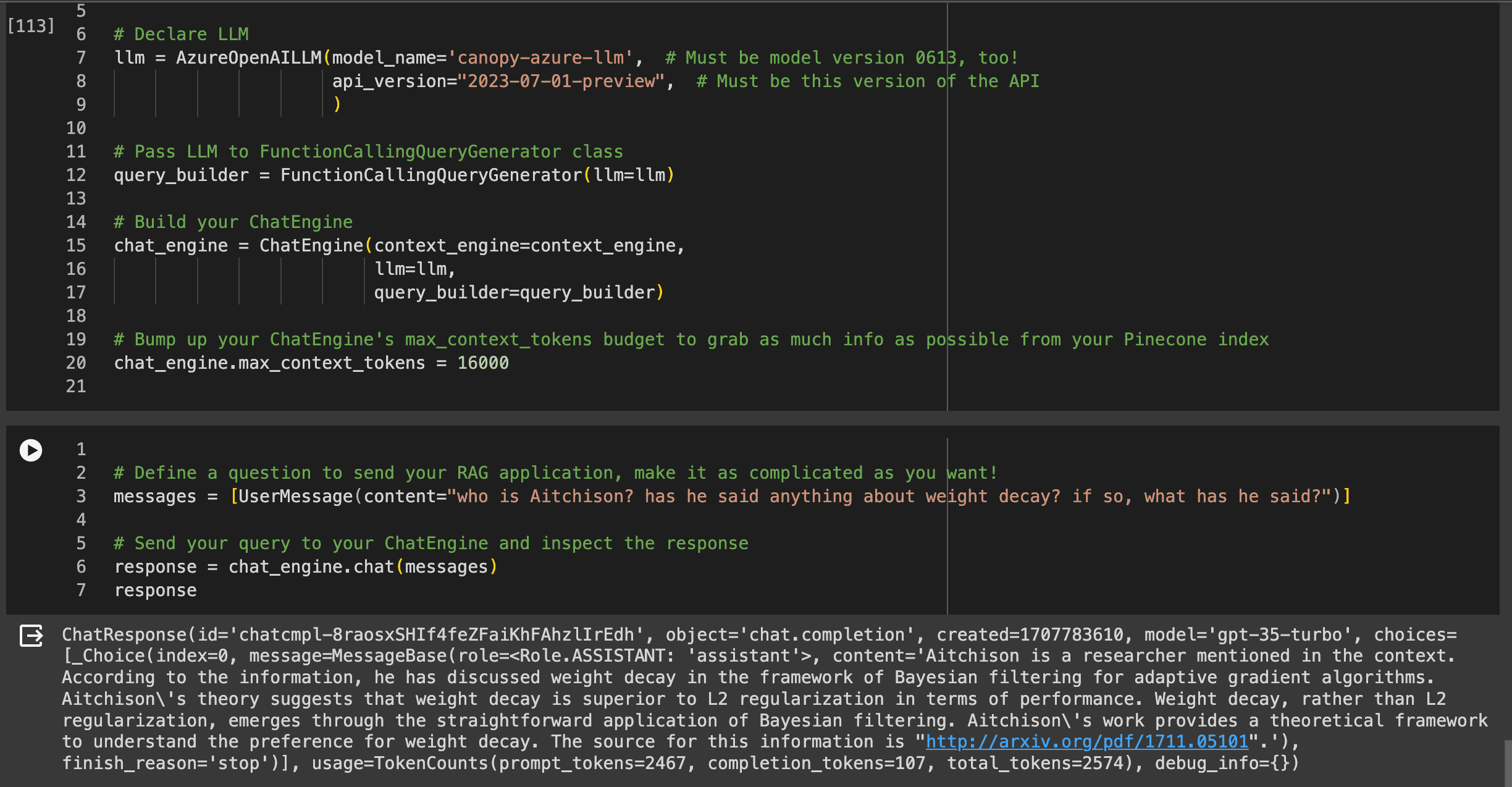
Above is a preview of your final product: a RAG application that answers questions based on the context retrieved from your Canopy index.

The Canopy CLI

One of the most exciting things about Canopy is its CLI. Engineers use the CLI during the proof-of-concept phase of the RAG application development lifecycle.

Through the canopy chat command, you can chat back and forth with the documents in your Canopy index. The ChatEngine’s answers will differ according to the parameters you set in a configuration file.

You can also use the CLI to quickly build a Canopy index (canopy new), upsert documents into that Canopy index (canopy upsert <file path to data file>), and start up the Canopy server (canopy start).

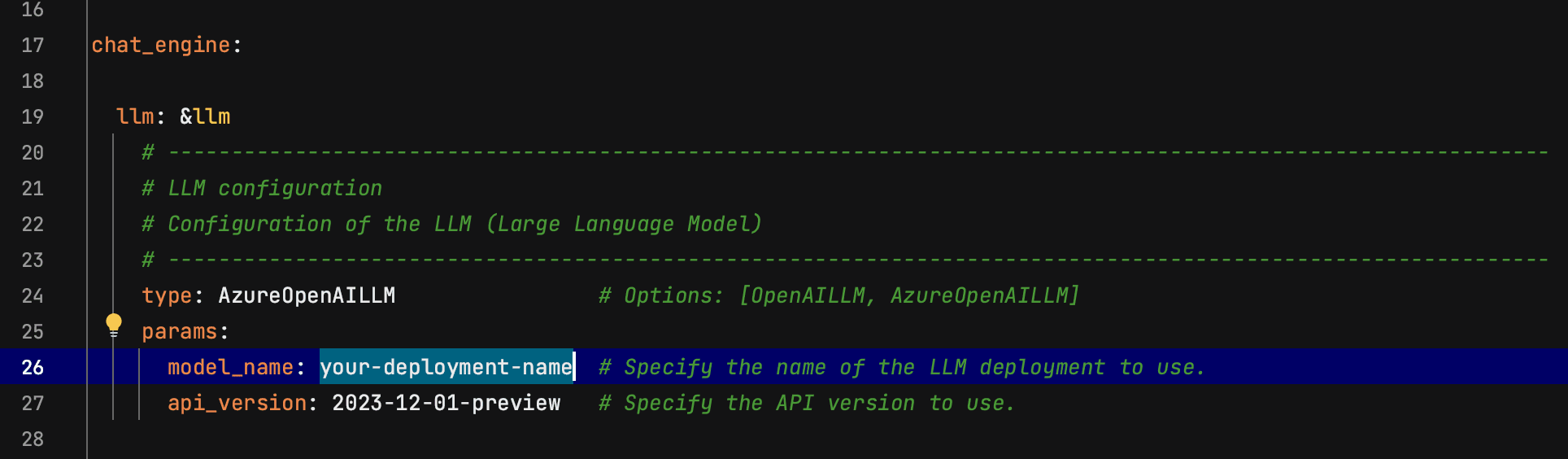
When using the CLI commands with Azure OpenAI Studio, you will need to modify the appropriate configuration file (azure.yaml in this case).

Config modifications

The first modification you’ll make to the example Azure configuration file is replacing dummy text in the LLM section with the name of your Azure-deployed LLM. This will be the LLM’s “deployment name,” not the name of the underlying OpenAI model. For instance, I could deploy a model named “canopy-azure-llm” whose underlying LLM is “gpt-35-turbo.” The “deployment name” that I would put in my config file would be “canopy-azure-llm,” not “gpt-35-turbo.”
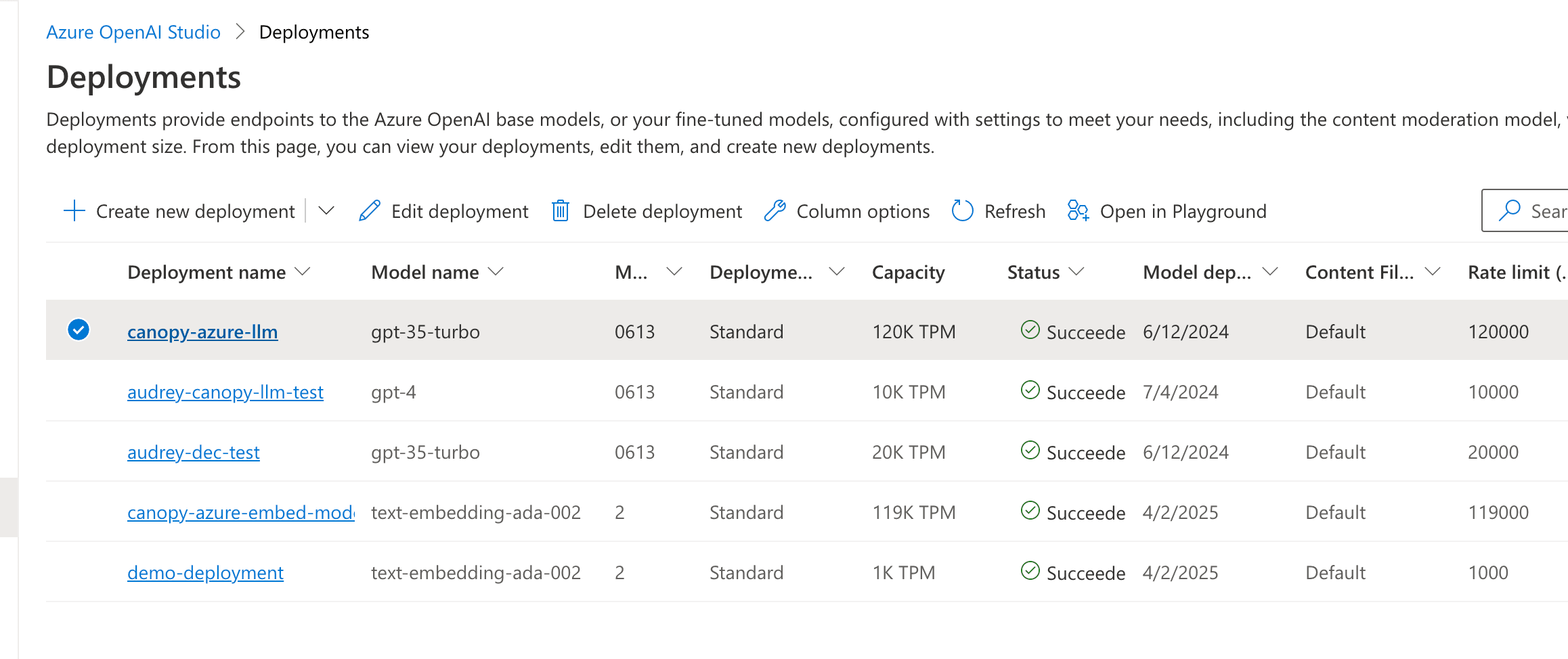
Preview of Azure OpenAI Studio's deployments page, showing each model's "deployment name."

The next thing you’ll do is replace more dummy text, this time in the ContextEngine section, with your Azure-deployed embedding model’s deployment name:

You can continue modifying the example Azure config file to your heart’s content. Replacing the two instances of dummy text outlined above, though, is mandatory to start using the CLI.

You can use these configuration files programmatically in notebooks and scripts, too; see the “Load from config section” in the demo notebook.

Canopy Chat

With your Azure configuration file modified and saved, you can spin up the canopy server, pointing it to your Azure config, by executing canopy start --config=canopy/config/azure.yaml from within the src directory. You’ll see the Uvicorn server start on your local machine.

Note: you’ll need to set the appropriate environment variables for this step to work.
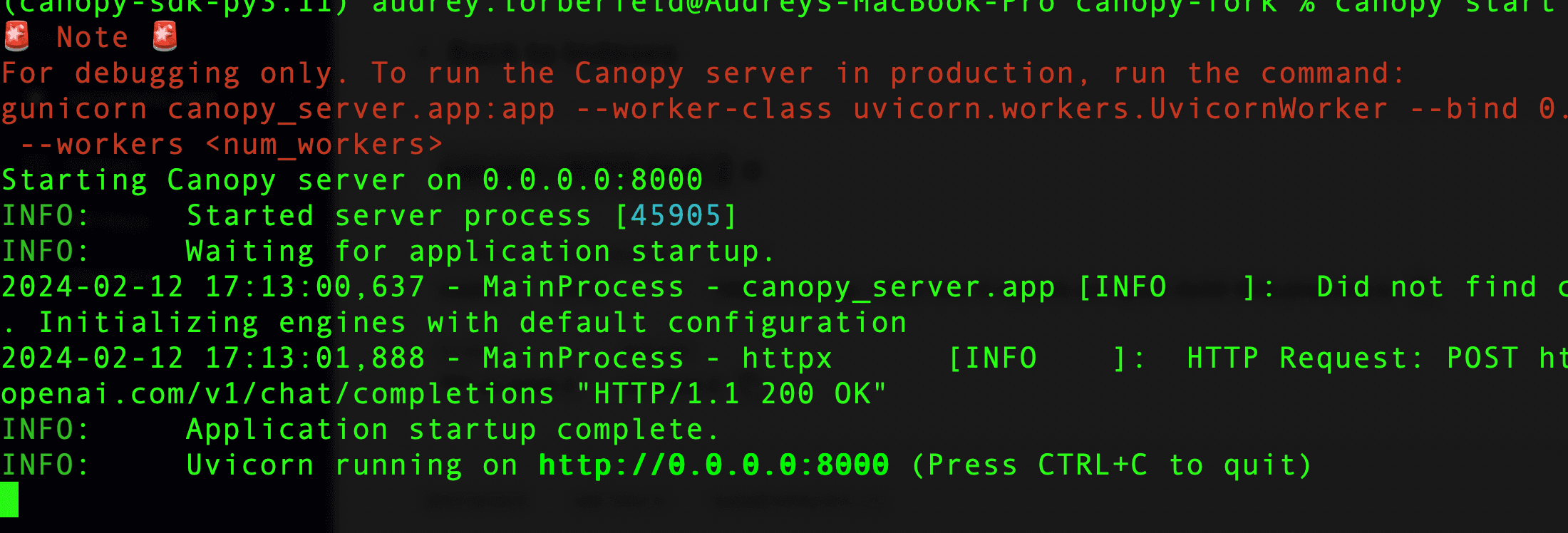
To chat with the docs in your Canopy index, open a new terminal window (ensure your environment variables are still set in this window). In this new window, execute canopy chat --no-rag. It’s fun to include the --no-rag flag when chatting with your documents because it shows you how your LLM’s answer changes with and without the addition of the context fetched from your Canopy index.

Note that in order to showcase the no-rag option, you’ll need to set your OpenAI API key environment variable (OPENAI_API_KEY).
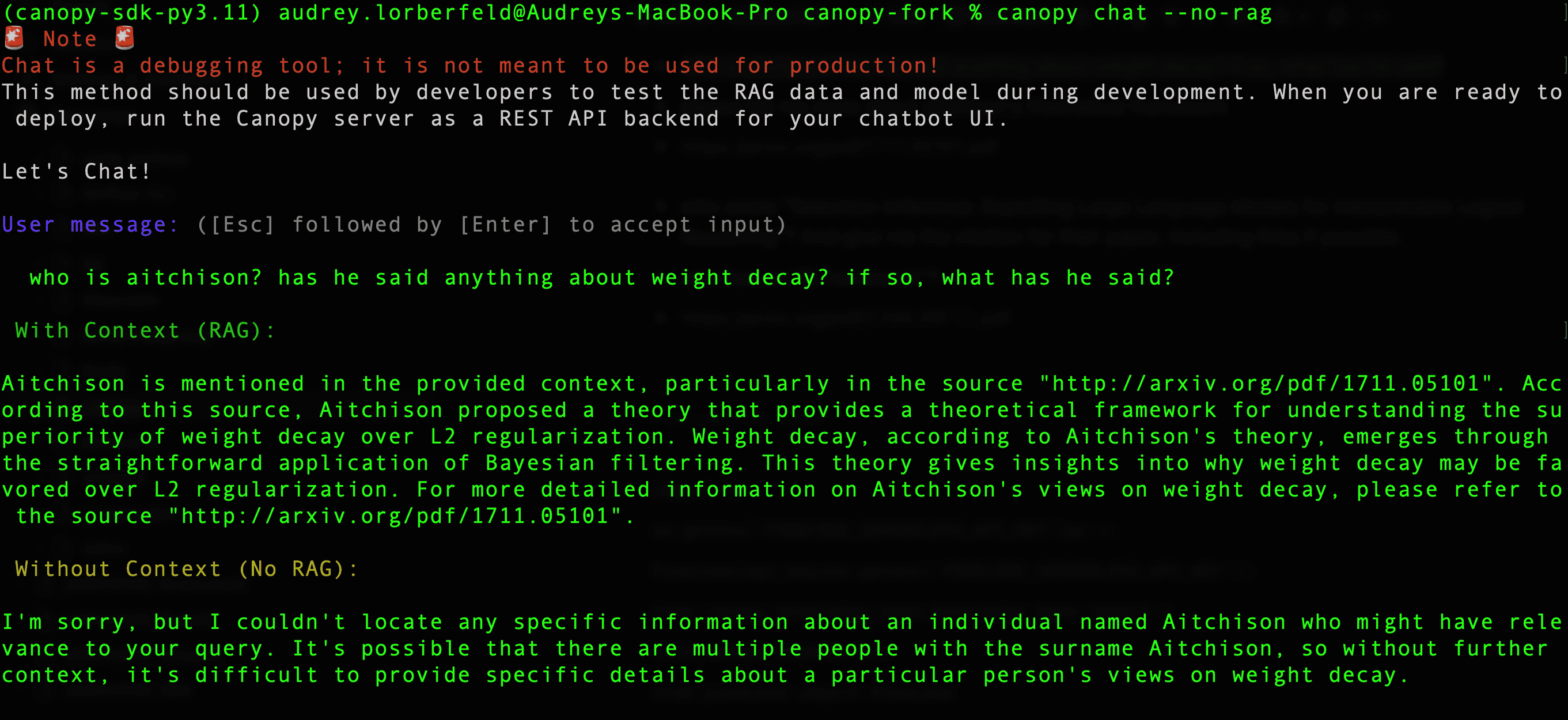
You can see above that without the context from the documents in your Canopy index, your LLM has no way of knowing which "Aitchison" you are referencing in your question!

Stay in touch

Integrating with enterprise-grade hosting platforms like Azure OpenAI Studio is just the beginning for Canopy. Check out Canopy's latest official releases (7 and 8) and submit issues and feature requests on Github.

We can’t wait to see what you build.