




Building high-performance vector search applications requires frameworks and tools that can handle concurrent operations effectively. In this article, we'll explore the benefits of using Pinecone's Python SDK with FastAPI, a web framework for building high performance APIs in Python and asyncio.
Just want the code? Grab it here.
As web developers, we want our apps to be fast and responsive for users. Web apps often make I/O bound requests, like querying a Pinecone index, reading from disk, or making an external API call. These requests are typically considered "slow" compared to requests that only require CPU or RAM. With high traffic and concurrent users, many "slow" requests can add up and increase response times for everyone.
To solve this problem, we implement concurrency strategies in our application. In the Python world, modern web frameworks rely on asyncio support for asynchronous code execution, handling the complicated bits of concurrency for us. asyncio is Python's native solution for writing concurrent code with the async/await syntax you may be familiar with from languages like JavaScript.
Using Pinecone's Python SDK with support for asyncio makes it possible to use Pinecone with modern async web frameworks such as FastAPI, Quart, and Sanic. These frameworks are optimized to handle high-concurrency, managing much of this for you with some additional knobs you can turn. This means calling Pinecone methods asynchronously allows I/O bound requests like querying an index to be handled concurrently without blocking other async tasks. This approach addresses the challenges of managing thread pools manually and brings additional benefits, especially at scale.
Managing and configuring thread pools manually is painful when workloads are variable or demand spikes. Wrapping synchronous code in a thread pool can create hidden bottlenecks — when concurrency exceeds the thread pool size, tasks block while waiting for available threads, leading to unpredictable latency spikes. Thread pools are also inefficient for I/O-bound work because each thread consumes CPU and memory even while sitting idle, waiting for external data. With asyncio, developers no longer need to manage thread pools manually or worry about resource limits imposed by FastAPI's run_in_threadpool.
asyncio enables lightweight concurrency that’s more efficient and scalable than managing thread pools manually. It allows you to handle thousands of simultaneous I/O-bound requests on modest hardware, reducing operational costs. You have access to utilities like asyncio.gather, asyncio.Semaphore, and asyncio.to_thread, making it easy to integrate your native async calls with other parts of your application. Since execution is single-threaded, debugging and profiling become more predictable. Explicit await points not only make it easier to read, but it's easier to reason about the flow of control in your application. This leads to code that is not only faster and cheaper to run but also easier to understand and maintain.
Now that we've covered the main benefits, let's implement a search route using Pinecone's async methods.
In order to get the benefits of asynchronous code execution from frameworks like FastAPI while interacting with Pinecone indexes, we can use the Pinecone Python SDK (version 6.0.0 and later) that includes async methods for use with asyncio.
In the example below, we have a FastAPI app where we implement semantic search and cascading retrieval using Pinecone. While this example uses FastAPI, you could extend this to any place you want to interact with Pinecone in an asynchronous way.
If you're not yet familiar with semantic search, lexical search, and cascading retrieval, you can read more about those here.
If you'd like to implement this yourself, you can grab the code here. You'll need a free Pinecone account with an API key as well as dense and sparse indexes loaded with data. If you don't already have dense and sparse indexes with data, you can run through these instructions to create your indexes and load some sample data.
First, we install the pinecone package with the asyncio extra. This adds a dependency on aiohttp and allows you to interact with Pinecone using async methods.
pip install "pinecone[asyncio]"Import the Pinecone client from the library and initialize the client with your Pinecone API key.
from pinecone import Pinecone

pc = Pinecone(api_key="YOUR_API_KEY")Next, we’ll build the IndexAsyncio object from the Pinecone client so that we can interact with our indexes. In order to benefit from connection pooling, we’ll do this during the startup of our app and then do some cleanup when it shuts down. By using FastAPI’s lifespan feature, we can ensure this code is executed once, on application startup, before any requests are made, and after the application finishes handling requests, on shutdown. We do this to lower the latency overhead of reestablishing the connection for every call to Pinecone.
You’ll first need to grab your dense and sparse index host URLs from the Pinecone console as shown below.
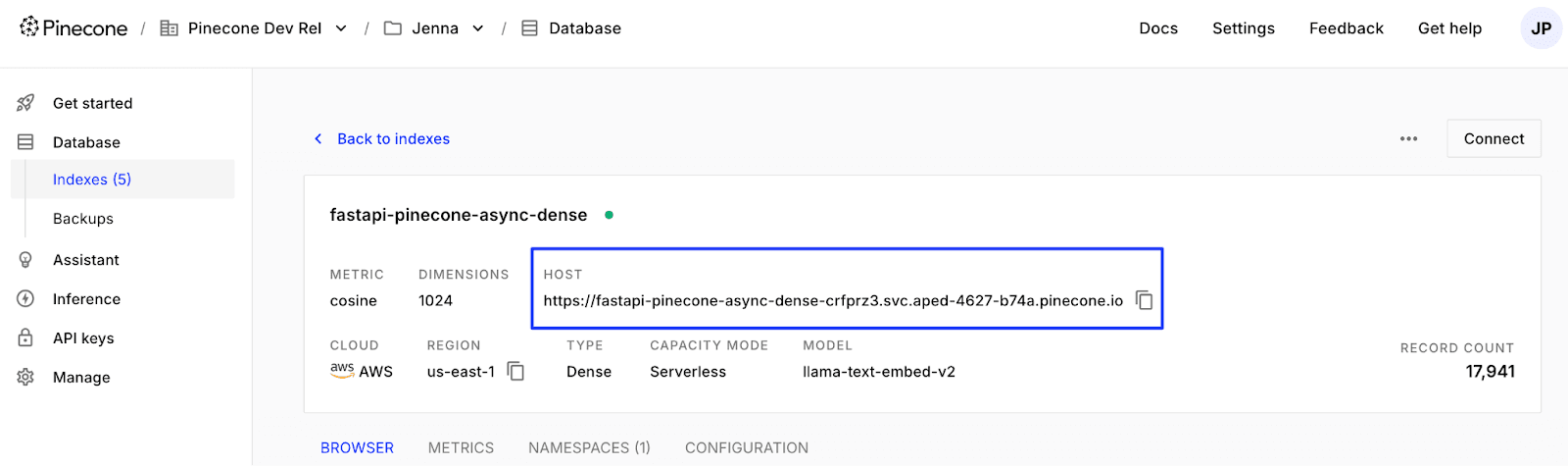
You can also grab the host URL from the Pinecone API using describe_index as detailed here.
We’ll use those host URLs to build the IndexAsyncio objects from the Pinecone client in the code below.
from contextlib import asynccontextmanager

pinecone_indexes = {}

@asynccontextmanager
async def lifespan(app: FastAPI):
	pinecone_indexes["dense"] = pc.IndexAsyncio("YOUR_DENSE_INDEX_HOST_URL")
	pinecone_indexes["sparse"] = pc.IndexAsyncio(host="YOUR_SPARSE_INDEX_HOST_URL")

	yield

	await pinecone_indexes["dense"].close()
	await pinecone_indexes["sparse"].close()
Here, we’ve defined an async lifespan function decorated with @asynccontextmanager. This turns the function into an async context manager where the code before the yield block is run on startup. We’ll save the IndexAsyncio objects in the pinecone_indexes dictionary at startup so they can be referenced during requests. And the code after the yield block is run on shutdown, cleaning up resources used by the IndexAsyncio object.
Finally, we pass the lifespan async context manager to the FastAPI app.
app = FastAPI(lifespan=lifespan)For the semantic search route, we’ll implement a function that makes the call to Pinecone and the route itself. Let’s implement the query_dense_index async function first.
async def query_dense_index(text_query: str, rerank: bool = False):
	return await pinecone_indexes['dense'].search_records(
    	namespace="YOUR_NAMESPACE",
    	query={
        	"inputs": {
            	"text": text_query,
        	},
        	"top_k":10,
    	},
    	rerank={
        	"model": "cohere-rerank-3.5",
        	"rank_fields": ["chunk_text"]
    	} if rerank else None
	)
Here, we use the IndexAsyncio object we retrieved when starting up the app and await the search_records call to the SDK.
Now, we'll implement a route for a simple semantic search over a dense index.
@app.get("/api/semantic-search")
async def semantic_search(text_query: str = None):
    dense_response = await query_dense_index(text_query)
    results = prepare_results(dense_response.result.hits)

    return {"results": results}
Here, we use async in the function definition for the route and await when we call the query_dense_index async function.
Next, we’ll implement cascading retrieval.
In cascading retrieval, we'll combine the benefits of a semantic search (over a dense index) with a lexical search (over a sparse index) and rerank for better results. This will involve two search_records calls to Pinecone and reranking, which is an expensive operation. Because we have two independent calls, we can run these concurrently.
We’ll use the query_dense_index function from earlier and define a new query_sparse_index function.
async def query_sparse_index(text_query: str, rerank: bool = False):
	return await pinecone_indexes['sparse'].search_records(
    	namespace="YOUR_NAMESPACE",
    	query={
        	"inputs":{
            	"text": text_query,
        	},
        	"top_k": 10,
    	},
    	rerank={
        	"model": "cohere-rerank-3.5",
        	"rank_fields": ["chunk_text"]
    	} if rerank else None
	)
Next, let's implement the cascading retrieval route. Here, we query a dense index, a sparse index, rerank the results, and return the top k unique results.
import asyncio

@app.get("/api/cascading-retrieval")
async def cascading_retrieval(text_query: str = None):
    dense_response, sparse_response = await asyncio.gather(
        query_dense_index(text_query, rerank=True),
        query_sparse_index(text_query, rerank=True)
    )

    combined_results = dense_response.result.hits + sparse_response.result.hits
    deduped_results = dedup_combined_results(combined_results)

    results = deduped_results[:10]

    return {"results": results}
In the semantic search route, there was only one async function that we were waiting on — query_dense_index. The interesting part in this cascading retrieval route is that since we are querying two Pinecone indexes, there's an opportunity to run both queries concurrently using asyncio.gather. Once both queries complete, we de-duplicate the results and return the top k results.
We haven’t covered the prepare_results and dedup_combined_results functions in the snippets above. prepare_results is simply reformatting results from the Pinecone response into what our app needs to return. dedup_combined_results is removing duplicates based on the id. You can find this code here.
In a web application, the performance of each request directly impacts the user experience, especially at scale. Using Pinecone’s Python SDK with asyncio support allows you to use web frameworks like FastAPI, Quart, and Sanic that are optimized for high concurrency. While your users benefit from a fast and responsive user experience, your application becomes faster and cheaper to run and easier to understand and maintain over the long-term.
Ready to integrate Pinecone into your FastAPI application? Grab the full code here.
此内容由惯性聚合(RSS阅读器)自动聚合整理,仅供阅读参考。 原文来自 — 版权归原作者所有。