


Large Language Models (LLMs) have a data freshness problem. Even some of the most powerful models, like GPT-4, have no idea about recent events.
The world, according to LLMs, is frozen in time. They only know the world as it appeared through their training data.
That creates problems for any use case that relies on up-to-date information or a particular dataset. For example, you may have internal company documents you’d like to interact with via an LLM.
The first challenge is adding those documents to the LLM, we could try training the LLM on these documents, but this is time-consuming and expensive. And what happens when a new document is added? Training for every new document added is beyond inefficient — it is simply impossible.
So, how do we handle this problem? We can use retrieval augmentation. This technique allows us to retrieve relevant information from an external knowledge base and give that information to our LLM.
The external knowledge base is our “window” into the world beyond the LLM’s training data. In this chapter, we will learn all about implementing retrieval augmentation for LLMs using LangChain.
Creating the Knowledge Base
We have two primary types of knowledge for LLMs. The parametric knowledge refers to everything the LLM learned during training and acts as a frozen snapshot of the world for the LLM.
The second type of knowledge is source knowledge. This knowledge covers any information fed into the LLM via the input prompt. When we talk about retrieval augmentation, we’re talking about giving the LLM valuable source knowledge.
(You can follow along with the following sections using the Jupyter notebook here!)
Getting Data for our Knowledge Base
To help our LLM, we need to give it access to relevant source knowledge. To do that, we need to create our knowledge base.
We start with a dataset. The dataset used naturally depends on the use case. It could be code documentation for an LLM that needs to help write code, company documents for an internal chatbot, or anything else.
In our example, we will use a subset of Wikipedia. To get that data, we will use Hugging Face datasets like so:
In[2]:
from datasets import load_dataset

data = load_dataset("wikipedia", "20220301.simple", split='train[:10000]')
data
Out[2]:
Downloading readme: 0%| | 0.00/16.3k [00:00<?, ?B/s]Out[2]:
Dataset({
    features: ['id', 'url', 'title', 'text'],
    num_rows: 10000
})
Out[3]:
{'id': '13',
 'url': 'https://simple.wikipedia.org/wiki/Alan%20Turing',
 'title': 'Alan Turing',
 'text': 'Alan Mathison Turing OBE FRS (London, 23 June 1912 – Wilmslow, Cheshire, 7 June 1954) was an English mathematician and computer scientist. He was born in Maida Vale, London.\n\nEarly life and family \nAlan Turing was born in Maida Vale, London on 23 June 1912. His father was part of a family of merchants from Scotland. His mother, Ethel Sara, was the daughter of an engineer.\n\nEducation \nTuring went to St. Michael\'s, a school at 20 Charles Road, St Leonards-on-sea, when he was five years old.\n"This is only a foretaste of what is to come, and only the shadow of what is going to be.” – Alan Turing.\n\nThe Stoney family were once prominent landlords, here in North Tipperary. His mother Ethel Sara Stoney (1881–1976) was daughter of Edward Waller Stoney (Borrisokane, North Tipperary) and Sarah Crawford (Cartron Abbey, Co. Longford); Protestant Anglo-Irish gentry.\n\nEducated in Dublin at Alexandra School and College; on October 1st 1907 she married Julius Mathison Turing, latter son of Reverend John Robert Turing and Fanny Boyd, in Dublin. Born on June 23rd 1912, Alan Turing would go on to be regarded as one of the greatest figures of the twentieth century.\n\nA brilliant mathematician and cryptographer Alan was to become the founder of modern-day computer science and artificial intelligence; designing a machine at Bletchley Park to break secret Enigma encrypted messages used by the Nazi German war machine to protect sensitive commercial, diplomatic and military communications during World War 2. Thus, Turing made the single biggest contribution to the Allied victory in the war against Nazi Germany, possibly saving the lives of an estimated 2 million people, through his effort in shortening World War II.\n\nIn 2013, almost 60 years later, Turing received a posthumous Royal Pardon from Queen Elizabeth II. Today, the “Turing law” grants an automatic pardon to men who died before the law came into force, making it possible for living convicted gay men to seek pardons for offences now no longer on the statute book.\n\nAlas, Turing accidentally or otherwise lost his life in 1954, having been subjected by a British court to chemical castration, thus avoiding a custodial sentence. He is known to have ended his life at the age of 41 years, by eating an apple laced with cyanide.\n\nCareer \nTuring was one of the people who worked on the first computers. He created the theoretical  Turing machine in 1936. The machine was imaginary, but it included the idea of a computer program.\n\nTuring was interested in artificial intelligence. He proposed the Turing test, to say when a machine could be called "intelligent". A computer could be said to "think" if a human talking with it could not tell it was a machine.\n\nDuring World War II, Turing worked with others to break German ciphers (secret messages). He  worked for the Government Code and Cypher School (GC&CS) at Bletchley Park, Britain\'s codebreaking centre that produced Ultra intelligence.\nUsing cryptanalysis, he helped to break the codes of the Enigma machine. After that, he worked on other German codes.\n\nFrom 1945 to 1947, Turing worked on the design of the ACE (Automatic Computing Engine) at the National Physical Laboratory. He presented a paper on 19 February 1946. That paper was "the first detailed design of a stored-program computer". Although it was possible to build ACE, there were delays in starting the project. In late 1947 he returned to Cambridge for a sabbatical year. While he was at Cambridge, the Pilot ACE was built without him. It ran its first program on 10\xa0May 1950.\n\nPrivate life \nTuring was a homosexual man. In 1952, he admitted having had sex with a man in England. At that time, homosexual acts were illegal. Turing was convicted. He had to choose between going to jail and taking hormones to lower his sex drive. He decided to take the hormones. After his punishment, he became impotent. He also grew breasts.\n\nIn May 2012, a private member\'s bill was put before the House of Lords to grant Turing a statutory pardon. In July 2013, the government supported it. A royal pardon was granted on 24 December 2013.\n\nDeath \nIn 1954, Turing died from cyanide poisoning. The cyanide came from either an apple which was poisoned with cyanide, or from water that had cyanide in it. The reason for the confusion is that the police never tested the apple for cyanide. It is also suspected that he committed suicide.\n\nThe treatment forced on him is now believed to be very wrong. It is against medical ethics and international laws of human rights. In August 2009, a petition asking the British Government to apologise to Turing for punishing him for being a homosexual was started. The petition received thousands of signatures. Prime Minister Gordon Brown acknowledged the petition. He called Turing\'s treatment "appalling".\n\nReferences\n\nOther websites \nJack Copeland 2012. Alan Turing: The codebreaker who saved \'millions of lives\'. BBC News / Technology \n\nEnglish computer scientists\nEnglish LGBT people\nEnglish mathematicians\nGay men\nLGBT scientists\nScientists from London\nSuicides by poison\nSuicides in the United Kingdom\n1912 births\n1954 deaths\nOfficers of the Order of the British Empire'}
Most datasets will contain records that include a lot of text. Because of this, our first task is usually to build a preprocessing pipeline that chunks those long bits of text into more concise chunks.
Creating Chunks
Splitting our text into smaller chunks is essential for several reasons. Primarily we are looking to:
- Improve “embedding accuracy” — this will improve the relevance of results later.
- Reduce the amount of text fed into our LLM as source knowledge. Limiting input improves the LLM’s ability to follow instructions, reduces generation costs, and helps us get faster responses.
- Provide users with more precise information sources as we can narrow down the information source to a smaller chunk of text.
- In the case of very long chunks of text, we will exceed the maximum context window of our embedding or completion models. Splitting these chunks makes it possible to add these longer documents to our knowledge base.
To create these chunks, we first need a way of measuring the length of our text. LLMs don’t measure text by word or character — they measure it by “tokens”.
A token is typically the size of a word or sub-word and varies by LLM. The tokens themselves are built using a tokenizer. We will be using gpt-3.5-turbo as our completion model, and we can initialize the tokenizer for this model like so:
import tiktoken  # !pip install tiktoken

tokenizer = tiktoken.get_encoding('p50k_base')
Using the tokenizer, we can create tokens from plain text and count the number of tokens. We will wrap this into a function called tiktoken_len:
In[28]:
# create the length function
def tiktoken_len(text):
    tokens = tokenizer.encode(
        text,
        disallowed_special=()
    )
    return len(tokens)

tiktoken_len("hello I am a chunk of text and using the tiktoken_len function "
             "we can find the length of this chunk of text in tokens")
With our token counting function ready, we can initialize a LangChain RecursiveCharacterTextSplitter object. This object will allow us to split our text into chunks no longer than what we specify via the chunk_size parameter.
from langchain.text_splitter import RecursiveCharacterTextSplitter

text_splitter = RecursiveCharacterTextSplitter(
    chunk_size=400,
    chunk_overlap=20,
    length_function=tiktoken_len,
    separators=["\n\n", "\n", " ", ""]
)
Now we split the text like so:
In[6]:
chunks = text_splitter.split_text(data[6]['text'])[:3]
chunks
Out[6]:
['Alan Mathison Turing OBE FRS (London, 23 June 1912 – Wilmslow, Cheshire, 7 June 1954) was an English mathematician and computer scientist. He was born in Maida Vale, London.\n\nEarly life and family \nAlan Turing was born in Maida Vale, London on 23 June 1912. His father was part of a family of merchants from Scotland. His mother, Ethel Sara, was the daughter of an engineer.\n\nEducation \nTuring went to St. Michael\'s, a school at 20 Charles Road, St Leonards-on-sea, when he was five years old.\n"This is only a foretaste of what is to come, and only the shadow of what is going to be.” – Alan Turing.\n\nThe Stoney family were once prominent landlords, here in North Tipperary. His mother Ethel Sara Stoney (1881–1976) was daughter of Edward Waller Stoney (Borrisokane, North Tipperary) and Sarah Crawford (Cartron Abbey, Co. Longford); Protestant Anglo-Irish gentry.\n\nEducated in Dublin at Alexandra School and College; on October 1st 1907 she married Julius Mathison Turing, latter son of Reverend John Robert Turing and Fanny Boyd, in Dublin. Born on June 23rd 1912, Alan Turing would go on to be regarded as one of the greatest figures of the twentieth century.\n\nA brilliant mathematician and cryptographer Alan was to become the founder of modern-day computer science and artificial intelligence; designing a machine at Bletchley Park to break secret Enigma encrypted messages used by the Nazi German war machine to protect sensitive commercial, diplomatic and military communications during World War 2. Thus, Turing made the single biggest contribution to the Allied victory in the war against Nazi Germany, possibly saving the lives of an estimated 2 million people, through his effort in shortening World War II.',
 'In 2013, almost 60 years later, Turing received a posthumous Royal Pardon from Queen Elizabeth II. Today, the “Turing law” grants an automatic pardon to men who died before the law came into force, making it possible for living convicted gay men to seek pardons for offences now no longer on the statute book.\n\nAlas, Turing accidentally or otherwise lost his life in 1954, having been subjected by a British court to chemical castration, thus avoiding a custodial sentence. He is known to have ended his life at the age of 41 years, by eating an apple laced with cyanide.\n\nCareer \nTuring was one of the people who worked on the first computers. He created the theoretical  Turing machine in 1936. The machine was imaginary, but it included the idea of a computer program.\n\nTuring was interested in artificial intelligence. He proposed the Turing test, to say when a machine could be called "intelligent". A computer could be said to "think" if a human talking with it could not tell it was a machine.\n\nDuring World War II, Turing worked with others to break German ciphers (secret messages). He  worked for the Government Code and Cypher School (GC&CS) at Bletchley Park, Britain\'s codebreaking centre that produced Ultra intelligence.\nUsing cryptanalysis, he helped to break the codes of the Enigma machine. After that, he worked on other German codes.',
 'From 1945 to 1947, Turing worked on the design of the ACE (Automatic Computing Engine) at the National Physical Laboratory. He presented a paper on 19 February 1946. That paper was "the first detailed design of a stored-program computer". Although it was possible to build ACE, there were delays in starting the project. In late 1947 he returned to Cambridge for a sabbatical year. While he was at Cambridge, the Pilot ACE was built without him. It ran its first program on 10\xa0May 1950.\n\nPrivate life \nTuring was a homosexual man. In 1952, he admitted having had sex with a man in England. At that time, homosexual acts were illegal. Turing was convicted. He had to choose between going to jail and taking hormones to lower his sex drive. He decided to take the hormones. After his punishment, he became impotent. He also grew breasts.\n\nIn May 2012, a private member\'s bill was put before the House of Lords to grant Turing a statutory pardon. In July 2013, the government supported it. A royal pardon was granted on 24 December 2013.\n\nDeath \nIn 1954, Turing died from cyanide poisoning. The cyanide came from either an apple which was poisoned with cyanide, or from water that had cyanide in it. The reason for the confusion is that the police never tested the apple for cyanide. It is also suspected that he committed suicide.\n\nThe treatment forced on him is now believed to be very wrong. It is against medical ethics and international laws of human rights. In August 2009, a petition asking the British Government to apologise to Turing for punishing him for being a homosexual was started. The petition received thousands of signatures. Prime Minister Gordon Brown acknowledged the petition. He called Turing\'s treatment "appalling".\n\nReferences\n\nOther websites \nJack Copeland 2012. Alan Turing: The codebreaker who saved \'millions of lives\'. BBC News / Technology']
None of these chunks are larger than the 400 chunk size limit we set earlier:
In[7]:
tiktoken_len(chunks[0]), tiktoken_len(chunks[1]), tiktoken_len(chunks[2])With the text_splitter, we get nicely-sized chunks of text. We’ll use this functionality during the indexing process later. For now, let’s take a look at embeddings.
Creating Embeddings
The vector embeddings are vital to retrieving relevant context for our LLM. We take the chunks of text we’d like to store in our knowledge base and encode each chunk into a vector embedding.
These embeddings can act as “numerical representations” of the meaning of each chunk of text. This is possible because we create the embeddings with another AI language model that has learned to translate human-readable text into AI-readable embeddings.
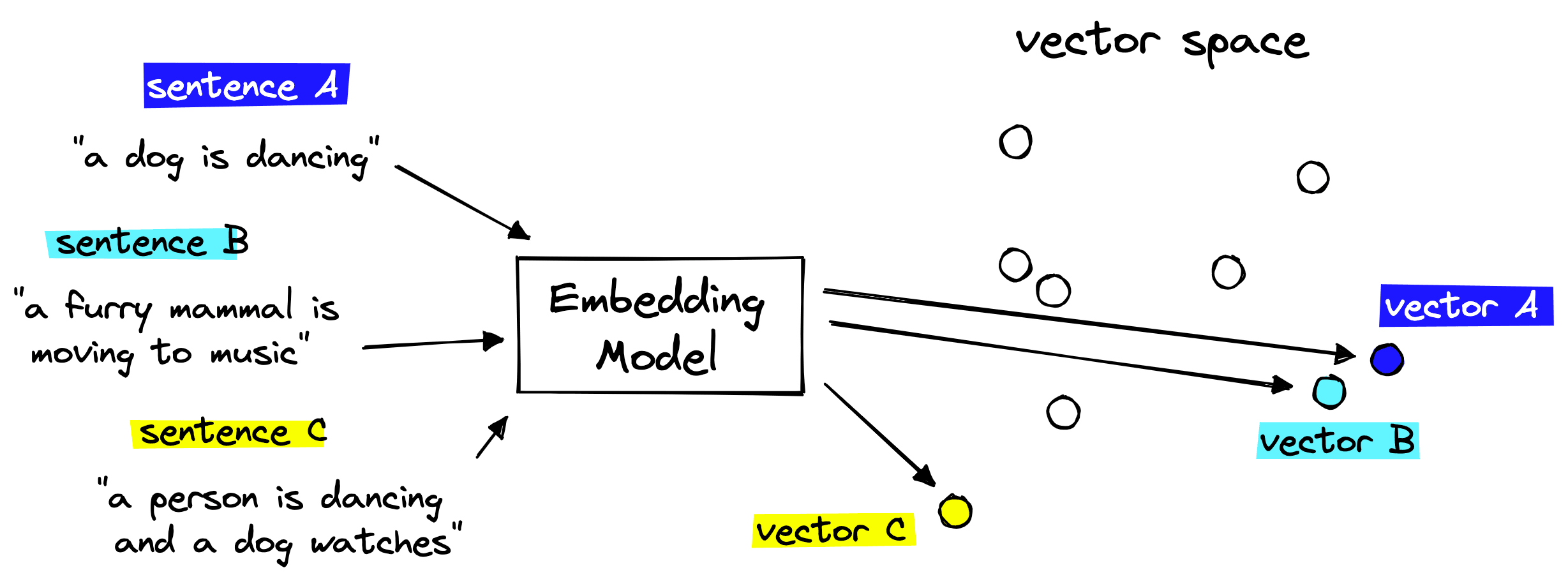
We then store these embeddings in our vector database (more on this soon) and can find text chunks with similar meanings by calculating the distance between embeddings in vector space.
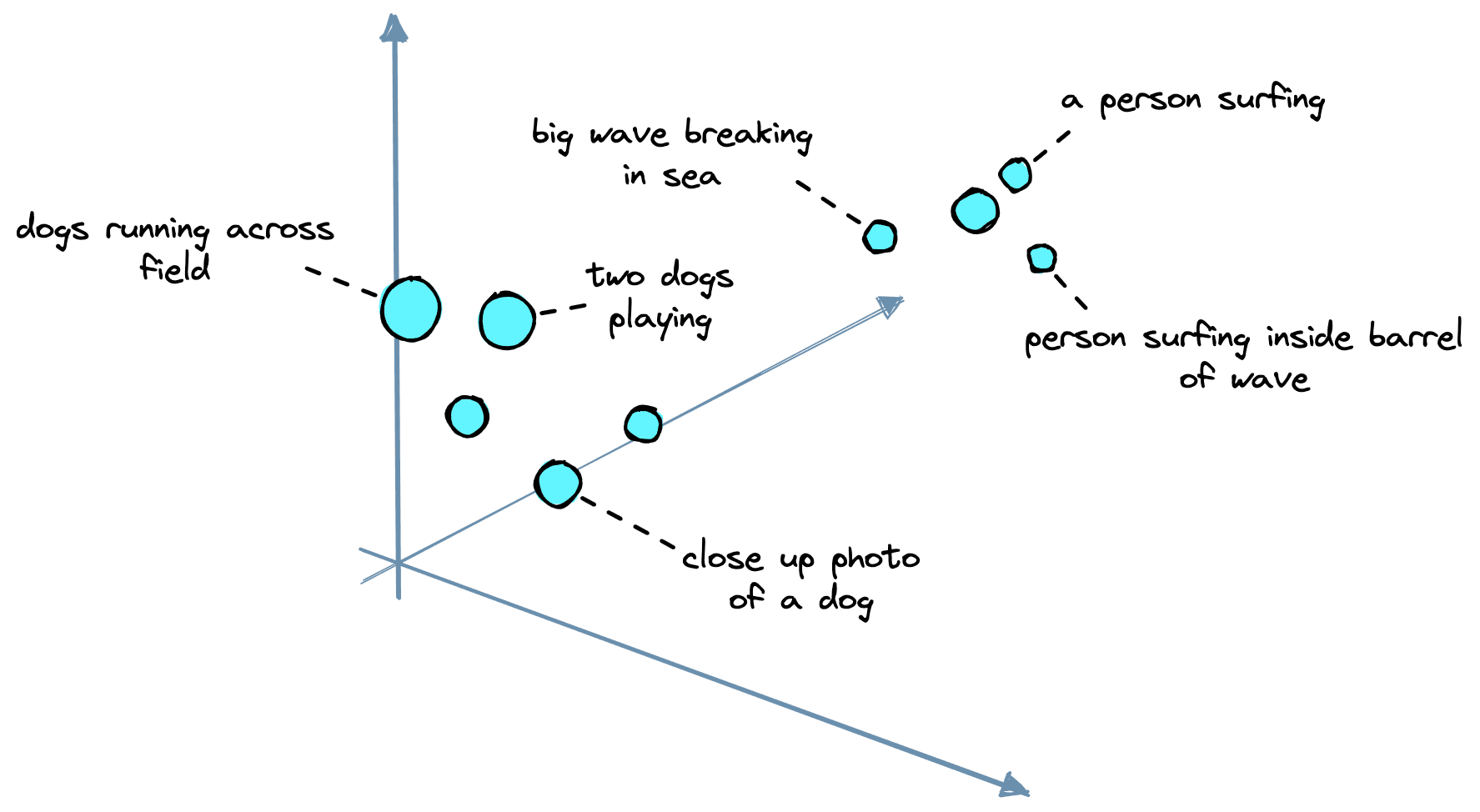
The embedding model we will use is another OpenAI model called text-embedding-ada-002. We can initialize it via LangChain like so:
from langchain.embeddings.openai import OpenAIEmbeddings

model_name = 'text-embedding-ada-002'

embed = OpenAIEmbeddings(
    document_model_name=model_name,
    query_model_name=model_name,
    openai_api_key=OPENAI_API_KEY
)
Now we can embed our text:
In[10]:
texts = [
    'this is the first chunk of text',
    'then another second chunk of text is here'
]

res = embed.embed_documents(texts)
len(res), len(res[0])
From this, we get two embeddings as we passed in two chunks of text. Each embedding is a 1536-dimensional vector. This dimension is simply the output dimensionality of text-embedding-ada-002.
With that, we have our dataset, text splitter, and embedding model. We have everything needed to begin constructing our knowledge base.
Vector Database
A vector database is a type of knowledge base that allows us to scale the search of similar embeddings to billions of records, manage our knowledge base by adding, updating, or removing records, and even do things like filtering.
We will be using the Pinecone vector database. To use it, we need a free API key. Then we initialize our database index like so:
import pinecone

index_name = 'langchain-retrieval-augmentation'

pinecone.init(
        api_key="YOUR_API_KEY",  # find api key in console at app.pinecone.io
        environment="YOUR_ENV"  # find next to api key in console
)

# we create a new index
pinecone.create_index(
        name=index_name,
        metric='dotproduct',
        dimension=len(res[0]) # 1536 dim of text-embedding-ada-002
)
Then we connect to the new index:
In[12]:
index = pinecone.GRPCIndex(index_name)

index.describe_index_stats()
Out[12]:
{'dimension': 1536,
 'index_fullness': 0.0,
 'namespaces': {},
 'total_vector_count': 0}
We will see that the new Pinecone index has a total_vector_count of 0 because we haven’t added any vectors yet. Our next task is to do that.
The indexing process consists of us iterating through the data we’d like to add to our knowledge base, creating IDs, embeddings, and metadata — then adding these to the index.
We can do this in batches to speed up the process.
from tqdm.auto import tqdm
from uuid import uuid4

batch_limit = 100

texts = []
metadatas = []

for i, record in enumerate(tqdm(data)):
    # first get metadata fields for this record
    metadata = {
        'wiki-id': str(record['id']),
        'source': record['url'],
        'title': record['title']
    }
    # now we create chunks from the record text
    record_texts = text_splitter.split_text(record['text'])
    # create individual metadata dicts for each chunk
    record_metadatas = [{
        "chunk": j, "text": text, **metadata
    } for j, text in enumerate(record_texts)]
    # append these to current batches
    texts.extend(record_texts)
    metadatas.extend(record_metadatas)
    # if we have reached the batch_limit we can add texts
    if len(texts) >= batch_limit:
        ids = [str(uuid4()) for _ in range(len(texts))]
        embeds = embed.embed_documents(texts)
        index.upsert(vectors=zip(ids, embeds, metadatas))
        texts = []
        metadatas = []
We’ve now indexed everything. To check the number of records in our index, we call describe_index_stats again:
In[14]:
index.describe_index_stats()Out[14]:
{'dimension': 1536,
 'index_fullness': 0.1,
 'namespaces': {'': {'vector_count': 27437}},
 'total_vector_count': 27437}
Our index contains ~27K records. As mentioned earlier, we can scale this up to billions, but 27K is enough for our example.
LangChain Vector Store and Querying
We construct our index independently of LangChain. That’s because it’s a straightforward process, and it is faster to do this with the Pinecone client directly. However, we’re about to jump back into LangChain, so we should reconnect to our index via the LangChain library.
from langchain.vectorstores import Pinecone

text_field = "text"

# switch back to normal index for langchain
index = pinecone.Index(index_name)

vectorstore = Pinecone(
    index, embed.embed_query, text_field
)
We can use the similarity search method to make a query directly and return the chunks of text without any LLM generating the response.
In[16]:
query = "who was Benito Mussolini?"

vectorstore.similarity_search(
    query,  # our search query
    k=3  # return 3 most relevant docs
)
Out[16]:
[Document(page_content='Benito Amilcare Andrea Mussolini KSMOM GCTE (29 July 1883 – 28 April 1945) was an Italian politician and journalist. He was also the Prime Minister of Italy from 1922 until 1943. He was the leader of the National Fascist Party.\n\nBiography\n\nEarly life\nBenito Mussolini was named after Benito Juarez, a Mexican opponent of the political power of the Roman Catholic Church, by his anticlerical (a person who opposes the political interference of the Roman Catholic Church in secular affairs) father. Mussolini\'s father was a blacksmith. Before being involved in politics, Mussolini was a newspaper editor (where he learned all his propaganda skills) and elementary school teacher.\n\nAt first, Mussolini was a socialist, but when he wanted Italy to join the First World War, he was thrown out of the socialist party. He \'invented\' a new ideology, Fascism, much out of Nationalist\xa0and Conservative views.\n\nRise to power and becoming dictator\nIn 1922, he took power by having a large group of men, "Black Shirts," march on Rome and threaten to take over the government. King Vittorio Emanuele III gave in, allowed him to form a government, and made him prime minister. In the following five years, he gained power, and in 1927 created the OVRA, his personal secret police force. Using the agency to arrest, scare, or murder people against his regime, Mussolini was dictator\xa0of Italy by the end of 1927. Only the King and his own Fascist party could challenge his power.', lookup_str='', metadata={'chunk': 0.0, 'source': 'https://simple.wikipedia.org/wiki/Benito%20Mussolini', 'title': 'Benito Mussolini', 'wiki-id': '6754'}, lookup_index=0),
 Document(page_content='Fascism as practiced by Mussolini\nMussolini\'s form of Fascism, "Italian Fascism"- unlike Nazism, the racist ideology that Adolf Hitler followed- was different and less destructive than Hitler\'s. Although a believer in the superiority of the Italian nation and national unity, Mussolini, unlike Hitler, is quoted "Race? It is a feeling, not a reality. Nothing will ever make me believe that biologically pure races can be shown to exist today".\n\nMussolini wanted Italy to become a new Roman Empire. In 1923, he attacked the island of Corfu, and in 1924, he occupied the city state of Fiume. In 1935, he attacked the African country Abyssinia (now called Ethiopia). His forces occupied it in 1936. Italy was thrown out of the League of Nations because of this aggression. In 1939, he occupied the country Albania. In 1936, Mussolini signed an alliance with Adolf Hitler, the dictator of Germany.\n\nFall from power and death\nIn 1940, he sent Italy into the Second World War on the side of the Axis countries. Mussolini attacked Greece, but he failed to conquer it. In 1943, the Allies landed in Southern Italy. The Fascist party and King Vittorio Emanuel III deposed Mussolini and put him in jail, but he was set free by the Germans, who made him ruler of the Italian Social Republic puppet state which was in a small part of Central Italy. When the war was almost over, Mussolini tried to escape to Switzerland with his mistress, Clara Petacci, but they were both captured and shot by partisans. Mussolini\'s dead body was hanged upside-down, together with his mistress and some of Mussolini\'s helpers, on a pole at a gas station in the village of Millan, which is near the border  between Italy and Switzerland.', lookup_str='', metadata={'chunk': 1.0, 'source': 'https://simple.wikipedia.org/wiki/Benito%20Mussolini', 'title': 'Benito Mussolini', 'wiki-id': '6754'}, lookup_index=0),
 Document(page_content='Fascist Italy \nIn 1922, a new Italian government started. It was ruled by Benito Mussolini, the leader of Fascism in Italy. He became head of government and dictator, calling himself "Il Duce" (which means "leader" in Italian). He became friends with German dictator Adolf Hitler. Germany, Japan, and Italy became the Axis Powers. In 1940, they entered World War II together against France, Great Britain, and later the Soviet Union. During the war, Italy controlled most of the Mediterranean Sea.\n\nOn July 25, 1943, Mussolini was removed by the Great Council of Fascism. On September 8, 1943, Badoglio said that the war as an ally of Germany was ended. Italy started fighting as an ally of France and the UK, but Italian soldiers did not know whom to shoot. In Northern Italy, a movement called Resistenza started to fight against the German invaders. On April 25, 1945, much of Italy became free, while Mussolini tried to make a small Northern Italian fascist state called the Republic of Salò. The fascist state failed and Mussolini tried to flee to Switzerland and escape to Francoist Spain, but he was captured by Italian partisans. On 28 April 1945 Mussolini was executed by a partisan.\n\nAfter World War Two \n\nThe state became a republic on June 2, 1946. For the first time, women were able to vote. Italian people ended the Savoia dynasty and adopted a republic government.\n\nIn February 1947, Italy signed a peace treaty with the Allies. They lost all the colonies and some territorial areas (Istria and parts of Dalmatia).\n\nSince then Italy has joined NATO and the European Community (as a founding member). It is one of the seven biggest industrial economies in the world.\n\nTransportation \n\nThe railway network in Italy totals . It is the 17th longest in the world. High speed trains include ETR-class trains which travel at .', lookup_str='', metadata={'chunk': 5.0, 'source': 'https://simple.wikipedia.org/wiki/Italy', 'title': 'Italy', 'wiki-id': '363'}, lookup_index=0)]
All of these are relevant results, telling us that the retrieval component of our systems is functioning. The next step is adding our LLM to generatively answer our question using the information provided in these retrieved contexts.
Generative Question Answering
In generative question-answering (GQA), we pass our question to the LLM but instruct it to base the answer on the information returned from our knowledge base. We can do this in LangChain easily using the RetrievalQA chain.
from langchain.chat_models import ChatOpenAI
from langchain.chains import RetrievalQA

# completion llm
llm = ChatOpenAI(
    openai_api_key=OPENAI_API_KEY,
    model_name='gpt-3.5-turbo',
    temperature=0.0
)

qa = RetrievalQA.from_chain_type(
    llm=llm,
    chain_type="stuff",
    retriever=vectorstore.as_retriever()
)
Let’s try this with our earlier query:
Out[22]:
'Benito Mussolini was an Italian politician and journalist who served as the Prime Minister of Italy from 1922 until 1943. He was the leader of the National Fascist Party and invented the ideology of Fascism. Mussolini was a dictator of Italy by the end of 1927, and his form of Fascism, "Italian Fascism," was different and less destructive than Hitler\'s Nazism. Mussolini wanted Italy to become a new Roman Empire and attacked several countries, including Abyssinia (now called Ethiopia) and Greece. He was removed from power in 1943 and was executed by Italian partisans in 1945.'The response we get this time is generated by our gpt-3.5-turbo LLM based on the retrieved information from our vector database.
We’re still not entirely protected from convincing yet false hallucinations by the model, they can happen, and it’s unlikely that we can eliminate the problem completely. However, we can do more to improve our trust in the answers provided.
An effective way of doing this is by adding citations to the response, allowing a user to see where the information is coming from. We can do this using a slightly different version of the RetrievalQA chain called RetrievalQAWithSourcesChain.
In[23]:
from langchain.chains import RetrievalQAWithSourcesChain

qa_with_sources = RetrievalQAWithSourcesChain.from_chain_type(
    llm=llm,
    chain_type="stuff",
    retriever=vectorstore.as_retriever()
)
Out[24]:
{'question': 'who was Benito Mussolini?',
 'answer': 'Benito Mussolini was an Italian politician and journalist who was the Prime Minister of Italy from 1922 until 1943. He was the leader of the National Fascist Party and invented the ideology of Fascism. He became dictator of Italy by the end of 1927 and was friends with German dictator Adolf Hitler. Mussolini attacked Greece and failed to conquer it. He was removed by the Great Council of Fascism in 1943 and was executed by a partisan on April 28, 1945. After the war, several Neo-Fascist movements have had success in Italy, the most important being the Movimento Sociale Italiano. His granddaughter Alessandra Mussolini has outspoken views similar to Fascism. \n',
 'sources': 'https://simple.wikipedia.org/wiki/Benito%20Mussolini, https://simple.wikipedia.org/wiki/Fascism'}
Now we have answered the question being asked but also included the source of this information being used by the LLM.
We’ve learned how to ground Large Language Models with source knowledge by using a vector database as our knowledge base. Using this, we can encourage accuracy in our LLM’s responses, keep source knowledge up to date, and improve trust in our system by providing citations with every answer.
We’re already seeing LLMs and knowledge bases paired together in huge products like Bing’s AI search, Google Bard, and ChatGPT plugins. Without a doubt, the future of LLMs is tightly coupled with high-performance, scalable, and reliable knowledge bases.
Was this article helpful?