






We have always relied on different models for different tasks in machine learning. With the introduction of multi-modality and Large Language Models (LLMs), this has changed.
Gone are the days when we needed separate models for classification, named entity recognition (NER), question-answering (QA), and many other tasks.
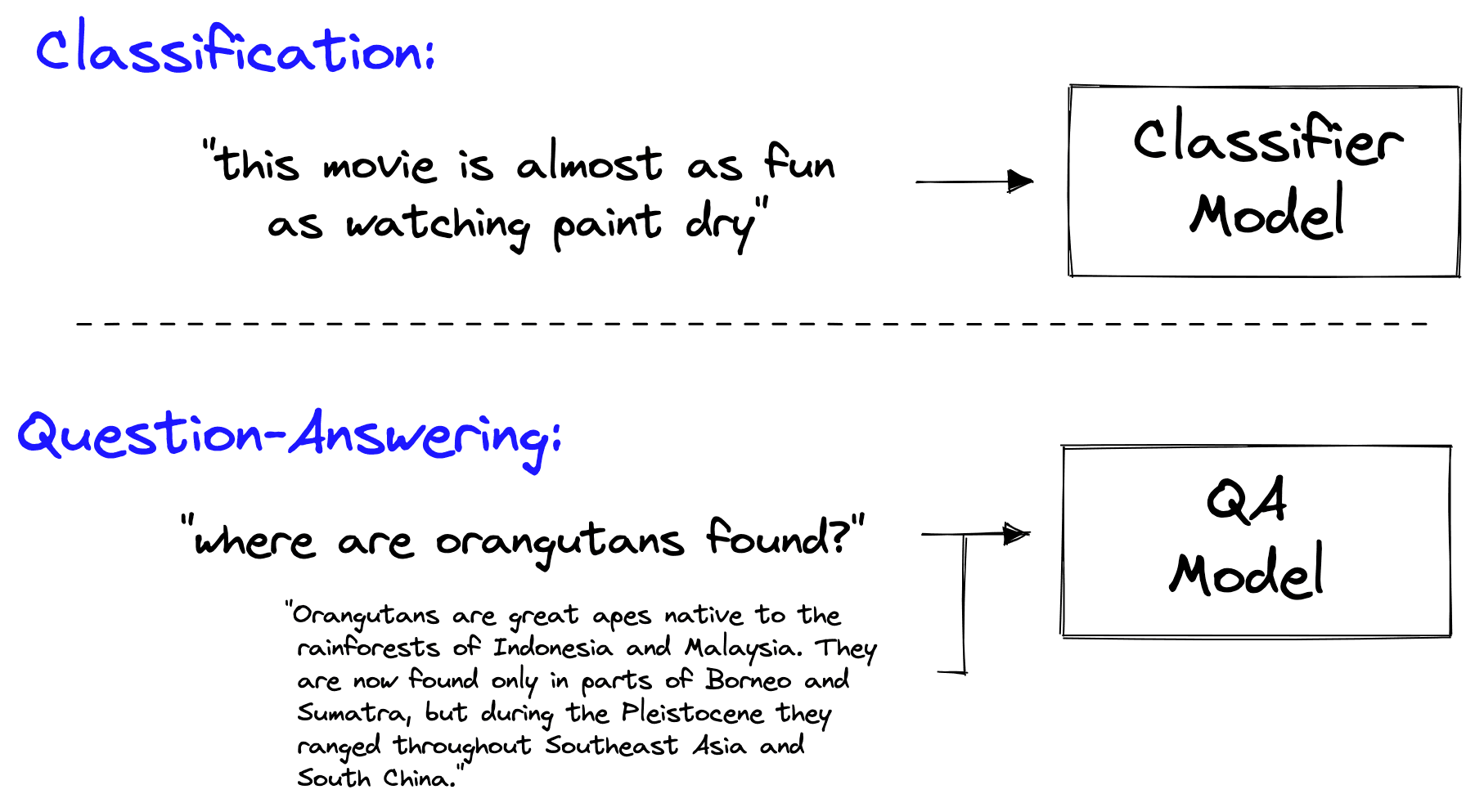
Before transfer learning, different tasks and use cases required training different models.
With the introduction of transformers and transfer learning, all that was needed to adapt a language model for different tasks was a few small layers at the end of the network (the head) and a little fine-tuning.
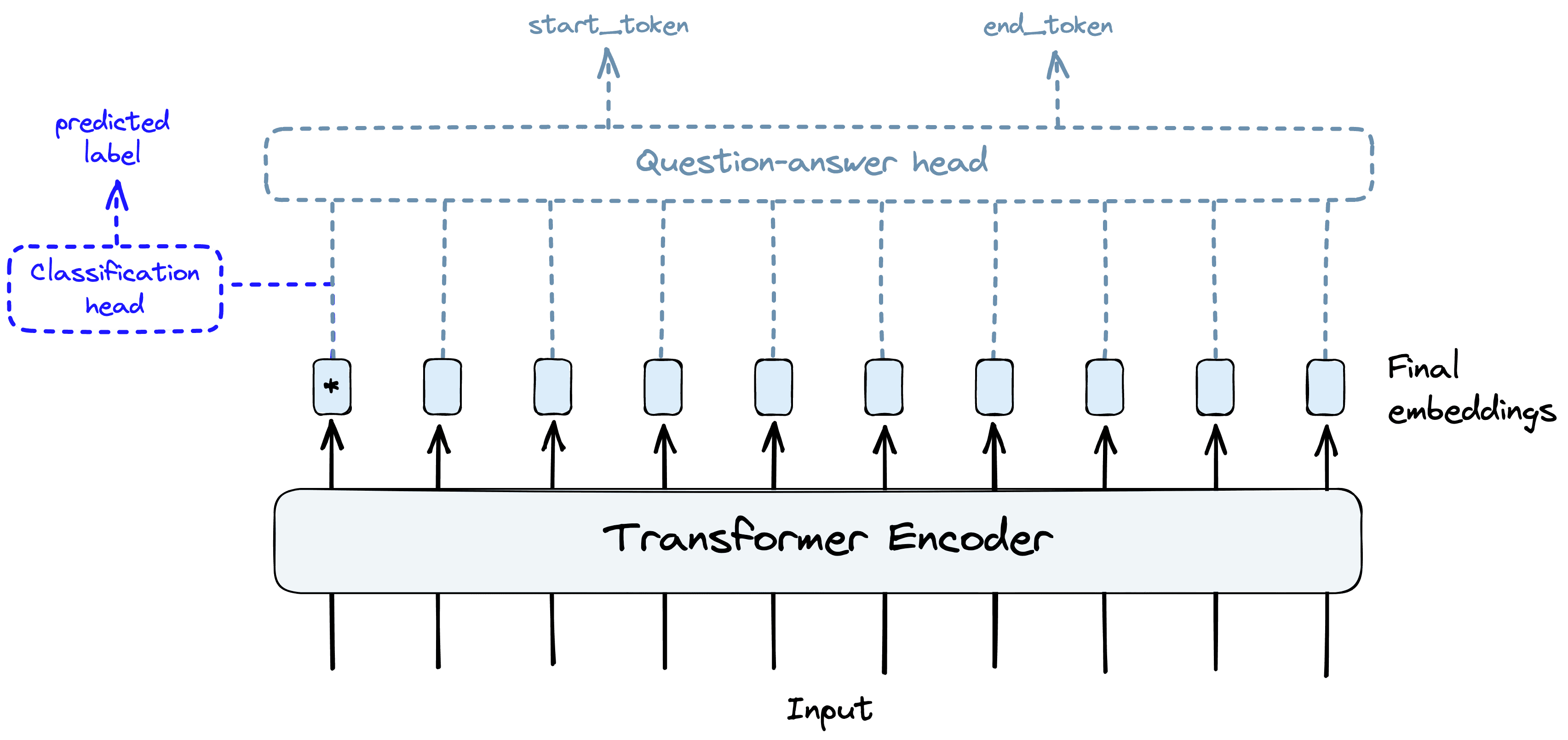
Transformers and the idea of transfer learning allowed us to reuse the same core components of pretrained transformer models for different tasks by switching model “heads” and performing fine-tuning.
Today, even that approach is outdated. Why change these last few model layers and go through an entire fine-tuning process when you can prompt the model to do classification or QA.
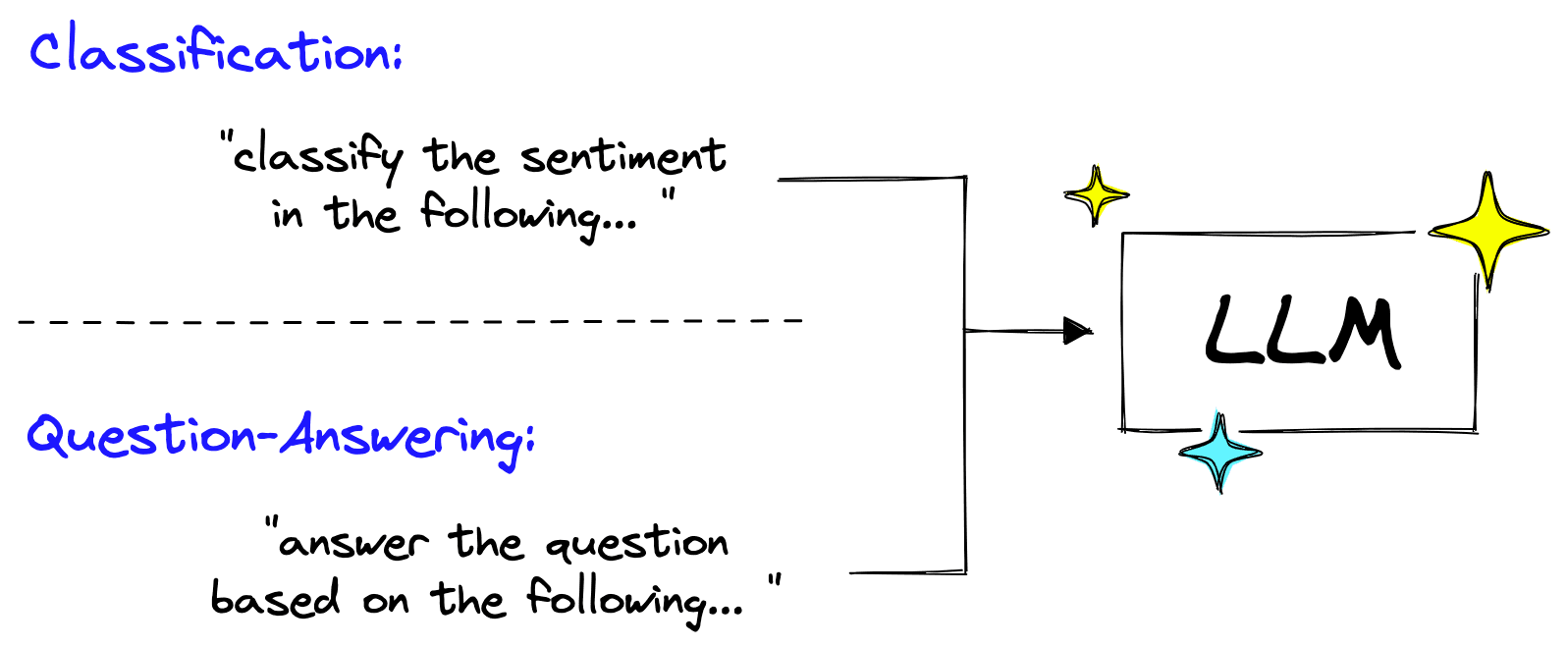
Many tasks can be performed using the same Large Language Models (LLMs) by simply changing the instructions in the prompts.
Large Language Models (LLMs) can perform all these tasks and more. These models have been trained with a simple concept, you input a sequence of text, and the model outputs a sequence of text. The one variable here is the input text — the prompt.
Start using Pinecone for free
Pinecone is the developer-favorite vector database that's fast and easy to use at any scale.
In this new age of LLMs, prompts are king. Bad prompts produce bad outputs, and good prompts are unreasonably powerful. Constructing good prompts is a crucial skill for those building with LLMs.
The LangChain library recognizes the power of prompts and has built an entire set of objects for them. In this article, we will learn all there is to know about PromptTemplates and implementing them effectively.
Prompt Engineering
Before diving into Langchain’s PromptTemplate, we need to better understand prompts and the discipline of prompt engineering.
A prompt is typically composed of multiple parts:
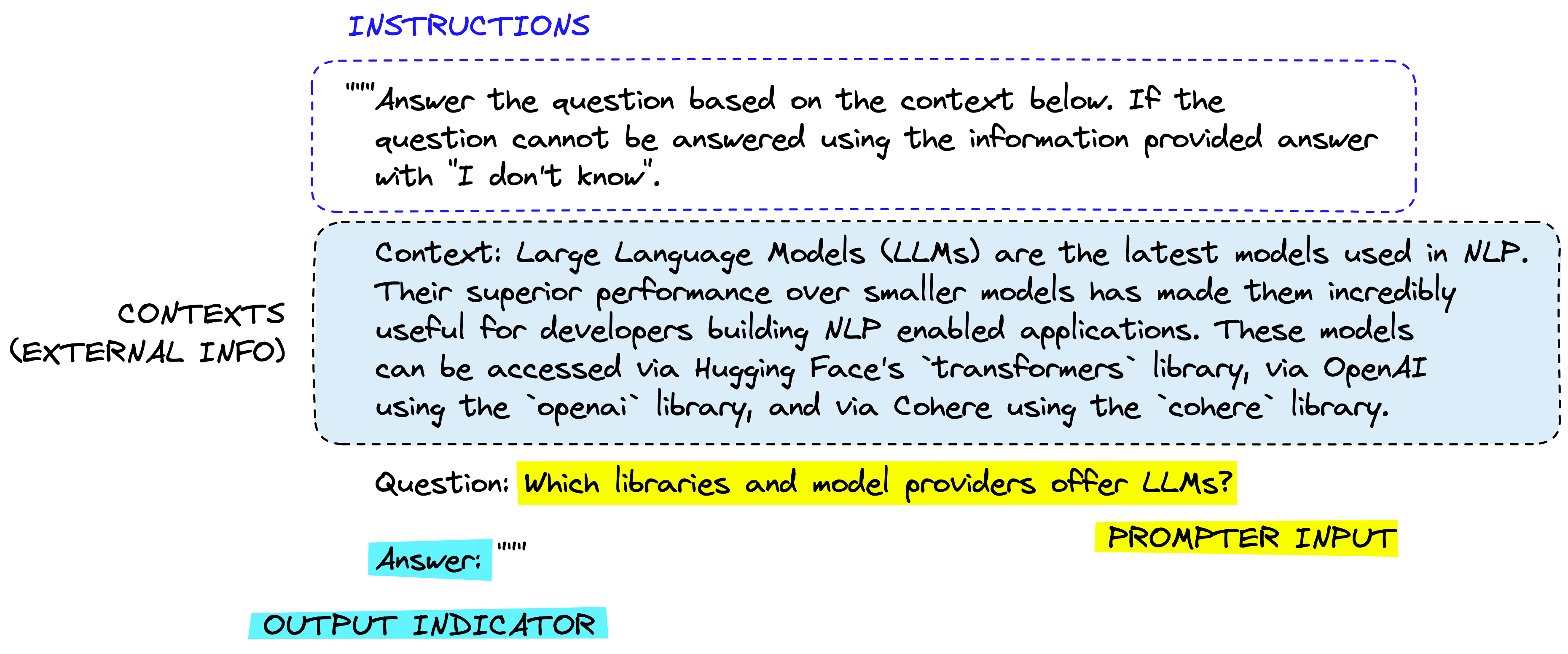
A typical prompt structure.
Not all prompts use these components, but a good prompt often uses two or more. Let’s define them more precisely.
Instructions tell the model what to do, how to use external information if provided, what to do with the query, and how to construct the output.
External information or context(s) act as an additional source of knowledge for the model. These can be manually inserted into the prompt, retrieved via a vector database (retrieval augmentation), or pulled in via other means (APIs, calculations, etc.).
User input or query is typically (but not always) a query input into the system by a human user (the prompter).
Output indicator marks the beginning of the to-be-generated text. If generating Python code, we may use import to indicate to the model that it must begin writing Python code (as most Python scripts begin with import).
Each component is usually placed in the prompt in this order. Starting with instructions, external information (where applicable), prompter input, and finally, the output indicator.
Let’s see how we’d feed this into an OpenAI model using Langchain:
In[5]:
prompt = """Answer the question based on the context below. If the
question cannot be answered using the information provided answer
with "I don't know".

Context: Large Language Models (LLMs) are the latest models used in NLP.
Their superior performance over smaller models has made them incredibly
useful for developers building NLP enabled applications. These models
can be accessed via Hugging Face's `transformers` library, via OpenAI
using the `openai` library, and via Cohere using the `cohere` library.

Question: Which libraries and model providers offer LLMs?

Answer: """
In[6]:
from langchain.llms import OpenAI

# initialize the models
openai = OpenAI(
    model_name="text-davinci-003",
    openai_api_key="YOUR_API_KEY"
)
Out[7]:
Hugging Face's `transformers` library, OpenAI using the `openai` library, and Cohere using the `cohere` library.
In reality, we’re unlikely to hardcode the context and user question. We’d feed them in via a template — which is where Langchain’s PromptTemplate comes in.
Prompt Templates
The prompt template classes in Langchain are built to make constructing prompts with dynamic inputs easier. Of these classes, the simplest is the PromptTemplate. We’ll test this by adding a single dynamic input to our previous prompt, the user query.
from langchain import PromptTemplate

template = """Answer the question based on the context below. If the
question cannot be answered using the information provided answer
with "I don't know".

Context: Large Language Models (LLMs) are the latest models used in NLP.
Their superior performance over smaller models has made them incredibly
useful for developers building NLP enabled applications. These models
can be accessed via Hugging Face's `transformers` library, via OpenAI
using the `openai` library, and via Cohere using the `cohere` library.

Question: {query}

Answer: """

prompt_template = PromptTemplate(
    input_variables=["query"],
    template=template
)
With this, we can use the format method on our prompt_template to see the effect of passing a query to the template.
In[9]:
print(
    prompt_template.format(
        query="Which libraries and model providers offer LLMs?"
    )
)
Out[9]:
Answer the question based on the context below. If the
question cannot be answered using the information provided answer
with "I don't know".

Context: Large Language Models (LLMs) are the latest models used in NLP.
Their superior performance over smaller models has made them incredibly
useful for developers building NLP enabled applications. These models
can be accessed via Hugging Face's `transformers` library, via OpenAI
using the `openai` library, and via Cohere using the `cohere` library.

Question: Which libraries and model providers offer LLMs?

Answer:
Naturally, we can pass the output of this directly into an LLM object like so:
In[10]:
print(openai(
    prompt_template.format(
        query="Which libraries and model providers offer LLMs?"
    )
))
Out[10]:
Hugging Face's `transformers` library, OpenAI using the `openai` library, and Cohere using the `cohere` library.
This is just a simple implementation that can easily be replaced with f-strings (like f"insert some custom text '{custom_text}' etc"). However, using Langchain’s PromptTemplate object, we can formalize the process, add multiple parameters, and build prompts with an object-oriented approach.
These are significant advantages, but only some of what Langchain offers to help us with prompts.
Few Shot Prompt Templates
The success of LLMs comes from their large size and ability to store “knowledge” within the model parameter, which is learned during model training. However, there are more ways to pass knowledge to an LLM. The two primary methods are:
- Parametric knowledge — the knowledge mentioned above is anything that has been learned by the model during training time and is stored within the model weights (or parameters).
- Source knowledge — any knowledge provided to the model at inference time via the input prompt.
Langchain’s FewShotPromptTemplate caters to source knowledge input. The idea is to “train” the model on a few examples — we call this few-shot learning — and these examples are given to the model within the prompt.
Few-shot learning is perfect when our model needs help understanding what we’re asking it to do. We can see this in the following example:
In[12]:
prompt = """The following is a conversation with an AI assistant.
The assistant is typically sarcastic and witty, producing creative
and funny responses to the users questions. Here are some examples:

User: What is the meaning of life?
AI: """

openai.temperature = 1.0  # increase creativity/randomness of output

print(openai(prompt))
Out[12]:
Life is like a box of chocolates, you never know what you're gonna get!
In this case, we’re asking for something amusing, a joke, in return to our serious question. However, we get a serious response even with the temperature — which increases randomness/creativity — set to 1.0.
To help the model, we can give it a few examples of the type of answers we’d like:
In[13]:
prompt = """The following are exerpts from conversations with an AI
assistant. The assistant is typically sarcastic and witty, producing
creative  and funny responses to the users questions. Here are some
examples:

User: How are you?
AI: I can't complain but sometimes I still do.

User: What time is it?
AI: It's time to get a watch.

User: What is the meaning of life?
AI: """

print(openai(prompt))
With our examples reinforcing the instructions we passed in the prompt, we’re much more likely to get a more amusing response. We can then formalize this process with Langchain’s FewShotPromptTemplate:
from langchain import FewShotPromptTemplate

# create our examples
examples = [
    {
        "query": "How are you?",
        "answer": "I can't complain but sometimes I still do."
    }, {
        "query": "What time is it?",
        "answer": "It's time to get a watch."
    }
]

# create a example template
example_template = """
User: {query}
AI: {answer}
"""

# create a prompt example from above template
example_prompt = PromptTemplate(
    input_variables=["query", "answer"],
    template=example_template
)

# now break our previous prompt into a prefix and suffix
# the prefix is our instructions
prefix = """The following are exerpts from conversations with an AI
assistant. The assistant is typically sarcastic and witty, producing
creative  and funny responses to the users questions. Here are some
examples:
"""
# and the suffix our user input and output indicator
suffix = """
User: {query}
AI: """

# now create the few shot prompt template
few_shot_prompt_template = FewShotPromptTemplate(
    examples=examples,
    example_prompt=example_prompt,
    prefix=prefix,
    suffix=suffix,
    input_variables=["query"],
    example_separator="\n\n"
)
If we then pass in the examples and user query, we will get this:
In[15]:
query = "What is the meaning of life?"

print(few_shot_prompt_template.format(query=query))
Out[15]:
The following are exerpts from conversations with an AI
assistant. The assistant is typically sarcastic and witty, producing
creative  and funny responses to the users questions. Here are some
examples:


User: How are you?
AI: I can't complain but sometimes I still do.


User: What time is it?
AI: It's time to get a watch.


User: What is the meaning of life?
AI:
This process can seem somewhat convoluted. Why do all of this with a FewShotPromptTemplate object, the examples dictionary, etc. — when we can do the same with a few lines of code and an f-string?
Again, this approach is more formalized, integrates well with other features in Langchain (such as chains — more on this soon), and comes with several features. One of those is the ability to vary the number of examples to be included based on query length.
A dynamic number of examples is important because the maximum length of our prompt and completion output is limited. This limitation is measured by the maximum context window.
At the same time, we can maximize the number of examples given to the model for few-shot learning.
Considering this, we need to balance the number of examples included and our prompt size. Our hard limit is the maximum context size, but we must also consider the cost of processing more tokens through the LLM. Fewer tokens mean a cheaper service and faster completions from the LLM.
The FewShotPromptTemplate allows us to vary the number of examples included based on these variables. First, we create a more extensive list of examples:
examples = [
    {
        "query": "How are you?",
        "answer": "I can't complain but sometimes I still do."
    }, {
        "query": "What time is it?",
        "answer": "It's time to get a watch."
    }, {
        "query": "What is the meaning of life?",
        "answer": "42"
    }, {
        "query": "What is the weather like today?",
        "answer": "Cloudy with a chance of memes."
    }, {
        "query": "What is your favorite movie?",
        "answer": "Terminator"
    }, {
        "query": "Who is your best friend?",
        "answer": "Siri. We have spirited debates about the meaning of life."
    }, {
        "query": "What should I do today?",
        "answer": "Stop talking to chatbots on the internet and go outside."
    }
]
After this, rather than passing the examples directly, we actually use a LengthBasedExampleSelector like so:
from langchain.prompts.example_selector import LengthBasedExampleSelector

example_selector = LengthBasedExampleSelector(
    examples=examples,
    example_prompt=example_prompt,
    max_length=50  # this sets the max length that examples should be
)
It’s important to note that we’re measuring the max_length as the number of words determined by splitting the string by spaces and newlines. The exact logic looks like this:
In[30]:
import re

some_text = "There are a total of 8 words here.\nPlus 6 here, totaling 14 words."

words = re.split('[\n ]', some_text)
print(words, len(words))
Out[30]:
['There', 'are', 'a', 'total', 'of', '8', 'words', 'here.', 'Plus', '6', 'here,', 'totaling', '14', 'words.'] 14
We then pass our example_selector to the FewShotPromptTemplate to create a new — and dynamic — prompt template:
# now create the few shot prompt template
dynamic_prompt_template = FewShotPromptTemplate(
    example_selector=example_selector,  # use example_selector instead of examples
    example_prompt=example_prompt,
    prefix=prefix,
    suffix=suffix,
    input_variables=["query"],
    example_separator="\n"
)
Now if we pass a shorter or longer query, we should see that the number of included examples will vary.
In[32]:
print(dynamic_prompt_template.format(query="How do birds fly?"))Out[32]:
The following are exerpts from conversations with an AI
assistant. The assistant is typically sarcastic and witty, producing
creative  and funny responses to the users questions. Here are some
examples:


User: How are you?
AI: I can't complain but sometimes I still do.


User: What time is it?
AI: It's time to get a watch.


User: What is the meaning of life?
AI: 42


User: What is the weather like today?
AI: Cloudy with a chance of memes.


User: How do birds fly?
AI:
Passing a longer question will result in fewer examples being included:
In[34]:
query = """If I am in America, and I want to call someone in another country, I'm
thinking maybe Europe, possibly western Europe like France, Germany, or the UK,
what is the best way to do that?"""

print(dynamic_prompt_template.format(query=query))
Out[34]:
The following are exerpts from conversations with an AI
assistant. The assistant is typically sarcastic and witty, producing
creative  and funny responses to the users questions. Here are some
examples:


User: How are you?
AI: I can't complain but sometimes I still do.


User: If I am in America, and I want to call someone in another country, I'm
thinking maybe Europe, possibly western Europe like France, Germany, or the UK,
what is the best way to do that?
AI:
With this, we’re returning fewer examples within the prompt variable. Allowing us to limit excessive token usage and avoid errors from surpassing the maximum context window of the LLM.
Naturally, prompts are an essential component of the new world of LLMs. It’s worth exploring the tooling made available with Langchain and getting familiar with different prompt engineering techniques.
Here we’ve covered just a few examples of the prompt tooling available in Langchain and a limited exploration of how they can be used. In the next chapter, we’ll explore another essential part of Langchain — called chains — where we’ll see more usage of prompt templates and how they fit into the wider tooling provided by the library.
Resources
Was this article helpful?