


Agents are one of the most powerful and fascinating approaches to using Large Language Models (LLMs). The explosion of interest in LLMs has made agents incredibly prevalent in AI-powered use cases.
Using agents allows us to give LLMs access to tools. These tools present an infinite number of possibilities. With tools, LLMs can search the web, do math, run code, and more.
The LangChain library provides a substantial selection of prebuilt tools. However, in many real-world projects, we’ll often find that only so many requirements can be satisfied by existing tools. Meaning we must modify existing tools or build entirely new ones.
This chapter will explore how to build custom tools for agents in LangChain. We’ll start with a couple of simple tools to help us understand the typical tool building pattern before moving on to more complex tools using other ML models to give us even more abilities like describing images.
Building Tools
At their core, tools are objects that consume some input, typically in the format of a string (text), and output some helpful information as a string.
In reality, they are little more than a simple function that we’d find in any code. The only difference is that tools take input from an LLM and feed their output to an LLM.
With that in mind, tools are relatively simple. Fortunately, we can build tools for our agents in no time.
(Follow along with the code notebook here!)
Simple Calculator Tool
We will start with a simple custom tool. The tool is a simple calculator that calculates a circle’s circumference based on the circle’s radius.
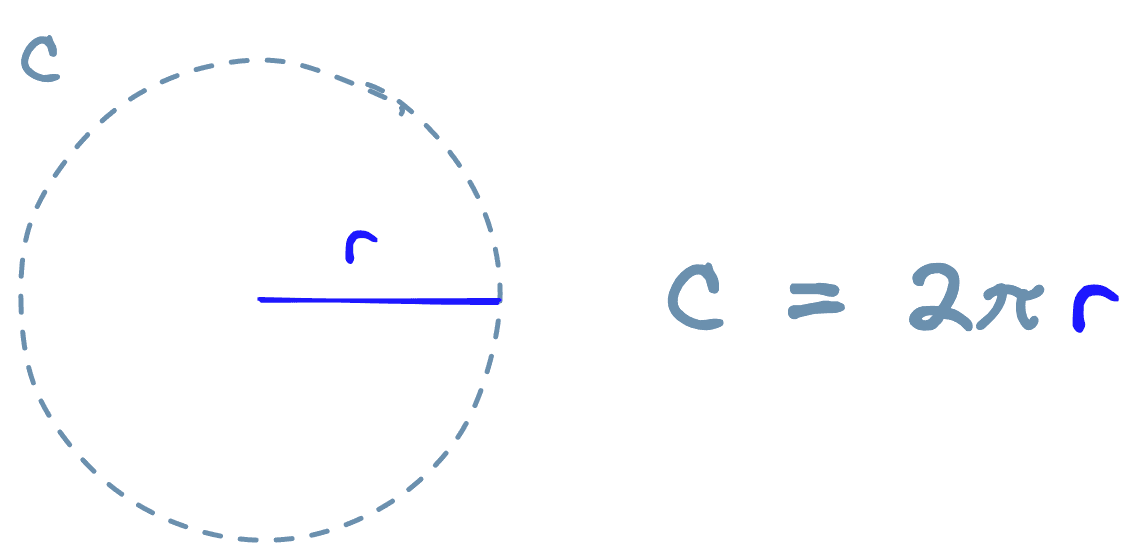
To create the tool, we do the following:
from langchain.tools import BaseTool
from math import pi
from typing import Union


class CircumferenceTool(BaseTool):
      name = "Circumference calculator"
      description = "use this tool when you need to calculate a circumference using the radius of a circle"

    def _run(self, radius: Union[int, float]):
        return float(radius)*2.0*pi

    def _arun(self, radius: int):
        raise NotImplementedError("This tool does not support async")
Here we initialized our custom CircumferenceTool class using the BaseTool object from LangChain. We can think of the BaseTool as the required template for a LangChain tool.
We have two attributes that LangChain requires to recognize an object as a valid tool. Those are the name and description parameters.
The description is a natural language description of the tool the LLM uses to decide whether it needs to use it. Tool descriptions should be very explicit on what they do, when to use them, and when not to use them.
In our description, we did not define when not to use the tool. That is because the LLM seemed capable of identifying when this tool is needed. Adding “when not to use it” to the description can help if a tool is overused.
Following this, we have two methods, _run and _arun. When a tool is used, the _run method is called by default. The _arun method is called when a tool is to be used asynchronously. We do not cover async tools in this chapter, so, for now, we initialize it with a NotImplementedError.
From here, we need to initialize the LLM and conversational memory for the conversational agent. For the LLM, we will use OpenAI’s gpt-3.5-turbo model. To use this, we need an OpenAI API key.
When ready, we initialize the LLM and memory like so:
from langchain.chat_models import ChatOpenAI
from langchain.chains.conversation.memory import ConversationBufferWindowMemory


# initialize LLM (we use ChatOpenAI because we'll later define a `chat` agent)
llm = ChatOpenAI(
        openai_api_key="OPENAI_API_KEY",
        temperature=0,
        model_name='gpt-3.5-turbo'
)

# initialize conversational memory
conversational_memory = ConversationBufferWindowMemory(
        memory_key='chat_history',
        k=5,
        return_messages=True
)
Here we initialize the LLM with a temperature of 0. A low temperature is useful when using tools as it decreases the amount of “randomness” or “creativity” in the generated text of the LLMs, which is ideal for encouraging it to follow strict instructions — as required for tool usage.
In the conversation_memory object, we set k=5 to “remember” the previous five human-AI interactions.
Now we initialize the agent itself. It requires the llm and conversational_memory to be already initialized. It also requires a list of tools to be used. We have one tool, but we still place it into a list.
from langchain.agents import initialize_agent

tools = [CircumferenceTool()]

# initialize agent with tools
agent = initialize_agent(
    agent='chat-conversational-react-description',
    tools=tools,
    llm=llm,
    verbose=True,
    max_iterations=3,
    early_stopping_method='generate',
    memory=conversational_memory
)
The agent type of chat-conversation-react-description tells us a few things about this agent, those are:
chatmeans the LLM being used is a chat model. Bothgpt-4andgpt-3.5-turboare chat models as they consume conversation history and produce conversational responses. A model liketext-davinci-003is not a chat model as it is not designed to be used this way.conversationalmeans we will be includingconversation_memory.reactrefers to the ReAct framework, which enables multi-step reasoning and tool usage by giving the model the ability to “converse with itself”.descriptiontells us that the LLM/agent will decide which tool to use based on their descriptions — which we created in the earlier tool definition.
With that all in place, we can ask our agent to calculate the circumference of a circle.
The agent is close, but it isn’t accurate — something is wrong. We can see in the output of the AgentExecutor Chain that the agent jumped straight to the Final Answer action:
{ "action": "Final Answer", "action_input": "The circumference of a circle with a radius of 7.81mm is approximately 49.03mm." }The Final Answer action is what the agent uses when it has decided it has completed its reasoning and action steps and has all the information it needs to answer the user’s query. That means the agent decided not to use the circumference calculator tool.
LLMs are generally bad at math, but that doesn’t stop them from trying to do math. The problem is due to the LLM’s overconfidence in its mathematical ability. To fix this, we must tell the model that it cannot do math. First, let’s see the current prompt being used:
# existing prompt
print(agent.agent.llm_chain.prompt.messages[0].prompt.template)
Assistant is a large language model trained by OpenAI.
Assistant is designed to be able to assist with a wide range of tasks, from answering simple questions to providing in-depth explanations and discussions on a wide range of topics. As a language model, Assistant is able to generate human-like text based on the input it receives, allowing it to engage in natural-sounding conversations and provide responses that are coherent and relevant to the topic at hand.
Assistant is constantly learning and improving, and its capabilities are constantly evolving. It is able to process and understand large amounts of text, and can use this knowledge to provide accurate and informative responses to a wide range of questions. Additionally, Assistant is able to generate its own text based on the input it receives, allowing it to engage in discussions and provide explanations and descriptions on a wide range of topics.
Overall, Assistant is a powerful system that can help with a wide range of tasks and provide valuable insights and information on a wide range of topics. Whether you need help with a specific question or just want to have a conversation about a particular topic, Assistant is here to assist.
We will add a single sentence that tells the model that it is “terrible at math” and should never attempt to do it.
Unfortunately, the Assistant is terrible at maths. When provided with math questions, no matter how simple, assistant always refers to its trusty tools and absolutely does NOT try to answer math questions by itself
With this added to the original prompt text, we create a new prompt using agent.agent.create_prompt — this will create the correct prompt structure for our agent, including tool descriptions. Then, we update agent.agent.llm_chain.prompt.
sys_msg = """Assistant is a large language model trained by OpenAI.

Assistant is designed to be able to assist with a wide range of tasks, from answering simple questions to providing in-depth explanations and discussions on a wide range of topics. As a language model, Assistant is able to generate human-like text based on the input it receives, allowing it to engage in natural-sounding conversations and provide responses that are coherent and relevant to the topic at hand.

Assistant is constantly learning and improving, and its capabilities are constantly evolving. It is able to process and understand large amounts of text, and can use this knowledge to provide accurate and informative responses to a wide range of questions. Additionally, Assistant is able to generate its own text based on the input it receives, allowing it to engage in discussions and provide explanations and descriptions on a wide range of topics.

Unfortunately, Assistant is terrible at maths. When provided with math questions, no matter how simple, assistant always refers to it's trusty tools and absolutely does NOT try to answer math questions by itself

Overall, Assistant is a powerful system that can help with a wide range of tasks and provide valuable insights and information on a wide range of topics. Whether you need help with a specific question or just want to have a conversation about a particular topic, Assistant is here to assist.
"""
new_prompt = agent.agent.create_prompt(
system_message=sys_msg,
tools=tools
)
agent.agent.llm_chain.prompt = new_promptNow we can try again:
agent("can you calculate the circumference of a circle that has a radius of 7.81mm")
[1m> Entering new AgentExecutor chain...[0m
[32;1m[1;3m```json
{
"action": "Circumference calculator",
"action_input": "7.81"
}
```[0m
Observation: [36;1m[1;3m49.071677249072565[0m
Thought:[32;1m[1;3m```json
{
"action": "Final Answer",
"action_input": "The circumference of a circle with a radius of 7.81mm is approximately 49.07mm."
}
```[0m
[1m> Finished chain.[0m
{'input': 'can you calculate the circumference of a circle that has a radius of 7.81mm',
'chat_history': [HumanMessage(content='can you calculate the circumference of a circle that has a radius of 7.81mm', additional_kwargs={}),
AIMessage(content='The circumference of a circle with a radius of 7.81mm is approximately 49.03mm.', additional_kwargs={})],
'output': 'The circumference of a circle with a radius of 7.81mm is approximately 49.07mm.'}We can see that the agent now uses the Circumference calculator tool and consequently gets the correct answer.
Tools With Multiple Parameters
In the circumference calculator, we could only input a single value — the radius — more often than not, we will need multiple parameters.
To demonstrate how to do this, we will build a Hypotenuse calculator. The tool will help us calculate the hypotenuse of a triangle given a combination of triangle side lengths and/or angles.
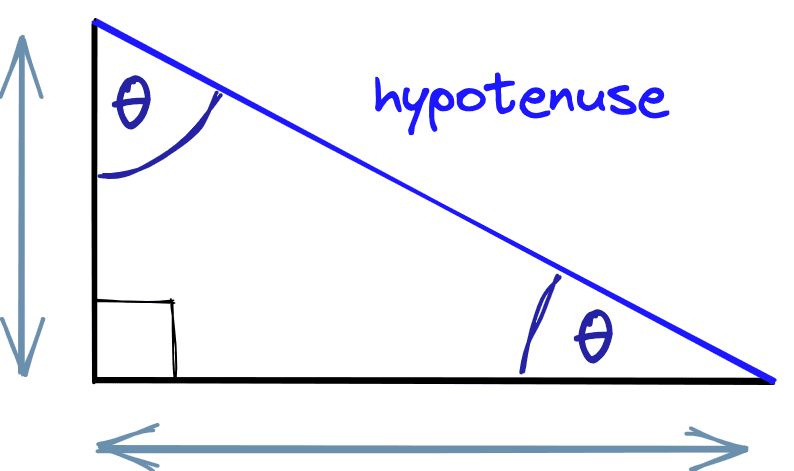
We want multiple inputs here because we calculate the triangle hypotenuse with different values (the sides and angle). Additionally, we don’t need all values. We can calculate the hypotenuse with any combination of two or more parameters.
We define our new tool like so:
from typing import Optional
from math import sqrt, cos, sin
desc = (
"use this tool when you need to calculate the length of a hypotenuse"
"given one or two sides of a triangle and/or an angle (in degrees). "
"To use the tool, you must provide at least two of the following parameters "
"['adjacent_side', 'opposite_side', 'angle']."
)
class PythagorasTool(BaseTool):
name = "Hypotenuse calculator"
description = desc
def _run(
self,
adjacent_side: Optional[Union[int, float]] = None,
opposite_side: Optional[Union[int, float]] = None,
angle: Optional[Union[int, float]] = None
):
# check for the values we have been given
if adjacent_side and opposite_side:
return sqrt(float(adjacent_side)**2 + float(opposite_side)**2)
elif adjacent_side and angle:
return adjacent_side / cos(float(angle))
elif opposite_side and angle:
return opposite_side / sin(float(angle))
else:
return "Could not calculate the hypotenuse of the triangle. Need two or more of `adjacent_side`, `opposite_side`, or `angle`."
def _arun(self, query: str):
raise NotImplementedError("This tool does not support async")
tools = [PythagorasTool()]In the tool description, we describe the tool functionality in natural language and specify that to “use the tool, you must provide at least two of the following parameters [‘adjacent_side’, ‘opposite_side’, ‘angle’]". This instruction is all we need for gpt-3.5-turbo to understand the required input format for the function.
As before, we must update the agent’s prompt. We don’t need to modify the system message as we did before, but we do need to update the available tools described in the prompt.
new_prompt = agent.agent.create_prompt(
    system_message=sys_msg,
    tools=tools
)

agent.agent.llm_chain.prompt = new_promptUnlike before, we must also update the agent.tools attribute with our new tools:
Now we ask a question specifying two of the three required parameters:
agent("If I have a triangle with two sides of length 51cm and 34cm, what is the length of the hypotenuse?")
[1m> Entering new AgentExecutor chain...[0m
WARNING:langchain.chat_models.openai:Retrying langchain.chat_models.openai.ChatOpenAI.completion_with_retry.<locals>._completion_with_retry in 1.0 seconds as it raised RateLimitError: The server had an error while processing your request. Sorry about that!.
[32;1m[1;3m{
"action": "Hypotenuse calculator",
"action_input": {
"adjacent_side": 34,
"opposite_side": 51
}
}[0m
Observation: [36;1m[1;3m61.29437168288782[0m
Thought:[32;1m[1;3m{
"action": "Final Answer",
"action_input": "The length of the hypotenuse is approximately 61.29cm."
}[0m
[1m> Finished chain.[0m
{'input': 'If I have a triangle with two sides of length 51cm and 34cm, what is the length of the hypotenuse?',
'chat_history': [HumanMessage(content='can you calculate the circumference of a circle that has a radius of 7.81mm', additional_kwargs={}),
AIMessage(content='The circumference of a circle with a radius of 7.81mm is approximately 49.03mm.', additional_kwargs={}),
HumanMessage(content='can you calculate the circumference of a circle that has a radius of 7.81mm', additional_kwargs={}),
AIMessage(content='The circumference of a circle with a radius of 7.81mm is approximately 49.07mm.', additional_kwargs={})],
'output': 'The length of the hypotenuse is approximately 61.29cm.'}The agent correctly identifies the correct parameters and passes them to our tool. We can try again with different parameters:
agent("If I have a triangle with the opposite side of length 51cm and an angle of 20 deg, what is the length of the hypotenuse?")
[1m> Entering new AgentExecutor chain...[0m
[32;1m[1;3m{
"action": "Hypotenuse calculator",
"action_input": {
"opposite_side": 51,
"angle": 20
}
}[0m
Observation: [36;1m[1;3m55.86315275680817[0m
Thought:[32;1m[1;3m{
"action": "Final Answer",
"action_input": "The length of the hypotenuse is approximately 55.86cm."
}[0m
[1m> Finished chain.[0m
{'input': 'If I have a triangle with the opposite side of length 51cm and an angle of 20 deg, what is the length of the hypotenuse?',
'chat_history': [HumanMessage(content='can you calculate the circumference of a circle that has a radius of 7.81mm', additional_kwargs={}),
AIMessage(content='The circumference of a circle with a radius of 7.81mm is approximately 49.03mm.', additional_kwargs={}),
HumanMessage(content='can you calculate the circumference of a circle that has a radius of 7.81mm', additional_kwargs={}),
AIMessage(content='The circumference of a circle with a radius of 7.81mm is approximately 49.07mm.', additional_kwargs={}),
HumanMessage(content='If I have a triangle with two sides of length 51cm and 34cm, what is the length of the hypotenuse?', additional_kwargs={}),
AIMessage(content='The length of the hypotenuse is approximately 61.29cm.', additional_kwargs={})],
'output': 'The length of the hypotenuse is approximately 55.86cm.'}Again, we see correct tool usage. Even with our short tool description, the agent can consistently use the tool as intended and with multiple parameters.
More Advanced Tool Usage
We’ve seen two examples of custom tools. In most scenarios, we’d likely want to do something more powerful — so let’s give that a go.
Taking inspiration from the HuggingGPT paper [1], we will take an existing open-source expert model that has been trained for a specific task that our LLM cannot do.
That model will be the Salesforce/blip-image-captioning-large model hosted on Hugging Face. This model takes an image and describes it, something that we cannot do with our LLM.
To begin, we need to initialize the model like so:
# !pip install transformers
import torch
from transformers import BlipProcessor, BlipForConditionalGeneration
# specify model to be used
hf_model = "Salesforce/blip-image-captioning-large"
# use GPU if it's available
device = 'cuda' if torch.cuda.is_available() else 'cpu'
# preprocessor will prepare images for the model
processor = BlipProcessor.from_pretrained(hf_model)
# then we initialize the model itself
model = BlipForConditionalGeneration.from_pretrained(hf_model).to(device)The process we will follow here is as follows:
- Download an image.
- Open it as a Python PIL object (an image datatype).
- Resize and normalize the image using the
processor. - Create a caption using the
model.
Let’s start with steps one and two:
import requests
from PIL import Image
img_url = 'https://images.unsplash.com/photo-1616128417859-3a984dd35f02?ixlib=rb-4.0.3&ixid=MnwxMjA3fDB8MHxwaG90by1wYWdlfHx8fGVufDB8fHx8&auto=format&fit=crop&w=2372&q=80'
image = Image.open(requests.get(img_url, stream=True).raw).convert('RGB')
image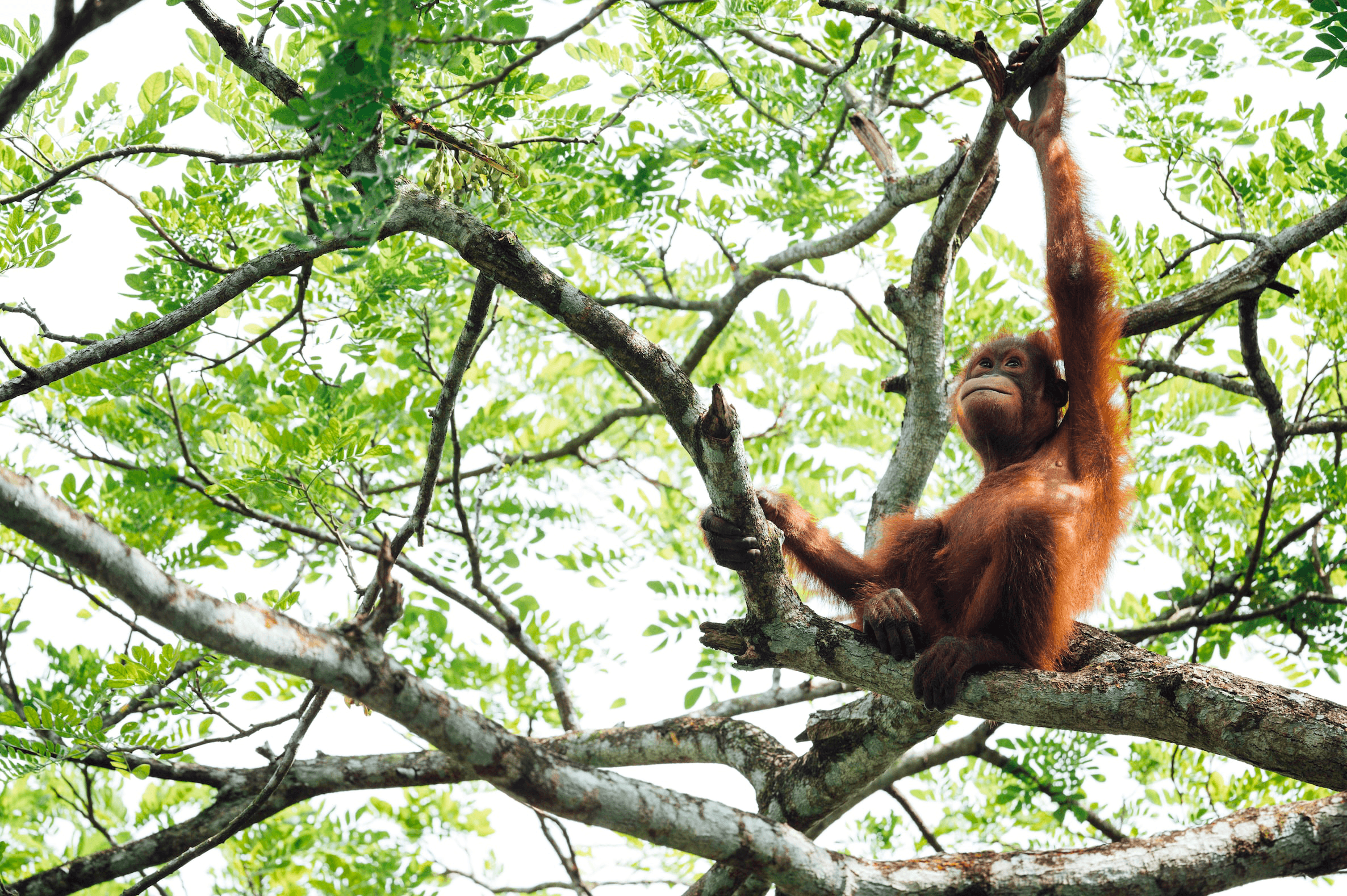
With this, we’ve downloaded an image of a young orangutan sitting in a tree. We can go ahead and see what the predicted caption for this image is:
# unconditional image captioning
inputs = processor(image, return_tensors="pt").to(device)
out = model.generate(**inputs, max_new_tokens=20)
print(processor.decode(out[0], skip_special_tokens=True))there is a monkey that is sitting in a tree
Although an orangutan isn’t technically a monkey, this is still reasonably accurate. Our code works. Now let’s distill these steps into a tool our agent can use.
desc = (
"use this tool when given the URL of an image that you'd like to be "
"described. It will return a simple caption describing the image."
)
class ImageCaptionTool(BaseTool):
name = "Image captioner"
description = desc
def _run(self, url: str):
# download the image and convert to PIL object
image = Image.open(requests.get(img_url, stream=True).raw).convert('RGB')
# preprocess the image
inputs = processor(image, return_tensors="pt").to(device)
# generate the caption
out = model.generate(**inputs, max_new_tokens=20)
# get the caption
caption = processor.decode(out[0], skip_special_tokens=True)
return caption
def _arun(self, query: str):
raise NotImplementedError("This tool does not support async")
tools = [ImageCaptionTool()]We reinitialize our agent prompt (removing the now unnecessary “you cannot do math” instruction) and set the tools attribute to reflect the new tools list:
sys_msg = """Assistant is a large language model trained by OpenAI.
Assistant is designed to be able to assist with a wide range of tasks, from answering simple questions to providing in-depth explanations and discussions on a wide range of topics. As a language model, Assistant is able to generate human-like text based on the input it receives, allowing it to engage in natural-sounding conversations and provide responses that are coherent and relevant to the topic at hand.
Assistant is constantly learning and improving, and its capabilities are constantly evolving. It is able to process and understand large amounts of text, and can use this knowledge to provide accurate and informative responses to a wide range of questions. Additionally, Assistant is able to generate its own text based on the input it receives, allowing it to engage in discussions and provide explanations and descriptions on a wide range of topics.
Overall, Assistant is a powerful system that can help with a wide range of tasks and provide valuable insights and information on a wide range of topics. Whether you need help with a specific question or just want to have a conversation about a particular topic, Assistant is here to assist.
"""
new_prompt = agent.agent.create_prompt(
    system_message=sys_msg,
    tools=tools
)

agent.agent.llm_chain.prompt = new_prompt
# update the agent tools
agent.tools = toolsNow we can go ahead and ask our agent to describe the same image as above, passing its URL into the query.
agent(f"What does this image show?\n{img_url}")
[1m> Entering new AgentExecutor chain...[0m
[32;1m[1;3m{
"action": "Image captioner",
"action_input": "https://images.unsplash.com/photo-1616128417859-3a984dd35f02?ixlib=rb-4.0.3&ixid=MnwxMjA3fDB8MHxwaG90by1wYWdlfHx8fGVufDB8fHx8&auto=format&fit=crop&w=2372&q=80"
}[0m
Observation: [36;1m[1;3mthere is a monkey that is sitting in a tree[0m
Thought:[32;1m[1;3m{
"action": "Final Answer",
"action_input": "There is a monkey that is sitting in a tree."
}[0m
[1m> Finished chain.[0m
{'input': 'What does this image show?\nhttps://images.unsplash.com/photo-1616128417859-3a984dd35f02?ixlib=rb-4.0.3&ixid=MnwxMjA3fDB8MHxwaG90by1wYWdlfHx8fGVufDB8fHx8&auto=format&fit=crop&w=2372&q=80',
 'chat_history': [HumanMessage(content='can you calculate the circumference of a circle that has a radius of 7.81mm', additional_kwargs={}),
  AIMessage(content='The circumference of a circle with a radius of 7.81mm is approximately 49.03mm.', additional_kwargs={}),
  HumanMessage(content='can you calculate the circumference of a circle that has a radius of 7.81mm', additional_kwargs={}),
  AIMessage(content='The circumference of a circle with a radius of 7.81mm is approximately 49.07mm.', additional_kwargs={}),
  HumanMessage(content='If I have a triangle with two sides of length 51cm and 34cm, what is the length of the hypotenuse?', additional_kwargs={}),
  AIMessage(content='The length of the hypotenuse is approximately 61.29cm.', additional_kwargs={})],
 'output': 'There is a monkey that is sitting in a tree.'}
Let’s try some more:

img_url = "https://images.unsplash.com/photo-1502680390469-be75c86b636f?ixlib=rb-4.0.3&ixid=MnwxMjA3fDB8MHxwaG90by1wYWdlfHx8fGVufDB8fHx8&auto=format&fit=crop&w=2370&q=80"
agent(f"what is in this image?\n{img_url}")
[1m> Entering new AgentExecutor chain...[0m
[32;1m[1;3m{
"action": "Image captioner",
"action_input": "https://images.unsplash.com/photo-1502680390469-be75c86b636f?ixlib=rb-4.0.3&ixid=MnwxMjA3fDB8MHxwaG90by1wYWdlfHx8fGVufDB8fHx8&auto=format&fit=crop&w=2370&q=80"
}[0m
Observation: [36;1m[1;3msurfer riding a wave in the ocean on a clear day[0m
Thought:[32;1m[1;3m{
"action": "Final Answer",
"action_input": "The image shows a surfer riding a wave in the ocean on a clear day."
}[0m
[1m> Finished chain.[0m
{'input': 'what is in this image?\nhttps://images.unsplash.com/photo-1502680390469-be75c86b636f?ixlib=rb-4.0.3&ixid=MnwxMjA3fDB8MHxwaG90by1wYWdlfHx8fGVufDB8fHx8&auto=format&fit=crop&w=2370&q=80',
 'chat_history': [HumanMessage(content='can you calculate the circumference of a circle that has a radius of 7.81mm', additional_kwargs={}),
  AIMessage(content='The circumference of a circle with a radius of 7.81mm is approximately 49.03mm.', additional_kwargs={}),
  HumanMessage(content='can you calculate the circumference of a circle that has a radius of 7.81mm', additional_kwargs={}),
  AIMessage(content='The circumference of a circle with a radius of 7.81mm is approximately 49.07mm.', additional_kwargs={}),
  HumanMessage(content='If I have a triangle with two sides of length 51cm and 34cm, what is the length of the hypotenuse?', additional_kwargs={}),
  AIMessage(content='The length of the hypotenuse is approximately 61.29cm.', additional_kwargs={}),
  HumanMessage(content='What does this image show?\nhttps://images.unsplash.com/photo-1616128417859-3a984dd35f02?ixlib=rb-4.0.3&ixid=MnwxMjA3fDB8MHxwaG90by1wYWdlfHx8fGVufDB8fHx8&auto=format&fit=crop&w=2372&q=80', additional_kwargs={}),
  AIMessage(content='There is a monkey that is sitting in a tree.', additional_kwargs={})],
 'output': 'The image shows a surfer riding a wave in the ocean on a clear day.'}
That is another accurate description. Let’s try something more challenging:

img_url = "https://images.unsplash.com/photo-1680382948929-2d092cd01263?ixlib=rb-4.0.3&ixid=MnwxMjA3fDB8MHxwaG90by1wYWdlfHx8fGVufDB8fHx8&auto=format&fit=crop&w=2365&q=80"
agent(f"what is in this image?\n{img_url}")
[1m> Entering new AgentExecutor chain...[0m
[32;1m[1;3m```json
{
"action": "Image captioner",
"action_input": "https://images.unsplash.com/photo-1680382948929-2d092cd01263?ixlib=rb-4.0.3&ixid=MnwxMjA3fDB8MHxwaG90by1wYWdlfHx8fGVufDB8fHx8&auto=format&fit=crop&w=2365&q=80"
}
```[0m
Observation: [36;1m[1;3mthere is a lizard that is sitting on a tree branch in the water[0m
Thought:[32;1m[1;3m```json
{
"action": "Final Answer",
"action_input": "There is a lizard that is sitting on a tree branch in the water."
}
```[0m
[1m> Finished chain.[0m
{'input': 'what is in this image?\nhttps://images.unsplash.com/photo-1680382948929-2d092cd01263?ixlib=rb-4.0.3&ixid=MnwxMjA3fDB8MHxwaG90by1wYWdlfHx8fGVufDB8fHx8&auto=format&fit=crop&w=2365&q=80',
 'chat_history': [HumanMessage(content='can you calculate the circumference of a circle that has a radius of 7.81mm', additional_kwargs={}),
  AIMessage(content='The circumference of a circle with a radius of 7.81mm is approximately 49.03mm.', additional_kwargs={}),
  HumanMessage(content='can you calculate the circumference of a circle that has a radius of 7.81mm', additional_kwargs={}),
  AIMessage(content='The circumference of a circle with a radius of 7.81mm is approximately 49.07mm.', additional_kwargs={}),
  HumanMessage(content='If I have a triangle with two sides of length 51cm and 34cm, what is the length of the hypotenuse?', additional_kwargs={}),
  AIMessage(content='The length of the hypotenuse is approximately 61.29cm.', additional_kwargs={}),
  HumanMessage(content='What does this image show?\nhttps://images.unsplash.com/photo-1616128417859-3a984dd35f02?ixlib=rb-4.0.3&ixid=MnwxMjA3fDB8MHxwaG90by1wYWdlfHx8fGVufDB8fHx8&auto=format&fit=crop&w=2372&q=80', additional_kwargs={}),
  AIMessage(content='There is a monkey that is sitting in a tree.', additional_kwargs={}),
  HumanMessage(content='what is in this image?\nhttps://images.unsplash.com/photo-1502680390469-be75c86b636f?ixlib=rb-4.0.3&ixid=MnwxMjA3fDB8MHxwaG90by1wYWdlfHx8fGVufDB8fHx8&auto=format&fit=crop&w=2370&q=80', additional_kwargs={}),
  AIMessage(content='The image shows a surfer riding a wave in the ocean on a clear day.', additional_kwargs={})],
 'output': 'There is a lizard that is sitting on a tree branch in the water.'}
Slightly inaccurate with lizard rather than crocodile, but otherwise, the caption is good.
We’ve explored how to build custom tools for LangChain agents. A functionality that allows us to expand what is possible with Large Language Models massively.
In our simple examples, we saw the typical structure of LangChain tools before moving on to adding expert models as tools, with our agent as the controller of these models.
Naturally, there is far more we can do than what we’ve shown here. Tools can be used to integrate with an endless list of functions and services or to communicate with an orchestra of expert models, as demonstrated by HuggingGPT.
We can often use LangChain’s default tools for running SQL queries, performing calculations, or doing vector search. However, when these default tools cannot satisfy our requirements, we now know how to build our own.
References
[1] Y. Shen, K. Song, et al., HuggingGPT: Solving AI Tasks with ChatGPT and its Friends in HuggingFace (2023)
Was this article helpful?