


We’ve learned about how sentence transformers can be used to create high-quality vector representations of text. We can then use these vectors to find similar vectors, which can be used for many applications such as semantic search or topic modeling.
These models are very good at producing meaningful, information-dense vectors. But they don’t allow us to compare sentences across different languages.
Often this may not be a problem. However, the world is becoming increasingly interconnected, and many companies span across multiple borders and languages. Naturally, there is a need for sentence vectors that are language agnostic.
Unfortunately, very few textual similarity datasets span multiple languages, particularly for less common languages. And the standard training methods used for sentence transformers would require these types of datasets.
Different approaches need to be used. Fortunately, some techniques allow us to extend models to other languages using more easily obtained language translations.
In this article, we will cover how multilingual models work and are built. We’ll learn how to develop our own multilingual sentence transformers, the datasets to look for, and how to use high-performing pretrained multilingual models.
Multilingual Models
By using multilingual sentence transformers, we can map similar sentences from different languages to similar vector spaces.
If we took the sentence "I love plants" and the Italian equivalent "amo le piante", the ideal multilingual sentence transformer would view both of these as exactly the same.
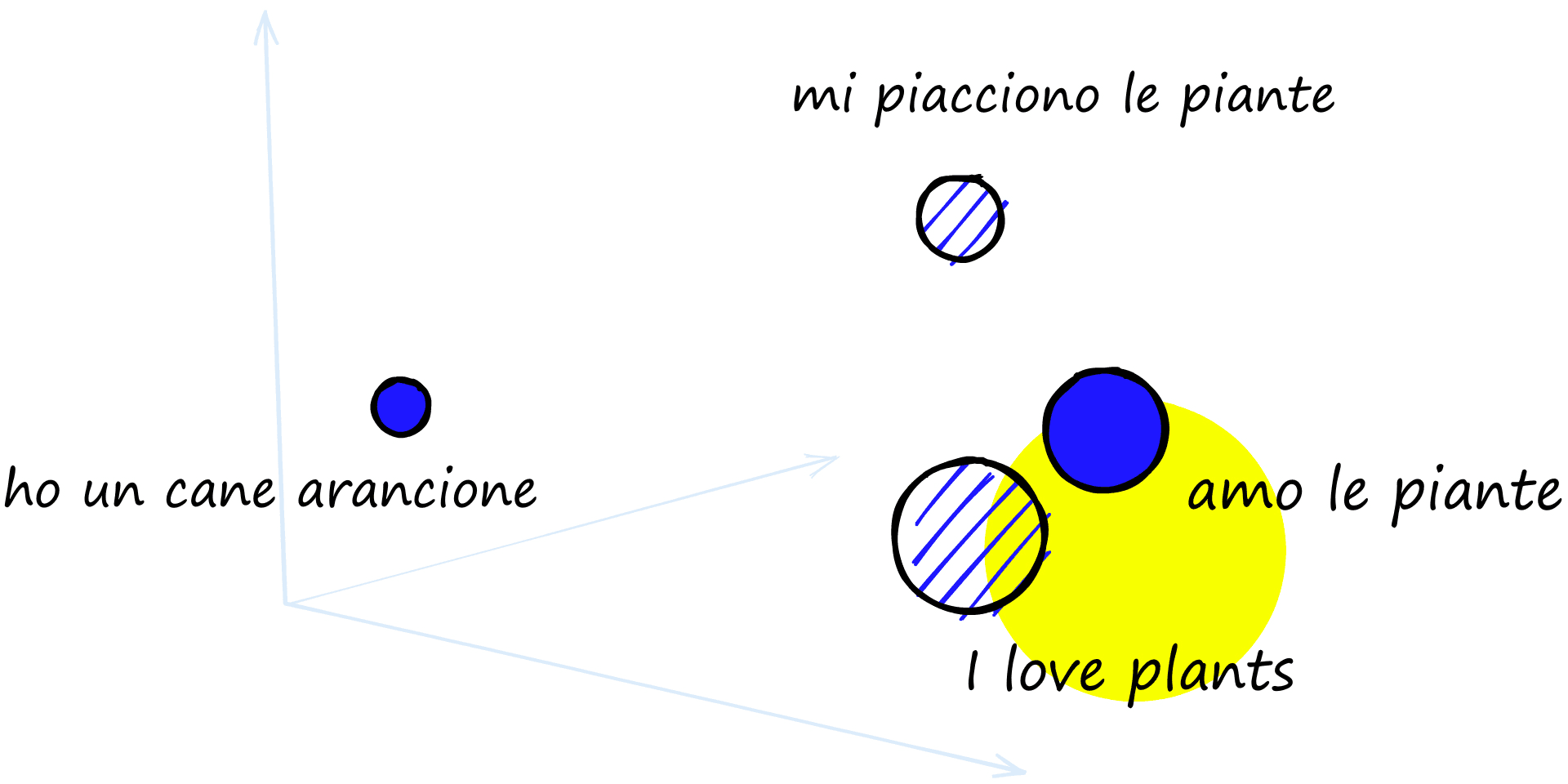
A multilingual model will map sentences from different languages into the same vector space. Similar sentences to similar vectors, creating ‘language-agnostic’ vectors (as highlighted).
The model should identify "mi piacciono le piante" (I like plants) as more similar to "I love plants" than "ho un cane arancione" (I have an orange dog).
Why would we need a model like this? For any scenario we might find usual sentence transformers applied; identifying similar documents, finding plagiarism, topic modeling, and so on. But now, used across borders or extended to previously inaccessible populations.
The lack of suitable datasets means that many languages have limited access to language models. By starting with existing, high-performance monolingual models trained in high resource languages (such as English), we can use multilingual training techniques to extend the performance of these models to other languages using significantly less data.
Training approaches
Typical training methods for sentence transformer models use some sort of contrastive training function. Given a high similarity sentence pair, models are optimized to produce high similarity sentence vectors.
Training data for this is not hard to come by as long as you stick to common languages, mainly English. But it can be hard to find data like this in other languages.
Both examples below rely in-part or in full on having translation pairs rather than similarity pairs, which are easier to find. There are many materials in the world that have been translated, but far fewer that compare similar same-language sentences.
Translation-based Bridge Tasks
Using a multi-task training setup, we train on two alternate datasets:
- An English dataset containing question-answer or anchor-positive) pairs (anchor-positive meaning two high-similarity sentences).
- Parallel data containing cross-language pairs (English_sentence, German_sentence).
The idea here is that the model learns monolingual sentence-pair relationships via a (more common) source language dataset. Then learns how to translate that knowledge into a multilingual scope using parallel data [2].
This approach works, but we have chosen to focus on the next multilingual training approach for a few reasons:
- The amount of training data required is high. The multilingual universal sentence encoder (mUSE) model was trained on over a billion sentence pairs [3].
- It uses a multi-task dual-encoder architecture. Optimizing two models in parallel is harder as both training tasks must be balanced (optimizing one is hard enough…).
- Results can be mediocre without the use of hard negatives [1]. Hard negatives are sentences that seem similar (often on a related topic) but are irrelevant/or contradict the anchor sentence. Because they’re harder for a model to identify as dissimilar, by training on these, the model becomes better.
Let’s move on to our preferred approach and the focus of the remainder of the article.
Multilingual Knowledge Distillation
Another approach is to use multilingual knowledge distillation — a more recent method introduced by Nils Reimers and Iryna Gurevych in 2020 [1]. With this, we use two models during fine-tuning, the teacher and student models.
The teacher model is an already fine-tuned sentence transformer used for creating embeddings in a single language (most likely English). The student model is a transformer that has been pretrained on a multilingual corpus.
There are two stages to training a transformer model. Pretraining refers to the initial training of the core model using techniques such as masked-language modeling (MLM), producing a ‘language engine’. Fine-tuning comes after — where the core model is trained for a specific task like semantic similarity, Q&A, or classification.
However, it is also common to refer to previously fine-tuned models as pretrained.
We then need a parallel dataset (translation pairs) containing translations of our sentences. These translation pairs are fed into the teacher and student models.
![Chart showing the flow of information from parallel pairs through the teacher and student models and the optimization performed using MSE loss. Adapted from [1].](https://www.pinecone.io/_next/image/?url=https%3A%2F%2Fcdn.sanity.io%2Fimages%2Fvr8gru94%2Fproduction%2F2d10acf40972b49d6da17a3bba2ca7a04387fb59-1920x640.png&w=3840&q=75)
Chart showing the flow of information from parallel pairs through the teacher and student models and the optimization performed using MSE loss. Adapted from [1].
Let’s assume we have English-Italian pairs. The English sentence is fed into our teacher and student models, producing two English sentence vectors. Then we feed the Italian sentence into the student model. We calculate the mean squared error (MSE) loss between the one teacher vector and the two student vectors. The student model is optimized using this loss.
The student model will learn to mimic the monolingual teacher model — but for multiple languages.
Using multilingual knowledge distillation is an excellent way to extend language options using already trained models. It requires much less data than training from scratch, and the data it uses is widely available — translated pairs of sentences.
Fine-tuning with Multilingual Sentence Transformers
The final question is, how do we build one of these models? We covered multilingual knowledge distillation conceptually, but translating concepts into code is never as straightforward as it seems.
Luckily for us, the sentence-transformers library makes this process much easier. Let’s see how we can use the library to build our very own multilingual models.
Data Preparation
As always, we start with data. We need a data source that contains multilingual pairs, split into our source language and target language(s).
Note that we wrote language(s) — we can fine-tune a model on many languages. In fact, some of the multilingual models in sentence-transformers support more than 50 languages. All of these are trained with multilingual knowledge distillation.
In the paper from Reimers and Gurevych, one dataset uses translated subtitles from thousands of TED talks. These subtitles also cover a wide range of languages (as we will see). We can access a similar dataset using HF datasets.
In[1]:
import datasets

ted = datasets.load_dataset('ted_multi', split='train')
ted
Out[1]:
Reusing dataset ted_multi_translate
Out[1]:
Dataset({
    features: ['translations', 'talk_name'],
    num_rows: 258098
})
This dataset contains a list of language labels, the translated sentences, and the talk they came from. We only really care about the labels and sentences.
Out[2]:
{'translations': {'language': ['ar',
   'bg',
   'de',
   '...
   'zh-cn',
   'zh-tw'],
  'translation': ['من ضمن جميع المثبطات المقلقة التي نعاني منها اليوم نفكر في ',
   'Наред с всички обезпокоителни дефицити',
   'Unter den schwierigen Problemen',
   '...
   '当今我们与之斗争的所有不足中',
   '在所有今日世人仍然必需去努力實現的種種令人憂心的缺點之中']},
 'talk_name': 'jonas_gahr_store_in_defense_of_dialogue'}
We need to transform this dataset into a friendlier format. The data we feed into training will consist of nothing more than pairs of source sentences and their respective translations.
To create this format, we need to use the language labels to (1) identify the position of our source sentence and (2) extract translations of languages we want to fine-tune on. Which will look something like this:
In[3]:
# get the index
idx = ted[0]['translations']['language'].index('en')
idx
In[4]:
# use the index to get the corresponding translation
source = ted[0]['translations']['translation'][idx]
source
Out[4]:
'Amongst all the troubling deficits we struggle with today — we think of financial and economic primarily — the ones that concern me most is the deficit of political dialogue — our ability to address modern conflicts as they are , to go to the source of what they 're all about and to understand the key players and to deal with them .'In[5]:
# use that info to create all (source, translation) pairs
pairs = []
for i, translation in enumerate(ted[0]['translations']['translation']):
    # we don't want to use the source language (English) as a translation
    if i != idx:
        pairs.append((source, translation))

# let's see what we have
pairs[0]
Out[5]:
('Amongst all the troubling deficits we struggle with today — we think of financial and economic primarily — the ones that concern me most is the deficit of political dialogue — our ability to address modern conflicts as they are , to go to the source of what they 're all about and to understand the key players and to deal with them .',
 'من ضمن جميع المثبطات المقلقة التي نعاني منها اليوم نفكر في المقام الاول في الامور المالية والاقتصادية واكثر ما يهمني بشكل اكثر هو عجز الحوار السياسي — قدرتنا على فهم الصراعات الحديثة على ماهي عليه , بالذهاب الى اصلها الفعلي وعلى فهم اللاعبين الرئيسيين وعلى التعامل معهم')
Here we returned 27 pairs from a single row of data. We don’t have to limit the languages we fine-tune on. Still, unless you plan on using and evaluating every possible language, it’s likely a good idea to restrict the range.
We will use English en as our source language. For target languages, we will use Italian it, Spanish es, Arabic ar, French fr, and German de. These are ISO language codes, which you can find here.
Later we will be using a ParallelSentencesDataset class, which expects our pairs to be separated by a tab character \t, and each language pair in a different dataset — so we add that in too.
In[7]:
from sentence_transformers import InputExample
from tqdm.auto import tqdm  # so we see progress bar

# initialize list of languages to keep
lang_list = ['it', 'es', 'ar', 'fr', 'de']
# create dict to store our pairs
train_samples = {f'en-{lang}': [] for lang in lang_list}

# now build our training samples list
for row in tqdm(ted):
    # get source (English)
    idx = row['translations']['language'].index('en')
    source = row['translations']['translation'][idx].strip()
    # loop through translations
    for i, lang in enumerate(row['translations']['language']):
        # check if lang is in lang list
        if lang in lang_list:
            translation = row['translations']['translation'][i].strip()
            train_samples[f'en-{lang}'].append(
                source+'\t'+translation
            )
Out[7]:
100%|██████████| 258098/258098 [00:22<00:00, 11477.42it/s]
In[8]:
# how many pairs for each language?
for lang_pair in train_samples.keys():
    print(f'{lang_pair}: {len(train_samples[lang_pair])}')
Out[8]:
en-it: 204503
en-es: 196026
en-ar: 214111
en-fr: 192304
en-de: 167888
Out[9]:
'( Applause )\t( Applausi )'Hopefully, all TED talk subtitles end with '( Applause )'. With that, let’s save our training data to file ready for the ParallelSentencesDataset class to pick it up again later.
In[27]:
import gzip

if not os.path.exists('./data'):
    os.mkdir('./data')

# save to file, sentence transformers reader will expect tsv.gz file
for lang_pair in train_samples.keys():
    with gzip.open(f'./data/ted-train-{lang_pair}.tsv.gz', 'wt', encoding='utf-8') as f:
        f.write('\n'.join(train_samples[lang_pair]))
That’s it for data preparation. Now let’s move on to set everything up for fine-tuning.
Set-up and Training
Before training, we need four things:
- Our
teachermodel. - The new
studentmodel. - A loaded
DataLoaderto feed the (source, translation) pairs into our model during training. - The loss function.
Let’s start with our teacher and student models.
Model Selection
We already know we need a teacher and a student, but how do we choose a teacher and student? Well, the teacher must be a competent model in producing sentence embeddings, just as we’d like our teachers to be competent in the topic they are teaching us.
The ideal student can take what the teacher teaches and extend that knowledge beyond the teacher’s capabilities. We want the same from our student model. That means that it must be capable of functioning with different languages.
The knowledge of a monolingual teacher capable of performing in a single language is distilled to a new model capable of working across multiple languages.
Not all models can do this, and of the models that can — some are better than others.
The first check for a capable student model is its tokenizer. Can the student’s tokenizer deal with a variety of languages?
BERT uses a WordPiece tokenizer. That means that it encodes either word-level or sub-word-level chunks of text. The vocabulary of a pretrained BERT tokenizer is already set and limited to (mostly) English tokens. If we begin introducing unrecognizable words/word pieces, the tokenizer will convert them into ‘unknown’ tokens or small character sequences.
When BERT sees the occasional unknown token, it’s not a problem. But if we feed many unknowns to BERT — it becomes unmanageable. If I gave you the sentence:
I went to the [UNK] today to buy some milk.
You could probably fill in the ‘unknown’ [UNK] with an accurate guess of ‘shop’ or ‘store’. What if I gave you:
[UNK] [UNK] [UNK] [UNK] [UNK] [UNK] [UNK] [UNK] [UNK] [UNK]
Can you fill in the blanks? In this sentence, I said “I went for a walk in the forest yesterday” — if you guessed correct, well done! If not, well, that’s to be expected.
BERT works in the same way. It can fill in the occasional blank, but too many, and the task is unsolvable. Let’s take a look at how BERTs tokenizer copes with different languages.
In[28]:
from transformers import BertTokenizer

bert_tokenizer = BertTokenizer.from_pretrained('bert-base-uncased')
In[29]:
sentences = [
    'we will include several languages',
    '一些中文单词',
    'το ελληνικό αλφάβητο είναι πολύ ωραίο',
    'ჩვენ გვაქვს ქართული'
]

for text in sentences:
    print(bert_tokenizer.tokenize(text))
Out[29]:
['we', 'will', 'include', 'several', 'languages']
['一', '[UNK]', '中', '文', '[UNK]', '[UNK]']
['τ', '##ο', 'ε', '##λ', '##λ', '##η', '##ν', '##ι', '##κ', '##ο', 'α', '##λ', '##φ', '##α', '##β', '##η', '##τ', '##ο', 'ε', '##ι', '##ν', '##α', '##ι', 'π', '##ο', '##λ', '##υ', 'ω', '##ρ', '##α', '##ι', '##ο']
['[UNK]', '[UNK]', '[UNK]']
The tokenizer misses most of our Chinese text and all of the Georgian text. Greek is split into character-level tokens, limiting the length of input sequences to just 512 characters. Additionally, character-level tokens carry limited meaning.
A BERT tokenizer is therefore not ideal. There is another transformer model built for multilingual comprehension called XLM-RoBERTa (XLMR).
XLMR uses a SentencePiece-based tokenizer with a vocabulary of 250K tokens. This means XLMR already knows many more words/characters than BERT. SentencePiece also handles new languages much better thanks to language-agnostic preprocessing (it treats all sentences as sequences of Unicode characters) [4].
In[30]:
from transformers import XLMRobertaTokenizer

xlmr_tokenizer = XLMRobertaTokenizer.from_pretrained('xlm-roberta-base')
In[31]:
for text in sentences:
    print(xlmr_tokenizer.tokenize(text))
Out[31]:
['▁we', '▁will', '▁include', '▁several', '▁language', 's']
['▁', '一些', '中文', '单', '词']
['▁το', '▁ελληνικό', '▁αλ', 'φά', 'βη', 'το', '▁είναι', '▁πολύ', '▁ωραίο']
['▁ჩვენ', '▁გვაქვს', '▁ქართული']
We can see straight away that our XLMR tokenizer handles these other languages much better. Naturally, we’ll use XLMR as our student.
The student model will be initialized from Hugging Face’s transformers. It has not been fine-tuned to produce sentence vectors, and we need to initialize a mean pooling to convert the 512 token vectors into a single sentence vector.
To put these two components together, we will use sentence-transformers transformer and pooling modules.
In[32]:
from sentence_transformers import models

xlmr = models.Transformer('xlm-roberta-base')
pooler = models.Pooling(
    xlmr.get_word_embedding_dimension(),
    pooling_mode_mean_tokens=True
)

student = SentenceTransformer(modules=[xlmr, pooler])
student
Out[32]:
SentenceTransformer(
  (0): Transformer({'max_seq_length': 512, 'do_lower_case': False}) with Transformer model: XLMRobertaModel
  (1): Pooling({'word_embedding_dimension': 768, 'pooling_mode_cls_token': False, 'pooling_mode_mean_tokens': True, 'pooling_mode_max_tokens': False, 'pooling_mode_mean_sqrt_len_tokens': False})
)
That’s our student. Our teacher must be an already fine-tuned monolingual sentence transformer model. We could try the all-mpnet-base-v2 model:
In[31]:
from sentence_transformers import SentenceTransformer

teacher = SentenceTransformer('all-mpnet-base-v2')
teacher
Out[31]:
SentenceTransformer(
  (0): Transformer({'max_seq_length': 384, 'do_lower_case': False}) with Transformer model: MPNetModel
  (1): Pooling({'word_embedding_dimension': 768, 'pooling_mode_cls_token': False, 'pooling_mode_mean_tokens': True, 'pooling_mode_max_tokens': False, 'pooling_mode_mean_sqrt_len_tokens': False})
  (2): Normalize()
)
But here, there is a final normalization layer. We need to avoid outputting normalized embeddings for our student to mimic. So we either remove that normalization layer or use a model without it. The paraphrase models do not use normalization. We’ll use one of those.
In[31]:
teacher = SentenceTransformer('paraphrase-distilroberta-base-v2')
teacher
Out[31]:
SentenceTransformer(
  (0): Transformer({'max_seq_length': 256, 'do_lower_case': False}) with Transformer model: RobertaModel
  (1): Pooling({'word_embedding_dimension': 768, 'pooling_mode_cls_token': False, 'pooling_mode_mean_tokens': True, 'pooling_mode_max_tokens': False, 'pooling_mode_mean_sqrt_len_tokens': False})
)
And with that, we’re ready to set everything up for fine-tuning.
Fine-Tuning
For fine-tuning, we now need to initialize our data loader and loss function. Starting with the data loader, we first need to initialize a ParallelSentencesDataset object.
In[33]:
from sentence_transformers import ParallelSentencesDataset

data = ParallelSentencesDataset(student_model=student, teacher_model=teacher, batch_size=32, use_embedding_cache=True)
And once we have initialized the dataset object, we load in our data.
In[34]:
max_sentences_per_language = 500000
train_max_sentence_length = 250 # max num of characters per sentence

train_files = [f for f in os.listdir('./data') if 'train' in f]
for f in train_files:
    print(f)
    data.load_data('./data/'+f, max_sentences=max_sentences_per_language, max_sentence_length=train_max_sentence_length)
Out[34]:
ted-train-en-ar.tsv.gz
ted-train-en-de.tsv.gz
ted-train-en-es.tsv.gz
ted-train-en-fr.tsv.gz
ted-train-en-it.tsv.gz
With our dataset ready, all we do is pass it to a PyTorch data loader.
In[41]:
from torch.utils.data import DataLoader

loader = DataLoader(data, shuffle=True, batch_size=32)
The final thing we need for fine-tuning is our loss function. As we saw before, we will be calculating the MSE loss, which we initialize like so:
In[42]:
from sentence_transformers import losses

loss = losses.MSELoss(model=student)
It’s that simple! Now we’re onto the fine-tuning itself. As usual with sentence-transformers we call the .fit method on our student model.
In[43]:
from sentence_transformers import evaluation
import numpy as np

epochs = 1
warmup_steps = int(len(loader) * epochs * 0.1)

student.fit(
    train_objectives=[(loader, loss)],
    epochs=epochs,
    warmup_steps=warmup_steps,
    output_path='./xlmr-ted',
    optimizer_params={'lr': 2e-5, 'eps': 1e-6, 'correct_bias': False},
    save_best_model=True,
    show_progress_bar=False
)
And we wait. Once fine-tuning is complete, we find the new model in the ./xlmr-ted directory. The model can be loaded using the SentenceTransformer class as we would any other sentence transformer.
It would be helpful to understand how our model is performing, so let’s take a look at model evaluation.
Evaluation
To evaluate our model, we need a multilingual textual similarity dataset. That is a dataset containing multilingual pairs and their respective similarity scores. A great one is the Sentence Textual Similarity benchmark (STSb) multilingual dataset.
We can find this dataset on HF datasets, named stsb_multi_mt. It includes a lot of different languages, but we will stick to evaluating two, English and Italian. First, we download both of those.
In[1]:
import datasets

en = datasets.load_dataset('stsb_multi_mt', 'en', split='test')
en
Out[1]:
Reusing dataset stsb_multi_mt
Out[1]:
Dataset({
    features: ['sentence1', 'sentence2', 'similarity_score'],
    num_rows: 1379
})
In[2]:
it = datasets.load_dataset('stsb_multi_mt', 'it', split='test')
it
Out[2]:
Reusing dataset stsb_multi_mt
Out[2]:
Dataset({
    features: ['sentence1', 'sentence2', 'similarity_score'],
    num_rows: 1379
})
Each row of the different language sets aligns with the same row in the other language sets. Meaning sentence1 in row 0 of the English dataset is translated to sentence1 in row 0 of the Italian dataset.
Out[3]:
{'sentence1': 'A girl is styling her hair.',
 'sentence2': 'A girl is brushing her hair.',
 'similarity_score': 2.5}
Out[4]:
{'sentence1': 'Una ragazza si acconcia i capelli.',
 'sentence2': 'Una ragazza si sta spazzolando i capelli.',
 'similarity_score': 2.5}
Here the Italian dataset sentence1 means ‘A girl is styling her hair’. This alignment also applies to sentence2 and the similarity_score.
One thing we do need to change in this dataset is the similarity_score. When we calculate the positive cosine similarity between sentence vectors, we will output a zero (no similarity) to one (exact matches) value. The similarity_score varies between zero to five. We must normalize this to bring it within the correct range.
In[5]:
en = en.map(lambda x: {'similarity_score': x['similarity_score'] / 5.0})
it = it.map(lambda x: {'similarity_score': x['similarity_score'] / 5.0})

en[0]
Out[5]:
{'sentence1': 'A girl is styling her hair.',
 'sentence2': 'A girl is brushing her hair.',
 'similarity_score': 0.5}
Before feeding our data into a similarity evaluator, we need to reformat it to use an InputExample format. While we do this, we will also merge English and Italian sets to create a new English-Italian dataset for evaluation.
In[6]:
from sentence_transformers import InputExample

en_samples = []
it_samples = []
en_it_samples = []

for i in range(len(en)):
    en_samples.append(InputExample(
        texts=[en[i]['sentence1'], en[i]['sentence2']],
        label=en[i]['similarity_score']
    ))
    it_samples.append(InputExample(
        texts=[it[i]['sentence1'], it[i]['sentence2']],
        label=it[i]['similarity_score']
    ))
    en_it_samples.append(InputExample(
        texts=[en[i]['sentence1'], it[i]['sentence2']],
        label=en[i]['similarity_score']
    ))
We can use an EmbeddingSimilarityEvaluator class to evaluate the performance of our model. First, we need to initialize one of these evaluators for each of our sets.
In[14]:
from sentence_transformers.evaluation import EmbeddingSimilarityEvaluator

en_eval = EmbeddingSimilarityEvaluator.from_input_examples(
    en_samples, write_csv=False
)
it_eval = EmbeddingSimilarityEvaluator.from_input_examples(
    it_samples, write_csv=False
)
en_it_eval = EmbeddingSimilarityEvaluator.from_input_examples(
    en_it_samples, write_csv=False
)
And with that, we just pass our student model through each evaluator to return its performance.
In[15]:
from sentence_transformers import SentenceTransformer

model = SentenceTransformer('./xlmr-ted')

en_eval(model)
That looks pretty good. Let’s see how it compares to our untrained student.
In[18]:
from sentence_transformers import models

xlmr = models.Transformer('xlm-roberta-base')
pooler = models.Pooling(
    xlmr.get_word_embedding_dimension(),
    pooling_mode_mean_tokens=True
)

student = SentenceTransformer(modules=[xlmr, pooler])
Some really great results. We can now take the new model and use it with English en, Italian it, Spanish es, Arabic ar, French fr, and German de.
Sentence Transformer Models
Fortunately, we rarely need to fine-tune our own model. We can load many high-performing multilingual models as quickly as we initialized our teacher model earlier.
We can find a list of these multilingual models on the Pretrained Models page of the sentence-transformers docs. A few of which support more than 50 languages.
To initialize one of these, all we need is:
from sentence_transformers import SentenceTransformer

model = SentenceTransformer('paraphrase-multilingual-mpnet-base-v2')
And that’s it, encode your sentences with model.encode, and you’re good to go.
That’s all for this article on multilingual sentence transformers. We’ve taken a look at the two most common approaches taken to train multilingual sentence transformers; multi-task translation-based bridging and multilingual knowledge distillation.
From there, we dived into the tune-tuning process of a multilingual model using multilingual knowledge distillation, covering the required data, loss functions, fine-tuning, and evaluation.
We’ve also looked at how to use the existing pretrained multilingual sentence transformers.
References
[1] N. Reimers, I. Gurevych, Making Monolingual Sentence Embeddings Multilingual using Knowledge Distillation (2020), EMNLP
[2] M. Chidambaram, Learning Cross-Lingual Sentence Representations vis a Multi-task Dual-Encoder Model (2019), RepL4NLP
[3] Y. Yang, et al., Multilingual Universal Sentence Encoder for Semantic Retrieval (2020), ACL
[4] Google, SentencePiece Repo, GitHub
Was this article helpful?