







Large Language Models (LLMs) are incredible tools, but they're useless as soon as we require up-to-date or cited information. The reason for this is the learning strategy for all "parametric knowledge" of LLMs.
Parametric knowledge refers to the information an LLM learns during its training phase. During training, the LLM learns to encode information from the training dataset into its internal model parameters — the model's parametric knowledge.
To add new parametric knowledge, we must fine-tune an LLM. Training, whether pretraining (which costs a reported $100M for GPT-4 [1]) or fine-tuning, is expensive and slow. Expensive and slow are not qualities we want when needing to keep our LLM knowledge up to date.
Retrieval Augmented Generation (RAG) has become the people's method for solving this problem. Rather than baking knowledge into the LLM via fine-tuning, we insert an external "knowledge base" into the LLM. When done well, this knowledge base is scalable, we can manage it as we would a traditional DB, and it can be significantly more reliable than fine-tuning.
Video walkthrough for super fast Retrieval Augmented Generation (RAG).
Retrieval Augmented Generation (RAG) allows us to update the knowledge of LLMs via the model's "source knowledge". The source knowledge refers to any information fed into the LLM via the input prompt.
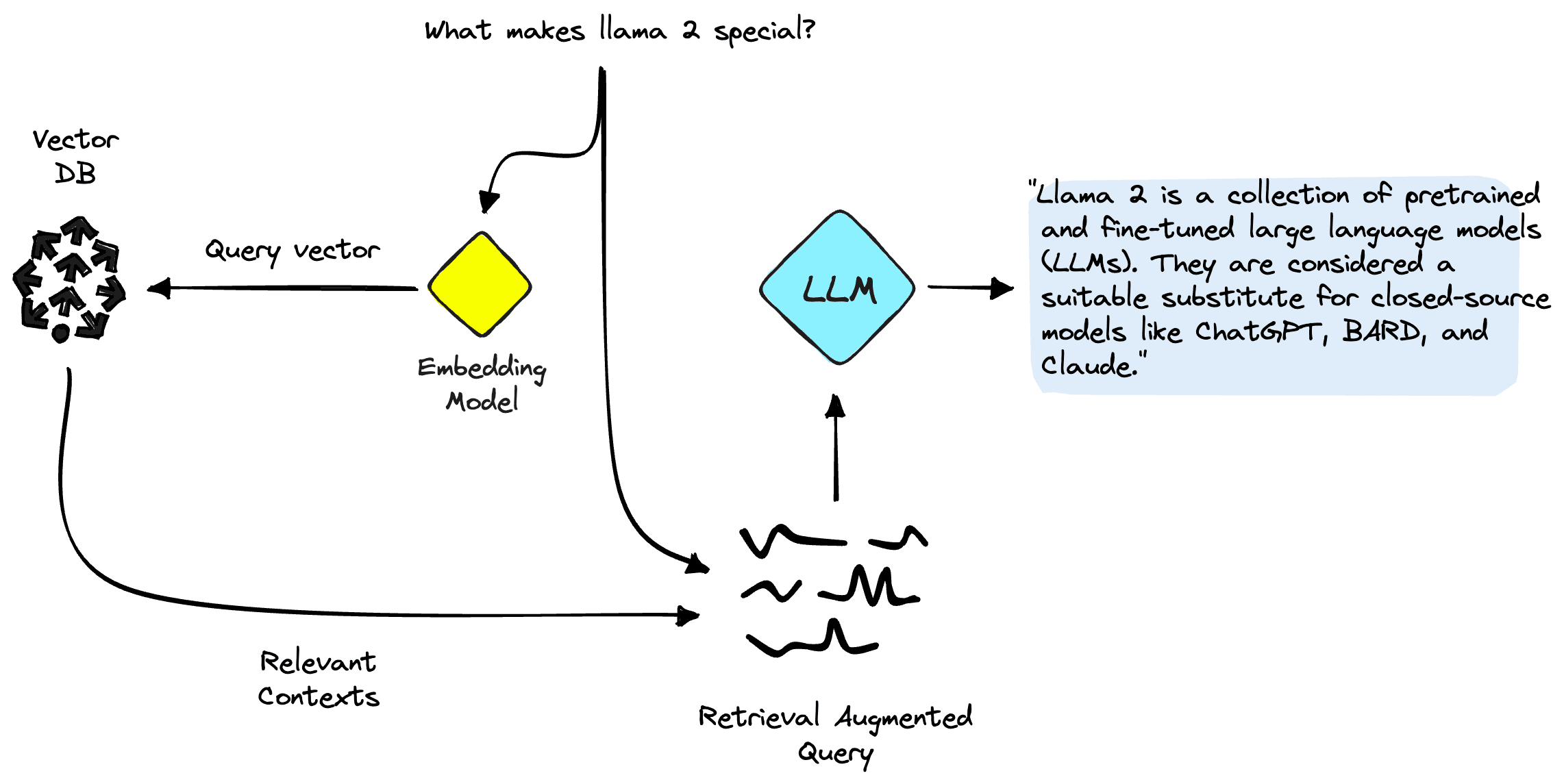
The most common approach to RAG.
Using RAG and source knowledge, we retrieve relevant information from an external data source, augment our prompt with this additional source knowledge, and feed that information into the LLM. This approach is compelling because it allows us to keep LLM knowledge accurate and up to date with minimal cost.
The above describes what I refer to as "naive RAG". Naive RAG is the most common implementation. It is simple, efficient, and effective.
However, there are other ways of doing RAG. The other popular approach is to use agents that have access to RAG tools.
At its core, an agent is an LLM with added logic that allows it to reason over multiple generation steps, decide to use various tools, and specify how to use those tools.
![Example reasoning and action logic from an agent framework called ReAct [2].](https://www.pinecone.io/_next/image/?url=https%3A%2F%2Fcdn.sanity.io%2Fimages%2Fvr8gru94%2Fproduction%2F4defbaed3e9f223a658a87b9b625da131048c84d-2240x2024.png&w=3840&q=75)
Example reasoning and action logic from an agent framework called ReAct [2].
This methodology allows the agent to answer far more complex queries. Rather than needing to produce an answer in a single step, it can now formulate and execute a plan to construct the best possible answer.
RAG is one of the most common tools to give agents access to external knowledge. The advantage of this approach over the naive RAG approach primarily stems from the more advanced reasoning ability of the agent. It can decide when to use RAG and how to use it. An agent can formulate a better search query based on the user's question, its parametric knowledge, and conversational history — it can also decide on additional parameters like how many results to return or whether to use metadata filtering.
The problem with agent-powered RAG is speed and cost. Every reasoning step taken by an agent is a call to an LLM — LLMs are slow and expensive — so we will be waiting longer for a response and paying more money.
These two approaches to RAG are the most common. We have naive RAG and agent RAG. However, a third option provides us with a middle ground between the two, a best of both. I like to call that option RAG with Guardrails.
Rather than using a slow and expensive LLM call to decide which action to take, we can use guardrails. Guardrails can be described as classifiers of user intent. We can create a guardrail to identify queries that indicate someone is asking a question — when a user asks a question, the guardrails identify this intent and trigger the RAG pipeline.
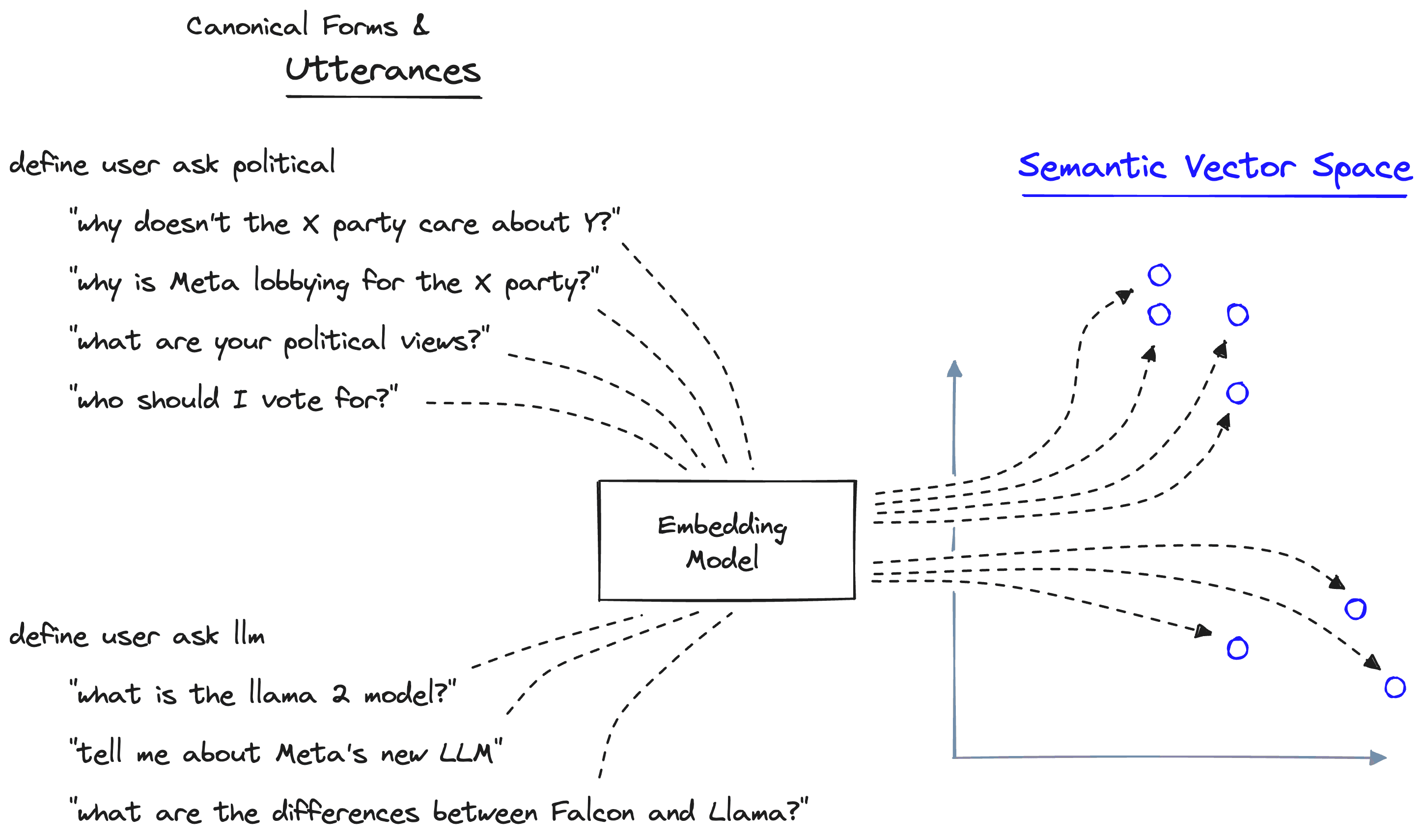
Defining canonical forms (categories of user intent) with example utterances. The utterances are encoded into vector space, giving us a type of classifier function.
The categories of user intent are called "canonical forms". We define a canonical form by providing example queries (utterances) that we believe belong to that canonical form.
If we had a RAG pipeline that contained information about LLMs, we could define a canonical form that identifies when a user asks about LLMs. In the image above, we define this canonical form with "define user ask llm". We then provide a few example queries that should trigger this form:
"what is the llama 2 model?"
"tell me about Meta's new LLM"
"what are the differences between Falcon and Llama?"
Each utterance is encoded into a semantic vector space, creating a semantic "map". That map helps us line up semantic meaning and canonical forms.
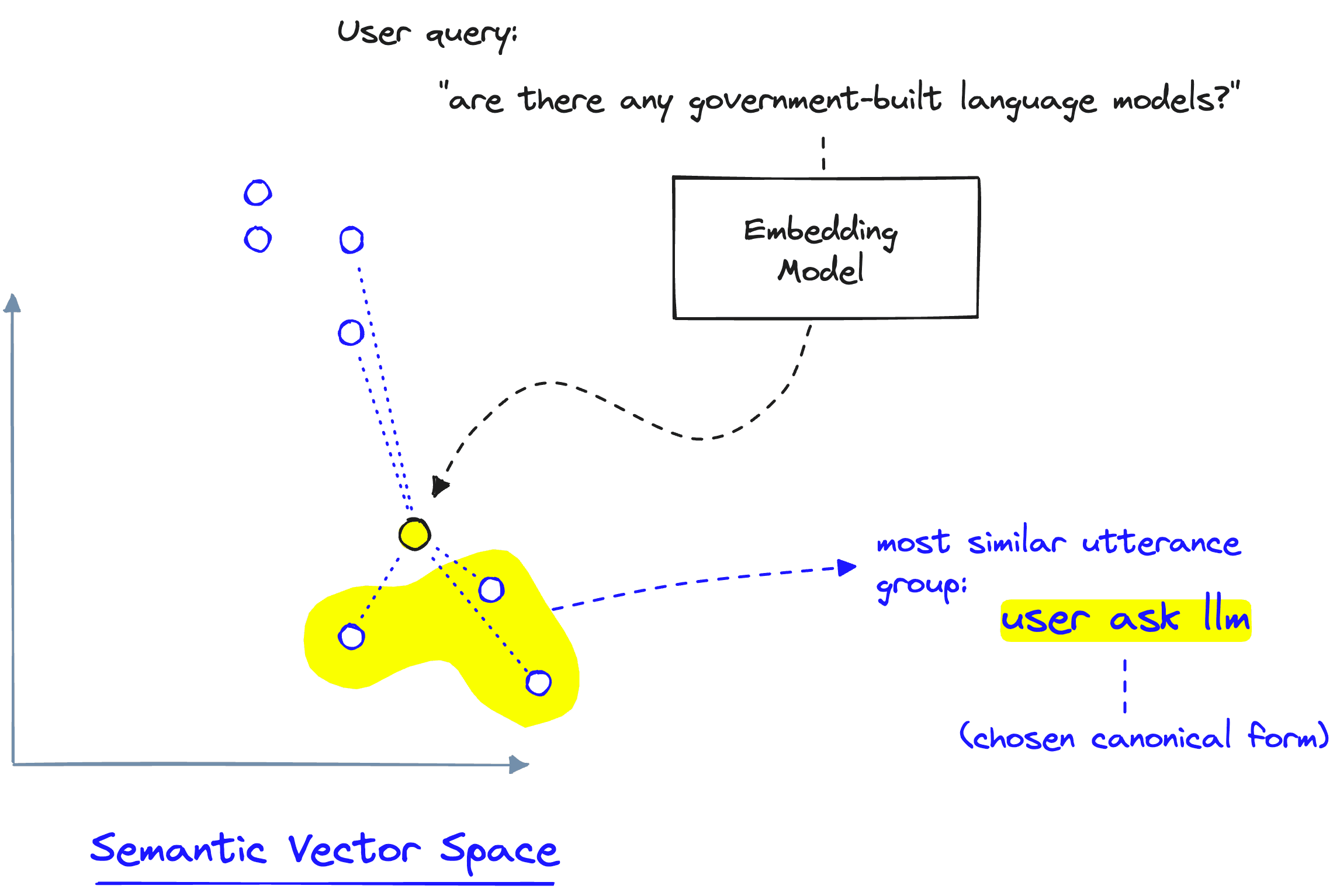
User queries are encoded into the same vector space, allowing us to identify if they have a semantic similarity to an existing cano
When a new user query comes in, we encode it into the same semantic vector space as our previous utterance examples. Using that map of utterances and the canonical forms they belong to, we can identify when a user query is semantically similar to those utterance examples. If the query is similar, we trigger the canonical form that those utterances belong to.
With that, we have a decision-making process in milliseconds rather than several seconds — as with agents.
Using RAG with guardrails does have nuances that we should consider. First, we must define the canonical forms. We could view the requirement of defining canonical forms in two ways: (1) we can be more deterministic about what should trigger a particular action, or (2) we lose out on the innate decision-making ability of an LLM.
RAG with guardrails allows us to insert a user query directly into an action — but it cannot rephrase the query, specify metadata filters, or decide how many results to return. On the other hand, using an agent makes those tasks easy. However, if we can infer these parameters deterministically with code, we can include them without using an LLM.
That gives us an idea of how RAG with guardrails works and its pros and cons. Let's jump into the implementation itself.
To implement RAG with guardrails, we will rely on the NVIDIA NeMo Guardrails library. The library primarily focuses on AI safety by implementing "guardrails" as protective measures against unwanted interactions. However, we can also use these guardrails to trigger things like RAG.
!pip install -qU \
    nemoguardrails==0.4.0 \
    pinecone-client==2.2.2 \
    datasets==2.14.3 \
openai==0.27.8As with every RAG use case, we must first create our knowledge base. For that, we will use a small dataset of Llama 2 related ArXiv papers stored in Hugging Face — we download the dataset like so:
The data has already been preprocessed for this use case, so we don't need to worry about chunking — however, we need to reformat the data to keep only what we need for our knowledge base.
The chunk field contains the text we will encode and store inside Pinecone. To encode that data, we need to use an embedding model. We will use OpenAI's text-embedding-ada-002 here, so we must authenticate ourselves with an OpenAI API key.
import os

# set your api key here
os.environ["OPENAI_API_KEY"] = "YOUR_API_KEY"
Then we create embeddings via the openai.Embedding.create endpoint like so:
As we fed two chunks of text into the embedding function, we received two embeddings (one for each chunk). Note that each is 1536-dimensional. We need this number when setting up our Pinecone index in a moment.
Now, we need a place to store these embeddings and enable an efficient vector search through them all. To do that, we use Pinecone. We can get a free API key and enter it below, where we will initialize our connection to Pinecone.
import pinecone

# initialize connection to pinecone (get API key at app.pinecone.io)
api_key = "YOUR_API_KEY"
# find your environment next to the api key in pinecone console
env = "YOUR_ENV"

pinecone.init(api_key=api_key, environment=env)
Now, we create the vector index:
import time

index_name = "nemo-guardrails-rag-with-actions"

# check if index already exists (it shouldn't if this is first time)
if index_name not in pinecone.list_indexes():
    # if does not exist, create index
    pinecone.create_index(
        index_name,
        dimension=len(res['data'][0]['embedding']),
        metric='cosine'
    )
    # wait for index to be initialized
    while not pinecone.describe_index(index_name).status['ready']:
        time.sleep(1)

# connect to index
index = pinecone.Index(index_name)
With that, our knowledge base is ready to go, and we can move on to implementing RAG with guardrails.
We first need to set up the functions triggered when our guardrails identify that the user is asking a question about LLMs. For that, we will use a retrieve function that performs the retrieval component of RAG — and a rag function that wraps all of this and the rest of the RAG pipeline logic together.
async def retrieve(query: str) -> list:
    # create query embedding
    res = openai.Embedding.create(input=[query], engine=embed_model_id)
    xq = res['data'][0]['embedding']
    # get relevant contexts from pinecone
    res = index.query(xq, top_k=5, include_metadata=True)
    # get list of retrieved texts
    contexts = [x['metadata']['chunk'] for x in res['matches']]
    return contexts

async def rag(query: str, contexts: list) -> str:
    print("> RAG Called")  # we'll add this so we can see when this is being used
    context_str = "\n".join(contexts)
    # place query and contexts into RAG prompt
    prompt = f"""You are a helpful assistant, below is a query from a user and
    some relevant contexts. Answer the question given the information in those
    contexts. If you cannot find the answer to the question, say "I don't know".

    Contexts:
    {context_str}

    Query: {query}

    Answer: """
    # generate answer
    res = openai.Completion.create(
        engine="text-davinci-003",
        prompt=prompt,
        temperature=0.0,
        max_tokens=100
    )
    return res['choices'][0]['text']
Note that both functions are async functions — we need this for them to integrate with the guardrails generate_async function later. Next up, we need to initialize our guardrails config files. We use these to define the guardrails, actions, etc. You can read more about these in our introduction to NeMo Guardrails.
yaml_content = """
models:
- type: main
  engine: openai
  model: text-davinci-003
"""

rag_colang_content = """
# define limits
define user ask politics
    "what are your political beliefs?"
    "thoughts on the president?"
    "left wing"
    "right wing"

define bot answer politics
    "I'm a personal assistant, I don't like to talk of politics."

define flow politics
    user ask politics
    bot answer politics
    bot offer help

# define RAG intents and flow
define user ask llms
    "tell me about llama 2?"
    "what is large language model"
    "where did meta's new model come from?"
    "what is the falcon model?"
    "have you ever meta llama?"

define flow llms
    user ask llms
    $contexts = execute retrieve(query=$last_user_message)
    $answer = execute rag(query=$last_user_message, contexts=$contexts)
    bot $answer
"""
Here, we have defined two possible dialogue flows. The first is typical of guardrails. It is a safety measure for our chatbot to avoid the topic of politics. The second is our RAG-enabled flow — triggered when a user asks about LLMs.
The LLM flow — defined by the user ask llms canonical form — executes the retrieve action using the $last_user_message to get our $contexts. We then pass the $last_user_message and $contexts to our rag action. To initialize our RAG-enabled rails, we do the following:
from nemoguardrails import LLMRails, RailsConfig

# initialize rails config
config = RailsConfig.from_content(
    colang_content=rag_colang_content,
    yaml_content=yaml_content
)
# create rails
rag_rails = LLMRails(config)
Every time we define actions in the Colang config file, we must register them — otherwise, our rails have no idea how to execute retrieve or execute rag. We register both like so:
rag_rails.register_action(action=retrieve, name="retrieve")
rag_rails.register_action(action=rag, name="rag")
Now let's try it out:
We can see from the printed statement of > RAG Called that the second prompt triggered the RAG pipeline. So, our RAG with guardrails pipeline is working!
Everything looks good. However, it'd be interesting to see what the effect of RAG has on our answer. Let's initialize a new Rails instance that doesn't include the call to RAG to compare the results.
no_rag_colang_content = """
# define limits
define user ask politics
    "what are your political beliefs?"
    "thoughts on the president?"
    "left wing"
    "right wing"

define bot answer politics
    "I'm a shopping assistant, I don't like to talk of politics."
    "Sorry I can't talk about politics!"

define flow politics
    user ask politics
    bot answer politics
    bot offer help
"""

# initialize rails config
config = RailsConfig.from_content(
    colang_content=no_rag_colang_content,
    yaml_content=yaml_content
)
# create rails
no_rag_rails = LLMRails(config)
Let's ask about Llama 2 again:
That's not the Llama 2 we were looking for — let's try some more questions and compare RAG vs. no-RAG answers.
Our no RAG rails provide an exciting but utterly wrong answer. Let's try the same with our RAG-enabled rails:
A perfect answer! Our RAG-enabled rail is far more capable of answering questions while only calling the RAG action when required, as set in our actions.co config file.
By using Guardrails for RAG in this way, we manage to create a balance between the lightweight but naive approach of implementing RAG with every user call vs. the heavyweight and slow method of implementing a conversational agent with RAG tool access.
[1] W. Knight, OpenAI's CEO Says the Age of Giant AI Models Is Already Over (2023), Wired
[2] S. Yao, ReAct: Synergizing Reasoning and Acting in Language Models (2023), ICLR
此内容由惯性聚合(RSS阅读器)自动聚合整理,仅供阅读参考。 原文来自 — 版权归原作者所有。