


Special offer for n8n users: Build with the Assistant node before May 1, 2026 to get a discount when upgrading to Pinecone's Standard plan. Add the Pinecone Assistant node and connect to Pinecone in n8n to claim this offer.
When you're building a RAG (retrieval-augmented generation) workflow in n8n, the first instinct is usually to point everything at one knowledge base and let retrieval sort it out. For small, uniform datasets, that works. But once your knowledge base starts covering meaningfully different domains—different clients, different products, different locations, different teams—that single knowledge base starts working against you.
Here's the problem: context pollution. When a guest at a vacation rental asks "how do I turn on the heat?", they shouldn't be getting answers pulled from a different property's HVAC documentation. But when all your property guides live in one knowledge base, that's exactly what can happen. The knowledge base doesn't know which property the guest is staying at—it just finds what's semantically close and returns it. For a property manager, a guest getting the wrong HVAC instructions means a support call, a bad review, or no rebooking. At scale, that's not a UX problem—it's a revenue and trust problem. And for teams managing dozens of domains, a single polluted knowledge base becomes a debugging nightmare that slows every update.
The fix is the same instinct that makes us separate spreadsheet data into tabs: different domains need different contexts.
Instead of one knowledge base serving all queries, you maintain one specialized knowledge base per domain and add a routing layer that maps incoming queries to the right one before retrieval happens.
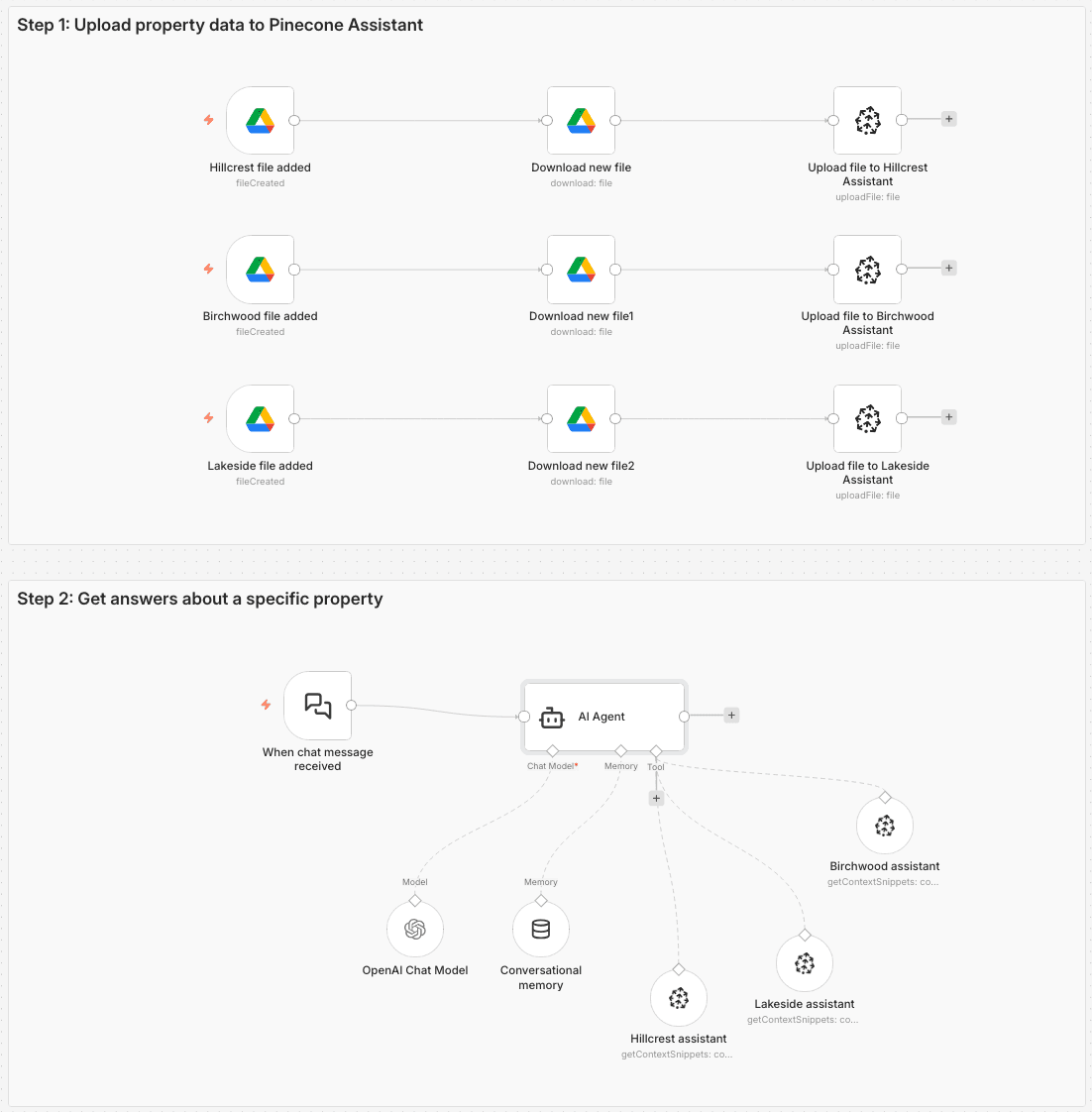
For the vacation rental scenario I've been using as a demo—managing requests for multiple rental properties—the n8n workflow has two main paths:
As shown in the visual below, the result is three separate Pinecone Assistants—one each for lakeside, birchwood, and hillcrest—each containing only the documentation for that property.
The Pinecone Assistant node in n8n is doing more work than it might look like. Under the hood, Pinecone Assistant handles chunking your documents with a sensible chunking strategy, converting those chunks into vector embeddings, executing the semantic search, and re-ranking results before returning them.
We could also use the Pinecone Vector Store node here with namespaces or even metadata filtering, but it brings added complexity in this scenario. While we’d have complete control over every component, we’d have more decisions to make and have to manage 5+ nodes (vector store, embedding model, data loader, text splitter, reranker) and additional API keys. Separate Assistants give you complete context isolation and cleaner debugging.
What this means practically is that the n8n workflow gets to focus on the routing logic—which is the actually interesting problem—rather than on wiring up chunking, embedding models, and re-ranking steps separately.
When all your knowledge lives in one assistant, "How do I reset the thermostat?" might pull answers from three different properties. The correct answer for Lakeside may be completely wrong for Hillcrest. Giving each domain its own Pinecone Assistant means every result is at least from the right context. Fewer wrong answers means less time spent on support escalations and a higher trust signal for end users.
With a single shared knowledge base, debugging a bad answer means understanding how every document in the entire knowledge base might be interfering. With domain-specific assistants, you can test, update, and debug each one independently. Change the wifi password for one property without worrying about effects on the others. This reduces debugging time and limits the blast radius to exactly what changed.
The pattern that works for three properties works for thirty. Adding a fourth property means creating a new Pinecone Assistant, uploading its documents, and adding one routing condition to the AI Agent node. You don't touch anything else.
The quality of your routing logic has an outsized effect on the whole system. If the AI Agent node misidentifies the domain—or worse, can't decide and blends results from multiple assistants—you lose most of the benefit of domain separation.
We also can’t rely on the guest always including their property name because they don’t know that this system serves guests at multiple properties.
The system message I landed on makes the routing decision explicit and gives the agent a clear fallback: if the property isn't inferable from the message, ask. Don't guess. Don't default to the most recently mentioned property. Ask.
Here’s the system message:
You are a helpful assistant for a vacation rental property manager and their guests. Based on the user's message, decide if they are requesting information about the "hillcrest", "birchwood", "lakeside" property. You route requests based on property name to the appropriate pinecone assistant tool to fetch answers about the property.

If you cannot infer the property from the user's message, do not call any tools and instead ask for more information in the chat.

If the person requests to be contacted, do not call any tools and instead return a response indicating that someone will reach out to them.

Use a friendly, helpful tone.
Bonus: add a confidence check before routing. One step further: you can add a lightweight confidence check before routing happens at all. Use a Basic LLM Chain node to evaluate the incoming message and return a structured confidence score — essentially asking the model to rate how clearly the message maps to a known domain. Then feed that score into an If or Switch node: if confidence is high enough, route to the appropriate Pinecone Assistant Tool node as normal; if it's too low, short-circuit to a clarifying response before any retrieval happens. It's a cheap gate that prevents a whole class of bad retrievals before they start.
The vacation rental scenario is a stand-in for any workflow where you have meaningfully different knowledge domains:
The signal that you need domain separation: when a wrong answer can be explained by "it pulled from the wrong part of the knowledge base," and that part is logically unrelated to the question.
The n8n workflow template for the vacation rental implementation is available here. It includes the full file upload path (Google Drive Trigger → Google Drive node → Pinecone Assistant node) and the chat path (Chat Trigger → AI Agent node → Pinecone Assistant Tool nodes → response).
To adapt it, the main things to change are the routing conditions in the AI Agent's system message and the number of domain-specific Pinecone Assistant Tool nodes. The rest of the structure stays the same.
RAG isn't a monolithic system—it's a pattern you can shape to match how your data is actually organized. If your knowledge base covers multiple distinct domains, separating them into dedicated Pinecone Assistants and routing queries to the right one before retrieval is a straightforward way to improve accuracy, make debugging easier, and keep scaling manageable. The n8n workflow template gives you a working starting point; the routing logic is the main thing to make your own. The payoff: guests get the right answer for their property, every time—and you can debug, update, or scale any one domain without touching the rest.
You can find the rest of our n8n resources here:
此内容由惯性聚合(RSS阅读器)自动聚合整理,仅供阅读参考。 原文来自 — 版权归原作者所有。