








本例源码:/Files/mshwu/L2_simpleinterface.rar
Android应用程序的图型化用户界面是由不同层次的view 和viewgroup对象组成,view常指一些窗口小部件,如button,text view, 而viewgroup 是一种可见的view容器,定义其子view如何被呈现,
如grid,vertical list。Android提供了一个XML词汇表,用于表述View和ViewGroup的子类,所以你可以用XML定义一个层次结构的UI的视图。
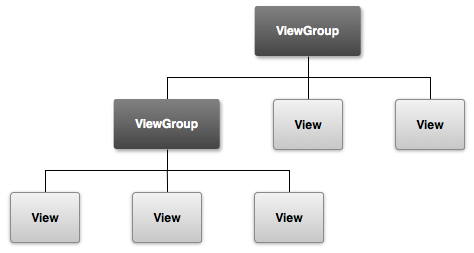
图1,viewgroup 如何作为一个容器被使用
把布局分开定义在XML里面有很多好处,在android里,允许你根据不同的屏幕大小定义可更改的布局, 比如你可定义大小两种不同的布局,然后根据手机屏幕的大小,让程序选择合适的布局。
下面我们将创建一个由一个button 和一个text input field组成的XML布局, 后面我们将响应button的事件,事件监听方法把text field里面的内容传到另一个activity
使用 Linear Layout(线性布局)

A layout that organizes its children into a single horizontal or vertical row. It creates a scrollbar if the length of the window exceeds the length of the screen.
打开res/layout/里的activity_main.xml(新建android项目默认都会包括这一个文件)
Eclipse 里面,ADT layout支持可视化设计,这里我们尝试直接操作XML文件,点击底部的activity_main.xml tab 打开XML 编辑模式,
把默认设置更改成:
<LinearLayout xmlns:android="http://schemas.android.com/apk/res/android%22
android:layout_width="match_parent"
android:layout_height="match_parent"
android:orientation="horizontal" >
</LinearLayout>
Linearlayout是一种view的容器(viewgroup的一个子类),可以水平或垂直显示容器里的view,通过属性android:oritentation的设置,容器里的view按它们在XML里出现的顺序先后呈现。
别外两个属性 android:layout_width 和android:layout_height对所有view都是必须的,用于确定他们的大小。
因为linearlayout在整个布局里面是根view,我们把它的大小设为match_parent
Add a Text Field
创建一个user可编辑的text field,在<LinearLayout>里加一个<EditText>子标签, EditText的类是view的一个子类,用于显示一个可编辑的text field。
像其它的view一样,我们必须定义它的属性。
<EditText
android:id="@+id/edit_message"
android:layout_width="wrap_content"
android:layout_height="wrap_content"
android:layout_weight="1"
android:hint="@string/edit_message"
android:ems="10" >
<requestFocus />
</EditText>
android: id
是view的唯一标识,应用程序中可通过此ID实现对view的访问,比如读取或操作此Object。
如果需要引用XML中的Object,必须加标识符@,
当你第一次定义资源id时,符号+是必要的,它告知SDK工具这一资源ID是必须新创建的。所以,当程序被编译时,SDK工具会使用这一ID值:eidt_message 在你项目的gen/R新创建一个唯一object标识, 一旦资源ID被创建,java文件就跟你的EditText关联上了。
一旦ID创建成功,所有对此ID的引用都不再需要+标识。
android:layout_width 和android:layout_height
跟强制限定宽高度的大小不同,wrap_content让它所修饰的view的大小按view的内容自动调整, 如果使用fill_parent,那么EditText将填充屏幕,因为它将匹配它的父容器LinearLayour的大小,想了解更多,可参考XML Layouts guide。
android:hint
当text field 是空时,将显示这一默认字符串而不采用hard-coded字符串的形式,@string/edit_message 引用一独立定义的字符串资源,value 文件夹里的string.xml,
Add String resources
当你需要在用户界面添加一些文字或字符串时,不建议采用Hard_coded的方式,而要把第一个字符串都定义在资源文件里,这样便于程序的维护,另一个好处,可以定义不同的语言而实现程序的国际化
<resources>
<string name="app_name">L2_simpleinterface</string>
<string name="menu_settings">Settings</string>
<string name="title_activity_main">Simple interface</string>
<string name="edit_message">Enter a message</string>
<string name="button_send">Send</string>
</resources>
关于如何支持多国语言,参考后面的Supporting Various Devices章节.
Add a Button
添加<Button> 进布局里,可参照 <EditText>
<Button
android:layout_width="wrap_content"
android:layout_height="wrap_content"
android:text="@string/button_send" />
layout_width, layout_height 设置成wrap_content,所以按钮大小将按它上面的Text大小自己调节,没有android:id,因为不需要在activity 中引用。
Make the Input Box Fill in the Screen Width
按照当前的设置,EditText 和Button大小都是按它门上面的内容自己调节,如下图:

对按钮是没有问题的,但对于text field,如果用户输入过长,内容有可能超出屏幕左方,在linearLayOut中可使用android:layout_weight属性,
只对空间的占有比,比如一个view设了2,别一个设1,则第一个占2/3,另一个则点1/3,若一个设为1,另一个不设,则分配给view2后,其它空间全由view1占用,本例中,我们把edit text设为1
<EditText android:layout_weight="1" ... />
使用layout_weight后,我们必须把width设为0(0db),这可以提高性能,
because using"wrap_content" as the width requires the system to calculate a width that is ultimately irrelevant because the weight value requires another width calculation to fill the remaining space.
    <EditText
        android:layout_weight="1"
        android:layout_width="0dp"
        ... />

现在,我们的整个layout设置如下:
<?xml version="1.0" encoding="utf-8"?>
<LinearLayout xmlns:android="http://schemas.android.com/apk/res/android%22
android:layout_width="fill_parent"
android:layout_height="fill_parent"
android:orientation="horizontal">
<EditText android:id="@+id/edit_message"
android:layout_weight="1"
android:layout_width="0dp"
android:layout_height="wrap_content"
android:hint="@string/edit_message" />
<Button
android:layout_width="wrap_content"
android:layout_height="wrap_content"
android:text="@string/button_send" />
</LinearLayout>
此layout自动使用于SDK创建的默认的activity 类,我们可以直接运行。
在Eclipse中,点击 Run as … android application
下一节,我们将响应该按钮事件,读取text field的内容,开启另一个activity等等
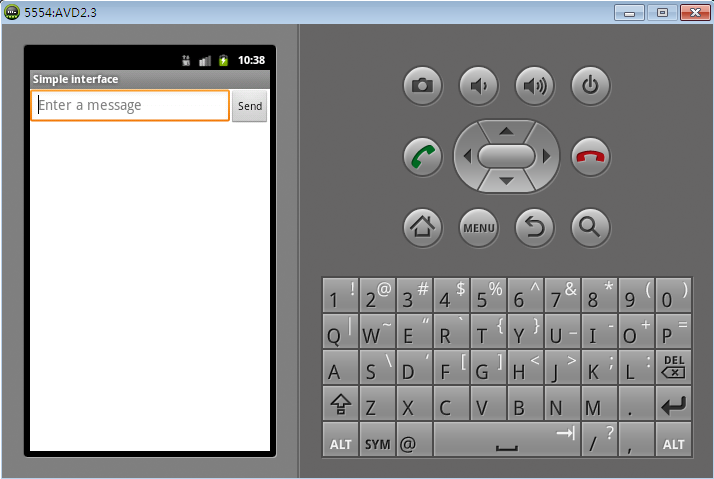
运行效果:
此内容由惯性聚合(RSS阅读器)自动聚合整理,仅供阅读参考。 原文来自 — 版权归原作者所有。