


惯性聚合 高效追踪和阅读你感兴趣的博客、新闻、科技资讯
阅读原文 在惯性聚合中打开

推荐订阅源

F
Fortinet All Blogs
V
Visual Studio Blog
T
Tor Project blog
量子位
Jina AI
Jina AI
Hugging Face - Blog
Hugging Face - Blog
酷 壳 – CoolShell
酷 壳 – CoolShell
有赞技术团队
有赞技术团队
博客园 - 司徒正美
博客园_首页
罗磊的独立博客
美团技术团队
人人都是产品经理
人人都是产品经理
让小产品的独立变现更简单 - ezindie.com
月光博客
月光博客
奇客Solidot–传递最新科技情报
奇客Solidot–传递最新科技情报
IT之家
IT之家
C
Check Point Blog
博客园 - 聂微东
爱范儿
爱范儿
Schneier on Security
T
Threat Research - Cisco Blogs
T
Tailwind CSS Blog
L
LINUX DO - 热门话题
大猫的无限游戏
大猫的无限游戏
V
Vulnerabilities – Threatpost
C
Cisco Blogs
GbyAI
GbyAI
Spread Privacy
Spread Privacy
博客园 - 叶小钗
博客园 - 【当耐特】
T
Tenable Blog
雷峰网
雷峰网
OSCHINA 社区最新新闻
OSCHINA 社区最新新闻
Apple Machine Learning Research
小众软件
小众软件
J
Java Code Geeks
Threat Intelligence Blog | Flashpoint
宝玉的分享
宝玉的分享
Microsoft Azure Blog
Simon Willison's Weblog
N
Netflix TechBlog - Medium
T
The Exploit Database - CXSecurity.com
腾讯CDC
C
CERT Recently Published Vulnerability Notes
P
Proofpoint News Feed
阮一峰的网络日志
阮一峰的网络日志
Scott Helme
Scott Helme
cs.CL updates on arXiv.org
Martin Fowler
Martin Fowler

Latest from Windows Central

"An unmatched upgrade opportunity": Intel's new Core Series 3 mobile CPUs target "value buyers"… "There are over 5,700 combinations.": I attended Panasonic's USS Intrepid press conference and saw 10Gbps, Wi‑Fi 7 and on‑device AI in the new Toughbook 56, but should you swap out your Toughbook 55? "We "So Mac folks feel comfortable": Microsoft Microsoft thinks you'll want an Xbox Controller and 1 year of Microsoft 365 and Xbox Game Pass over a MacBook Neo "Microsoft fired the skilled people, leaving flowchart followers": Microsoft's Security Response Center is being blamed for the zero-day BlueHammer exploit leak, but I can't tell who's right "Thank you to every Greymane": Crimson Desert shows no signs of slowing down, topping over 5 million sales… "Another all-round excellent mini PC:" Beelink's discounted desktop is fantastic for intensive work and… Xbox's Starfield gets Nintendo Switch 2 rating days after its PS5 release, keeping hopes for a port of Bethesda's RPG alive — here's what we know "The stuff that we're seeing is really well put together": Xbox game publishing chief says Forza Horizon 6 takes him back to the golden years of racing games Microsoft's Xbox games lead Matt Booty says its studios are in a "culture of cultures" and work together more than you think — Blizzard is even helping with Fable Rumored feature coming to Steam that will help you track prices, and Microsoft should copy it immediately for Xbox and… Xbox and Best Buy want to help you build your first video game in 2026 Microsoft prepares display upgrades and two stage launch for new Surface Pro and Surface Laptop with Intel and… Someone discovered Seagate's Xbox Storage Expansion cards can be used on PC — which has made their value more… ID@Xbox makes a bold claim — “Games launching day one into Game Pass… do very well on other platforms… Before Forza Horizon 6 takes us to Japan, let's remember where the legend began almost 14 years ago "Users can now simply ask what happened": AppControl's optional AI integration gives you in-depth PC diagnostic history in plain English — It works with popular LLMs, but I'll use offline models for added security Our friends at Tom's Guide are upgrading: Here's what it means, and how our sister site's overhaul… "Quantity over quality is not always the answer": WWE 2K26 comes close to being the best in the world, but yearly releases are holding it back I "This is one headset that absolutely will not disappoint anyone": Our favorite Xbox headset raises the bar for sound quality with a price that's lower than I expected "One of the better laptops I’ve encountered and one I’d happily use daily": This high-end ThinkPad is a solid bet for professionals — especially after this generous discount I've finally found a loophole to block a specific type of YouTube ads, and it won’t cost you a dime: Just a… www.windowscentral.com "The Lotus guys probably figured it didn't matter to be wrong": Excel thinks 1900 was a leap year because of a small shortcut taken in the '80s — I'll think of this next time I want to cut corners Starfield's sales on PlayStation 5 make me wonder why Xbox even bothered... was this worth devaluing exclusivity? Overwatch Season 2 is LIVE! Xbox Your Xbox Storage Expansion Cards can have a life after the console if you get a simple adapter for your PC Microsoft is hiking Surface Prices, but one of its best laptops is dodging it with this BIG discount Subnautica 2 publisher changes from Krafton to the game Metro 2039 will be "darker than anything you Surface Hub is dead: Microsoft pulls the plug on its 50-inch and 85-inch collaborative touch displays Microsoft says its MAI-Image-2-Efficient AI model slashes costs by 41% while boosting speed by 22% (and maintaining… Mindwarping Morrowind-like Steam gets an ARM native build for Kingdom Come II, while PC Game Pass players are left waiting Alienware just shook up the budget QD-OLED market with its new AW2726DM — Are the compromises worth the low price? Microsoft's crazy Surface price hikes are pushing me to Apple: I can no longer recommend Surface over a MacBook or… Windows Wrap: Snapdragon X PCs are the latest victims of lazy takes and willfully ignorant tech journalists “I stopped digging through folders”: How OmniSearch changed the way I find files on Windows 11 "The sound quality and comfort are excellent": This PC gaming headset with low latency is great for players who use multiple devices at a budget price "What else were Steam Deck users to do but create their own solutions?": I watched Valve's Linux-first handheld turn into a Windows 11 experiment in its community Is Valve prepping its own AI for Steam? Is Valve prepping its own AI for Steam? “We have discontinued SaRA”: Microsoft replaces its Windows 11 Recovery Assistant — here’s how… "An ode to the Horde:" A ramble on what World of Warcraft's most iconic faction means to me — and a… “Truthfully, I still think Bethesda is just part of something that is not authentic and is not genuine” — Pete Hines reflects on Bethesda after Microsoft’s acquisition “As of January 2026… Drew Murray is now working on the StarCraft shooter” — this report could be the clearest sign yet that the project is moving forward Let's talk about it: Which Xbox console is the best-looking of all time and why is it the Xbox One X? "I didn't know a $50 controller could be this good": this PC gamepad with Hall Effect sticks was already a bargain, but it's now an absolute steal "It still won’t be my dream Surface Pro": The missing piece Microsoft never built vanished — and… Project Helix “Actually lets you test its new features”: Why Microsoft’s Windows 11 Insider overhaul finally feels… Snapdragon X2 laptops need a quick update to stop getting the wrong graphics drivers "The pro-aim function is like cheat mode for shooters": Who needs Xbox's Elite controller when this… "This genuinely puts what Microsoft makes to shame": Someone built the best-looking app for Xbox Cloud Gaming… Microsoft says Windows 11's bugs are all "resolved": At least the ones it knows about — and new… How Red Bull Wololo turned Age of Empires into a headline esports event "Repeated choices to serve their business over their customers": Mozilla accuses Microsoft of using 'dark patterns' to force its Copilot AI on Windows 11 users "I’ve died more times than I can count": This side-scrolling roguelike is an ID@Xbox triumph. Say hi to… The original Xbox was going to be a lot like Project Helix, says ex-Microsoft gaming exec — here's why the first plans for a console-PC hybrid didn't work out "We are rocking on bringing new Xbox console features!": Xbox is soliciting ideas for new features directly.… Former Microsoft Xbox VP says AI is "the big question mark" for the future of gaming — he believes "There won't be a line where it's 'AI' and 'not AI' anymore" Windows and Xbox are now prioritizing user feedback in a huge pivot ... but why now? I can't help but be suspicious… "This is exactly the kind of thing driving me away from Windows": even Edge users don't want this new… Xbox handheld owners finally get the one feature they’ve begged for, and it instantly fixes one of the… "The CRT revival is real": I'm amazed by the community efforts to keep CRT gaming alive — and how OLED could be its renaissance for modern gamers "Gaming just got smoother on Snapdragon": You can finally customize your gaming gear on Windows on Arm Microsoft finally begins removing Copilot from Notepad on Windows 11 — but the AI still persists Fresh Xbox discoveries point to "Duet" codename: A possible companion to "Triton" and more Game Pass… NASA's Artemis II photos will give your Xbox dashboard a serious glow-up, and I didn't even know you could do… "I can't recommend this mouse enough": Logitech's unconventional design will save your wrists and… Microsoft broke Windows 11 search by trying to fix it: Here's what happened "Listening to how we can keep making it better for you": Windows Insider meetups are coming back after years away, connecting Windows 11 users with Microsoft "Reclaiming my screen's real estate": Google Chrome is finally launching vertical browser tabs to catch… Ex-Microsoft gaming VP reveals why Xbox was greenlit despite how “unlikely” it was — “they saw it as a hedge against the threat” of Japan in tech Oop, Xbox's Halo: Campaign Evolved release date may have just leaked thanks to a retailer's mistake — it might have a Deluxe Edition with Early Access, too “Still one of my favorites”: This dependable 2‑in‑1 is discounted again while modern laptops remain… Xbox is finally giving Achievements a huge update with several new features — “We stood up a dedicated team… “Wait, Windows uses less?”: I break down the surprising requirement that flips the Linux vs. Windows script ChatGPT’s refusal to admit mistakes is getting out of hand, and this exchange proves it If you bought an Xbox controller recently: Read this — Microsoft says you might be eligible for free batteries. Dell is scrubbing its failed Premium brand from existence, but who cares when you can save almost $900 on an XPS 14? "Raptor Lake will continue to be abundantly available": Intel exec makes a case for its older chips as RAM prices soar, but are they actually worth buying in 2026? Here's a closer look at the gigantic Forza Horizon 6 Japan map, easily the greatest in the series' history "I hope NVIDIA's legal team lets this slide": I dive into OpenNOW, an open-source GeForce Now alternative that's trending in cloud gaming — for good reason "An error was made": We asked ASUS why Zenbook prices are suddenly soaring, and we have bad news Four new features I found in the Forza Horizon 6 preview that will change how you play the game I finally played Forza Horizon 6 and Japan is a spectacle the likes of which we've never seen “I’m already sold”: Xbox’s new Forza Horizon 6 limited‑edition accessories are (almost) here — and they might be even cooler than I expected ASUS’ Zenbook A16 shows why Microsoft must rethink Copilot+ PC branding "I can't stop laughing": I might have a reason to press my Copilot key as this absurd Windows 11 app adds… Microsoft's Azure cloud platform problems stem from AI, according to a former engineer: "Those disruptions… Xbox Game Pass is losing one of its best games at the worst possible time — get it now while it's cheap… “I finally found something that just works”: I explain the open‑source screenshot tool that beat Snipping Tool and ShareX for me — and why it might become your new default Xbox Game Pass' April lineup brings this surging Call of Duty game, and one of last year's biggest additions is coming to more tiers — plus, Hades 2, DayZ, and more "This was not opportunistic. It was precision." — How North Korean hackers used Microsoft Teams and Slack to compromise Windows PCs with an elaborate ploy I compared Lenovo Qira to HP IQ in a battle of on-device AI intelligence — Are these finally the assistants… Is this the perfect Windows app to emulate? Microsoft needs to take notes.
The privacy King: Surface Laptop 8 for business review—is the new stealth screen worth the $2,549 entry price?
Daniel RubinoSocial Links NavigationEditor-in-chief · 2026-05-19 · via Latest from Windows Central

Windows Central Verdict

The Surface Laptop for Business 8th Edition is a specialized powerhouse that prioritizes high-level security and display clarity over general consumer value. While its steep $1,949.99 starting price and roughly eight-hour real-world battery life may give some pause, the addition of a first-of-its-kind integrated privacy screen and a sharper 262 PPI panel on the 15-inch model makes it an indispensable tool for professionals handling sensitive data. Between its improved repairability, top-tier haptic touchpad, and hardened security architecture, this laptop remains the gold standard for the corporate and government elite who require a secure, premium mobile office.

Pros

  • +

    Groundbreaking integrated privacy screen

  • +

    Higher PPI for 15" model

  • +

    Strong performance from Core Ultra Series 3

  • +

    Excellent overall user experience

  • +

    Exceptional haptic touchpad and keyboard

Cons

  • -

    Significant price increase ($1,949+ starting)

  • -

    5G option is now "last gen"

  • -

    Battery life hampred by small 54WHr battery

Why you can trust Windows Central Our expert reviewers spend hours testing and comparing products and services so you can choose the best for you. Find out more about how we test.

The new Surface Laptop for Business 8th Edition for 2026 arrives at a fascinating crossroads for Microsoft. While much of the recent conversation has focused on the Qualcomm revolution and the shift to ARM, Intel is not bowing out quietly. For the corporate world and government sectors, the "Business" moniker represents a specialized branch of hardware designed for security, repairability, and specific features that the average consumer might never notice, but an IT administrator will appreciate.

Surface Laptop for Business, 13.8 and 15-inch (8ᵗʰ Edition) | Intel from $1,949.99 at Microsoft Store

This new 8th Edition brings some of the most significant functional upgrades we have seen in years, specifically an optional integrated privacy screen and a long-awaited boost in display density.

However, these improvements come during a period of controversy for the Surface brand, as price hikes continue to sting. With a starting price now reaching $1,949.99 ($500 more than last year's 7th Edition), Microsoft is clearly positioning this as a premium tool for the enterprise elite (Lenovo's competing ThinkPad X1 Carbon starts at $1,853, for comparison, but that only has a U-processor, not H, and a low-res display).

I have spent the last week living with the Intel Core Ultra variant to see if the "Business" tag justifies the heavy investment.

Why you should trust me

Headshot of Daniel Rubino from Windows Central

Why you should trust me

Daniel Rubino

I’ve been following Microsoft’s Surface Pro journey since day one, when I was in New York City when Microsoft launched the Surface RT in 2012, and I never looked back. In short, I'm a fan of Surface, which is why you should trust my judgment on whether Surface Laptop for Business 8th Edition is good or not, as I have nearly every other current high-end 2026 laptop to compare it to. In short, I know these devices (and how Microsoft thinks about them) inside out.

Hardware Specifications

Swipe to scroll horizontally

Surface Laptop for Busines 8th Edition sample specifications

Component

Spec

CPU

Intel Core Ultra X7 368H

RAM

32 GB LPDDR5X

GPU

Intel ARC B390

Display

13.8 inches, 2304x1536 (201 PPI), 3:2 aspect ratio, 120Hz DRR, touch, Dolby Vision IQ, HDR
Privacy screen/anti-glare

Storage

512GB M.2 PCIe 4.0 NVMe SSD (upgradeable)

Battery / Charger

54Whr / 39W

Weight

(13.8") 2.99 pounds (1.36kg)

Suface Laptop for Business 8th Edition with a black keyboard and a modern design, displaying a blue abstract swirl on its screen, set against a light gradient background.

Surface Laptop for Business 8th Edition with new combo anti-glare + Privacy touch screen. (Image credit: Daniel Rubino)

Design, what's new and banner feature: Stealth Mode

At first glance, the Surface Laptop for Business 8th Edition keeps the iconic, minimalist aluminum design that has long defined the Surface lineup. It feels incredibly dense and premium (and compared to my 7th Edition with Qualcomm, it is a teeny 29 grams heavier, coming in at 2.998lbs).

Ports are the same: two Type-C (Thunderbolt 4), Type-A, and headphone jack on the left; on the right is the Surface Connect charging port.

A closed Microsoft Surface Laptop for Business 8th Edition viewed from the bottom, showing a sleek gray finish and four round rubber feet on a minimalistic design.

No visible thermal intake vents or speakers keeps this laptop clean and minimalist. (Image credit: Daniel Rubino)

Audio is also a highlight. The Omnisonic speakers with Dolby Atmos provide a wide soundstage and surprisingly deep bass for a thin laptop. Whether you’re on a Teams call or watching a video, the clarity is exceptional, especially since the speakers are hidden below the keyboard.

There's also Wi-Fi 7 and Bluetooth 5.4 on board, which both worked flawlessly for me.

Close-up of Surface Laptop for Business 8th Edition side, showing a USB port, two USB-C ports, and part of the keyboard. The sleek design suggests a modern aesthetic.

Ports remain unchaged for 2026, which is fine. (Image credit: Daniel Rubino)

Microsoft ships the laptop with a 39W wall charger, with an optional 45W available for purchase. (The larger 15-inch variant has a 65W charger.) For fast charging, I believe a 60W charger is required.

While the look is familiar, the most important hardware change is hidden within the 13.8-inch display: the optional integrated privacy screen with touch, which is also anti-glare for the first time

Image 1 of 2

Close-up of a computer screen displaying an advertisement for a "Surface Laptop for Business." The ad features a sleek laptop open with a colorful screen image. The tone is professional and modern.

Privacy off

Blank Pixel

This is the banner feature of the 8th Edition. With a single tap of the F1 key, the viewing angle narrows dramatically. To someone sitting next to you on a plane or in a coffee shop, your screen appears dark and unreadable, while you maintain a clear view from the front. This isn't a flimsy plastic add-on you clip to the bezel, as it is built directly into the display using "in-cell TDM technology" and wide-LEDs.

Know the difference

When it comes to displays, not all are created equal:

  • Glossy: Sharpest image. Most vibrant colors and contrast, but very reflective and harder to use in bright light.
  • Anti-reflective: Same clarity as glossy with coatings that reduce (not eliminate) glare; still more reflective than matte. Better for visual creatives.
  • Anti-glare/matte: Great in bright rooms, offices, or outdoors; reflections are diffused, but the image can look a bit grainier or less crisp. Best for reducing eye-strain and doing text work.

How this all works is similar to Samsung's vaunted Galaxy S26 Ultra, which I also use, with its new privacy screen. Basically, there are wide and narrow view pixels, and toggling between them creates the effect. As far as I know, this is the first time it's ever been implemented in a laptop in this way (HP has been doing SureView for LCD screens, developed with 3M, for many years now, but it's a reflective-blocking approach versus a directional emission one like Microsoft's).

Besides the convenience of being built-in, this tech works from all angles, whereas third-party screen-protector add-ons only work from the sides, and this can be toggled on or off with the F1 key.

The technical implementation is impressive because it maintains color accuracy (100% sRGB, 89% Adobe, and 100% P3 in my tests) and brightness when looking at it head-on.

Speaking of brightness, I'm only getting 500 nits at 100%, but that's not unusual for this class of device (but underperforms for this price range), and I found it satisfactory (it also supports HDR 600 in settings with a 120Hz variable refresh rate).

Demonstration of Surface Laptop for Business 8th Edition's privacy screen engaged, making the slightly tilted laptop's display difficult to read due to being so dim.

The privacy screen is very effective for blocking onlookers from reading your laptop's display without considerable effort. (Image credit: Daniel Rubino)

Blank Pixel

However, there is a catch. Currently, you cannot pair this privacy screen with a 5G-enabled variant. You have to choose between a secure connection or a secure display.

I also noticed the entry point for this feature is steep, with privacy screen configurations starting at a whopping $2,549.99.

Microsoft told me that it conducted extensive testing to make sure the display isn’t visible to people sitting nearby on planes or trains, simulating the experience in a lab while fine-tuning the hardware.

Image 1 of 2

Close-up of a laptop screen displaying vibrant, abstract digital art. The artwork features swirling waves of orange and red, with a glowing blue circle.

Older, reflective glossy LCD (Surface Laptop 7)


As someone who values privacy and often travels, I find this feature to be outstanding and a clever creation I had not anticipated from Microsoft.

That said, it's a slightly weird effect when you combine it with a matte display, so while some will value it, others will prefer the standard anti-reflective display.

Display: Sharper than Ever
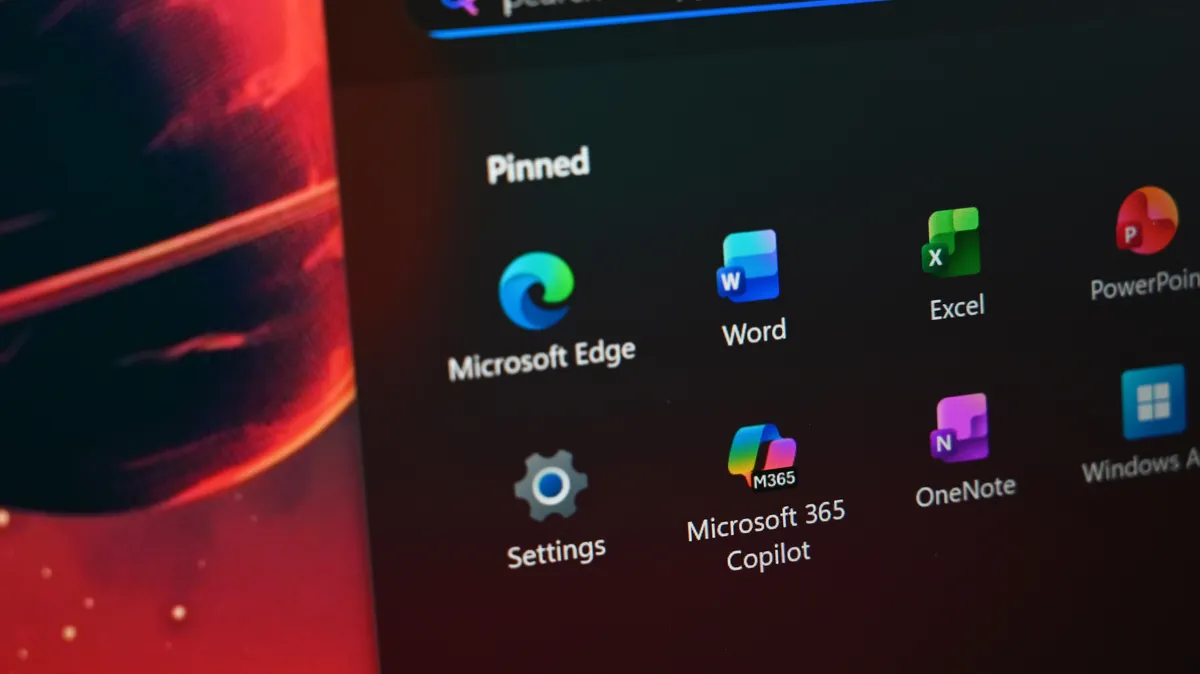
Close-up of Surface Laptop for Business 8th Edition desktop with pinned applications, including Microsoft Edge, Word, Excel, and Microsoft 365 Copilot.

Compared to the previous generation's LCD, the new anti-glare looks sharper and crisper to me for text and images. (Image credit: Daniel Rubino)

Microsoft finally addressed one of my long-standing complaints: pixel density. On the 15-inch model, they jumped from 201 PPI to 262 PPI. The resolution now sits at 3270 x 2180. In daily use, this results in noticeably crisper text and sharper images. When you are staring at spreadsheets for eight hours a day, that extra clarity helps reduce eye fatigue.

While the 13.8-inch model remains at 2304x1536 resolution (201 PPI), text looks sharper and crisper to me compared to the previous-gen LCD, likely due to the new display panel.

Microsoft also notes that this display is certified TÜV SÜD to meet the requirements of ISO 9241-307.

Performance: Intel Core Ultra Series 3

A close-up of a computer system information screen, displaying details like device name, processor type, RAM, graphics card, and storage used. Dark background, sleek and technical tone.

Intel's X7 367H packs quite the punch with 16-cores, epecially for this compact form factor. (Image credit: Daniel Rubino)

My test unit is powered by the Intel Core Ultra X7 368H, with 16 cores (4 P‑cores + 12 E‑cores), boost frequency up to 5.0GHz on the P-cores, and sits only behind the X9 378H for performance in Intel's current lineup.

This chip brings a system-level approach to performance, balancing the CPU, GPU, and NPU (48 TOPS) to handle sustained workloads. That NPU also qualifies this as a full-fledged Copilot+ PC, though Qualcomm's current Snapdragon X2 lineup packs 80 TOPs by comparison.

Benchmarks and Context

Image 1 of 3

Bar chart displaying Geekbench 6 scores for various laptops. Lenovo Yoga Slim 7x leads with 19,844 multi-core score. Surface Laptop for Business 8th Edition highlighted with 16,152.

Geekbench 6


I ran the SLB8 through our standard suite, and the results provide some much-needed context for the Intel vs. Qualcomm debate:

  • Geekbench 6 (Multi-Core): The Surface Laptop 8 (Intel) scored 16,152, which actually surpasses the 14,557 score of the Snapdragon X Elite in the Surface Laptop 7. For raw multi-threaded power in x86 environments, Intel is still a beast.
  • Cinebench 2024 (Multi-Core): Here, the Intel chip scored 602, falling behind the Snapdragon X Elite's 961. This suggests that while Intel is great for bursts and general multitasking, the ARM variant still holds a significant lead in sustained rendering tasks.
  • CrystalDiskMark (SSD Speeds): I was blown away by the storage speeds. The Read speed hit 7,006 MB/s, and Write speeds reached 5,842 MB/s. This puts it nearly on par with the Lenovo ThinkPad X1 Carbon Gen 12 and makes the machine feel instantaneous when moving large files or launching heavy apps.

The Intel ARC B390 GPU is also noticeably more powerful this year. Microsoft claims up to 35% more graphics performance than a MacBook Air with M5, which is a bold claim that seems to hold up in my initial testing of creative apps. As Nancie Gaskill, Vice President of Surface Business, notes in the internal launch documents: "The hardware people use enables businesses and teams to achieve more," and this GPU definitely helps on that front.

3DMark Night Raid benchmark results showing a score of 32,478, with a graphic score of 48,693 and CPU score of 11,250. Monitoring graphs included.

Intel's ARC B390 is on the higher-end for integrated graphics these days and does pretty well for a 13.8" laptop. (Image credit: Daniel Rubino)

In my testing, the B390 got 32,478 on 3DMark's NightRaid benchmark. To put that in perspective, an NVIDIA RTX 3050 for Laptop GPU scores 30,513, so this GPU packs a punch.

3DMark estimates 110+ FPS in a game like Fortnite when set to 1080p Ultra-level graphics.

Fan noise was remarkably quiet for everyday usage, only coming on during initial PC setup and for Windows Updates, both of which are expected. Likewise for temps, which remain on the cool side in usage, and only really warming up under sustained usage or fast charging, but not to a point where it's uncomfortable.

Touchpad and Keyboard: The Gold Standard

Surface Laptop for Business 8th Edition sits open on a white surface, displaying a vibrant sci-fi landscape wallpaper with a red planet and mountainous terrain.

Surface Laptop for Business 8th Edition shares a lot of the DNA as last year's models, but it has some substantial improvements. (Image credit: Daniel Rubino)

The typing experience on a Surface Laptop remains the best in the business. The keys have a perfect amount of travel and a satisfying tactile response. Backlight is also excellent with three stages and auto-sensing. But the real story is the touchpad.

A hand wearing a black ring rests on the touchpad of a Surface Laptop for Business 8th Edition. The laptop keyboard is visible, highlighting the Shift, Ctrl, and Alt keys.

While Surface Laptop for Business 7th Edition already had a great haptic touchpad, Microsoft is taking it to the next level with the 8th Edition, with an improved design and new abilities. (Image credit: Daniel Rubino)

The new advanced haptic touchpad is a joy to use. It provides subtle tactile cues that confirm your actions.

New for 2026, when I snap a window into place or drag a file between folders, the touchpad gives a tiny "click" feeling that makes the software feel physical. It even has detents for slider ranges. Microsoft has worked to ensure these signals have a delay of less than 50ms, so the feedback feels directly connected to your finger's movement (it even worked on the sound it makes).

Windows 11 settings interface showing touchpad options: Click sensitivity set to medium, Haptic click and new Haptic signals toggled on, with Signal intensity adjustable.

Under Settings, users now have a Haptic signals option to tune "subtle vibrations" when using Windows 11. (Image credit: Daniel Rubino)

What's even cooler is that there is an API for this, so third-party apps can now leverage haptic feedback for various tests like video scrubbing, snapping windows, raising volume, etc. Apps like PowerPoint, Concepts, Filmora, and Affinity either have this or are getting it in future updates, and I expect (hope?) other companies will follow suit.

Battery Life and Disappointments

Close-up of a dimly lit QWERTY keyboard with black keys. The letters and symbols are visible, creating a moody and focused atmosphere.

Surface Laptop for Business 8th Edition three-step keyiobard backlight is is clear and reliable. (Image credit: Daniel Rubino)

(Note: I'm still testing the battery, so consider this early impressions/in-the-works as I collect more data. I'll update in the coming days with more solid numbers).

While the performance is top-tier, the 54WHr battery is merely "OK." Microsoft marketing may claim all-day battery life, but in my real-world usage—heavy Chrome and Edge browsing, Slack, Telegram, YouTube, and constant video calls—I am seeing about 8 hours of usage.

That is enough to get through a standard workday, but it doesn't touch the endurance of the Qualcomm-powered Surface Laptop 7. I expect the consumer Qualcomm variant with the Snapdragon X2 Elite, due later this summer, to significantly outperform this Intel model in terms of longevity, and possibly even performance.

Daniel Rubino, with dark hair and a serious expression, is seen on Surface Laptop for Business 8th Edition's screen during a video call. He's wearing a black t-shirt in a well-lit room.

While unchanged, Surface still packs one of the best webcams on a laptop, especially with AI features like eye-gaze correction, auto-framing, and portrait blur, which use the NPU without taxing your CPU. (Image credit: Daniel Rubino)

I am also disappointed by the lack of Human Presence Detection (HPD). For a device so focused on privacy and security, having the screen automatically lock when I walk away would have been a perfect inclusion. Instead, you are still relying solely on Windows Hello facial recognition. While fast and secure, it isn't quite the "set it and forget it" security I wanted to see here.

The Enterprise "Differentiation"

Surface Laptop for Business 8th Edition viewed from the side; focus on the slim design and keyboard. Screen slightly angled open, emphasizing a modern and minimalist aesthetic.

Surfaced Connect is still here on the right side using Microsoft's proprietary magnetic charger; however you can still charge on the left side with either Thunderbolt 4 port. (Image credit: Daniel Rubino)

Nancie Gaskill, Vice President of Surface Business, noted that "hardware people use enables businesses and teams to achieve more". This version of the laptop is explicitly aimed at enterprise and government users for several reasons:

  • Security: It features a UEFI built with Patina, a modern, memory-safe approach written in Rust. This hardens the device against firmware-level attacks in a way consumer laptops rarely are.
  • Management: Every unit includes scannable QR codes under the feet and inside the chassis to simplify asset management and repairs.
  • Repairability: Almost every major component, from the display module to the motherboard and battery, is replaceable on-site by a technician.

While this is the "Business" edition, anyone can buy it through the Microsoft Store if they want the privacy screen or prefer Intel's compatibility.

Should you buy the Surface Laptop for Business 8th Edition?

You should buy this if ...

✅ You want a premium Surface experience for enterprise or government

✅ You work with sensitive documents in public spaces

✅ You want an excellent keyboard, touchpad, speakers, and webcam

✅ You need enterprise‑grade security (Pluton, Secured‑core PC protections, Rust‑based firmware, and deep Intune integration)

You should not buy this if ...

❌ You need a more rugged enterprise laptop

❌ You need a laptop with the best battery life

❌ You're working with a tight hardware budget


Surface Laptop for Business 8th Edition, with a black keyboard and a modern design, displaying a blue abstract swirl on its screen, set against a light gradient background.

It's now too expensive, and battery life is just OK, but in using the Surface Laptop for Business 8th Edition, I really enjoyed the experience. (Image credit: Daniel Rubino)

The Surface Laptop for Business 8th Edition is a specialized machine. If you are a standard consumer, you are likely better off waiting for the Snapdragon X2 models later this summer, which will almost certainly offer better battery life and cooler operation for a lower price.

However, if you are in the corporate or government sector and your "office" is often a tray table on an airplane or a busy terminal, this is currently one of the best laptops on the market. Between the revolutionary privacy screen, the top-tier typing and touchpad experience, and the rock-solid security foundation, it is a formidable tool for getting work done safely.

Surface Laptop for Business 8th Edition with a closed screen featuring a Windows logo, resting on a white surface. The background is a soft gradient from light blue to green.

At 3lbs and packing a 54WHr battery, it's not the lightest laptop, nor the longest lasting, but it's great to use and gets the job done. (Image credit: Daniel Rubino)

Microsoft has leaned into its strengths here. As Nancie Gaskill puts it, Surface is the "foundation that makes the rest of the strategy possible." If your strategy involves high-level security and raw Intel power, this is the machine you've been waiting for—just make sure your budget can handle the "RAM crisis" premium.

Some worthy alternatives to the Surface Laptop for Business 8th Edition include the HP EliteBook Ultra 14 (G1i), which has a slightly larger battery, is lighter, and more affordable, while also still being our top pick for business laptops. If you want super light, but also really expensive, and OK battery life, you could go with the Lenovo ThinkPad X1 Carbon Gen 12 (we haven't reviewed the latest version yet, but will soon). The new Gen 13 model starts at $1,853.10, so it's not like Microsoft is really far off from the competition here.

My final score is 4.0 out of 5 stars because it is a very good laptop that I really enjoy using (it's one of my favorites, actually), but that high price and so-so battery life keep it from being perfect.

Surface Laptop 8 with a sleek design displays a pastel abstract swirl wallpaper on a dark background. The screen is open and angled slightly left.

Microsoft

Surface Laptop for Business 8

The Surface Laptop for Business (8th Edition) packs the Intel Core Ultra Series 3 with a 50 TOPS NPU, delivering a big boost for sustained AI tasks. On select 13.8-inch models, an optional privacy screen lets professionals protect sensitive data in an instant. The 15-inch version boasts a crisp 262 PPI display for sharp text and visuals. With up to 23 hours of battery life, advanced haptics, and robust security powered by a Rust-based UEFI, it’s built for secure, high-performance productivity on the go.


Click to join us on r/WindowsCentral

Join us on Reddit at r/WindowsCentral to share your insights and discuss our latest news, reviews, and more.


Daniel Rubino

Daniel Rubino is the Editor-in-Chief of Windows Central. He is also the head reviewer, podcast co-host, and lead analyst. He has been covering Microsoft since 2007, when this site was called WMExperts (and later Windows Phone Central). His interests include Windows, laptops, next-gen computing, and wearable tech. He has reviewed laptops for over 10 years and is particularly fond of Qualcomm processors, new form factors, and thin-and-light PCs. Before all this tech stuff, he worked on a Ph.D. in linguistics studying brain and syntax, performed polysomnographs in NYC, and was a motion-picture operator for 17 years.

You must confirm your public display name before commenting

Please logout and then login again, you will then be prompted to enter your display name.