
惯性聚合 高效追踪和阅读你感兴趣的博客、新闻、科技资讯
阅读原文 在惯性聚合中打开

推荐订阅源

The GitHub Blog
The GitHub Blog
博客园 - 三生石上(FineUI控件)
V
V2EX
博客园 - 司徒正美
小众软件
小众软件
freeCodeCamp Programming Tutorials: Python, JavaScript, Git & More
T
Tailwind CSS Blog
Last Week in AI
Last Week in AI
雷峰网
雷峰网
月光博客
月光博客
钛媒体:引领未来商业与生活新知
钛媒体:引领未来商业与生活新知
Apple Machine Learning Research
让小产品的独立变现更简单 - ezindie.com
S
SegmentFault 最新的问题
美团技术团队
Hugging Face - Blog
Hugging Face - Blog
WordPress大学
WordPress大学
宝玉的分享
宝玉的分享
爱范儿
爱范儿
博客园 - 聂微东
量子位
J
Java Code Geeks
OSCHINA 社区最新新闻
OSCHINA 社区最新新闻
Vercel News
Vercel News

Latest from Windows Central

"An unmatched upgrade opportunity": Intel's new Core Series 3 mobile CPUs target "value buyers"… "There are over 5,700 combinations.": I attended Panasonic's USS Intrepid press conference and saw 10Gbps, Wi‑Fi 7 and on‑device AI in the new Toughbook 56, but should you swap out your Toughbook 55? "We "So Mac folks feel comfortable": Microsoft Microsoft thinks you'll want an Xbox Controller and 1 year of Microsoft 365 and Xbox Game Pass over a MacBook Neo "Microsoft fired the skilled people, leaving flowchart followers": Microsoft's Security Response Center is being blamed for the zero-day BlueHammer exploit leak, but I can't tell who's right "Thank you to every Greymane": Crimson Desert shows no signs of slowing down, topping over 5 million sales… "Another all-round excellent mini PC:" Beelink's discounted desktop is fantastic for intensive work and… Xbox's Starfield gets Nintendo Switch 2 rating days after its PS5 release, keeping hopes for a port of Bethesda's RPG alive — here's what we know "The stuff that we're seeing is really well put together": Xbox game publishing chief says Forza Horizon 6 takes him back to the golden years of racing games Microsoft's Xbox games lead Matt Booty says its studios are in a "culture of cultures" and work together more than you think — Blizzard is even helping with Fable Rumored feature coming to Steam that will help you track prices, and Microsoft should copy it immediately for Xbox and… Xbox and Best Buy want to help you build your first video game in 2026 Microsoft prepares display upgrades and two stage launch for new Surface Pro and Surface Laptop with Intel and… Someone discovered Seagate's Xbox Storage Expansion cards can be used on PC — which has made their value more… ID@Xbox makes a bold claim — “Games launching day one into Game Pass… do very well on other platforms… Before Forza Horizon 6 takes us to Japan, let's remember where the legend began almost 14 years ago "Users can now simply ask what happened": AppControl's optional AI integration gives you in-depth PC diagnostic history in plain English — It works with popular LLMs, but I'll use offline models for added security Our friends at Tom's Guide are upgrading: Here's what it means, and how our sister site's overhaul… "Quantity over quality is not always the answer": WWE 2K26 comes close to being the best in the world, but yearly releases are holding it back I "This is one headset that absolutely will not disappoint anyone": Our favorite Xbox headset raises the bar for sound quality with a price that's lower than I expected "One of the better laptops I’ve encountered and one I’d happily use daily": This high-end ThinkPad is a solid bet for professionals — especially after this generous discount I've finally found a loophole to block a specific type of YouTube ads, and it won’t cost you a dime: Just a… www.windowscentral.com "The Lotus guys probably figured it didn't matter to be wrong": Excel thinks 1900 was a leap year because of a small shortcut taken in the '80s — I'll think of this next time I want to cut corners Starfield's sales on PlayStation 5 make me wonder why Xbox even bothered... was this worth devaluing exclusivity? Overwatch Season 2 is LIVE! Xbox Your Xbox Storage Expansion Cards can have a life after the console if you get a simple adapter for your PC
Sniffnet is my new go-to app for network monitoring &mdas...
c.cale.hunt@ · 2026-04-17 · via Latest from Windows Central
Sniffnet dashboard with a dark blue and yellow theme displays network traffic. Graphs, numerical data, and lists of hosts, services, and programs are shown. The background is a blue abstract design.
Sniffnet's overview page displayed on a Windows 11 desktop. (Image credit: Future)

I'm always on the lookout for novel Windows apps that can either improve my baseline experience or provide more insight than the regular tools that come with my favorite OS.

This week, I was introduced to Sniffnet, which has recently exploded in popularity to hit some 401,000+ overall downloads. It's available to download directly from the Sniffnet website or from GitHub, where it has amassed 33,800 stars.

Article continues below

The Sniffnet network monitoring dashboard with a dark blue and yellow theme shows data usage and traffic rate. Includes graphs, service, and program details.

A look at the Sniffnet dashboard with network hosts, services, programs, and traffic rates readily available. (Image credit: Giuliano Bellini (Sniffnet))

I've been toying around with Sniffnet, and I can testify that it's quite easy to navigate and operate. It's clearly been refined over its three years of development history (all by Bellini, notably), and because it's developed with Rust, it uses hardly any system resources.

The part I appreciate most? Sniffnet doesn't collect any user data. Everything remains on your device, so you don't have to worry about outside forces snooping on your traffic. It also works with VPNs, which is great news considering I usually have one enabled.

What can Sniffnet do for you?

Sniffnet's network monitoring interface showing data for domain github.com. Columns display source/destination addresses, ports, protocol (TCP), and service (https).

A look at the Sniffnet inspect page, taking a look at the GitHub.com domain. (Image credit: Giuliano Bellini (Sniffnet))

I downloaded Sniffnet without issue and installed the required Npcap capture packet tool to begin (you'll be prompted to download at the end of the Sniffnet installation). Easy enough.

The app is instantly populated with traffic sources, and you can choose to begin monitoring any of the sources. Once you've gone deeper, a full list of network hosts, services, and programs shows up with detailed information about each connection.

Filter and notification settings are available for each entry, and you can add alerts for when data thresholds are met. There are 12 preset themes from which you can choose, and you can also mix and match colors. Within the app, you can also select one of 24 different languages.

Image

1

of

2
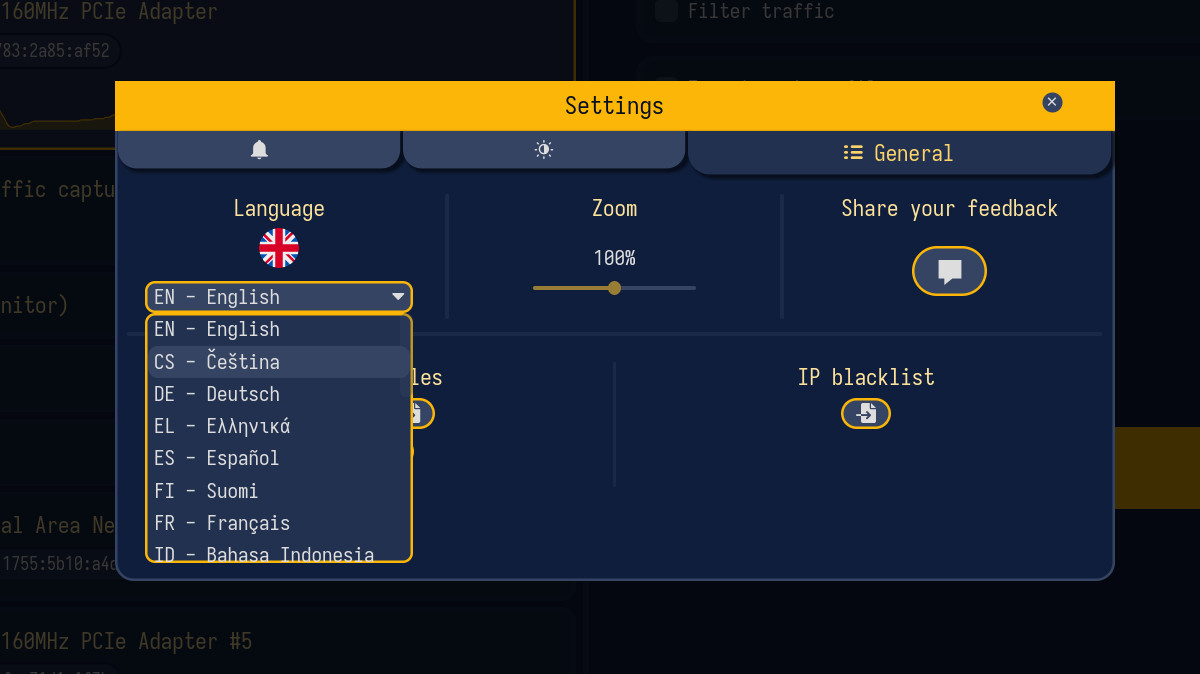
Sniffnet settings menu screen with a dark blue background and yellow accents. Language options dropdown includes various languages. Zoom is set to 100%.
A look at the Sniffnet app's varied language options.(Image credit: Future)

The full-size app is, of course, the best way to monitor your traffic, but a thumbnail overlay setup is also available if you want to keep an eye on movement from the corner of your screen.

Sniffnet is great for keeping tabs on your network's bandwidth usage and connections, but as mentioned, it's also great for sniffing out suspicious activity.

If you deal in IoT devices on your network, a tool like this is especially priceless for identifying unauthorized connections.

What features were just added with the Sniffnet 1.5 update?

Sniffnet version 1.5 just launched on April 14, 2026, adding tools that identify which apps and programs are using up your network's bandwidth.

Not only does this help rein in data usage, but it also helps users spot suspicious programs that they might not otherwise notice.

Drilling deeper, each application can be favorited and set up to notify you whenever it begins to generate traffic. Adding to the security aspect, the Sniffnet 1.5 update adds the ability to import IP blacklists and traffic rundowns for any network adapter connected to your PC.

Blank Pixel

Windows Central's take

I've been toying around with Sniffnet on my PC for a couple of days now, and it's not going anywhere.

It's fast, it hardly takes up any system resources, and it provides the level of detail I need. I can see why it's so popular.

Have you already tried Sniffnet? Do you use a different network monitoring tool? Let me know in the comments section below!


Click to join us on r/WindowsCentral

Join us on Reddit at r/WindowsCentral to share your insights and discuss our latest news, reviews, and more.


Cale Hunt brings to Windows Central more than nine years of experience writing about PC gaming, Windows laptops, accessories, and beyond. If it runs Windows or in some way complements the hardware, there’s a good chance he knows about it, has written about it, or is already busy testing it.

You must confirm your public display name before commenting

Please logout and then login again, you will then be prompted to enter your display name.