


惯性聚合 高效追踪和阅读你感兴趣的博客、新闻、科技资讯
阅读原文 在惯性聚合中打开

推荐订阅源

月光博客
月光博客
L
LangChain Blog
Jina AI
Jina AI
WordPress大学
WordPress大学
人人都是产品经理
人人都是产品经理
S
Secure Thoughts
T
The Exploit Database - CXSecurity.com
钛媒体:引领未来商业与生活新知
钛媒体:引领未来商业与生活新知
博客园 - 聂微东
小众软件
小众软件
Apple Machine Learning Research
C
Cyber Attacks, Cyber Crime and Cyber Security
Project Zero
Project Zero
T
Threat Research - Cisco Blogs
量子位
G
GRAHAM CLULEY
腾讯CDC
让小产品的独立变现更简单 - ezindie.com
C
CERT Recently Published Vulnerability Notes
The Hacker News
The Hacker News
C
Cisco Blogs
Scott Helme
Scott Helme
Spread Privacy
Spread Privacy
宝玉的分享
宝玉的分享
V
V2EX
博客园 - 三生石上(FineUI控件)
T
Tor Project blog
P
Proofpoint News Feed
雷峰网
雷峰网
D
Darknet – Hacking Tools, Hacker News & Cyber Security
V
Vulnerabilities – Threatpost
PCI Perspectives
PCI Perspectives
博客园_首页
L
LINUX DO - 最新话题
IT之家
IT之家
有赞技术团队
有赞技术团队
博客园 - Franky
Hacker News: Ask HN
Hacker News: Ask HN
Last Week in AI
Last Week in AI
The Cloudflare Blog
Exploit-DB.com RSS Feed
freeCodeCamp Programming Tutorials: Python, JavaScript, Git & More
美团技术团队
博客园 - 【当耐特】
OSCHINA 社区最新新闻
OSCHINA 社区最新新闻
Security Archives - TechRepublic
L
LINUX DO - 热门话题
AWS News Blog
AWS News Blog
S
Security Affairs
T
Tailwind CSS Blog

Captivate Unlimited Podcast Hosting & Analytics

Apple Video Podcasting: Best Practices to Get The Most From The New Tech Apple Video Podcasting, powered by HLS: what is it and what does it mean for your podcast? Captivate Announced as Day One Launch Partner for Apple’s New HLS Video Release Introducing Captivate Assistant: The Most Useful AI Podcasting Assistant Yet; Grow Your Audience AND Save Time! 3 Low-Effort Ways to Promote Your Podcast (and Grow Listeners) this Autumn Captivate Unveils Ad Marketplace, Online Podcast Recording Platform and Integrated Audio Editing Tools Captivate Launches New Podcast Submission Process for Apple Podcasts Captivate Releases Sync V3 Make Money Podcasting: How to Successfully Monetize With Podcast Sponsorship And Advertisements Make Money Podcasting: How to Monetize Your Podcast Through Listener Donations World First: Captivate Podcast Hosting Platform Achieves IAB Tech Lab Podcast Measurement 2.2 Certification Captivate 2.5: Upgraded UI and Brand New Features to Make Your Podcast Even More Successful 8 Quick Ways to Build A Community Using Your Podcast Video: GarageBand For Podcasters - Tutorial, Tips and Tricks - Captivate Unlimited Podcast Hosting & Analytics 7 Common Podcast Sponsorship Mistakes – Plus How to Avoid & Fix Them! 12 Best Podcast Logos & Artwork Examples (That Actually Engage Listeners) Video: Podcast Logos vs Cover Art (Roles and Differences Explained!) - Captivate Unlimited Podcast Hosting & Analytics Video: How to Write a Podcast Script (And 5 Reasons Yours Doesn't Work!) - Captivate Unlimited Podcast Hosting & Analytics How to Write the Perfect Podcast Intro Script: Hook and Engage Listeners Video: How Podcasters Make Money (PLUS 5 Reasons You Don’t) - Captivate Unlimited Podcast Hosting & Analytics Is Apple Podcasts Free for Podcasters? Plus 8 Easy Steps to Upload your Podcast to Apple Ultimate Podcast Production Guide 2024 – How to Successfully Produce a Podcast How to Write a Perfect Podcast Episode Summary – Plus Tips, Benefits & Examples Changing Podcast Host Without Losing Subscribers, Listeners PLUS How to Move Your Analytics 80 Best Engaging & Interesting Podcast Interview Questions for Guests Captivate Launches Support For Apple Podcasts Subscriptions Spotify Launches 2023 Wrapped for Podcasters What is a Podcast? Plus 10 Reasons You Should Start One Today! What are Podcast Chapters? How do they Improve Listener Retention? YouTube Launches Its RSS Upload Tool for Podcasts – What Does This Mean for Podcasters? Podcast Branding 2024 Guide: How to Build a Podcast Brand & Benefits 43 Engaging Podcast Topics & Ideas Based on Show Format or Type – Including Examples 9 Best Ways to Promote a Podcast on Social Media – Plus FAQs Answered Podcast Downloads 2024 Guide: What is Good & How to Get More? Podcast Categories 2024 Guide – Get Discovered on Spotify, Apple and More How to Get on Podcasts – Plus Nailing your Pitch and Guest Interview How to Create Engaging and Powerful Podcast Taglines 2024 – Plus Examples Google Podcasts to be Discontinued in 2024 – Time to Say Goodbye How to Host Engaging and Powerful Podcast Interviews with Your Guests MP3 vs WAV – What is the Best File Format for Podcasts? How Much Money Do Podcasters Make in 2024? Plus Examples & How To Do It How to Record a Podcast Remotely 2024 Guide – Remote Podcast Setup How to Use Podcasts for Marketing and Branding Podcast Headphones 2023 Guide – 6 Best Headphones for Podcasting Podcast Equipment Essentials and Setup for Beginners and any Budget – Plus Advanced Extras How to Analyze and Track your Podcast Analytics Formats & Types of Podcast Explained – 10 Examples Plus Pros and Cons Demystifying Podcast Advertising: Ultimate Guide – Plus Tips for Podcasters to get Advertisers How to Publish a Podcast to Spotify, Apple Podcasts and Any Directory – Where to Upload & Distribute Podcast RSS Feeds 101: A Beginner’s Guide – What They Are & How They Work What are the best podcast apps? Both free and paid! Podcast Keyword Strategy: How to Uncover High-Impact Keywords to Boost Your Reach Podcast Calls to Action (CTAs): Converting Listeners into Engaged Fans Apple Launches iOS 17 – New Features for Apple Podcasts & Podcasters How to Start & Build a Podcast with No Audience and From Scratch – (Tips & Examples) Planning Podcast Episodes 2023 Guide – Templates, Outlines & Format Tips Patreon Alternatives – Best Podcast Subscription Platforms (is Apple Podcast Subscriptions the Best?) Make Money with Podcast Subscriptions & One-Off Donations Easily with Captivate The Easiest Way to Start a Video Podcast (& Why You Shouldn’t Wait) How to Start or Move your Podcast to YouTube – 5 Easy Tips Podcast Networks Explained – Everything You Need to Know! [2024 Guide] What is Podcast Hosting? Everything You Need to Know! YouTube Music for Podcasts: Boost Your Discoverability Today with New Features How to Find the Ideal Podcast Episode Length for Your Show Podcasting 2.0 Explained: RSS Enhancements for the Independent Podcaster How to Optimize Your Podcast Guest Appearance for Search Grow Your Audience Using a Podcast Avatar and 13 Other Techniques 4 Main Reasons Stopping Podcasters from Launching – Which Blocker is Stopping You? How to Edit and Record a Podcast in GarageBand Best Podcast Voice Tips and Advice by Voice Coach and Podcaster Nic Redman Making Your Podcast Hosting Even Better Value Best Podcast Tips & Advice from Podcasters 2022/23 for International Podcast Day How to Write the Perfect Podcast Script (plus Examples & Templates) Captivate are Platinum Sponsors of the APVA Awards 13 Best Podcast Recording Software 2023 (including remote) – Reviewed by Podcasters We Interviewed 11 Attendees about The Podcast Show 2022 Podcast Show 2022 Roundup – Interview with Captivate’s MD Mark Asquith Descript for Podcasters Tutorial: Everything you need to know Facebook Is Stopping Podcast Services – Why & What To Do Next? In-Depth Review of Alitu for Podcasters – How it makes recording and editing easier Captivate Supports Podchaser’s #Reviews4Good April 2022 – Raising Money for #ChefsForUkraine 2021 A Year in Review: Your Big Podcast Achievements and ours! What is Dynamic Ad & Content Insertion in Podcasting? Video: Captivate's AMIE Dynamic Ad Insertion Technology for Podcasters [Overview] - Captivate Unlimited Podcast Hosting & Analytics Recommended Podcasting Tools & Resources Video: How to Use the Free Podcast Guest Booking & Interview Management System - Captivate Unlimited Podcast Hosting & Analytics Free Interview Management & Guest Booking Platform for Podcasters Captivate Shareable Podcast Player V2 is Here! Introducing Cross-Promotional Feed Drops & Network Features for Every Captivate Podcaster Video: How to Grow Your Podcast with Captivate Growth Labs - Captivate Unlimited Podcast Hosting & Analytics Learn How to Grow & Monetize Your Podcast with Captivate Growth Labs Video: Get Listed on Apple Podcasts, Spotify + More - Captivate Unlimited Podcast Hosting & Analytics Video: How to Publish an Episode: Captivate Podcast Hosting Tutorial - Captivate Unlimited Podcast Hosting & Analytics Video: Dashboard Overview | Captivate Podcast Hosting Tutorial - Captivate Unlimited Podcast Hosting & Analytics Video: How to Create A Podcast | Captivate Podcast Hosting Tutorial - Captivate Unlimited Podcast Hosting & Analytics Captivate 2.0: A New Look, New Features and New Podcasting Possibilities! Podcast Intro & Outro – How to Make Yours Ear-Grabbing Podcast PLUS 4 Real-Life Examples! Write an Engaging Podcast Description that Turns Scrollers into Listeners (Plus Examples) How to Podcast on YouTube: The 3 Biggest Mistakes to Avoid Want to Be a Better Podcaster? Listen to These 13 Podcasts About Podcasting
GarageBand vs Audacity for Podcasting: Pros, Cons and Similarities
Ben Dodd · 2024-04-04 · via Captivate Unlimited Podcast Hosting & Analytics

Reading Time: 6 minutes

What’s the best platform to record and edit your podcast – let’s take a look at GarageBand vs Audacity! We’ll break down the pros and cons of each platform, explain their respective feature sets and help you decide what’s best for you.
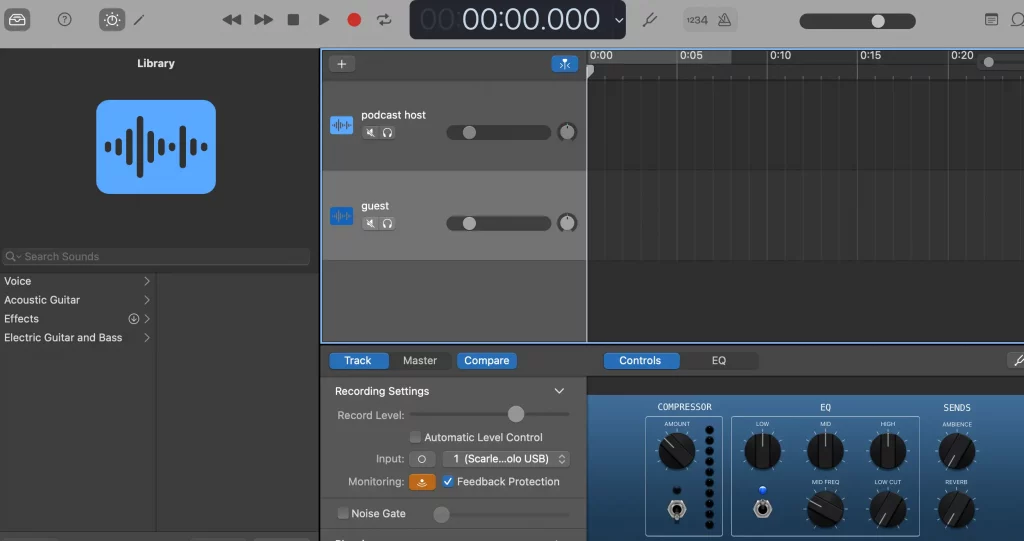
What is GarageBand?

GarageBand's UI, showing some empty audio tracks and effect options
The GarageBand user interface

GarageBand is Apple’s free Digital Audio Workstation (also known as a DAW), which comes pre-installed on all Apple tech. There’s a version for Mac, iPhone and iPad, as well as iPod if you’re into your retro tech. 

It was primarily designed for musicians, allowing them to record and edit at home or on the go (hence GarageBand), but it’s perfect for podcasters, too – you’ll just need to disregard some of the more music-orientated features, which we’ll discuss below.
Garageband Gear Guide Everything You Need

Download The Garageband Gear Guide right now,
for free!

"*" indicates required fields

100% secure. We never share your email
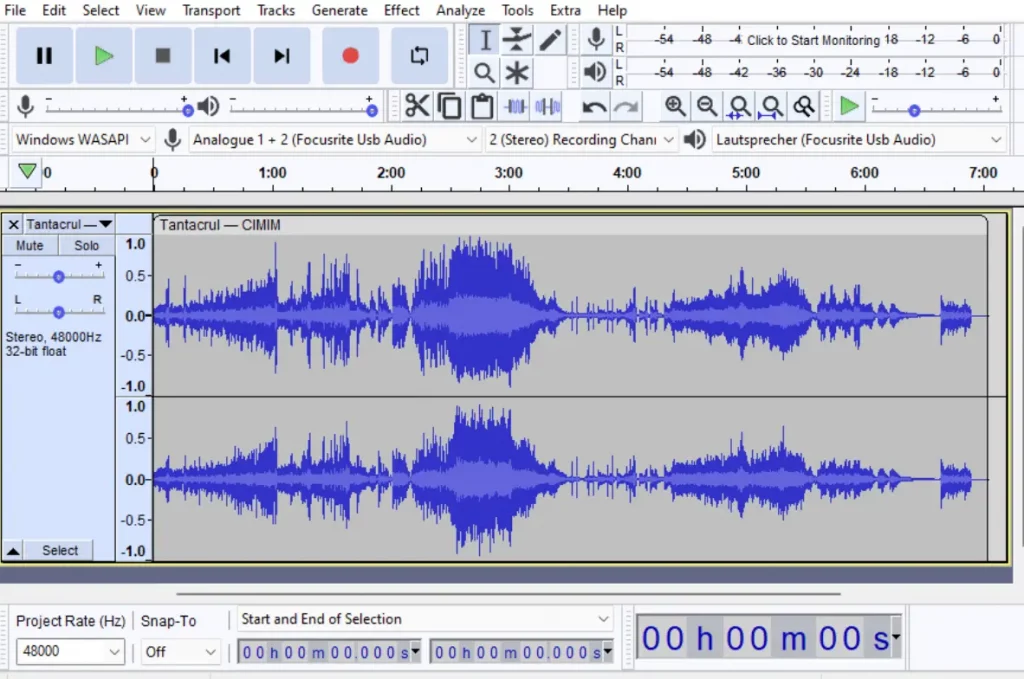
What is Audacity?

Audacity's UI, showing two audio files.
Audacity’s user interface

Audacity is a free, beginner-level DAW available on all operating systems. It’s simple – it doesn’t have some of the bells and whistles available on paid editors like Descript – but certainly effective for new and veteran podcasters alike. 

Like most DAWs, it’s capable of recording and editing, as well as converting from one file type to another.

Can I use both GarageBand and Audacity for my podcast?

Both Garageband and Audacity are totally suitable for recording and editing your podcast episodes, however Garageband is only available to you if you’re working on an iOS device. Audacity is cross-platform, though, so you’re able to use that on Windows as well.

Being free, they both lack some of the more specialised features of a paid DAW like Descript or Logic Pro, but they’re popular for a reason: they work really well for beginners.

GarageBand and Audacity Similarities

1. Both are free

You can download GarageBand or Audacity to your machine without any payments or subscriptions whatsoever.

2. Full recording and editing capabilities

Some DAWs (even paid ones) offer only recording or editing – not so with Garageband or Audacity. Both options are a one-stop-shop for all of your digital audio needs.

3. Resource bank

You can find a plethora of educational content for both platforms online, giving you a helping hand on your journey from editing newbie to seasoned pro.

4. Simplicity

Garageband and Audacity are both designed with beginners in mind – they have a very user-friendly interface that you’ll pick up after a few uses.

5. Multi-track functionality

You can record and edit on multiple tracks within the same project on both platforms, making the editing process quick and streamlined.

6. Standard editing features

Of course, both platforms offer the basic editing features you need in a DAW: you can cut, copy and paste, fade in and out, adjust volume and remove sections of imported or recorded files.

7. Advanced editing features

Both platforms also offer some cool, more advanced features – things like compression, which makes your vocal tracks louder and more resonant, and background noise removal or reduction. 

8. Export options

You’ve got a number of options with regards to which file format to export your project as (we’d strongly recommend mp3, though, as this is pretty much the most widely accepted format). You can also choose the quality you’re exporting in; 192 KBPS is the industry recommended standard for podcasts.

9. Mono and stereo functionality

Both platforms allow you to choose whether to record in mono or stereo. Essentially, stereo feeds audio to two separate speakers, left and right, allowing the sound to surround the listener and meaning you can pan certain audio elements to one side or the other. Mono just feeds all the audio to one channel, so all speakers are playing the exact same thing.

GarageBand Pros

1. Ease of use

GarageBand’s UI is familiar to anyone who’s used an Apple product before. If you’re an iOS native, the lay out and tool functionality will just make sense. Any icons indicate their function immediately, and you’ll be able to get to grips with it all extremely fast.

2. It comes pre-installed

Any Apple product you buy – whether that’s a Mac, iPhone or iPad, will come with Garageband already installed. All you need to do is open it up!

3. Easy to import audio

Importing pre-recorded audio – whether that’s a jingle, interview or advertisement – couldn’t be simpler with Garageband. Just drag and drop your file in and it will automatically place it on a new track. You can of course then easily drag and drop it to other tracks, as with any audio in your project.

4. MIDI enabled

Garageband supports MIDI files and tracks, meaning you can import any jingles or musical stings directly – or, conceivably, you could make your own jingle directly in Garageband using a MIDI keyboard or other instrument.

5. Edits can be easily undone

If you make an edit to an imported piece of audio, this doesn’t alter the original file, meaning your edits can be undone nice and easily.

6. Background noise reduction

By using the Noise Gate feature, you can reduce and remove unwanted background noise like hissing or buzzing, making your podcast sound far more professional – and your listeners will thank you too.

GarageBand Cons

1. Lots to ignore

As GarageBand was designed with musicians in mind, there are a lot of features to ignore – things like tempo, drum tracks and keys are displayed, which are obviously totally irrelevant for podcasters. As a result, the interface could perhaps be a little overwhelming to a first-timer, though this sensation won’t last long.

It’s important to switch off the metronome, which is enabled as standard – if you leave this on, you’ll have a click track in the background of your episodes. 
Another article we think you'd like...

Edit and record with GarageBand blog featured image

Reading Time: 10 minutes A walk through of how to use Garageband for podcasters and an evaluation of it’s strengths as a recording and editing tool.

2. Exclusive to iOS

If you’re not using an Apple device, you simply can’t use GarageBand – it’s not available anywhere except iOS.

3. No remote recording

GarageBand wasn’t designed with remote podcasting in mind, so there’s no option to record remotely like with something like Zoom or Riverside. Only local recording is supported here.

Audacity Pros

1. Cross-platform

Unlike GarageBand, Audacity is available everywhere – you just need to download it. It’ll work on Windows, Apple and whatever else you could be running!

2. Easy to import audio

Like GarageBand, you can just drag and drop an audio file into your Audacity project and it’ll render it and place it on a new track, which you can drag to anywhere else on your project.

3. Advanced background noise reduction

Audacity will analyse a sample of your background noise and help you remove it, with some effective granular options for how much noise to remove and where to do it. This really helps your audio come out at a professional quality.

4. Loudness normalization

A handy tool, called Loud Normalization, allows you to normalize your audio levels to the industry standard of -16 LUFS – which basically means that your podcast will be at the same volume as other podcasts on directories.

Audacity Cons

1. Doesn’t support MIDI tracks

You won’t be able to import MIDI files into Audacity, you’ll have to convert them to a supported format first, like mp3 or wav. You also can’t record MIDI (meaning you couldn’t plug a keyboard into Audacity and play it), so no making your own jingles on the fly.

2. No remote recording

Like GarageBand, Audacity doesn’t support remote recording. You’ll need something like Riverside or Squadcast for that – you can only record locally in Audacity.

3. UI 

Audacity’s user interface is a little… retro – for a total newbie, it might take a little while to get to grips with it. It doesn’t really look like anything else, so you’ll just have to give it a little time to get familiar.

Which one should you choose?

Both options are good, so it’s not a case of one being a clear “winner” over the other – except in the case that you don’t have an Apple device, where your only choice of the two is Audacity.

If you are on an iOS device and you’ve got a bit of experience with editing anything on iOS before (whether that’s videos, pictures or anything else), GarageBand slightly edges it due to familiarity and ease of UX – it’ll just feel more like second nature to you. Outside of that, they’re both totally valid options, and they’re both free, so you can try them out and see which you prefer!

Takeaway

Audacity and GarageBand are two of the most popular free options for recording and editing podcasts, and both are championed by beginners and veteran podcasters alike. 

GarageBand, while designed with musicians in mind, is totally transferable to podcasters too – it’ll feel like home to anyone with any experience using any of Apple’s digital tools before. The biggest drawback is that it’s iOS exclusive – meaning if you’re a windows user, you’re not invited.

Audacity is available cross-platform, meaning Windows and iOS, and it’s simple interface and easy tools make it an attractive option. It boasts a really granular background noise removal tool, too, to get that professional sound.

Both DAWs are really great viable options – try both and see what works for you!

Garageband Gear Guide Everything You Need

Download The Garageband Gear Guide right now,
for free!

"*" indicates required fields

100% secure. We never share your email

Ben Dodd

Ben is a content writer and podcast support expert for Captivate, and has been with the team since 2021. He has a first-class degree in Journalism, and uses these skills to help new and veteran podcasters alike level up their content: reviewing tech, crafting product guides and sharing cutting edge podcasting news. Ben is always on hand to help Captivate podcasters with anything they run into, from when they first import their show to advanced questions like how to grow your audience or where to start with monetization. He loves what he does, and is committed to helping podcasters grow their show using Captivate. He’s always been a podcast fan - current favourites include Steven West’s ‘Philosophize This’ and Bob Mortimer’s ‘Athletico Mince’.