



惯性聚合 高效追踪和阅读你感兴趣的博客、新闻、科技资讯
阅读原文 在惯性聚合中打开

推荐订阅源

酷 壳 – CoolShell
酷 壳 – CoolShell
H
Hacker News: Front Page
P
Palo Alto Networks Blog
T
ThreatConnect
Apple Machine Learning Research
博客园_首页
T
True Tiger Recordings
P
Privacy & Cybersecurity Law Blog
B
Blog
IT之家
IT之家
Last Week in AI
Last Week in AI
F
Full Disclosure
Hacker News: Ask HN
Hacker News: Ask HN
C
Comments on: Blog
Microsoft Azure Blog
C
Cybersecurity and Infrastructure Security Agency CISA
Microsoft Security Blog
博客园 - 【当耐特】
N
News and Events Feed by Topic
NISL@THU
NISL@THU
腾讯CDC
雷峰网
雷峰网
Security Latest
Security Latest
李成银的技术随笔
M
Microsoft Research Blog - Microsoft Research
L
LangChain Blog
L
Lohrmann on Cybersecurity
cs.CL updates on arXiv.org
C
Check Point Blog
Y
Y Combinator Blog
Recent Announcements
博客园 - Franky
N
News | PayPal Newsroom
V
V2EX
A
About on SuperTechFans
The Register - Security
月光博客
月光博客
奇客Solidot–传递最新科技情报
奇客Solidot–传递最新科技情报
Google Online Security Blog
MyScale Blog
MyScale Blog
Cisco Talos Blog
Cisco Talos Blog
Vercel News
Vercel News
WordPress大学
WordPress大学
C
Cyber Attacks, Cyber Crime and Cyber Security
The Hacker News
The Hacker News
IntelliJ IDEA : IntelliJ IDEA – the Leading IDE for Professional Development in Java and Kotlin | The JetBrains Blog
爱范儿
爱范儿
A
Arctic Wolf
L
LINUX DO - 最新话题
freeCodeCamp Programming Tutorials: Python, JavaScript, Git & More

Captivate Unlimited Podcast Hosting & Analytics

Captivate & DAX US Launch Unified Monetization Suite for US Creators Apple Video Podcasting: Best Practices to Get The Most From The New Tech Apple Video Podcasting, powered by HLS: what is it and what does it mean for your podcast? Captivate Announced as Day One Launch Partner for Apple’s New HLS Video Release Introducing Captivate Assistant: The Most Useful AI Podcasting Assistant Yet; Grow Your Audience AND Save Time! 3 Low-Effort Ways to Promote Your Podcast (and Grow Listeners) this Autumn Captivate Unveils Ad Marketplace, Online Podcast Recording Platform and Integrated Audio Editing Tools Captivate Launches New Podcast Submission Process for Apple Podcasts Captivate Releases Sync V3 Make Money Podcasting: How to Successfully Monetize With Podcast Sponsorship And Advertisements Make Money Podcasting: How to Monetize Your Podcast Through Listener Donations World First: Captivate Podcast Hosting Platform Achieves IAB Tech Lab Podcast Measurement 2.2 Certification Captivate 2.5: Upgraded UI and Brand New Features to Make Your Podcast Even More Successful 8 Quick Ways to Build A Community Using Your Podcast GarageBand vs Audacity for Podcasting: Pros, Cons and Similarities Video: GarageBand For Podcasters – Tutorial, Tips and Tricks 7 Common Podcast Sponsorship Mistakes – Plus How to Avoid & Fix Them! 12 Best Podcast Logos & Artwork Examples (That Actually Engage Listeners) Video: Podcast Logos vs Cover Art (Roles and Differences Explained!) Video: How to Write a Podcast Script (And 5 Reasons Yours Doesn’t Work!) How to Write the Perfect Podcast Intro Script: Hook and Engage Listeners Video: How Podcasters Make Money (PLUS 5 Reasons You Don’t) - Captivate Unlimited Podcast Hosting & Analytics Is Apple Podcasts Free for Podcasters? Plus 8 Easy Steps to Upload your Podcast to Apple Ultimate Podcast Production Guide 2024 – How to Successfully Produce a Podcast How to Write a Perfect Podcast Episode Summary – Plus Tips, Benefits & Examples Changing Podcast Host Without Losing Subscribers, Listeners PLUS How to Move Your Analytics 80 Best Engaging & Interesting Podcast Interview Questions for Guests Captivate Launches Support For Apple Podcasts Subscriptions Spotify Launches 2023 Wrapped for Podcasters What is a Podcast? Plus 10 Reasons You Should Start One Today! What are Podcast Chapters? How do they Improve Listener Retention? YouTube Launches Its RSS Upload Tool for Podcasts – What Does This Mean for Podcasters? Podcast Branding 2024 Guide: How to Build a Podcast Brand & Benefits 43 Engaging Podcast Topics & Ideas Based on Show Format or Type – Including Examples 9 Best Ways to Promote a Podcast on Social Media – Plus FAQs Answered Podcast Downloads 2024 Guide: What is Good & How to Get More? Podcast Categories 2024 Guide – Get Discovered on Spotify, Apple and More How to Get on Podcasts – Plus Nailing your Pitch and Guest Interview How to Create Engaging and Powerful Podcast Taglines 2024 – Plus Examples Google Podcasts to be Discontinued in 2024 – Time to Say Goodbye How to Host Engaging and Powerful Podcast Interviews with Your Guests MP3 vs WAV – What is the Best File Format for Podcasts? How Much Money Do Podcasters Make in 2024? Plus Examples & How To Do It How to Record a Podcast Remotely 2024 Guide – Remote Podcast Setup How to Use Podcasts for Marketing and Branding Podcast Headphones 2023 Guide – 6 Best Headphones for Podcasting Podcast Equipment Essentials and Setup for Beginners and any Budget – Plus Advanced Extras How to Analyze and Track your Podcast Analytics Formats & Types of Podcast Explained – 10 Examples Plus Pros and Cons Demystifying Podcast Advertising: Ultimate Guide – Plus Tips for Podcasters to get Advertisers How to Publish a Podcast to Spotify, Apple Podcasts and Any Directory – Where to Upload & Distribute Podcast RSS Feeds 101: A Beginner’s Guide – What They Are & How They Work What are the best podcast apps? Both free and paid! Podcast Keyword Strategy: How to Uncover High-Impact Keywords to Boost Your Reach Podcast Calls to Action (CTAs): Converting Listeners into Engaged Fans Apple Launches iOS 17 – New Features for Apple Podcasts & Podcasters How to Start & Build a Podcast with No Audience and From Scratch – (Tips & Examples) How to Get Quality Podcast Backlinks in 2023 Planning Podcast Episodes 2023 Guide – Templates, Outlines & Format Tips Patreon Alternatives – Best Podcast Subscription Platforms (is Apple Podcast Subscriptions the Best?) Make Money with Podcast Subscriptions & One-Off Donations Easily with Captivate The Easiest Way to Start a Video Podcast (& Why You Shouldn’t Wait) How to Start or Move your Podcast to YouTube – 5 Easy Tips Podcast Networks Explained – Everything You Need to Know! [2024 Guide] What is Podcast Hosting? Everything You Need to Know! YouTube Music for Podcasts: Boost Your Discoverability Today with New Features How to Find the Ideal Podcast Episode Length for Your Show Podcasting 2.0 Explained: RSS Enhancements for the Independent Podcaster How to Optimize Your Podcast Guest Appearance for Search Grow Your Audience Using a Podcast Avatar and 13 Other Techniques 4 Main Reasons Stopping Podcasters from Launching – Which Blocker is Stopping You? How to Edit and Record a Podcast in GarageBand Best Podcast Voice Tips and Advice by Voice Coach and Podcaster Nic Redman Making Your Podcast Hosting Even Better Value Best Podcast Tips & Advice from Podcasters 2022/23 for International Podcast Day How to Write the Perfect Podcast Script (plus Examples & Templates) Captivate are Platinum Sponsors of the APVA Awards 13 Best Podcast Recording Software 2023 (including remote) – Reviewed by Podcasters We Interviewed 11 Attendees about The Podcast Show 2022 Podcast Show 2022 Roundup – Interview with Captivate’s MD Mark Asquith Descript for Podcasters Tutorial: Everything you need to know Facebook Is Stopping Podcast Services – Why & What To Do Next? In-Depth Review of Alitu for Podcasters – How it makes recording and editing easier Captivate Supports Podchaser’s #Reviews4Good April 2022 – Raising Money for #ChefsForUkraine 2021 A Year in Review: Your Big Podcast Achievements and ours! What is Dynamic Ad & Content Insertion in Podcasting? Video: Captivate's AMIE Dynamic Ad Insertion Technology for Podcasters [Overview] - Captivate Unlimited Podcast Hosting & Analytics Recommended Podcasting Tools & Resources Video: How to Use the Free Podcast Guest Booking & Interview Management System - Captivate Unlimited Podcast Hosting & Analytics Free Interview Management & Guest Booking Platform for Podcasters Captivate Shareable Podcast Player V2 is Here! Introducing Cross-Promotional Feed Drops & Network Features for Every Captivate Podcaster Video: How to Grow Your Podcast with Captivate Growth Labs - Captivate Unlimited Podcast Hosting & Analytics Learn How to Grow & Monetize Your Podcast with Captivate Growth Labs Video: Get Listed on Apple Podcasts, Spotify + More - Captivate Unlimited Podcast Hosting & Analytics Video: How to Publish an Episode: Captivate Podcast Hosting Tutorial - Captivate Unlimited Podcast Hosting & Analytics Video: Dashboard Overview | Captivate Podcast Hosting Tutorial - Captivate Unlimited Podcast Hosting & Analytics Video: How to Create A Podcast | Captivate Podcast Hosting Tutorial - Captivate Unlimited Podcast Hosting & Analytics Captivate 2.0: A New Look, New Features and New Podcasting Possibilities! Podcast Intro & Outro – How to Make Yours Ear-Grabbing Podcast PLUS 4 Real-Life Examples!
How to Podcast on YouTube: The 3 Biggest Mistakes to Avoid
2021-05-17 · via Captivate Unlimited Podcast Hosting & Analytics

Reading Time: 6 minutes

Putting your podcast on YouTube is a popular repurposing method for lots of podcasters. There are plenty of benefits to starting a channel, from repurposing your episodes and finding new listeners to building your brand and authority.

Before you put your podcast on YouTube, there are a few vital things you need to know (and things to absolutely avoid) in order to make your channel a success. 

Why do we know all this?

Last year, we ran a few trials with CEO Mark’s podcast, The Podcast Accelerator. We wanted to experiment with repurposing the episodes to our YouTube, to see if doing so would help to grow our audience as well as the channel. 

After months of testing, tweaking, recording and filming, the results were mixed. But, we learnt a lot about how to produce successful content on YouTube, and how podcasters like you can use video as an effective tool for marketing your podcast and sharing your content with YouTube’s billions of users.

Here is everything we learned about how to podcast on YouTube: the good, the bad and the things that just didn’t work. In this guide, we’ll cover:

  • Why YouTube is a powerful channel for promoting your podcast, brand or business
  • 3 big mistakes we made, so you can avoid them
  • 3 ways to use YouTube to support your podcast, that we know actually work

Is It Worth Putting a Podcast on Youtube?

There’s a lot of debate about whether or not you should upload your podcast to YouTube. 

Podcasting and YouTube are two entirely different mediums, with different goals, advantages and disadvantages when it comes to content. You won’t see success by approaching them in the same way (we’ll get to that later).

So, instead of asking what the benefits are of repurposing your podcast episodes on YouTube, let’s look at why it’s worth being on the platform in general!

YouTube gives potential listeners another way to find your content

screenshot from YouTube's press kit, reading: YouTube in numbers: 2+ billion users, that's how many users YouTube has

YouTube has over 2+ billion users, which is almost one-third of the Internet. After Google, it’s the second-most powerful search engine in the world. 

Just as submitting your podcast to every directory ensures your show is available anywhere your listeners might search for it, producing content for YouTube gives you a further opportunity to capture new listeners. If you’re trying to build a brand or business, and your podcast is just one element in that mix, YouTube will help you reach audiences you wouldn’t have access to with just podcasting. 

You can direct your audience on YouTube to your podcast

Good YouTube videos can get you thousands if not millions of views over time. A percentage of these viewers won’t know that your show exists, or even listen to podcasts at all. 

Just one well-produced, informative, optimized video can act as a permanent lead magnet for raising awareness and driving interested listeners over to your podcast. YouTube’s channel analytics can even give you insights into your audience you might not know about, helping to strengthen your content and tailor it to win new listeners!

Video content can provide a value-add for your premium subscribers

If you run a premium membership for your podcast, YouTube content is a great perk for paying subscribers who want more access to you and your content. Whether it’s a private live stream once a month, a webinar or bonus face-to-face interviews with your guests, this kind of video content is another way of adding value to your membership. 

How to Start a Podcast on Youtube: 3 Big Mistakes to Avoid and What to Do Instead

Publishing video content on YouTube can definitely help to grow your audience. But as a busy podcaster, how can you make sure it’s worth your time before jumping in? Here are 3 big mistakes to avoid.

1. Refrain from auto-publishing your audio

Lots of podcast hosting platforms and publishing tools offer the ability to auto-publish your podcast to YouTube. It’s basically like a long-form audiogram, with your cover art and sometimes an audiowave. It’s an attractive option because it can be automated and you’re covering both your podcast and channel at once. 

We did this to get the back catalogue of The Podcast Accelerator over to YouTube. At over 100 episodes, we have a strong archive of content that was and still is a useful resource for independent podcasters. 
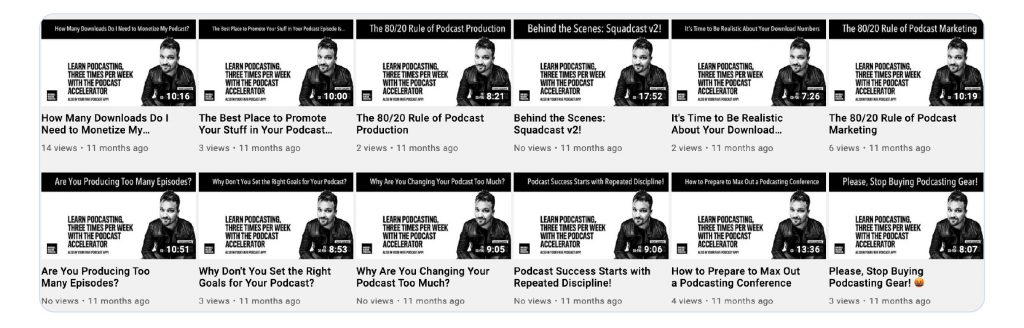
A screenshot of the Rebel Base Media YouTube channel showing 12 auto-published podcast episodes, some have 0 views, some have 2 or 3.
A YouTube fail: what happened when we auto-published our podcast episodes straight to YouTube.

The trouble was, no matter how good, valuable and useful the content, it wasn’t right for YouTube. Those videos didn’t get many views and didn’t do anything to grow our subscriber base. Most importantly, the content wasn’t connecting with the people it was for – in that format, it didn’t capture attention enough for them to keep watching and engage with each video.

Instead: think about how you can connect with a YouTube audience

YouTube users want very different things from their content, notably: video. A static image or audiogram won’t do anything to hold the attention of someone who is expecting to watch and be entertained by video content. 

If you’re thinking seriously about using YouTube to support your podcast, think about how you can connect with viewers and adapt your content to engage and attract them. You could try: 

  • Repurposing your podcast episodes into video scripts, so that they’re tailored for video and the person watching it. 
  • Breaking your episode down into segments and using cards to visually separate each section. 
  • Investing in some lighting (we use colour-changing LEDs) or backdrops to make your video setting attractive and inviting.
  • Introducing video-specific effects and edits, such as transitions, animated intro cards and jump cuts.

All these things will help increase your watch duration, which is one of the most influential factors in whether your videos get surfaced or not.

2. Don’t record audio and video simultaneously

Our next experiment with YouTube podcasting was to have Mark record in front of a camera in the studio whilst simultaneously recording the audio version. This approach allowed us to save time and, like auto-publishing, kill two birds with one stone. 
Another article we think you'd like...

Reading Time: 7 minutes Start promoting your podcast on social media and start attracting new listeners today! We share 9 actionable ways you can promote and answer FAQs.

We didn’t edit the video, or spend time on intro cards or flashy editing. We left in the audio intro, our pre-roll ads, and simply published it directly to YouTube. Whilst the videos performed better than the auto-published ones, this ‘video podcast’ approach still took us a long time to produce and wasn’t getting us the return we were hoping for. 

What’s more, we got feedback from viewers who were (rightly) put off by the music intro, ad reads and calls-to-action that weren’t relevant to them. 

It became clear to us that repurposing audio to YouTube wasn’t serving our audience, wasn’t helping to achieve our goals and wasn’t good use of our time, either. So, we tried a different, and ultimately successful approach.

Instead… create dedicated videos separate from your podcast

It might sound obvious to say you should create videos specifically for a video platform. It is. But it’s not what a lot of podcasters get told to do.

However, as we’ve seen, auto-publishing and video podcasting is not effective in actually advancing your podcast, brand or content. It doesn’t translate to actual viewers you can engage with and bring over to your podcast. 

Instead, focus on producing one well researched, high quality video made specifically for people to watch. Don’t repurpose every single podcast episode – cherry-pick just one episode to turn into its own separate, specific video. 

Work with YouTube’s algorithm, not against it, and you’ll be rewarded with evergreen content that will sit permanently on your channel and continue to generate views and traffic even without your input. 

3. Don’t expect your YouTube channel to grow on its own

Another mistake to make with podcasting on YouTube is expecting it to give you results without input from you. Like any marketing channel, producing video content takes time, resource, effort and interaction from you to make it grow. 

You can’t just throw a video online and expect it to blow up. In order to see success on YouTube, you need to give your videos the same attention and care that you would your podcast episodes, including keyword research, editing and paying attention to the algorithm.

Instead… optimize your videos for your audience and search

YouTube is a powerful search engine. Its algorithm is designed to surface the most relevant and popular content depending on what people search for as well as what your audience likes.

At the beginning, it will be hard to tailor content for a non-existent audience. So, you should use your podcast analytics and audience as a starting point. Ask them what they’d like to watch on your channel and make videos from your 3 most popular episodes. 

After you’ve been on the platform for a while, use your YouTube Channel Analytics to find the video(s) that have the most views and highest watch duration. This is the content your YouTube audience likes best and is what you should focus on producing more of. 

Just as you would your show notes, make sure to optimize your video so you help YouTube (and Google!) to connect your content with your audience. That means:

  • Carefully crafting your descriptions, tags and titles for relevant keywords. 
  • Including timestamps (or chapter markers) in your descriptions to section up your video and help viewers find what they’re looking for. 
  • Designing attention-grabbing custom thumbnails that stand out (give your videos curb appeal!).

Recap: How to Podcast on YouTube, the Right Way

By making some mistakes, we learned some clear lessons on how to use YouTube effectively as a means to grow your podcast. Here are some key takeaways:

  • YouTube and podcasting are two different mediums. Listeners and viewers want different things from their content and should offer very different experiences.
  • Instead of auto-publishing or recording a video podcast, think about how you can attract, engage and add value to a YouTube audience. When that trust is solidified, you can work on converting viewers to podcast listeners.
  • Rather than trying to publish one video per podcast episode, focus on creating one quality, considered and optimized video that people will want to watch.

Subscribe to the Rebel Base Media YouTube for how-tos, podcasting tutorials, reviews and webinars!

How to Market Your Podcast in 2021: 17 Easy Promotional Tactics!

10 Insider Podcast SEO Tips To Optimize Your Podcast

Podcast Keyword Research: How to Help Listeners Find Your Show

Rachel

Rachel is Captivate's Marketing Coordinator and works closely with podcasters to ensure that the content that Captivate creates is genuinely helpful and easy to understand.