






Reading Time: 5 minutes
What are podcast chapters, and are they worth including in your podcast? Let’s take a closer look at how to add podcast chapters to your episodes and the benefits for you and your listeners.
Podcast chapters are timestamps for your episodes, allowing listeners to jump around to specific points. They’re usually formatted as a hyperlink with a time code and a descriptive title, like this:
00:00: Intro
03:18: Colin Trevorrow Leaked Episode 9 Script
10:47: Haydn Christianson returns as Anakin Skywalker
They’re a great way to clearly signpost to your listeners what you’re talking about in your episodes, when and for how long. They’re also very good for retaining the interest of more casual listeners, who are perhaps interested in a particular topic but not inclined to listen to a whole episode. Using chapters, you can get that listener engaged with the topic they came looking for while also upping your download numbers, which is fantastic information to deliver to sponsors!
Chapters are only used on around 1.22% of podcast episodes – by incorporating them into your own podcast, you’ve got a user experience benefit over nearly 99% of other podcasters!
All a chapter needs to include for it to work correctly is a timestamp, taking the listener to the point in the episode you’re looking to highlight, and a title describing what that point is.
Some nice things you can include as well are:
Chapter specific artwork
Supported by Apple, uploading chapter specific artwork means that the episode artwork will change as your episode progresses, triggered each time the listener passes a timestamp at which you added some chapter art.
It’s not essential, but it’s an effective visual aid for your listeners as they engage with your content.
Chapter URLs
Chapter URLs allow you to include a hyperlink along with your chapter marker. This is especially useful if you’re talking about a piece of news, or something else that it’d be handy to provide listeners with an external link to.
If you’re including a paid sponsorship as a chapter, you could also link out to the sponsor’s site or product using a chapter URL. They’re a useful tool to make your listeners’ experience that bit smoother.
It’s easy to add chapters to your podcast episodes using Captivate! When publishing or editing an episode, just scroll down to the Chapters section – it’s right below AMIE – and then simply click “Add Chapter”.
From there, you can give your chapter a name and add an external link and some chapter art, if you’d like to. The only essential part is the name and the timestamp, but the link and art can really make the listening experience special for your listeners!
You can read our full chapters guide here, as well as reading our chapter FAQs.
Clearly signposting your chapters makes your listeners’ user experience (UX, for the tech-initiated) cleaner, simpler and easier. If they’re not interested in a particular topic, they can easily skip to the next one, and if they’re only here for one juicy bit of information, they can get right to it. Downloads register to your analytics if listeners listen for over a minute, so there’s no detriment to you if listeners are skipping around.
Chapters could also help in the planning stage – if you keep in mind the fact that you’re going to have clearly defined segments to allow listeners to jump around, this could make your planning more focussed on your topic flow, making the whole episode a better listen.
Lots of podcast apps support chapters, including Apple Podcasts and Spotify. When you’re adding your chapters to Captivate, the information is attached to your RSS feed through iD3 tags. This means any destination reading your feed which supports chapters can pull the data through, and any which don’t support them are unaffected.
No web players currently support chapters, but support will likely begin in the not-too-distant future, as they begin to begin the industry norm.
Once you’ve added your chapters in Captivate, you don’t need to do anything else to make them work in Apple Podcasts. They’ll track through nicely into the directory, including any chapter artwork you’ve added.
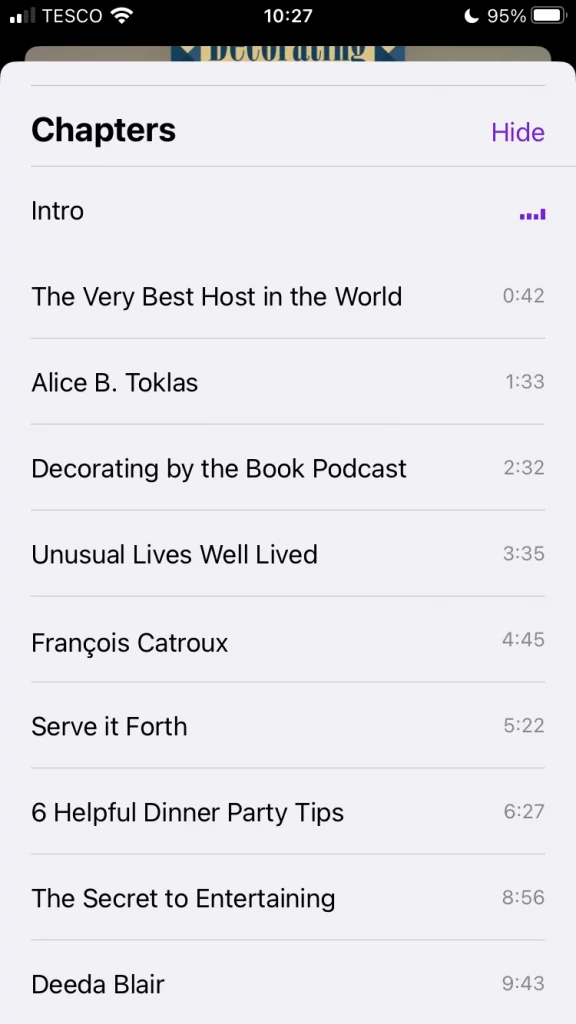
If you’re self-managing your RSS feed, you’ll need to add chapter information to the iD3 tags of any episode on which you’d like chapters to track through. You can read more information about that here.
Podcast chapters on Spotify pull through from Captivate with no need for any additional work on your end. Spotify doesn’t currently support chapter specific artwork, so that information won’t display.
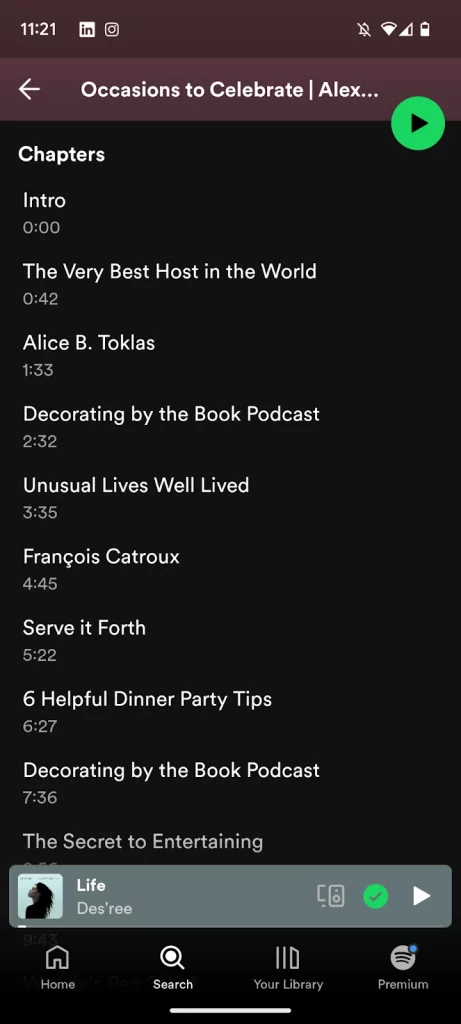
If you’re self managing your RSS feed, you can add chapters in Spotify by including timestamps in your show notes. Make sure to follow this formatting:
You can read more information on podcast chapters in Spotify here.

Reading Time: 3 minutes Join for free to launch your podcast, attract your first 100 listeners and cover your costs with our brand new course for the Podcast Success Academy!
Listeners will likely be using your chapters to skip around your episode, so make sure that they’re not going to join the conversation half way through a word or a sentence. Include your chapter break where there are natural pauses between topics you’re discussing to make their experience more seamless.
What are the most interesting and exciting ideas discussed in the episode? Once you’ve decided on what they are, you’ve got a good idea of what your chapters should be – consider the listener at every point and really try to imagine what will excite them
No need to get fancy with your chapter titles, just let your listeners know exactly what’s being spoken about and when. This will let them move around your episodes easily and intuitively.
If your episode contains a new or bonus segment – something new you’re trying, or something you’re being paid to include, like an ad read – it’s a great idea to make this clear by adding it as a chapter.
Whatever bonus or additional content an episode contains, chapters are an effective way to signpost and promote them to your listeners.
If you’ve got a sponsor read in your episodes, letting users know exactly what and where is a great idea.
It’s just another step in allowing them to listen to exactly what they want, and is another place you can get your sponsor’s name in black and white.
You can add chapters to your podcast through your hosting provider or, if you manage your RSS feed yourself, by adding the iD3 tags to your feed.
Many of the main podcast apps support chapters (Apple, Spotify, Overcast, Pocket Casts etc.) so wherever your audience are listening, you can make their experience easier and more seamless.
Chapters are accessed within the directory apps themselves. For Spotify, they’re found in the episode show notes, and for Apple they have their own section as you scroll down from the episode art.
No, podcast chapters simply document what’s coming up in the episode content and when, without having any effect on the length themselves.
Podcast chapters are timestamps allowing your listeners to jump around your podcast episodes to get to the content they’re interested in. Including them is easy, and is just another step you can take to make listening to your podcast a better experience for your long term fans, as well as keeping more casual listeners engaged by allowing them to get straight to the information they’re here for.
You can include external links and chapter art with your chapters to streamline the listener experience even further – while these aren’t essential, they make your podcast look even more professional to newcomers, subconsciously reinforcing the fact that you’re a voice to be listened to. Less than 2% of podcast episodes have chapters at time of writing – easily add yours today and get a step up over 98% of the other shows out there!
Ben is a content writer and podcast support expert for Captivate, and has been with the team since 2021. He has a first-class degree in Journalism, and uses these skills to help new and veteran podcasters alike level up their content: reviewing tech, crafting product guides and sharing cutting edge podcasting news. Ben is always on hand to help Captivate podcasters with anything they run into, from when they first import their show to advanced questions like how to grow your audience or where to start with monetization. He loves what he does, and is committed to helping podcasters grow their show using Captivate. He’s always been a podcast fan - current favourites include Steven West’s ‘Philosophize This’ and Bob Mortimer’s ‘Athletico Mince’.
此内容由惯性聚合(RSS阅读器)自动聚合整理,仅供阅读参考。 原文来自 — 版权归原作者所有。
