


常用的有5种 Layout panels:
技巧:
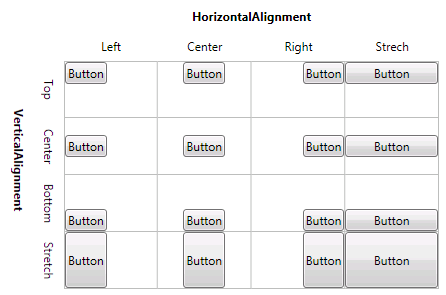
Vertical 和 Horizontal Alignment 属性
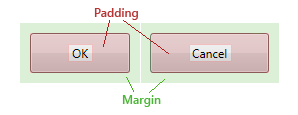
Margin 和 Padding
用于为控件预留空间
Height 和 Width 属性
不推荐使用,可以用于设置控件的固定大小。最好用MinHeight,MaxHeight,MinWidth 和MaxWidth属性定义可接受的大小范围
Overflow Handling
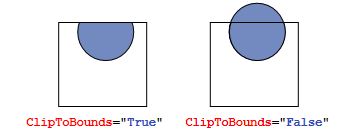
Clipping
Layout panels typically clip those parts of child elements that overlap the border of the panel. This behavior can be controlled by setting the ClipToBounds property to true or false.
Scrolling
When the content is too big to fit the available size, you can wrap it into a ScrollViewer. The ScrollViewer uses two scroll bars to choose the visible area.
The visibility of the scrollbars can be controlled by the vertical and horizontal ScrollbarVisibility properties.
<ScrollViewer>
<StackPanel>
<Button Content="First Item" />
<Button Content="Second Item" />
<Button Content="Third Item" />
</StackPanel>
</ScrollViewer>
此内容由惯性聚合(RSS阅读器)自动聚合整理,仅供阅读参考。 原文来自 — 版权归原作者所有。