


在做一个windows phone 8 即时通讯应用的时候,聊天界面的对话气泡。 需要根据不同的消息类型,加载对应的DataTemplate,
比如发送,接受,图片,语音,等气泡。 如下图所示
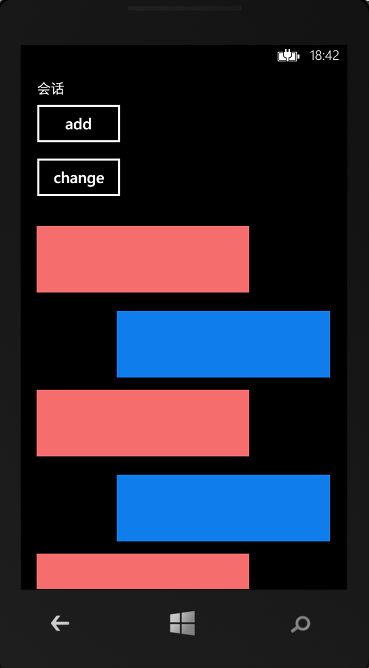
主要思想就是,定义多个不同的模板,在每一项的内容生成的时候,根据数据源的类型,加载对应的模板。
看代码
 1 public abstract class DataTemplateSelector:ContentControl
 2     {
 3             //根据newContent的属性,返回所需的DataTemplate
 4             public virtual DataTemplate SelectTemplate(object item, DependencyObject container)
 5             {
 6                 return null;
 7             }
 8
 9             protected override void OnContentChanged(object oldContent, object newContent)
10             {
11                 base.OnContentChanged(oldContent, newContent);
12                 //根据newContent的属性,选择对应的DataTemplate
13                 ContentTemplate = SelectTemplate(newContent, this);
14             }
15
16     }
17     public class ChatTemplateSelector : DataTemplateSelector
18     {
19         public DataTemplate ReciveMsgTP { get; set; }
20         public DataTemplate SendMsgTP { get; set; }
21
22         //根据newContent的属性,返回所需的DataTemplate
23         public override DataTemplate SelectTemplate(object item, DependencyObject container)
24         {
25             ChatModel model = item as ChatModel;
26             DataTemplate dt;
27             if (model != null)
28             {
29                 switch (model.CMType)
30                 {
31                     case MessageType.ReciveMsg:
32                         dt= ReciveMsgTP;
33                         break;
34                     case MessageType.SendMsg:
35                         dt= SendMsgTP;
36                         break;
37                     default:
38                         dt = ReciveMsgTP;
39                         break;
40                 }
41                 return dt;
42             }
43             return base.SelectTemplate(item, container);
44         }
45     }
.xaml
<phone:PhoneApplicationPage.Resources>
        <DataTemplate x:Key="ItemTP">
            <local:ChatTemplateSelector  Content="{Binding}">
                <local:ChatTemplateSelector.ReciveMsgTP>
                    <DataTemplate>
                        <Grid d:DesignWidth="415.522" d:DesignHeight="106.567" Height="113" Width="501">
                            <Grid.ColumnDefinitions>
                                <ColumnDefinition Width="124*"/>
                                <ColumnDefinition Width="43*"/>
                            </Grid.ColumnDefinitions>
                            <TextBlock Grid.Column="1" HorizontalAlignment="Left" Margin="10,10,0,0" TextWrapping="Wrap" Text="{Binding Msg}" VerticalAlignment="Top" FontSize="30" Height="0" Width="0"/>
                            <Border BorderBrush="Black" BorderThickness="1" HorizontalAlignment="Left" Height="100" Margin="10,3,0,0" VerticalAlignment="Top" Width="315" Background="#FFF56D6D"/>
                        </Grid>
                    </DataTemplate>

                </local:ChatTemplateSelector.ReciveMsgTP>
                <local:ChatTemplateSelector.SendMsgTP>
                    <DataTemplate>
                        <Grid d:DesignWidth="415.522" d:DesignHeight="106.567" Height="128" Width="498">
                            <Grid.ColumnDefinitions>
                                <ColumnDefinition Width="59*"/>
                                <ColumnDefinition Width="190*"/>
                            </Grid.ColumnDefinitions>
                            <TextBlock Grid.Column="1" HorizontalAlignment="Left" Margin="10,10,0,0" TextWrapping="Wrap" Text="{Binding Msg}" VerticalAlignment="Top" FontSize="30" Height="0" Width="0"/>
                            <Border BorderBrush="Black" BorderThickness="1" Grid.Column="1" HorizontalAlignment="Left" Height="100" Margin="10,15,0,0" VerticalAlignment="Top" Width="348" Background="#FF0F7DEC"/>
                        </Grid>
                    </DataTemplate>
                </local:ChatTemplateSelector.SendMsgTP>
            </local:ChatTemplateSelector>
        </DataTemplate>
    </phone:PhoneApplicationPage.Resources>
此内容由惯性聚合(RSS阅读器)自动聚合整理,仅供阅读参考。 原文来自 — 版权归原作者所有。