



惯性聚合 高效追踪和阅读你感兴趣的博客、新闻、科技资讯
阅读原文 在惯性聚合中打开

推荐订阅源

Simon Willison's Weblog
P
Privacy International News Feed
www.infosecurity-magazine.com
T
Troy Hunt's Blog
Hacker News - Newest:
Hacker News - Newest: "LLM"
Attack and Defense Labs
S
Secure Thoughts
V2EX - 技术
V2EX - 技术
cs.AI updates on arXiv.org
O
OpenAI News
Cloudbric
Cloudbric
Google Online Security Blog
Schneier on Security
cs.CV updates on arXiv.org
Help Net Security
Help Net Security
Cyberwarzone
Cyberwarzone
G
GRAHAM CLULEY
L
Lohrmann on Cybersecurity
Threat Intelligence Blog | Flashpoint
Spread Privacy
Spread Privacy
NISL@THU
NISL@THU
N
News and Events Feed by Topic
T
Tenable Blog
S
Security @ Cisco Blogs
N
News and Events Feed by Topic
The Hacker News
The Hacker News
C
CXSECURITY Database RSS Feed - CXSecurity.com
宝玉的分享
宝玉的分享
月光博客
月光博客
酷 壳 – CoolShell
酷 壳 – CoolShell
美团技术团队
奇客Solidot–传递最新科技情报
奇客Solidot–传递最新科技情报
Google DeepMind News
钛媒体:引领未来商业与生活新知
钛媒体:引领未来商业与生活新知
T
Tailwind CSS Blog
V
Visual Studio Blog
P
Proofpoint News Feed
Webroot Blog
Webroot Blog
让小产品的独立变现更简单 - ezindie.com
博客园 - 三生石上(FineUI控件)
cs.CL updates on arXiv.org
Jina AI
Jina AI
雷峰网
雷峰网
T
The Blog of Author Tim Ferriss
Hugging Face - Blog
Hugging Face - Blog
腾讯CDC
L
LangChain Blog
The Register - Security
OSCHINA 社区最新新闻
OSCHINA 社区最新新闻
博客园 - 聂微东

博客园 - KXLF

SharePoint 事件 2137 / 2138 :SharePoint 运行状况分析器检测到错误。驱动器的可用空间不足。 SharePoint 事件 7363:对象缓存:缓存使用的超级读者帐户没有足够的权限访问SharePoint数据库。 [转] geochart 地图控件官方示例 Outlook 2007 同步到本地的SharePoint文档库,点击不同文件夹时,总是弹出登陆框 [转]Publishing files stored in the file system through external list(使用bcs映射文件系统) SPContext.Current.Web.CurrentUser 为 null [转]Use PowerShell to Manage Lists, Views, and Items in SharePoint(使用PowerShell管理列表、视图、列表项) 连接TFS服务器记住密码。 [转]Login over HTTPS from HTTP pages(使用https登陆) [转]How to Handle Long PowerShell Statements(在PowerShell中使用多行模式) [转]How to use String.Format in PowerShell?(如何在PowerShell中使用string.format?) 推荐一个电子书网站,里面关于SharePoint的英文书籍有很多。 SharePoint 2010 术语表 [转]SharePoint 2010: Client Object Model for JavaScript (ECMAScript)(使用客户端对象模型) [转]Importing documents to Document Libraries with Mavention Import Document Library Contents(使用VS插件导出文档库内容定义) [转]Import List Instances and their data with Mavention Import List Instance(使用VS插件导出列表数据定义) [转]how to programatically access built-in properties of open xml word doc(如何读取open xml格式文档属性) [转]Content targeting for anonymous users with SharePoint Server 2010(给匿名用户配置外部配置文件) [转][MS-MAVA]: Microsoft Office SharePoint Server (MOSS) Analytics View Access Protocol Specification
[转]Allowing anonymous users access to SharePoint user's profile pictures(允许匿名用户访问用户配置文件中的头像图片)
KXLF · 2011-11-02 · via 博客园 - KXLF

I was developing discussion groups using web parts where I needed to show the discussion posting authors' profile images with the posting detail.

First problem I faced was, how to get the profile image url of the user. I was able to find the details about the User Information List living in the RootSite of the site collection. I was able to get the related user info by getting the list item as below and get the "Picture" property value
and properly formatting it.  

userPictureUrl = SPContext.Current.Site.RootWeb.SiteUserInfoList.GetItemById(itemCreator.ID)["Picture"].ToString(); 
SPFieldUrlValue userProfileImage = new SPFieldUrlValue(userPictureUrl);
authorProfileImageUrl = (new Uri(userProfileImage.Url)).AbsolutePath;
 

But, then I faced the next issue of viewing user's profile image as an anonymous user. To achieve that I had to go through the below process of granting anonymous users access to List and libraries in the mys site site collection and granting "View Items" access to user profile pictures library.

STEP 1:
Go to http://<<MysiteSitecollection web url>>/_layouts/settings.aspx
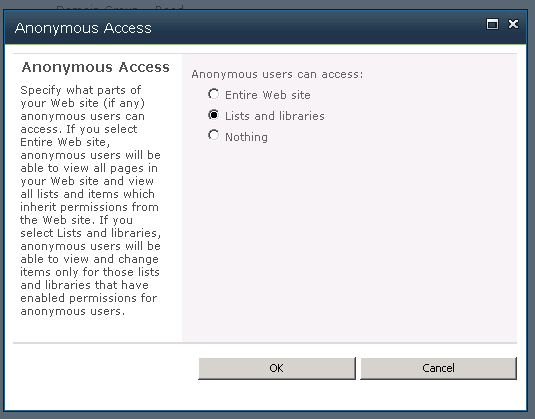
Go to "Site Permissions" and click Anonymous Access from the ribbon
Select "Lists and libraries" and click "OK".
STEP 2:
Go to View All Site Content -> User Photos -> Settings (Picture Library Settings)
Go to "Permissions for this picture library"
Click "Stop Inheriting Permissions"
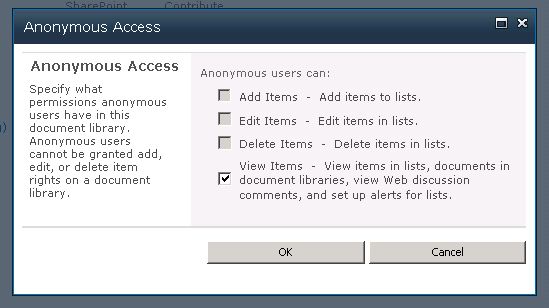
Click "Anonymous Access" from the ribbon
Check off "View Items" and click "OK"
After performing the above steps anonymous users were able to get access to profile pictures of other users.

Senthil S