






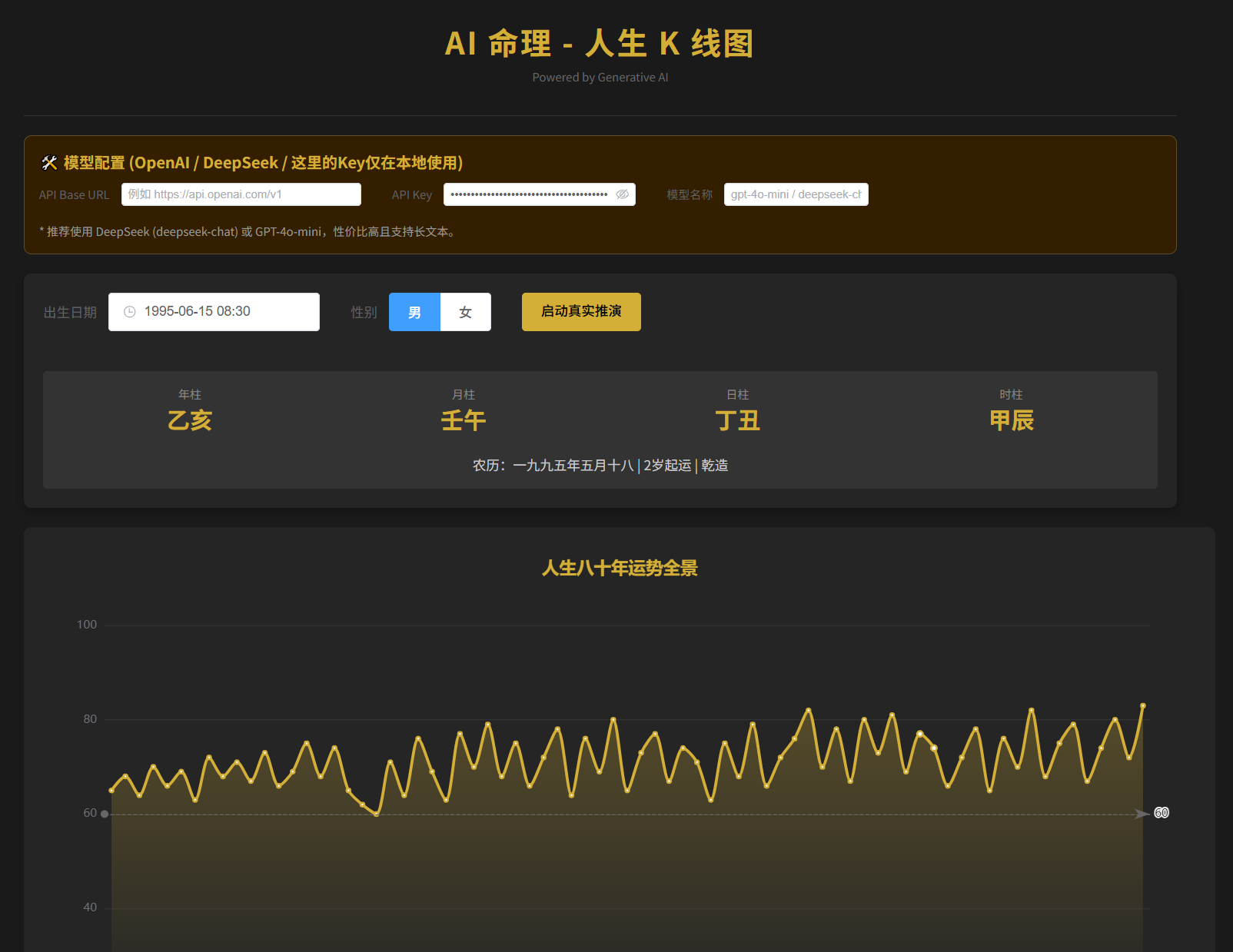
在桌面建一个 index.html 文件 把下面的代码复制进去用 chrome 打开就行了。
效果如下:
<!DOCTYPE html>
<html lang="zh-CN">
<head>
<meta charset="UTF-8">
<meta name="viewport" content="width=device-width, initial-scale=1.0">
<title>AI 命理 - 人生 K 线图</title>
<script src="https://unpkg.com/vue@3/dist/vue.global.js"></script>
<link rel="stylesheet" href="https://unpkg.com/element-plus/dist/index.css" />
<script src="https://unpkg.com/element-plus/dist/index.full.js"></script>
<script src="https://cdn.jsdelivr.net/npm/[email protected]/dist/echarts.min.js"></script>
<script src="https://cdn.jsdelivr.net/npm/[email protected]/lunar.js"></script>
<style>
:root { --bg-color: #1a1a1a; --card-bg: #252525; --text-color: #e0e0e0; --gold: #d4af37; --accent: #409eff; }
body { margin: 0; background-color: var(--bg-color); color: var(--text-color); font-family: 'PingFang SC', sans-serif; }
.container { max-width: 1200px; margin: 0 auto; padding: 20px; }
.header { text-align: center; margin-bottom: 20px; border-bottom: 1px solid #333; padding-bottom: 20px; }
.header h1 { color: var(--gold); margin: 0; letter-spacing: 2px; }
.config-panel { background: #331f00; border: 1px solid #5c4e2a; padding: 15px; border-radius: 8px; margin-bottom: 20px; }
.control-panel { background: var(--card-bg); padding: 20px; border-radius: 8px; margin-bottom: 20px; box-shadow: 0 4px 12px rgba(0,0,0,0.3); }
.bazi-result { display: grid; grid-template-columns: repeat(4, 1fr); gap: 10px; text-align: center; margin-top: 20px; padding: 15px; background: #333; border-radius: 4px; }
.pillar-box .ganzhi { font-size: 24px; color: var(--gold); font-weight: bold; }
.chart-container { background: var(--card-bg); padding: 20px; border-radius: 8px; height: 550px; width: 100%; margin-bottom: 20px; position: relative; }
.report-section { display: grid; grid-template-columns: 1fr 1fr; gap: 20px; margin-top: 20px; }
@media (max-width: 768px) { .report-section { grid-template-columns: 1fr; } }
.analysis-card { background: var(--card-bg); padding: 20px; border-radius: 8px; }
.loading-overlay { position: fixed; top: 0; left: 0; width: 100%; height: 100%; background: rgba(0,0,0,0.85); z-index: 999; display: flex; flex-direction: column; justify-content: center; align-items: center; color: var(--gold); }
.loading-text { margin-top: 15px; font-size: 16px; color: #fff; }
.loading-sub { margin-top: 5px; font-size: 12px; color: #888; }
/* 滚动条美化 */
::-webkit-scrollbar { width: 8px; height: 8px; }
::-webkit-scrollbar-thumb { background: #444; border-radius: 4px; }
::-webkit-scrollbar-track { background: #1a1a1a; }
</style>
</head>
<body>
<div id="app">
<div class="container">
<header class="header">
<h1>AI 命理 - 人生 K 线图</h1>
<p style="font-size: 12px; color: #666; margin-top: 5px;">Powered by Generative AI</p>
</header>
<div class="config-panel">
<h4 style="margin:0 0 10px 0; color:var(--gold)">🛠️ 模型配置</h4>
<el-form :inline="true" size="small">
<el-form-item label="API Base URL">
<el-input v-model="apiConfig.baseUrl" placeholder="例如 https://api.openai.com/v1" style="width: 250px"></el-input>
</el-form-item>
<el-form-item label="API Key">
<el-input v-model="apiConfig.apiKey" type="password" show-password placeholder="sk-..." style="width: 200px"></el-input>
</el-form-item>
<el-form-item label="模型名称">
<el-input v-model="apiConfig.model" placeholder="gpt-4o-mini / deepseek-chat" style="width: 150px"></el-input>
</el-form-item>
</el-form>
</div>
<div class="control-panel">
<el-form :inline="true" size="large">
<el-form-item label="出生日期">
<el-date-picker v-model="input.date" type="datetime" placeholder="选择出生时间" format="YYYY-MM-DD HH:mm"></el-date-picker>
</el-form-item>
<el-form-item label="性别">
<el-radio-group v-model="input.gender">
<el-radio-button label="1">男</el-radio-button>
<el-radio-button label="0">女</el-radio-button>
</el-radio-group>
</el-form-item>
<el-form-item>
<el-button type="primary" color="#d4af37" @click="handleGenerate" :disabled="loading">
{{ loading ? '正在连接天机...' : '启动真实推演' }}
</el-button>
</el-form-item>
</el-form>
<div v-if="baziData.year" class="bazi-result">
<div class="pillar-box"><div style="font-size:12px;color:#888">年柱</div><div class="ganzhi">{{ baziData.year }}</div></div>
<div class="pillar-box"><div style="font-size:12px;color:#888">月柱</div><div class="ganzhi">{{ baziData.month }}</div></div>
<div class="pillar-box"><div style="font-size:12px;color:#888">日柱</div><div class="ganzhi">{{ baziData.day }}</div></div>
<div class="pillar-box"><div style="font-size:12px;color:#888">时柱</div><div class="ganzhi">{{ baziData.time }}</div></div>
<div style="grid-column: span 4; margin-top: 10px; color: #ccc; font-size: 14px;">
{{ baziData.description }}
</div>
</div>
</div>
<div v-show="chartVisible" class="chart-container" id="lifeChart"></div>
<div v-if="reportData" class="report-section">
<div class="analysis-card">
<h3 style="color:var(--gold); border-bottom:1px solid #444; padding-bottom:10px">
{{ reportData.patternType }} <span style="font-size:12px; float:right">格局评分: {{ reportData.baseLevelScore }}</span>
</h3>
<p style="color:#ccc; line-height:1.6; font-size: 15px;">{{ reportData.summary }}</p>
<el-divider border-style="dashed"></el-divider>
<div style="display:grid; grid-template-columns: 1fr 1fr; gap: 10px; font-size:14px;">
<div>🍀 喜神: <span style="color:var(--gold)">{{ (reportData.suggestions?.favorableDirections || []).join('、') }}</span></div>
<div>🎨 幸运色: <span style="color:var(--gold)">{{ (reportData.suggestions?.favorableColors || []).join('、') }}</span></div>
<div>🔢 数字: <span style="color:var(--gold)">{{ (reportData.suggestions?.favorableNumbers || []).join('、') }}</span></div>
<div>🤝 贵人: <span style="color:var(--gold)">{{ (reportData.suggestions?.noblePeople || []).join('、') }}</span></div>
</div>
</div>
<div class="analysis-card">
<h3 style="color:var(--gold); border-bottom:1px solid #444; padding-bottom:10px">深度剖析</h3>
<el-collapse accordion>
<el-collapse-item title="💰 财富机缘" name="1">{{ reportData.wealthAnalysis }}</el-collapse-item>
<el-collapse-item title="🚀 事业官运" name="2">{{ reportData.industryAnalysis }}</el-collapse-item>
<el-collapse-item title="❤️ 婚姻情感" name="3">{{ reportData.marriageAnalysis }}</el-collapse-item>
<el-collapse-item title="🏥 健康保养" name="4">{{ reportData.healthAnalysis }}</el-collapse-item>
<el-collapse-item title="🏠 六亲眷属" name="5">{{ reportData.familyAnalysis }}</el-collapse-item>
</el-collapse>
</div>
</div>
</div>
<div v-if="loading" class="loading-overlay">
<div class="el-loading-spinner" style="margin-bottom: 20px;">
<svg class="circular" viewBox="25 25 50 50"><circle class="path" cx="50" cy="50" r="20" fill="none"></circle></svg>
</div>
<div class="loading-text">正在沟通大模型 API...</div>
<div class="loading-sub">生成 80 年数据量较大,请耐心等待 (约 20-60 秒)</div>
</div>
</div>
<script>
const { createApp, ref, reactive, nextTick } = Vue;
createApp({
setup() {
const loading = ref(false);
const chartVisible = ref(false);
// 默认配置 (为了方便演示,预填了一些通用地址,但 Key 留空)
const apiConfig = reactive({
baseUrl: localStorage.getItem('bazi_api_url') || 'https://api.openai.com/v1',
apiKey: localStorage.getItem('bazi_api_key') || '',
model: localStorage.getItem('bazi_model') || 'gpt-4o-mini'
});
const input = reactive({
date: new Date('1995-06-15 08:30'),
gender: '1'
});
const baziData = reactive({ year: '', month: '', day: '', time: '', description: '' });
const reportData = ref(null);
let myChart = null;
// 1. 八字排盘
const calculateBazi = () => {
const solar = Solar.fromDate(input.date);
const lunar = solar.getLunar();
const baZi = lunar.getEightChar();
baziData.year = baZi.getYear();
baziData.month = baZi.getMonth();
baziData.day = baZi.getDay();
baziData.time = baZi.getTime();
const gender = input.gender === '1' ? 1 : 0;
const yun = baZi.getYun(gender);
baziData.description = `农历:${lunar.toString()} | ${yun.getStartYear()}岁起运 | ${input.gender === '1'?'乾造':'坤造'}`;
return { baZi, yun, genderText: input.gender === '1'?'男':'女' };
};
// 2. 构建 Prompt
const buildPrompt = (baziInfo) => {
return `你是一位世界顶级的八字命理大师。请根据以下信息进行流年推算:
性别:${baziInfo.genderText}
出生公历:${input.date.toLocaleString()}
八字:${baziInfo.baZi.toString()}
任务:请生成该用户 1 岁 到 80 岁 的每一年的运势评分与简批。
要求:
1. 返回严格的 JSON 格式,不要包含 Markdown 代码块标记(如 \`\`\`json )。
2. JSON 结构必须严格包含:
{
"patternType": "格局名称",
"baseLevelScore": 基础分(0-100),
"summary": "总评(100 字内)",
"wealthAnalysis": "财运分析",
"industryAnalysis": "事业分析",
"marriageAnalysis": "婚姻分析",
"healthAnalysis": "健康分析",
"familyAnalysis": "家庭分析",
"suggestions": { "favorableDirections": [], "favorableColors": [], "favorableNumbers": [], "noblePeople": [] },
"chartPoints": [
{ "age": 1, "year": 1996, "daYun": "大运名", "score": 总分, "reason": "简短流年批语(30 字以内)", "scores": { "total": 分, "wealth": 分, "career": 分, "marriage": 分, "health": 分, "family": 分 } },
... (一直到 80 岁)
]
}
3. 评分逻辑:请务必根据八字喜用神、流年干支冲克关系进行科学打分,体现出人生的起伏波动,不要全部都是高分。
4. 流年批语(reason)要言简意赅,点出吉凶关键。
`;
};
// 3. 调用 LLM
const callLLM = async (prompt) => {
if (!apiConfig.apiKey) throw new Error("请输入 API Key");
const response = await fetch(`${apiConfig.baseUrl}/chat/completions`, {
method: 'POST',
headers: {
'Content-Type': 'application/json',
'Authorization': `Bearer ${apiConfig.apiKey}`
},
body: JSON.stringify({
model: apiConfig.model,
messages: [
{ role: "system", content: "你是一个只输出 JSON 数据的八字算命程序。" },
{ role: "user", content: prompt }
],
temperature: 0.7
})
});
if (!response.ok) {
const err = await response.text();
throw new Error(`API 请求失败: ${response.status} - ${err}`);
}
const data = await response.json();
let content = data.choices[0].message.content;
// 清洗数据:防止模型返回 Markdown 格式
content = content.replace(/```json/g, '').replace(/```/g, '').trim();
return JSON.parse(content);
};
// 4. 渲染图表
const renderChart = (data) => {
const chartDom = document.getElementById('lifeChart');
if (myChart) myChart.dispose();
myChart = echarts.init(chartDom);
const option = {
backgroundColor: 'transparent',
title: { text: '人生八十年运势全景', left: 'center', textStyle: { color: '#d4af37' }, top: 10 },
tooltip: {
trigger: 'axis',
backgroundColor: 'rgba(30,30,30,0.95)',
borderColor: '#d4af37',
textStyle: { color: '#fff' },
formatter: (params) => {
const p = data.chartPoints[params[0].dataIndex];
return `<div style="width:200px">
<div style="color:#d4af37;font-weight:bold">${p.age}岁 (${p.year}) ${p.daYun}运</div>
<div style="margin:5px 0;font-size:12px">${p.reason}</div>
<div style="border-top:1px solid #555;padding-top:5px;display:flex;justify-content:space-between;font-size:12px">
<span>💰${p.scores.wealth}</span><span>💼${p.scores.career}</span>
<span>❤️${p.scores.marriage}</span><span>🏥${p.scores.health}</span>
</div>
</div>`;
}
},
grid: { left: '3%', right: '4%', bottom: '10%', top: '15%', containLabel: true },
xAxis: {
type: 'category',
data: data.chartPoints.map(p => p.age),
axisLabel: { interval: 9, color: '#888' }
},
yAxis: { type: 'value', min: 20, max: 100, splitLine: { lineStyle: { color: '#333' } } },
dataZoom: [{ type: 'inside', start: 0, end: 100 }, { start: 0, end: 100, bottom: 0 }],
series: [
{
name: '总运', type: 'line', smooth: 0.3,
data: data.chartPoints.map(p => p.scores.total),
lineStyle: { width: 3, color: '#d4af37' },
itemStyle: { color: '#d4af37' },
areaStyle: { color: new echarts.graphic.LinearGradient(0,0,0,1,[{offset:0,color:'rgba(212,175,55,0.4)'},{offset:1,color:'rgba(212,175,55,0)'}]) },
markLine: { data: [{ yAxis: 60, lineStyle: { color: '#666', type: 'dashed' } }] }
}
]
};
myChart.setOption(option);
window.addEventListener('resize', () => myChart && myChart.resize());
};
const handleGenerate = async () => {
// 保存配置到本地,方便下次使用
localStorage.setItem('bazi_api_url', apiConfig.baseUrl);
localStorage.setItem('bazi_api_key', apiConfig.apiKey);
localStorage.setItem('bazi_model', apiConfig.model);
try {
loading.value = true;
chartVisible.value = false;
reportData.value = null;
const baziInfo = calculateBazi();
const prompt = buildPrompt(baziInfo);
console.log("发送给 AI 的 Prompt:", prompt);
// 真实调用
const result = await callLLM(prompt);
console.log("AI 返回数据:", result);
reportData.value = result;
chartVisible.value = true;
await nextTick();
renderChart(result);
} catch (e) {
console.error(e);
alert(`错误: ${e.message}`);
} finally {
loading.value = false;
}
};
return { input, apiConfig, loading, baziData, reportData, chartVisible, handleGenerate };
}
}).use(ElementPlus).mount('#app');
</script>
</body>
</html>
此内容由惯性聚合(RSS阅读器)自动聚合整理,仅供阅读参考。 原文来自 — 版权归原作者所有。