


⏲️Suggested reading time: 10min
Reincarnated in the AI R&D era, I no longer believe in "wishful programming," but rather integrate AI into the entire R&D chain of requirements, development, testing, and documentation.
Many people use AI to write code, the first step is to input the requirements and let it generate directly.
At first, it was indeed great, fast, and the results were decent. But when used in real projects, problems arose: inconsistent writing with the project, missing permissions, unhandled edge cases, and unaddressed exception scenarios, with testing falling behind.
The most troublesome part of this code is "it looks like it can work, but it's hard to modify later." It wasn't written based on the complete context but generated based on a temporary description. The requirements weren't clear, so the AI had to guess; the project constraints weren't provided, so the AI wrote it according to its own habits.
So often, it's not that the AI can't write code, but that we let it start writing code too early. The requirements, boundaries, solutions, and test points weren't ready, yet the AI was allowed to start implementing, and the faster it generated, the faster the rework.
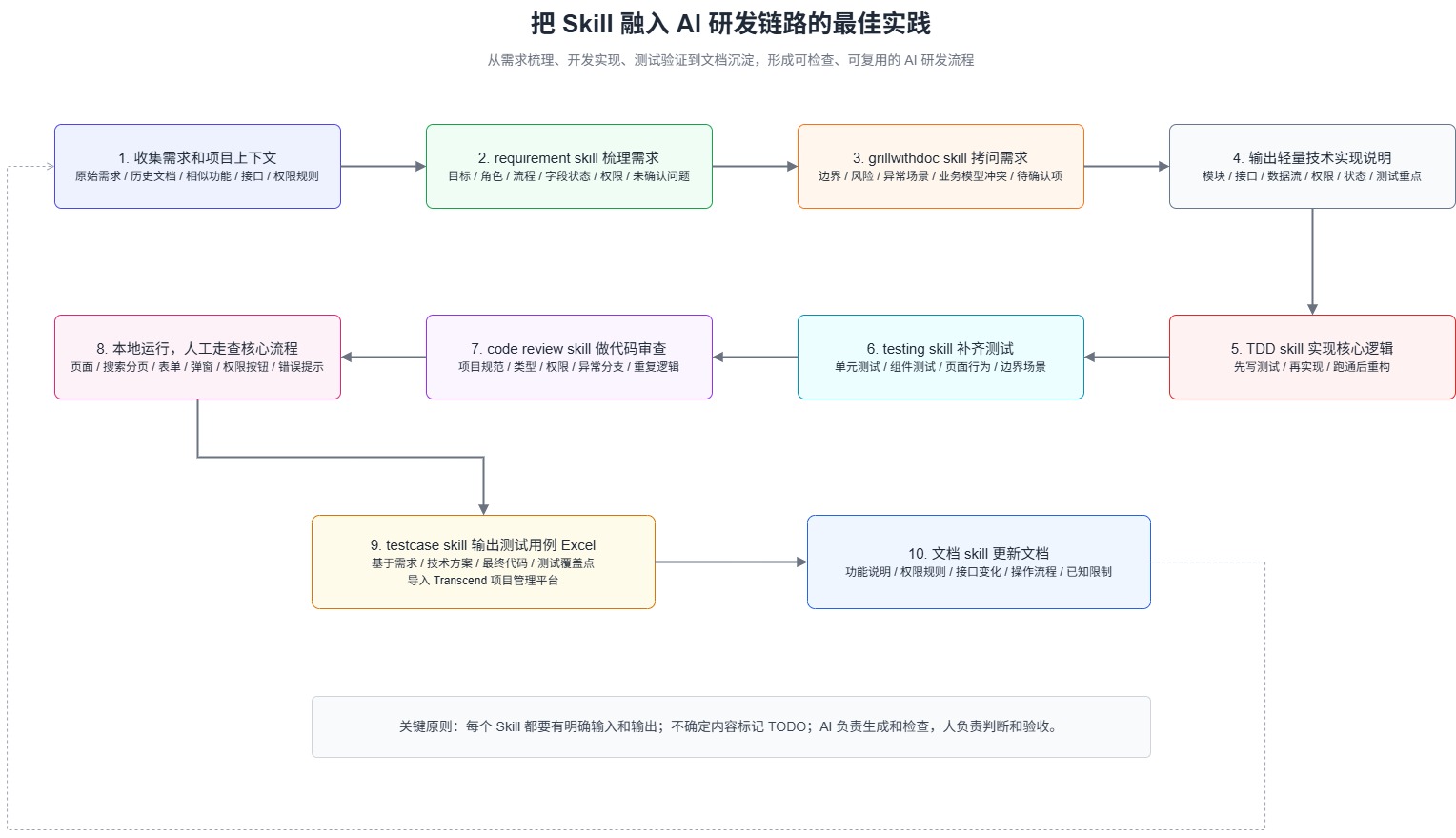
Collect requirements and project context
Use /requirement skill to organize requirements
Use /grillwithdoc skill to interrogate requirements, boundaries, and risks
Output Lightweight Technology Implementation Description
Use /TDD skill to Implement Core Logic
Use /testing skill to Complete Unit Test/Component Test
Use /code review skill for Code Review
Run Locally, Manually Review Core Flow
Use /testcase skill to Output Excel for Importing into Transcend Project Management Platform
Use/feature-doc-maintainerUpdate the document
This link is not just a straight-line process from 1 to 10.
The main process proceeds in order, but it may backtrack to previous steps during stages such as requirement questioning, technical solutions, code reviews, local testing, and document updates. If a problem is found, it goes back to fix it earlier, the earlier it's fixed, the lower the cost.
Don't let AI write requirements, proposals, or code right away. Because in the absence of complete context, AI can easily provide results that look complete but are actually a mess.
So the first step is to organize the information related to the requirements, such as original requirements, historical documents, similar functions, interface descriptions, permission rules, etc. Especially the existing ones.Similar functionsIt's very important as it allows AI to reference real coding styles in projects rather than reinventing a whole new solution.
Once the context is clear, you can easily proceed with the next steps, but if there is an error at the beginning, it is likely to proceed based on that error.
Once the context is ready, don't hurry into development. Use it first./requirement skillGo through the requirements.
This step mainly involves organizing scattered information into structured content, such as what the functional objectives are, who it's for, how the core process works, what fields and states are involved, and what the permission rules are.
Pay special attention to unresolved issues or points not yet fully understood, and mark them with TODO first before seeking confirmation later. After organizing, a basic executable requirement document can be produced, clarifying the overall direction. Later, we will use grillwithdoc to finalize the details.
When producing it, remember to select the plan mode.
After obtaining the requirement document, do not immediately assume it is correct. At this point, you can use /grillwithdoc skill to interrogate it again.
🥚When using the plan mode, there is a dialog box. can be confirmed one by one
This step is mainly to check if the requirements are clear, such as where the boundaries are, which scenarios are not covered, how to handle exceptions, whether permissions and data scope are affected, and whether button controls are complete. Many issues are not visible in the normal process, only by asking from a different angle will they be exposed. This /grillwithdoc skill is very strong, basically able to make all boundaries and details very clear. After the
interrogation is completed, a valuable confirmed detailed requirements document can be obtained
After confirming the details of the requirements, you can start looking at how to implement them.
Here it is not recommended to start with a heavy technical solution right away, it's too long for no one to read, and it may not be maintained later. My approach is to output a lightweight technical implementation explanation, just make the key points clear.
The value of this step is to provide a clear direction for subsequent development. Especially when working in a team or dealing with complex requirements, having a lightweight document can make writing code, adding tests, and conducting reviews much smoother.
If the requirements are simple or already clear, this step can also be omitted, resulting in less maintenance of a document👍
Once the technical implementation details are confirmed, you can start writing the code.
Use/TDD skillFirst handle the core logic. Don't just let the AI write everything at once. It's better to first have it break down the core behavior, then write the tests, and finally implement the code.
The advantage of doing this is that it can limit the free rein of AI. The tests should be written first, and the subsequent implementation of AI needs to revolve around these behaviors, making it less likely to go off track.
/TDD skillMore suitable for core logic, state flow, utility functions, and key business rules. If it's purely page styling or very simple display logic, there's no need to force TDD. Keep it lightweight and don't complicate the process.
After TDD is done, it doesn't mean testing is complete.
TDD focuses more on whether the core logic is implemented correctly, but things like page interactions, component behavior, exception handling, and permission visibility might not be fully covered. So, additional work is still needed./testing skill Need another round.
When conducting tests, it's important to also refer to the final code, not just the requirements document. Otherwise, it may seem like a lot of testing is being done, but it might not cover the truly critical areas.
/Testing Vue Vitest skill This also includes unit testing for the page UI unit tests
After completing the code and tests. At this point, you can use /code review skill Let's go through it again.
/code review skill It's also suitable for identifying easily overlooked issues, such as duplicate logic, incomplete boundary handling, and test coverage gaps in critical scenarios.
It will output a quality report based on priority.
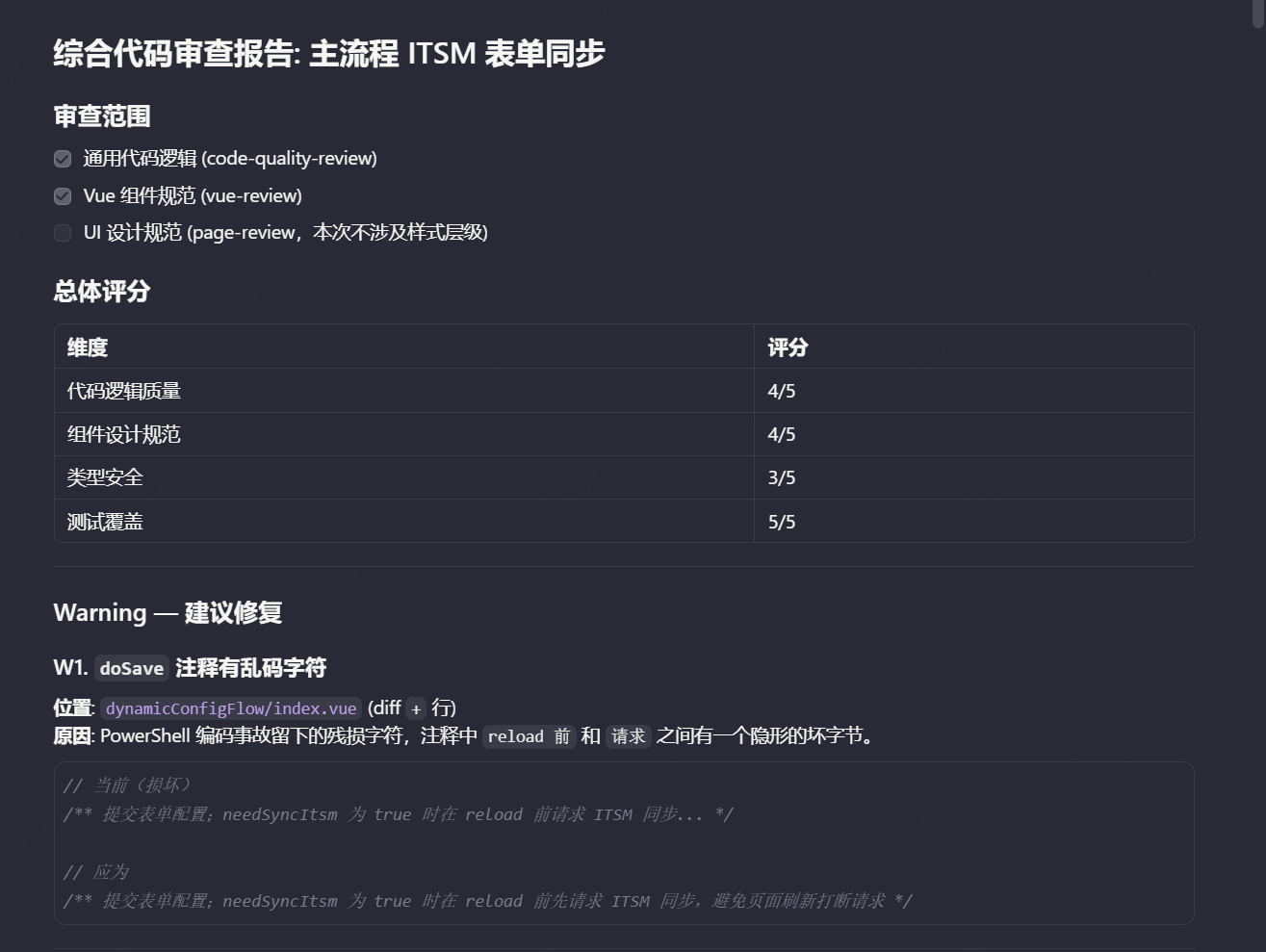
However, it's still important to note that AI review can only serve as a preliminary check. Whether this code can be merged ultimately depends on human judgment.
After the review, it's essential to run it locally.
Especially for front-end features, it's not enough to just look at the code and tests. You need to verify if the page loads correctly, if search pagination works, if add/edit/delete functions are functioning properly, if pop-up data is displayed correctly, if error messages are reasonable, and if permission buttons are displayed as expected. All these need to be tested manually.
This is pure manual labor, just for manual acceptance. AI can help you write code, fix tests, and do reviews, but it can't replace you actually using the feature once.
If problems are found during the local review, go back to the previous steps for repair. Don't force things forward just because the process has reached step eight.
After the local review is completed, you can start organizing the test cases.
Here I will use/testcase skillOutput test cases Excel. It is not generated only based on the initial requirements, but combined with the requirements document, technical implementation instructions, final code changes, existing test points, and local walk-through results.
The use cases produced this way will be closer to real functions and it will be harder to write content that looks complete but lacks key points.
We are currently importing Excel into the Transcend project management platform or handing it over to testing for evaluation.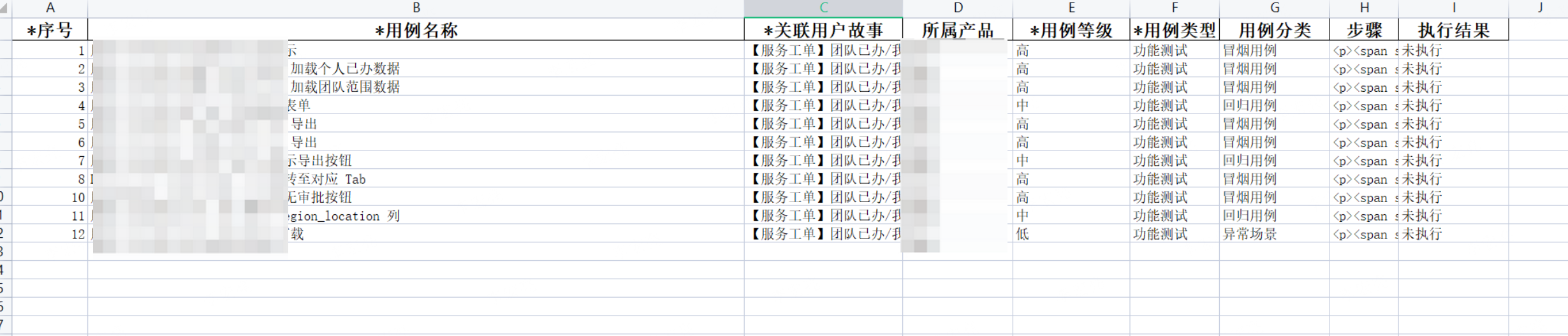
The last step is to update the document.
The documents here are mainly related to the repository and functionality, such as feature descriptions, permission rules, interface changes, operational procedures, known limitations, and test instructions. It's not about creating a very formal document, but rather about capturing the final implementation.
Often, documents only stay at the requirement stage, and the code is changed but the documents don't keep up. Over time, the next time you need to modify this feature, you have to understand it all over again.
So I will use it at the end of the chain./feature-doc-maintainerPerform a synchronization, and add the final implementation and key explanations back. This way, the results of this work won't just stay in the code, but can also be used by future people (AI).
To do the right thing is more important than to do things right.
Although this link uses many skills, the core judgment cannot be completely handed over to AI.
AI can help us organize information, generate content, complete testing, and conduct preliminary reviews, but trade-offs in requirements, technical judgments, test evaluations, and final acceptance still need to be handled by people.
Requirement Phase: Need to determine if the direction is valid, which scope to do, which to postpone, and which issues must be confirmed with the product owner or person in charge. AI can list the issues but cannot make the trade-offs for us.
Code and testing phase: Need to determine if the code aligns with the current project status, if the modification costs are acceptable, and if the testing truly covers key risks. Whether the code can be integrated and if the test cases are valuable still depend on human judgment.
So this process isn't about AI replacing humans, but rather freeing humans from repetitive tasks like organizing, supplementing, and reviewing, allowing them to focus on more critical judgment and decision-making. AI prepares the materials, and humans judge whether they are correct and usable.
The biggest change brought by this process isn't how much faster any single step becomes, but how the entire process becomes more stable.
Through /requirement skill and */grillwithdoc skill* Many boundaries, permissions, and exception scenarios can be exposed before development to avoid filling in requirements while writing code.
Every step has clear input and output, not letting AI improvise. Requirements, solutions, code, testing, and documentation can all be linked, making results easier to check.
The earlier a problem is discovered, the lower the modification cost. Issues that can be resolved in the requirements and solutions phase should not be left until after the code is written.
Testing is no longer a last-minute fix but is generated based on requirements, implementation, code changes, and local review results, making it closer to real risks.
Through /testcase skill Output Excel, can be imported into Transcend, or handed over to testing for evaluation, no longer just local files.
Finally, use /feature-doc-maintainer to fill in the final implementation, permission rules, interface changes, and known limitations for later maintenance, and to help AI continue understanding the context.
People are responsible for confirming direction, filtering results, and final acceptance.
Requirement: Use Plan mode first, don't execute directly
In the requirement phase, use Plan mode as much as possible, let the AI ask questions, define boundaries, and list TODOs.
Don't rush to generate code in this stage; the focus should be on clarifying the direction, scope, and exclusions first.
Code: First use the Opus 4.7 plan, then execute with Composer 2.5
Complex requirements can first be used to create plans and breakdowns with Opus 4.7, letting it list out the scope of changes, core logic, and risk points first.
After confirming the direction is correct, use Composer 2.5 to execute the code modifications as planned.
This is more stable than directly letting the execution model modify the code and easier to control the scope of changes.
Test: First test the core path, then supplement edge cases
Don't aim for very comprehensive testing from the start.
First, let the AI cover the core process, confirm that the main path works, and then add boundary scenarios like permissions, exceptions, empty data, search pagination, and modal feedback.
Test cases also need to be manually filtered, do not insist on keeping those of no value.
Document: Finally, update based on the final implementation.
The document should not be finalized too early.
The requirements, code, and testing will all be adjusted. It's best to do local testing and review first, and then proceed./feature-doc-maintainerUpdate.
Focus on the final implementation, permission rules, interface changes, and known limitations. Don't make it sound like a heavy manual.
Why should this practice be integrated into the R&D process?
Because simply letting AI write code can only solve a small part of the efficiency problem. What often slows down R&D is not writing code slowly, but unclear requirements, incomplete boundary thinking, late testing, and documentation that doesn't keep up. The issue isn't not doing things, but rather constantly filling gaps from the previous step.
The core of this process isn't automation, but controllability. Each step has input, output, checkpoints, and also allows for human intervention at any time for confirmation. The stronger AI's capabilities, the more such a process is needed to handle it.
The ultimate goal isn't to let AI complete R&D for us, but to have AI stably participate in R&D. Making requirements have a basis, solutions have constraints, testing have feedback, and documentation have accumulation. This way, efficiency isn't just a one-time gain, but something that can be continuously reused.
The main skills used in this process are the following:
| Skill | Function |
|---|---|
requirement-analysis |
Organize requirements, compile scattered information into an executable requirements document |
grill-with-docs |
Inquire about the boundaries of requirements, exceptional scenarios, permissions, and risks |
tdd |
Implement core logic using test-driven development |
testing-vue-vitest |
Complete unit tests and component tests with Vue 3 + Vitest |
code-review |
Conduct code reviews to identify quality and risk issues in advance |
diagnose |
When encountering complex bugs or performance issues, follow the process of reproduction, hypothesis, verification, fixing, and regression to locate the problem. |
testcase-excel |
Generate test case Excel, convenient for importing into test management platform |
feature-doc-maintainer |
According to the final implementation update the feature documentation |
If you also want to put these Skills into your own project, you can refer to the Git repository I've organized:
Git address:https://github.com/535803710/ai-rd-skills
These skills are not fixed answers, but more like a process template that can be continuously adjusted. When implementing them, it is recommended to make a round of modifications based on your team's project structure, testing standards, and documentation habits.
This content is automatically aggregated by InertiaRSS (RSS Reader) for reading reference only. Original from — Copyright belongs to the original author.