





If you are developing web applications utilizing Microsoft® ASP.NET and have the need to secure your site from unauthorized access, you have surely investigated the various authentication and authorization techniques that ASP.NET 1.x enables. This article discusses how to use Microsoft Active Directory Services by using developed wrapper API
Active Directory provides the ability to authenticate and authorize the users from a centralized location, so users don’t need to remember the password for every application, if they use Active Directory for authentication. Microsoft is using Active Directory in almost all of their application servers like Microsoft Content Management Server, Microsoft Share Point Portal Server, Microsoft CRM, and Microsoft Exchange Server etc for centralized authentication and authorization purpose. As Active Directory integrated with Windows Operating System, which means very intrinsic support is available at a very low level.
Active Directory Services Interface (ADSI) has always been a very effective
way of dealing with users in a Windows network. The
System.DirectoryServices namespace gives users access to some
rudimentary user administration via ASP.NET. ADSI classes in Directory Services
namespace which enables programmers to access ADSI objects using
System.DirectoryServices namespace.
Active Directory is simply a hierarchical, object-orientated database that represents all of your network resources. At the top there's typically the Organization (O), beneath that Organizational Units (OU) as containers, and finally objects that consist of your actual resources. This hierarchical format creates a very familiar and easy-to-administrate tree for systems administrators. For example, if you assign an OU access to a given resource, that access will also be persisted to the objects that are contained within it.
Active Directory Services is a bit complex, so to make it more users friendly I created a wrapper API in VB.NET and C#.NET, which performs all the operations as developer needs in order to navigate the active directory.
By using wrapper API, developer can do the following operations:
IsUserValid
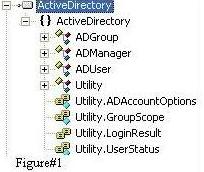
As shown in the figure#1, the wrapper API consists of following classes:
ADManager is a singleton class responsible for managing the
users and groups in the Active Directory.
To add the user in the particular Active directory group, following code will be used.
 Collapse
Dim _ADUser As ADUser
_ADUser = ADManager.Instance.LoadUser("adnan")
Dim _ADGroup As ADGroup
_ADGroup = ADManager.Instance.LoadGroup("DeveloperGroup")
ADManager.Instance.AddUserToGroup(_ADUser.DistinguishedName,
_ADGroup.DistinguishedName)
To check, whether the user exist in the Active Directory, the following simple code will be used.
Collapse
If ADManager.Instance.UserExists("adnan") Then
MsgBox("User Exist in the Active Directory")
End If
ADGroup class consists of properties and method responsible for
dealing with Active directory groups.
I mapped the following properties with Active Directory Group in order to make the properties simple.
The ADGroup class is used to create/update the group in the
Active Directory.
Below are the codes snipped for creating the group in Active Directory.
Collapse
Dim _AdGroup As New ADGroup
_AdGroup.Name = “DeveloperGroup”
_AdGroup.Description =”All developers in the company”
_AdGroup = ADManager.Instance.CreateADGroup(_AdGroup)
ADUser class consists of properties and method
responsible for dealing with Active directory users. The ADUser
properties and the corresponding property in Active Directory are given
below:
1. The ADUser class is used to create the user. The code snipped
to create the user is given below:
Collapse
Dim _AdUser As New ActiveDirectory.ADUser
_AdUser.FirstName = "Syed"
_AdUser.MiddleInitial = "Adnan"
_AdUser.LastName = "Ahmed"
_AdUser.Email = "adnanahmed235@yahoo.com"
_AdUser.UserName = "adnan"
_AdUser.Password = "123456"
_AdUser.IsAccountActive = True
_AdUser.MailingAddress = "Riyadh, Saudi Arabia"
_AdUser.Title = "Software Engineer"
_AdUser = ADManager.Instance.CreateADUser(_AdUser)
2. If you want to update the user in the Active Directory use the following code snipped.
Collapse
Dim _AdUser As ADUser
_AdUser = ADManager.Instance.LoadUser("adnan")
_AdUser.MailingAddress = "Jeddah, Saudi Arabia"
_AdUser.Title = "Senior Software Engineer"
_AdUser.Update()
3. You can use ADUser class to reset the user password.
Collapse
Dim _AdUser As ADUser
_AdUser = ADManager.Instance.LoadUser("adnan")
_AdUser.SetPassword("654321")
Utility class is responsible for general options.
Before using the wrapper API, You have to follow the following instructions for windows and web based applications.
Add the following line inside the <system.web> tag in the
web.config file.
Collapse
<identity impersonate="true" />
Add the following lines of tags inside the <appSettings>
tags.
Collapse
<add key="Domain" value="MyDomain.com" />
<add key="ADPAth" value="LDAP://MyDomain " />
<add key="ADUser" value="administrator" />
<add key="ADPassword" value="123" />
<add key="ADUsersPath" value="OU=DeveloperDepartment," />
Note: Here in ‘ADUsersPath’ Key, value (“OU=DeveloperDepartment,") shows the OU= Organizational Unit in the Active Directory as an example. You can write any of your organizational unit or create new one for testing.
Go to IIS select the website, In the properties windows, select the Directory Service Tab, In the Authentication and access control option, Click Edit Button, It will Open Authentication Methods window, select Anonymous access and enter Domain Administrator Account User Name, Password and select Integrated Windows Authentication as shown in the following figures.


Add the following lines of tags inside the <configuration>
tags.
Collapse
<appSettings>
<add key="Domain" value="MyDomain.com" />
<add key="ADPAth" value="LDAP://MyDomain " />
<add key="ADUser" value="administrator" />
<add key="ADPassword" value="123" />
<add key="ADUsersPath" value="OU=DeveloperDepartment," />
</appSettings>
Note: Sample App.config file is included in the download API.
I have tested the included project on following platforms
I have demonstrated, how easy it is to navigate the Active Directory Objects
by using the wrapper API which is using System.DirectoryServices.
In the next release of my wrapper API, I will demonstrate how to manage Active
Directory Roles and Permission by using the wrapper API. I have given the API in
both VB.NET and C#.NET and you can use it in both windows and web based
applications.
此内容由惯性聚合(RSS阅读器)自动聚合整理,仅供阅读参考。 原文来自 — 版权归原作者所有。