





This is the second of five articles about Host Workflow communication.
In this series of articles, I will try to show the different possibilities to implement communication, from the simplest case to the more complex. I am not planning to be exhaustive, but I will try to give a general panoramic in order to get us a good idea about the thematic.
Because I also don’t like large articles, I have divided this series into the followings parts:
In Part I, we understood how to pass information to a Workflow when it is launched. That works OK when you don’t need to return data from the Workflow. But often, you need to return information about the processed data in the Workflow.
在Part I讲述当WorkFlow启动时接收参数。当不需要从workflow返回数据时这种方法没问题。但是,workFlow经常要返回处理的数据。
The Workflow foundation is delivered with an Activity component to do this work: the CallExternalMethod Activity.
the CallExternalMethod Activity完成此功能。
Returning to the example of Part I, our program reads a file from the computer and sees determinate number of chars from it. In this program, we want to pass two parameters (the file path and the number of characters to return from the file), and the Workflow will show the information in an internal message box. Now, we have the requirement to show the return information directly in the console output and not in an internal message box form (see Figure 1).
在Part I的基础上,现在要从主程序输出数据。
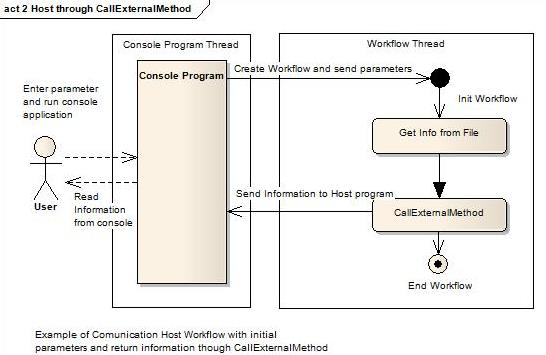
You can see that the barrier between the threads is passed with the Workflow invocation and again to return the character from the file to the console host application.
To implement passing the information form the Workflow to the Host, WWF comes with a dedicated activity named CallExternalMethod. That is the good news; the bad news is that we must create a specific service pattern to communicate with this activity.
CallExternalMethod 把信息从Workflow 传给主程序。但是需要创建一个特殊的服务
The communication service pattern works as another service. You must create a service interface, implement the service, and register it in the Workflow runtime instance.
需要创建服务接口和功能,在WorkFlow runtime instance中注册该服务。
You can implement the communication as you want, by poll or by events, but you must fulfill the CallExternalMethod requirements.
可以通过poll(??)或者事件的方式实现通信。
In short, you need to implement the following code structure:
完成下面的代码
Create the followings interface and classes:
CallExternalMethod Activity. 由CallExternalMethod Activity调用的接口及方法CallExternalMethod. In this method, you made the code to send the information to the host. 一个类完成上述接口。由CallExternalMethod调用的方法要在该类中实现。在这个方法中,信息传向主程序。EventArgs derived class to hold the information that you want to send to the host. 如果使用事件实现通讯,需要实现一个由类驱动的事件参数。 In the Host application, the following steps need to be taken: 在主程序端
ExternalDataExchangeService class and register it in the Workflow runtime. 需要创建一个ExternalDataExchangeService 类,并在workflow runtime 中注册In the Workflow: 在WorkFlow中
CallExternalMethod Activity. 需要有CallExternalMethod ActivityYou can see the result class structure for our example in the following diagram:

You can see that the CallExternalMethod makes a call to a method that is in another thread. When this method is executed, we have the results in the host thread! That is the trick. CallExternalMethod 调用了另一个线程中的方法,当此方法执行后,
We use a console application and a sequential Workflow to explain in detail how to create these structures.
The best thing to do is download the code that is attached to this article, or if you have it from of Part I of this series, you can reuse it.
The companion project has the communication with the Workflow through parameters, that was explained in Part I. I assumed that you would know how to do it (if you don’t know, please revisit Part I of this article series).
We will now do a step by step explanation of the use of CallExternalMethod in our example:
CallExternalMethod Activity. 定义又CallExternalMethod Activity调用的接口
You can create this interface in the same project as your host or in an independent project. For simplicity, we created it in the same host application. The interface simply contains the method to be called by the Workflow. You should now be thinking, why not call any method in the host? The answer is, this interface must have a special header to define it as an external method callable by the Workflow. 该接口必须有一个特殊的头部定义,表示由workflow可调用的The complete code is shown here:
 Collapse
 Copy Code
    [ExternalDataExchange]
    public interface ICommunicationService
    {


    void SendDataToHost(string response);
    }
Observe the ExternalDataExchangeHeader. It determines that the method in the class can be called from the Workflow.
The code for this class is your responsibility and your decision. You can decide to implement a method to simply hold the data passed from the Workflow and then the host will poll the class instance, or you can decide if you want to implement an event to asynchronously get the data. 在此类中可以决定采用poll的方式或者event的方式处理数据。
In our code, we implement an event. We should pass the data from the Workflow in the arguments of the event:
Collapse Copy Code
    public class CommunicationService: ICommunicationService
    {


    public event EventHandler <SendDataToHostEventArgs> SendDataToHostEvent;


    public void SendDataToHost(string response)  方法的实现
    {
    SendDataToHostEventArgs e = new SendDataToHostEventArgs();
    e.Response = response;
    EventHandler<senddatatohosteventargs > sendData = this.SendDataToHostEvent;
    if (sendData != null)
    {
    sendData(this, e);
    }
    }
    }
You can see the implementation of the event and the simple code of the method above. The method only passes the response input parameter to the event arguments and raises the event.
The definition of the event argument is trivial, and is shown here: 下面是事件参数的定义
Collapse Copy Code
public class SendDataToHostEventArgs: EventArgs
    {
    string _response = string.Empty;


    public string Response
    {
    get
    { return _response; }
    set
    { _response = value; }
    }
    }
In our example, we create the three classes in different files. You can see them here:
We register it in the Workflow runtime instance in the host program. 在主程序里的workflow runtime instance中注册ExternalDataExchangeService. The intercommunication class Workflow-Host must be registered as an External Data Exchange Service in the runtime. The registration is relatively simple, as you can see in the following code:
Collapse Copy Code
ExternalDataExchangeService dataservice = new ExternalDataExchangeService();

workflowRuntime.AddService(dataservice);

CommunicationService cservice = new CommunicationService();

dataservice.AddService(cservice);

cservice.SendDataToHostEvent += new
EventHandler<senddatatohosteventargs> (cservice_SendDataToHostEvent);
The first four instructions are related to registering the intercommunication service, and the last to registering the event to communicate the result from the Workflow. Our application is now complete in the host side. Now we should make our Workflow.
Well, we use as base the same Workflow as in Part I. We suppress the code activity that shows the MessageBox. Then, drag and drop a CallExternalMethod activity to the Workflow, and configure it as in the following figure: 在workflow中添加CallExternalMethod activity

Note that the InterfaceType property is filled with the created ICommunicationService. The MethodName is the method to be called by the activity in the interface. When you enter the MethodName, the property is expanded and you must declare the variable that will fill the response parameter. In our application exists a variable _response. To match the parameter with the variable, click in the ellipsis button in the Response field, and in the opened dialog, click in “Bind to a new member", create the field, and enter the name of the field _response. (If you click in the example code, the binding is already created, and you can see the variable directly in the “Bind to an existing member” screen).
The rest of the logic is trivial, and you can see it in the example (the logic to access the file and pass the initialization parameters from the Host).
Compile the application and launch it. You can use your proper parameters to launch the application or use the default. (Maybe you do not have the specific file that is used as the default. Feel free to change it for another that you have).
The basic step to pass information from the Workflow to the Host using the CallExternalMethod Activity are the following:
Create the followings interface and classes:
CallExternalMethod Activity and decorated with the header:
Collapse Copy Code
[ExternalDataExchange]CallExternalMethod. In the Host application:
ExternalDataExchangeService class in the Workflow runtime. ExternalDataExchangeServiceInstance. In the Workflow:
CallExternalMethod Activity in the point of the Workflow that you want to send information to the Host. CallExternalMethod Activity properties, register the Communication Interface, the method to call, and the variable or property to match the parameter of the called method. Now, you know how to do a bi-directional communication between a host and a Workflow. But you will continue to have limitations. Until now, you only knew how to send information to a Workflow in the initialization phase, but what about sending information from the Host to the Workflow at any point of the Workflow? We will talk about this in the next part.
此内容由惯性聚合(RSS阅读器)自动聚合整理,仅供阅读参考。 原文来自 — 版权归原作者所有。