





Here is my approach to make a compact framework form fullscreen:
A class that enables you to
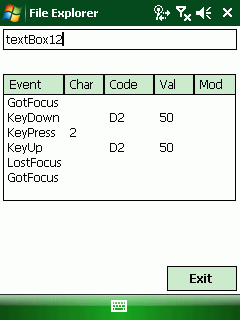
(You are right, you dont see ‘fullscreen’ in the screen shot, BUT the taskbar is locked!)
using System;
using System.Collections.Generic;
using System.Text;
using System.Runtime.InteropServices;

namespace myApp{
    class fullScreen
    {
        #region DllImports
        ///
        /// FindWindow will find a window by specifying the WndClass or the Caption
        ///
        ///

        ///

        /// an intPtr to the found window or null, if not found
        [DllImport("coredll.dll")]
        extern private static IntPtr FindWindowW(string lpClassName, string lpWindowName);

        ///
        /// we need this to get the size of the screen
        ///
        ///

        ///
        [DllImport("coredll.dll")]
        extern private static int GetSystemMetrics(int nIndex);
        ///
        /// the used nIndex values for screen width and height
        ///
        private const int SM_CXSCREEN = 0;
        private const int SM_CYSCREEN = 1;

        ///
        /// query a window for his state
        ///
        ///

        /// true if window is visible
        [DllImport("coredll.dll")]
        static extern bool IsWindowVisible(IntPtr hWnd);

        #endregion
        ///
        /// function to modify the window state of a window
        ///
        /// handle to the window
        /// the required window state
        ///
        [DllImport("coredll.dll")]
        static extern bool ShowWindow(IntPtr hWnd, uint nCmdShow);

        #region WStyles
        /// Enumeration of the different ways of showing a window using
        /// ShowWindow
        private enum WindowShowStyle : uint
        {
            /// Hides the window and activates another window.
            /// See SW_HIDE
            Hide = 0,
            /// Activates and displays a window. If the window is minimized
            /// or maximized, the system restores it to its original size and
            /// position. An application should specify this flag when displaying
            /// the window for the first time.
            /// See SW_SHOWNORMAL
            ShowNormal = 1,
            /// Activates the window and displays it as a minimized window.
            /// See SW_SHOWMINIMIZED
            ShowMinimized = 2,
            /// Activates the window and displays it as a maximized window.
            /// See SW_SHOWMAXIMIZED
            ShowMaximized = 3,
            /// Maximizes the specified window.
            /// See SW_MAXIMIZE
            Maximize = 3,
            /// Displays a window in its most recent size and position.
            /// This value is similar to "ShowNormal", except the window is not
            /// actived.
            /// See SW_SHOWNOACTIVATE
            ShowNormalNoActivate = 4,
            /// Activates the window and displays it in its current size
            /// and position.
            /// See SW_SHOW
            Show = 5,
            /// Minimizes the specified window and activates the next
            /// top-level window in the Z order.
            /// See SW_MINIMIZE
            Minimize = 6,
            /// Displays the window as a minimized window. This value is
            /// similar to "ShowMinimized", except the window is not activated.
            /// See SW_SHOWMINNOACTIVE
            ShowMinNoActivate = 7,
            /// Displays the window in its current size and position. This
            /// value is similar to "Show", except the window is not activated.
            /// See SW_SHOWNA
            ShowNoActivate = 8,
            /// Activates and displays the window. If the window is
            /// minimized or maximized, the system restores it to its original size
            /// and position. An application should specify this flag when restoring
            /// a minimized window.
            /// See SW_RESTORE
            Restore = 9,
            /// Sets the show state based on the SW_ value specified in the
            /// STARTUPINFO structure passed to the CreateProcess function by the
            /// program that started the application.
            /// See SW_SHOWDEFAULT
            ShowDefault = 10,
            /// Windows 2000/XP: Minimizes a window, even if the thread
            /// that owns the window is hung. This flag should only be used when
            /// minimizing windows from a different thread.
            /// See SW_FORCEMINIMIZE
            ForceMinimized = 11
        }
        #endregion
#region private vars
        private int m_width = 240;
        private int m_height = 320;
        private bool m_SIP_shown = false;
#endregion
        ///
        /// class instantiation
        /// store the screen size
        ///
        public fullScreen()
        {
            m_width = GetSystemMetrics(SM_CXSCREEN);
            m_height = GetSystemMetrics(SM_CYSCREEN);
            //Find SipWndClass
            IntPtr hWndSipWndClass = IntPtr.Zero;
            hWndSipWndClass = FindWindowW("SipWndClass", null);
            if (hWndSipWndClass != IntPtr.Zero)
            {
                m_SIP_shown = IsWindowVisible(hWndSipWndClass);
            }
            GXopen();
        }
        ///
        /// this will open the GX API and all keystrokes, even the softkeys as Vol_Up, Win etc will not be handled by the OS
        /// the gx.dll is only available on Windows Mobile OS, not on WinCE OS devices
        /// The GX class has been ousourced and will only be loaded in gx.dll exists
        /// otherwise you will get missing DLL exceptions
        ///
        private void GXopen(){
            if (System.IO.File.Exists(@"\Windows\gx.dll"))
            {
                GX_WM gxwm = new GX_WM();
                gxwm.GXopen();
            }
        }

        ///
        /// deinit GX API and let wiondows handle the 'softkeys'
        ///
        private void GXclose()
        {
            if (System.IO.File.Exists(@"\Windows\gx.dll"))
            {
                GX_WM gxwm = new GX_WM();
                gxwm.GXopen();
            }
        }
        ///
        /// public vars to get the screen size
        ///
        public int width
        {
            get
            {
                return m_width;
            }
        }
        public int height
        {
            get
            {
                return m_height;
            }
        }
        ///
        /// will enlarge the form to cover the full screen
        /// the taskbar will be hidden
        /// the SIP will be hidden
        ///
        /// the form to make fullscreen
        public void makeFullScreen(System.Windows.Forms.Form f)
        {
            f.Width = m_width;
            f.Height = m_height;
            f.Top = 0; f.Left = 0; // move the form to upper left
            hideTaskBar(true); //hide the taskbar
            showSIP(false); //hide the SIP window, regardless of it is shown or not
        }

        ///
        /// restore previous screen settings
        ///
        public void Unload()
        {
            hideTaskBar(false);
            if (m_SIP_shown)
                showSIP(true);
        }

        ///
        /// Hide or show the SIP
        ///
        ///

        public void showSIP(bool bShow)
        {
            //Find SipWndClass
            IntPtr hWndSipWndClass = IntPtr.Zero;
            hWndSipWndClass = FindWindowW("SipWndClass", null);
            if (hWndSipWndClass != IntPtr.Zero)
            {
                if (bShow)
                    ShowWindow(hWndSipWndClass, (uint)WindowShowStyle.ShowNormal);
                else
                    ShowWindow(hWndSipWndClass, (uint)WindowShowStyle.Minimize);
            }
        }

        ///
        /// Hide or show the TaskBar
        ///
        ///

        ///
        private int hideTaskBar(bool mode)
        {
            IntPtr hWndTaskBar = IntPtr.Zero;
            if (mode)
            {
                hWndTaskBar = FindWindowW("HHTaskBar", null);
                if (hWndTaskBar != IntPtr.Zero)
                    ShowWindow(hWndTaskBar, (uint)WindowShowStyle.Hide);
            }
            else
            {
                hWndTaskBar = FindWindowW("HHTaskBar", null);
                if (hWndTaskBar != IntPtr.Zero)
                    ShowWindow(hWndTaskBar, (uint)WindowShowStyle.ShowNormal);
            }
            return 0;
        }

    }
}
The GX_WM class:
using System;
using System.Collections.Generic;
using System.Text;
using System.Runtime.InteropServices;

namespace myApp
{
	class GX_WM {
		//nice mangled names
		//?GXCloseInput@@YAHXZ or use "#3"
		[DllImport("gx.dll", EntryPoint="?GXCloseInput@@YAHXZ")]
		extern private static Int16 GXOpenInput();
		//?GXOpenInput@@YAHXZ or use "#9"
		[DllImport("gx.dll", EntryPoint="?GXOpenInput@@YAHXZ")]
		extern private static Int16 GXCloseInput();

		public void GXopen(){
			GXOpenInput();
			System.Diagnostics.Debug.WriteLine("GXOpenInput()");
		}
		public void GXclose() {
			GXCloseInput();
			System.Diagnostics.Debug.WriteLine("GXCloseInput()");
		}
	}
}
To use the classes in your code, declare a new fullScreen object at a central point of your app. For example in Program.cs:
public static fullScreen fse;
The declaration is static to enable you to use this object in all forms of your app. Then before your Run statement place the initialisation of the fullScreen object. At the end of your app, it is a good way to unload the object, so it may restore the taskbar and SIP status.
static class Program
    {
        ///
        /// The main entry point for the application.
        ///
        public static fullScreen fse;
        [MTAThread]
        static void Main()
        {
            try
            {
                fse = new fullScreen();
                Application.Run(new MyAppForm());
            }
            catch (Exception ex)
            {
                MessageBox.Show("Sorry: " + ex.Message);
            }
            fse.Unload();
        }
    }
Now in every form you have, place the line:
Program.fse.makeFullScreen(this);
in the _Load event or – as I do – in the form constructor after the line “InitializeComponent();”
public myAppForm() {
    if (!InitApp())
        AppShutdown();
    InitializeComponent();
    <strong>Program.fse.makeFullScreen(this);</strong>
}
If you need to show the SIP, use
Program.fse.showSIP(true);
If you want to have a real fullscreen app without a title bar, dont forget to set the borderstyle of your form to None. You can also change the makeFullScreen function and do this for the form given in the argument.
Any comments or enhancements?
Have fun
PS: Key catching works fine in C# with the fullscreen class (either using GXOpenInput() or AllKeys()), see attached c# sample.
此内容由惯性聚合(RSS阅读器)自动聚合整理,仅供阅读参考。 原文来自 — 版权归原作者所有。