








要想在NodeJS中调用SS生成的DLL, 需要借助EdgeJS.
EdgeJS: http://tjanczuk.github.io/edge/
如果你还不知道如何在SS中生成DLL, 请查看: Spider Studio 新版本 (x-mas) - 可以引入第三方程序集, 可以将脚本生成为DLL
下面以曾经写过的XML/JSON互转的脚本为例 (C#中另辟蹊径解决JSON / XML互转的问题) 说明如何在NodeJS中应用SS DLL:
1. 安装edgejs
2. 为www.utilities_online.info.XmlJsonConverter.dll编写一个javascript的代理脚本
一共两个方法, Xml2Json & Json2Xml:
var edge = require('edge');

exports.xml2json = edge.func({
    source: function() {/*

        using System.Threading;
        using System.Threading.Tasks;
        using www.utilities_online.info;

        public class Startup
        {
            public async Task<object> Invoke(object input)
            {
                object result = null;
                Thread t = new Thread(new ParameterizedThreadStart((p) => {
                    using(var proxy = new XmlJsonConverter())
                    {
                        proxy.Init();
                        result = proxy.Xml2Json(p.ToString());
                    }
                } ));
                t.SetApartmentState(ApartmentState.STA);
                t.IsBackground = true;
                t.Start(input);
                while (t.ThreadState != ThreadState.Stopped)
                {
                    Thread.Sleep(100);
                }
                return result;
            }
        }
    */},
    references: [ __dirname + '\\www.utilities_online.info.XmlJsonConverter.dll' ]
});

exports.json2xml = edge.func({
    source: function() {/*

        using System.Threading;
        using System.Threading.Tasks;
        using www.utilities_online.info;

        public class Startup
        {
            public async Task<object> Invoke(object input)
            {
                object result = null;
                Thread t = new Thread(new ParameterizedThreadStart((p) => {
                    using(var proxy = new XmlJsonConverter())
                    {
                        proxy.Init();
                        result = proxy.Json2Xml(p.ToString());
                    }
                } ));
                t.SetApartmentState(ApartmentState.STA);
                t.IsBackground = true;
                t.Start(input);
                while (t.ThreadState != ThreadState.Stopped)
                {
                    Thread.Sleep(100);
                }
                return result;
            }
        }
    */},
    references: [ __dirname + '\\www.utilities_online.info.XmlJsonConverter.dll' ]
});
3. 编写服务脚本 www.utilities_online.info.XmlJsonConverter.js
var http = require('http');
var xmlJson = require('./www.utilities_online.info.XmlJsonConverter.proxy.js');

var person = { person:{ name:'Mike', age:30 }};

var proxy = http.createServer(function (req, res) {
  res.writeHead(200, {'Content-Type': 'application/xml'});
  var xml = xmlJson.json2xml(JSON.stringify(person), true);
  console.log(xml);
  res.end(xml);
}).listen(1338);
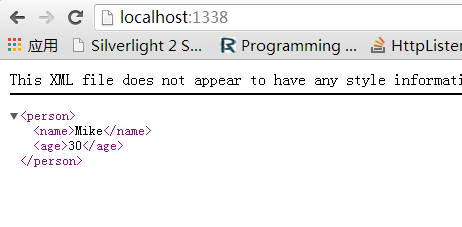
4. 运行, 查看效果:
此内容由惯性聚合(RSS阅读器)自动聚合整理,仅供阅读参考。 原文来自 — 版权归原作者所有。