





connected-react-router是一个绑定react-router到redux的组件,来实现双向绑定router的数据到redux store中,这么做的好处就是让应用更Redux化,可以在action中实现对路由的操作。
这个组件的关键就在于使用了react-router中的一个关键组件,也就是ReactTraining/history,这个组件看了下文档,作者是这么解释的
The history library is a lightweight layer over browsers' built-in History and Location APIs. The goal is not to provide a full implementation of these APIs, but rather to make it easy for users to opt-in to different methods of navigation.
按照我的理解应该是对浏览器原本的history对象做了一定的增强,同时应该对ReactNative等环境做了一定的polyfill。
使用connected-react-router这个库的关键点就在于创建合适的history对象
我当前connected-react-router的版本为v6,需要react router大于v4,并且react-redux大于v6,react大于v16.4.0
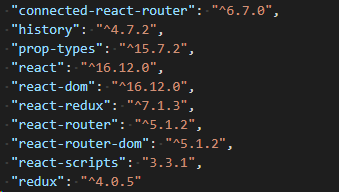
先看index.js
import React from 'react';
import ReactDOM from 'react-dom';
import { Provider } from 'react-redux'
import configureStore, { history } from './configureStore'
import { ConnectedRouter } from 'connected-react-router'
import routes from './routes'

const store = configureStore()

ReactDOM.render(
    <Provider store={store}>// Provider使用context将store传给子组件
        <ConnectedRouter history={history}>//ConnectedRouter传递history对象作为props
            { routes }
        </ConnectedRouter>
    </Provider>
  , document.getElementById('root'));
configureStore.js提供history与store
import { createBrowserHistory } from 'history'
import { applyMiddleware, compose, createStore } from 'redux'
import { routerMiddleware } from 'connected-react-router'
import createRootReducer from './reducers'
export const history = createBrowserHistory()
export default function configureStore(preloadedState) {
const composeEnhancer = window.__REDUX_DEVTOOLS_EXTENSION_COMPOSE__ ||
compose
const store = createStore(
createRootReducer(history),
preloadedState,
composeEnhancer(
applyMiddleware(
routerMiddleware(history),
),
),
)
return store
}
使用createBrowserHistory()创建history。
const history = createBrowserHistory()
使用redux-devtools-extension
window.__REDUX_DEVTOOLS_EXTENSION_COMPOSE__
reducers/index.js
import { combineReducers } from 'redux'
import { connectRouter } from 'connected-react-router'
import counterReducer from './counter'

const rootReducer = (history) => combineReducers({
  count: counterReducer,
  router: connectRouter(history)
})

export default rootReducer
combineReducers方法,用于 Reducer 的拆分。你只要定义各个子 Reducer 函数,然后用这个方法,将它们合成一个大的 Reducer
reducers/counter.js

const counterReducer = (state = 0, action) => {
    switch (action.type) {
      case 'INCREMENT':
        return state + 1
      case 'DECREMENT':
        return state - 1
      default:
        return state
    }
  }

  export default counterReducer
View Code
routes/index.js
import React from 'react'
import { Route, Switch } from 'react-router'
import Counter from '../components/Counter'
import { Link } from 'react-router-dom'
const routes = (
<div>
<div>
<Link to="/">Home</Link>
<Link to="/hello">Hello</Link>
<Link to="/counter">Counter</Link>
</div>
<Switch>
<Route exact path="/" ><div>Home</div></Route>
<Route path="/hello" ><div>Hello</div></Route>
<Route path="/counter" component={Counter} />
<Route ><div>No Match</div></Route>
</Switch>
</div>
)
export default routes
components/Counter.js
import React from 'react'
import PropTypes from 'prop-types'
import { connect } from 'react-redux'
import { increment, decrement } from '../actions/counter'

const Counter = (props) => (
  <div>
    Counter: {props.count}
    <button onClick={props.increment}>+</button>
    <button onClick={props.decrement}>-</button>
  </div>
)

Counter.propTypes = {
  count: PropTypes.number,
  increment: PropTypes.func.isRequired,
  decrement: PropTypes.func.isRequired,
}

const mapStateToProps = state => ({
  count: state.count,
})

const mapDispatchToProps = dispatch => ({
  increment: () => dispatch(increment()),
  decrement: () => dispatch(decrement()),
})

export default connect(mapStateToProps, mapDispatchToProps)(Counter)
actions/counter.js
export const increment = () => ({
  type: 'INCREMENT',
})

export const decrement = () => ({
  type: 'DECREMENT',
})
View Code
此内容由惯性聚合(RSS阅读器)自动聚合整理,仅供阅读参考。 原文来自 — 版权归原作者所有。