






Shapefiles are the most common format for GIS vector data, and just about every GIS program, free or commercial, can open them. Unfortunately, older vector data is often in the ArcINFO interchange E00 format which, unlike shapefiles, isn’t a well-documented format. Many free GIS programs can’t open E00 files at all, and even those few that can often have problems handling them correctly. But there’s a fairly simple two-stage process that can accurately convert vector E00 files into shapefile format.
The first stage involves converting the E00 files into ArcINFO coverage format (aka ArcView coverages, or even ArcGIS coverages). ESRI, the company that created the E00 format, has a free program called Import71 (Windows) to convert E00 files into ArcINFO coverage. You can download the program directly from ESRI (registration required), but a Google Search will turn up other direct download locations. Install the program, and run it:
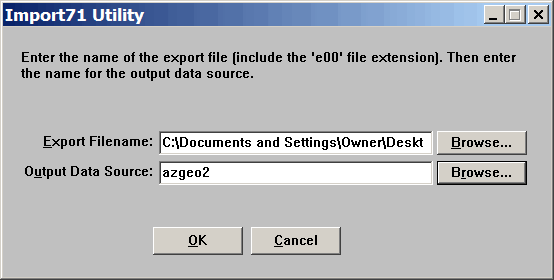
In the top box, enter the E00 file you wish to “Export” to ArcInfo coverages; use the browse button to select a file. For “Output Data Source”, enter a name for a folder that will hold the multiple coverage files; the default is to create it in the same directory that holds the E00 file. If you want to change the directory in which this folder is created, use the Browse button on the right. Click on OK, and the ArcINFO coverage files will be created in the specified folder.
If you’re a big fan of command-line interfaces, or if you run Linux, you might take a look at AVCImport, a free utility available in Windows and Linux flavors that converts E00 files to ArcINFO coverages. I’ve had mixed success with this utility, and if you’re running Linux, I’d guess that Import71 would probably install and run under the Wine emulator.
The second stage is to convert the ArcINFO coverages to shapefile format. For this, we’ll use ogr2ogr, one of the open source GDAL/OGR utilities written and maintained by Frank Warmerdam. The simplest way to get this utility, and many other useful ones, is to download and install the FWTools package for Windows, which contains ogr2ogr. As part of the installation package, FWTools creates a shell icon that you can use if you want to do the conversion process from a command line, following the syntax described in the ogr2ogr documentation page.
But the command line process involves a lot of typing, and you have to do it up to four times for every E00 file. That’s because E00 files can have four different kinds of vector data embedded within them, each of which needs to be converted into a separate shapefile:
LAB - Label point data, or isolated point data
CNT - Point data representing polygon centroids
ARC - Line data
PAL - Polygon/area data
Plus you have to type in the source and destination directories every time, which gets tedious very quickly for long filepaths. So I’ve written a simple Windows GUI front-end for ogr2ogr, that allows you to select the ArcINFO coverage directory graphically, and which converts all four types of coverage files at once; click on the link above to download it in zipped format. It’s called, oddly enough, ArcINFO2Shape GUI, and is a whopping 12KB download.
Unzip the program into the “bin” subdirectory of the FWTools directory, and either run it from there or make a shortcut to it on your Start Menu or Desktop. The following elaborate GUI will show up:
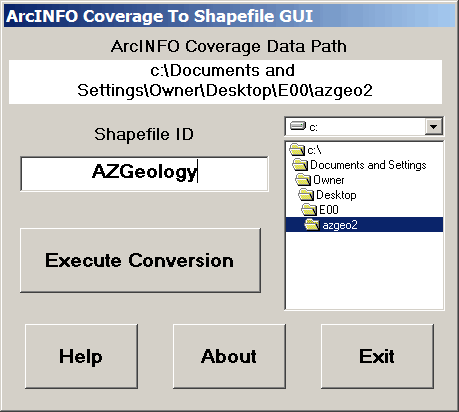
Use the drive and directory boxes on the right to select the ArcINFO coverage folder you created with Import71. Next, enter a Shapefile ID name into the lower box; this ID will be used in creating the shapefile names during the conversion. Click on “Execute Conversion”, and ogr2ogr will be invoked to convert the LAB, CNT, ARC and PAL coverages into shapefiles, opening and closing command shell windows for each individual process. If any coverages are not found, no file will be created. ArcINFO2Shape will assign names to the shapefiles based on both the ID you entered and the type of coverage. For example, if you entered “test” for the Shapefile ID, and there are only ARC and PAL coverages in the folder, the shapefiles created will be a line shapefile called “test_ARC.shp” and an area shapefile called “test_PAL.shp”. All shapefiles are created in the same folder as the ArcView coverages, and overwrite any older shapefiles with the same name. There is some minimal error testing: error message boxes pop up if you haven’t selected a directory or entered a shapefile ID; if it doesn’t find any ArcINFO coverages in the directory you’ve selected, it will let you know. If you come across any bugs or quirks, drop me a line.
ogr2ogr and FWTools are also available for Linux, and you can use ogr2ogr in command-line mode to do a conversion as well. ArcInfo2Shape GUI might run under Wine if you have the VB6 run-time libraries installed; no guarantees.
In addition to the three standard files in the shapefile format (*.shp, *.shx, and *.dbf), a *.prj file will be created containing information about the native coordinate system for the shapefile (projection and datum). You can open this *.prj file in any standard text editor, and it should be fairly easy to figure out what the coordinate system and datum is from the text in the file. Some GIS programs can use this .prj file to re-project the shapefile “on-the-fly”, while others require you to re-project the shapefile data separately to conform to the desired coordinate system, one that matches your other data. I’ll talk about a program that can easily re-project your shapefiles into another coordinate system in an upcoming post.
ArcINFO2Shape GUI is freely redistributable in unaltered form, and is free for any use, personal or commercialOther free utilities can be found on the Utilities page. If you find this or any of my other utilities particularly useful and would like to show your appreciation, donations of any amount are gratefully accepted via PayPal.
Note: Edited to incorporate the suggestion in the comments to use the term “ArcINFO coverage” instead of “ArcView coverage”. Also edited to emphasize that this is only for vector E00 files, not raster E00 files (e.g. DEMs).
此内容由惯性聚合(RSS阅读器)自动聚合整理,仅供阅读参考。 原文来自 — 版权归原作者所有。