










By Steve Tu, Senior Director of Product
You have the choice of a number of ways to physically connect to Megaport in your data centre. Which is right for you?
The world is rapidly adopting software defined networks like Megaport that are easy to provision and scale and also offer reliability and high performance. While this gives customers the ability to create and edit connections that are fully automated in the Megaport world, there is still a section within the network that remains the customer’s responsibility. That is the physical network device being used on the on-premises colocation DCs or office locations.
This article discusses some of the options for connecting your Megaport (physical port), VXCs, and IX.
To begin with, let’s compare different types of network equipment, according to their price/performance ratio, functionalities, and capabilities.
| Device Types | Switch | Router | Firewall |
|---|---|---|---|
| Key Functionalities | - Packet Switching - Routing (L3) | - Security - Routing | - Advanced Security - Routing |
| Performance | ✭✭✭✭✭ | ✭✭✭✭✩ | ✭✭✩✩✩ |
| Price | $ | $$ | $$$$$ |
| Route Table Size | Medium/Small | Large | Medium |
| Example | Juniper EX4600 Series Cisco Catalyst 3850 Series Juniper QFX Series Cisco Nexus Series | Juniper MX Series Cisco ASR Series | Cisco ASA Juniper SRX Palo Alto PA Fortinet Fortigate Sophos XG/UTM |
| Network Diagram Icon |  |  |  |
Most network engineers will understand that Layer 1 is the physical connection between two pieces of equipment. So from your rack or cage, when connecting to Megaport in the data centre, should you be using a router, switch or firewall to physically connect?
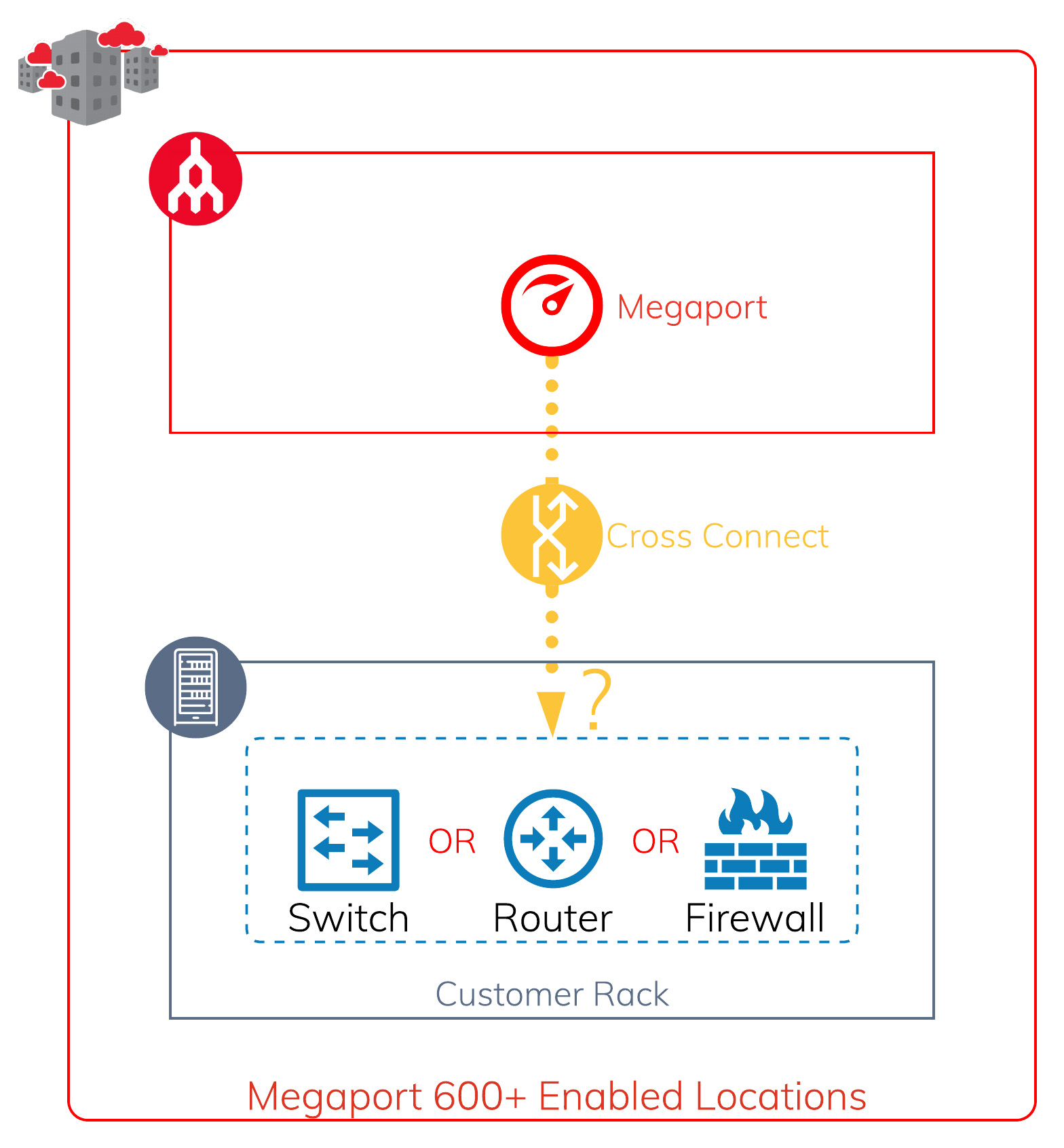
Megaport is a high-performance, multi-function port that allows you to connect to multiple different destinations from a single physical interface. This means you want your equipment to process each individual connection (VXC – Virtual Cross Connect) with sufficiently scalable throughput to ensure it is not the bottleneck of all the connections.
High Availability vs. Price
Is the device stackable on a 40Gbps or 100Gbps backplane?
Reliability
Packet processing preferred to be done at hardware level and not both hardware and software level
Protocol Support
802.1Q, 802.1ad Q-in-Q (Selective), Jumbo Frame
Recommended Equipment Type
L2/L3 10Gbps SFP+ Switch
Example:
Juniper EX4600-40F
Cisco Catalyst 3850-24XS (Note: Check whether your 3850 variation is stackable)
Physical Setup
Option 1 (Left): Single switch setup to single Megaport
Option 2 (Centre) (Recommended): Dual switch stack with dual Megaport LAG configuration
Option 3 (Right) (Recommended): Dual switch stack connecting to diverse Megaport switch chassis
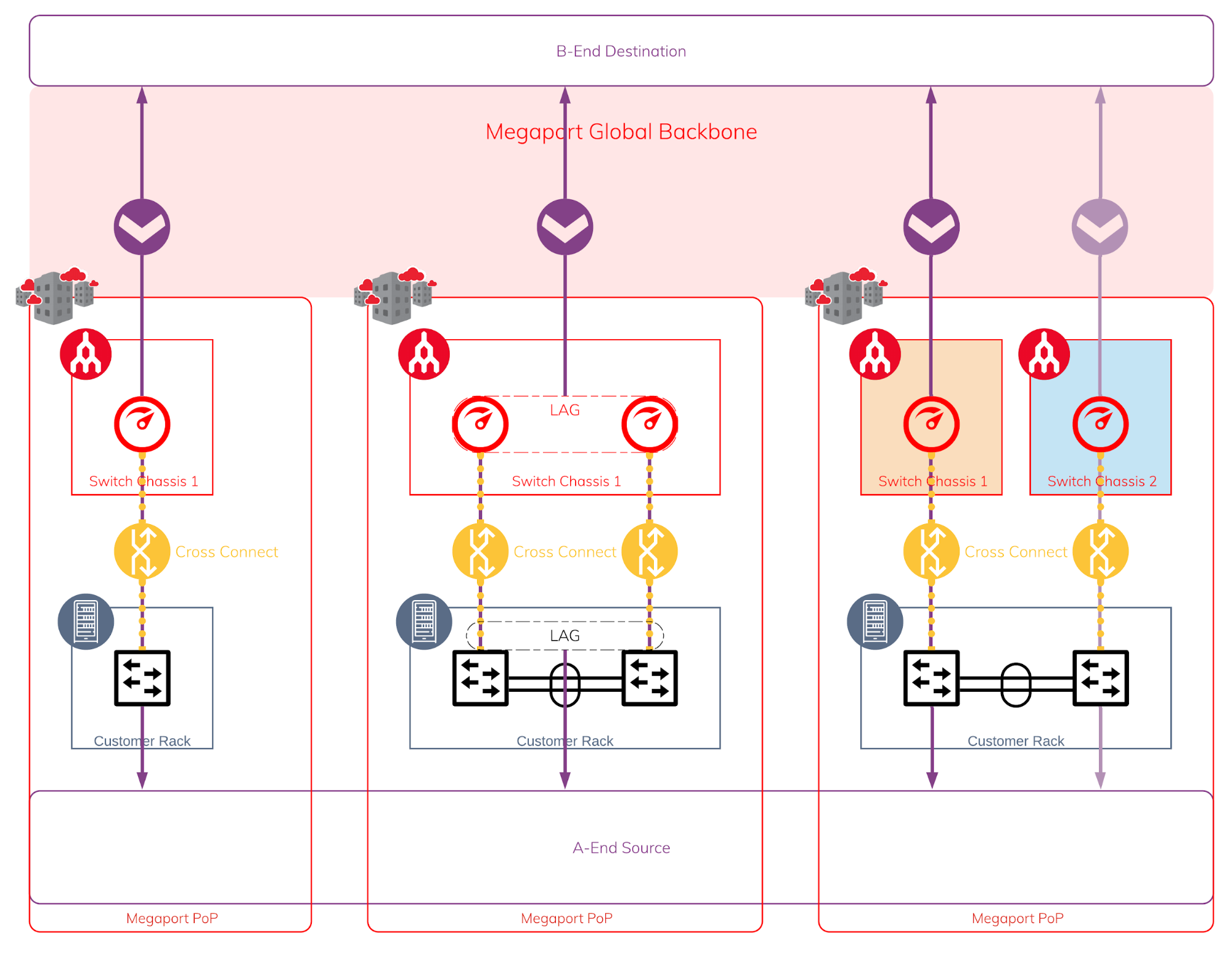
The three different options give you different levels of protection against different failures, but at a minimum we will recommend going with option 2 to give you SFP Transceiver and Cross Connect protection that is cost effective. This is especially important if you have many VXCs established over the LAG group.
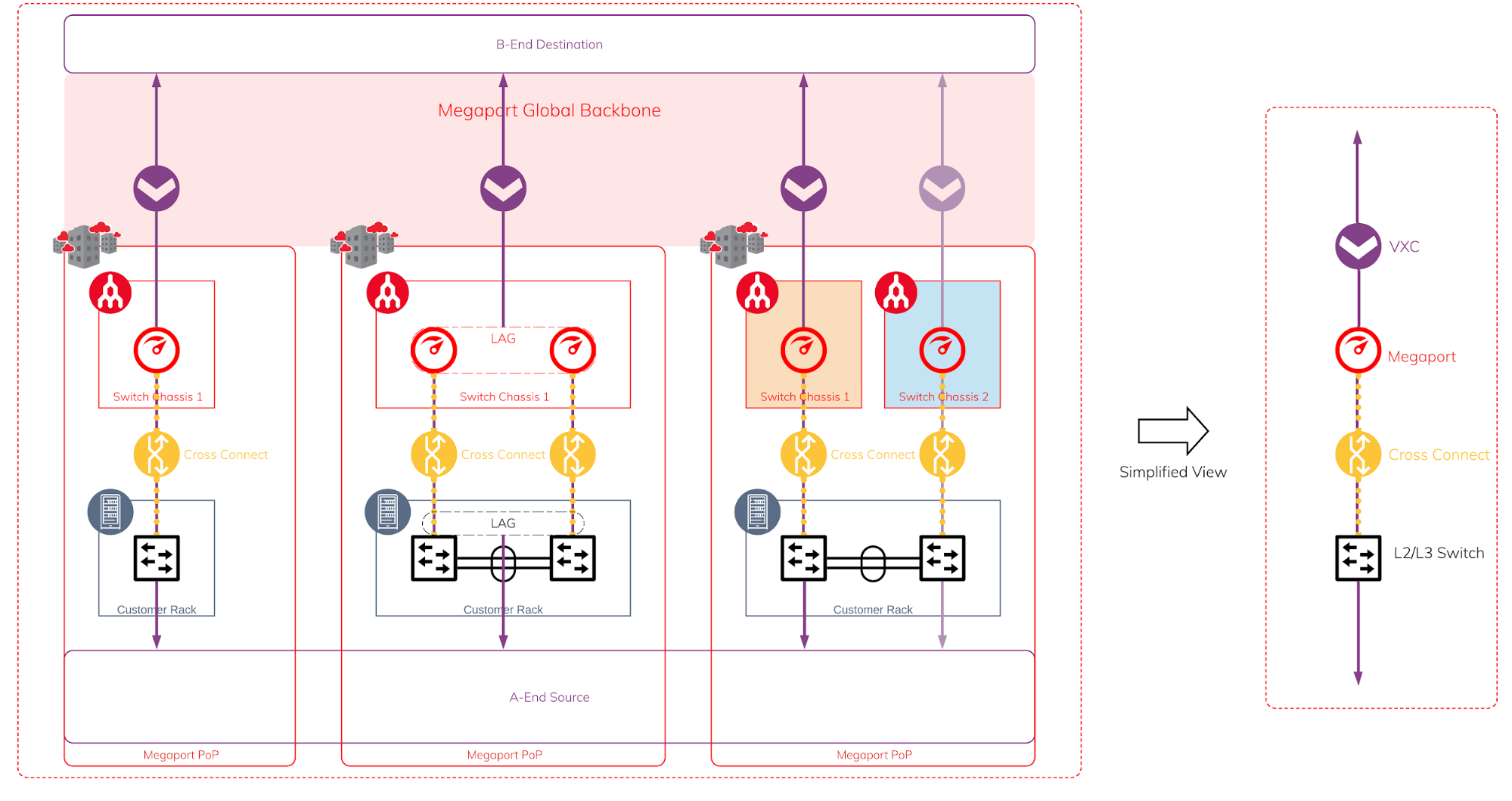
The diagram below shows a simplified view of the elements required.
When considering the device used to establish connectivity to public cloud (such as AWS, Azure, GCP, OCI etc.), there are two main categories to look at:
In order to create dedicated cloud connectivity, your device is required to support BGP (Border Gateway Protocol). If none of your devices support BGP, or you do not know what BGP is, never fear, you may check out the Megaport MCR offering that is able to simplify this requirement for you.
Should I use L3 switch, router or firewall for my cloud connectivity?
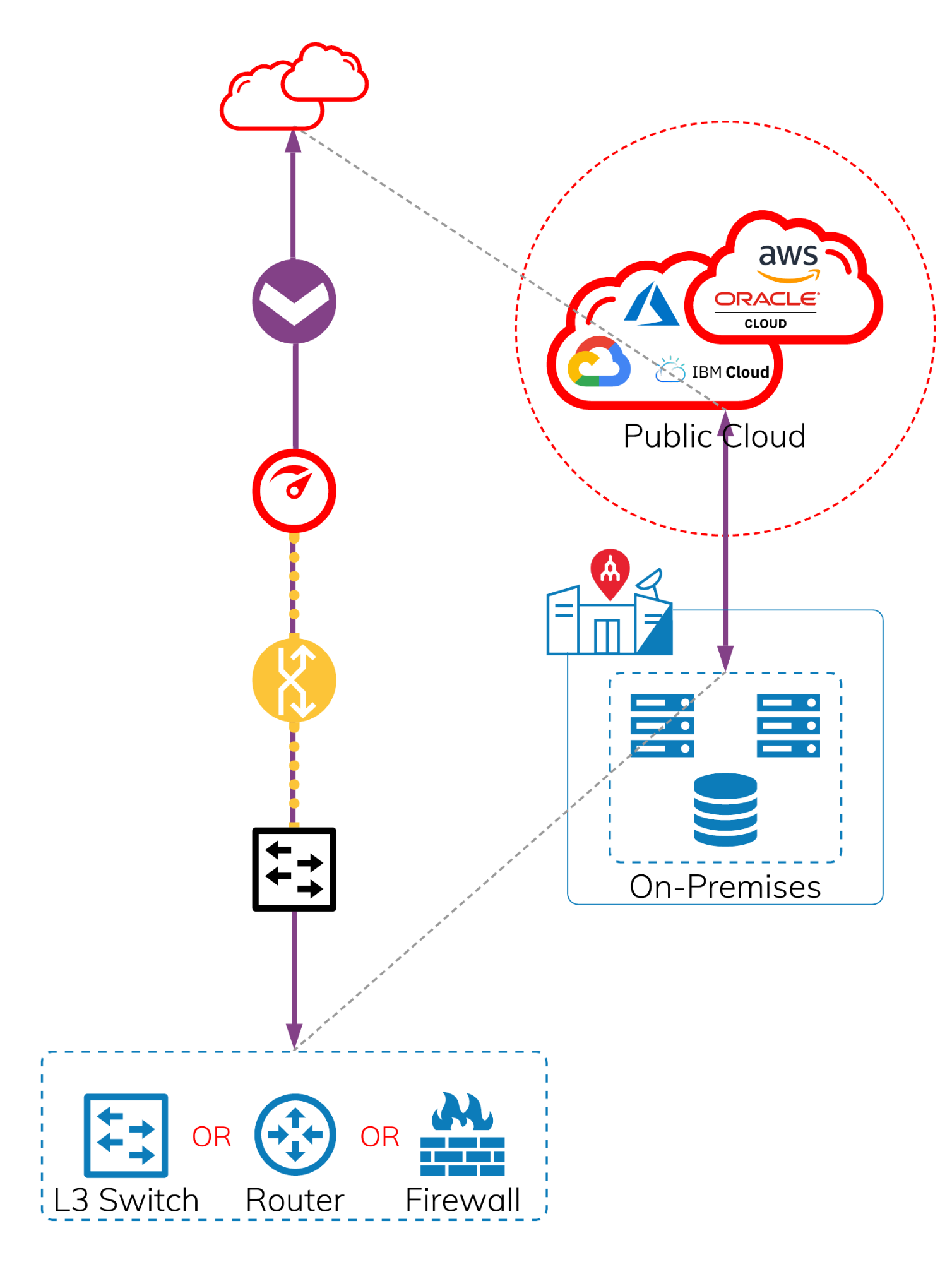
The answer to this question is that it depends on how you designed your cloud environment and also how you define your security zones.
Here are some examples of how you could treat your cloud environment as a trusted zone or DMZ zone.
Scenario 1: The cloud environment does not have internet access
Scenario 2: The cloud environment needs to go through a well controlled firewall to access the internet and generally no external inbound access
Scenario 3: The cloud environment allows external access
Scenario 4: The cloud environment is tiered with publicly accessible and privately accessible zones
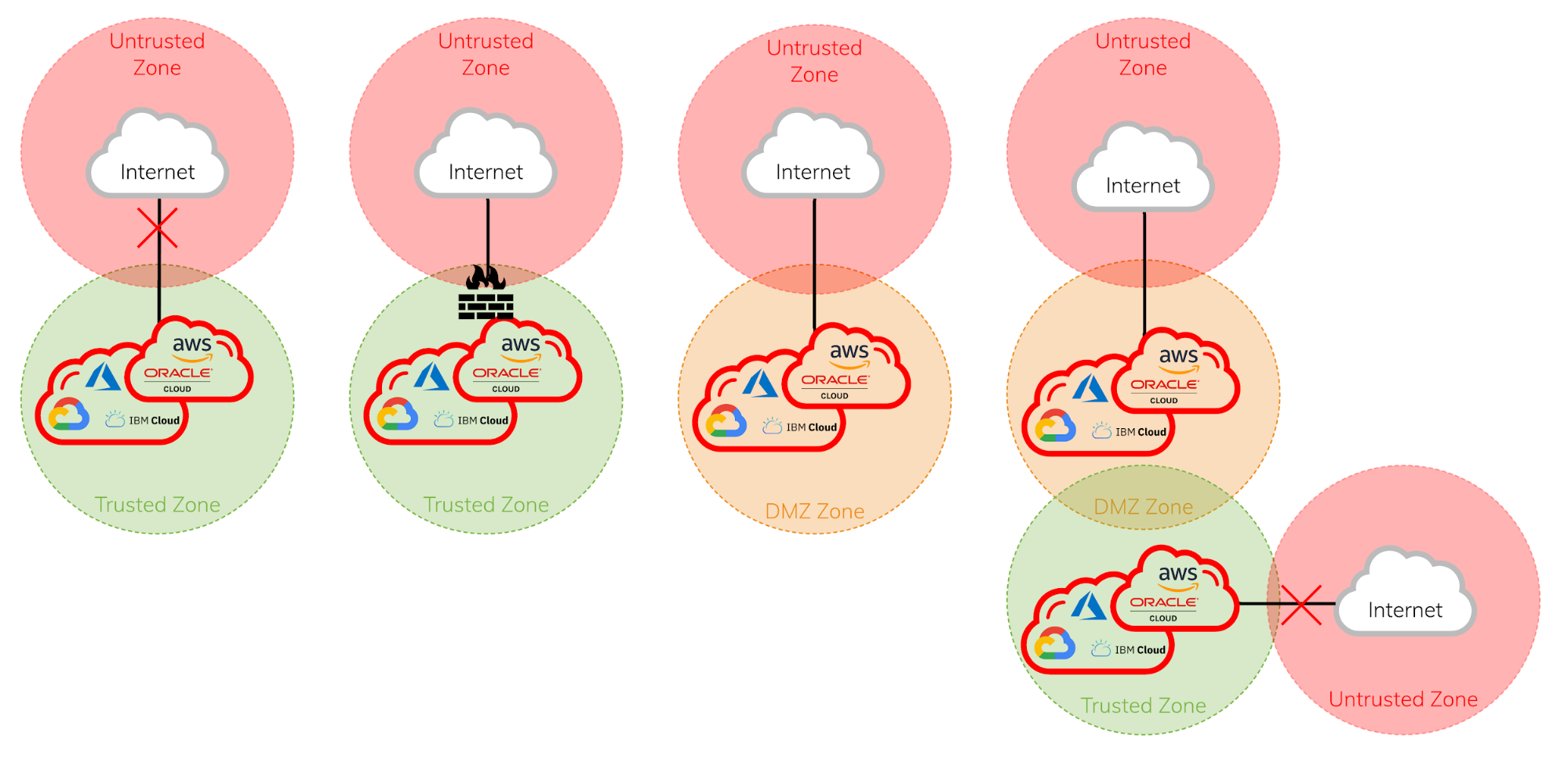
The security zones are generally defined differently from organisation to organisation.
Typically an organisation will treat the cloud environment as a trusted zone if it has a well-defined control and access, with limited/no external access. Although in some industries or organisations, taking a different cybersecurity approach could consider cloud environments as DMZ zone or in some rare instances an untrusted zone.
When setting up a cloud environment as an extension of your on-premises environment or a cloud-only topology, performance and predictability of your cloud connectivity are important. Often the bottleneck is caused by the physical device being used, and the security features being turned on, e.g. IPS/IDS, SSL decrypt, packet inspection etc.
For Trusted Zone
L3 switch or router ✭✭✭✭✭
Firewall ✭✭✭✩✩
Example L3 switch:
Juniper QFX Series or Cisco Nexus Series
For DMZ Zone
Firewall ✭✭✭✭✭
Router ✭✭✭✭✩
L3 switch ✭✭✭✩✩
In order to create dedicated cloud connectivity for public facing SaaS/PaaS/IaaS services, your needs to support BGP (Border Gateway Protocol) and you will also need to own your own public IP address. If you do not own a public IP address, or do not have a device that supports BGP, you can check out our MCR offering that will simplify this requirement for you.
Should I use L3 switch, router or firewall for my cloud connectivity for public facing services?
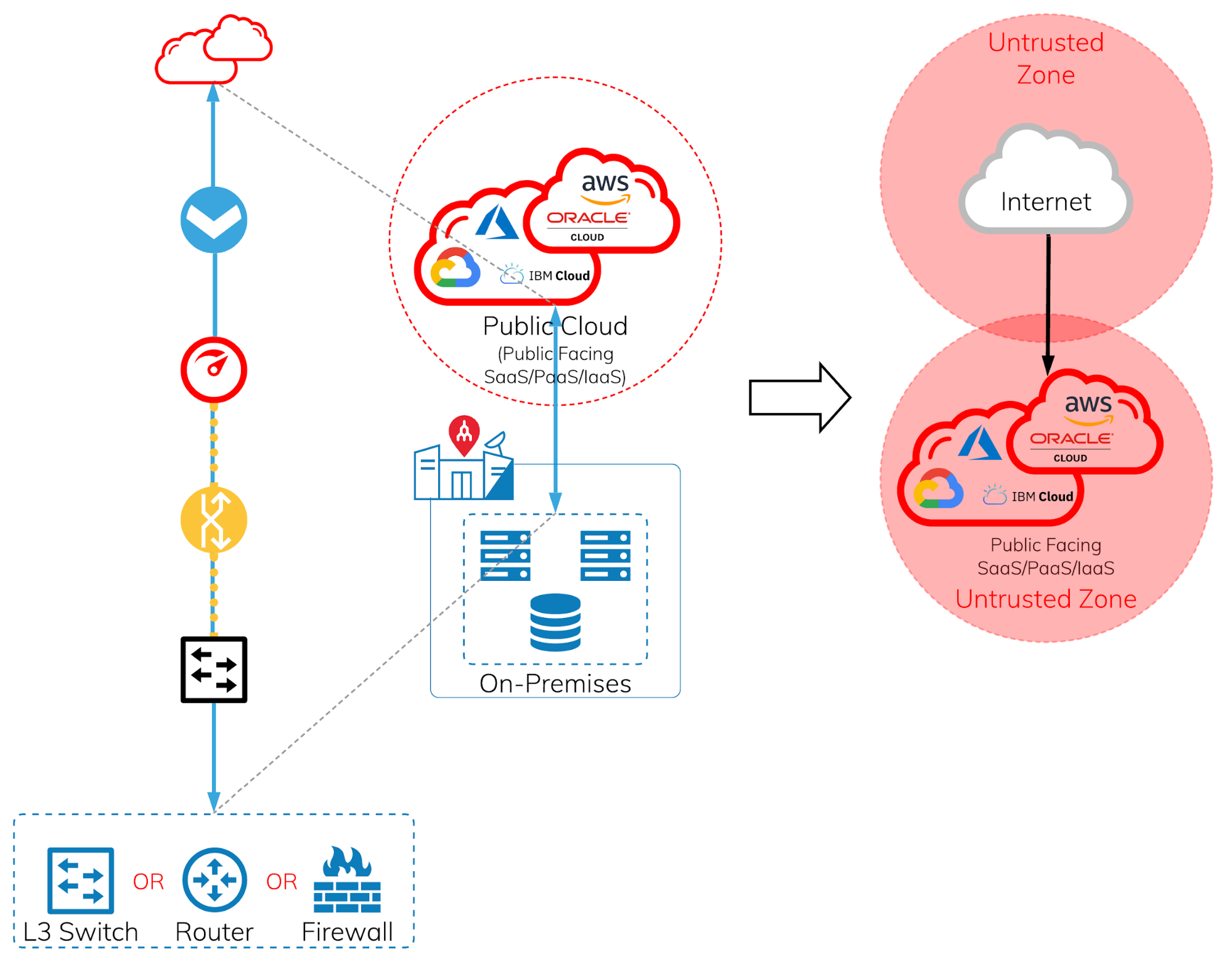
The answer to this question is a lot simpler than private IaaS cloud environments. Any public facing PaaS/SaaS services should be treated as untrusted zone. It’s only in some rare instances that it would be treated as a trusted zone, and I recommend you discuss it with your security team before implementing.
When it comes to accessing PaaS or SaaS services, this is when URL filtering, detection of malware, real time analysis, SSL decryption and content inspection etc., are the important things to give your users the protection they need. The platform is no longer for exclusive use of one particular organisation. However, it’s important to consider that when all the security features are turned on, how much compute is required to give the user the performance that is acceptable, or provides a good user experience, which will impact the overall cost of the device. However, nothing is more important than giving the user sufficient baseline security, as the cost of being compromised is much higher than the hardware itself.
Edge Router + Firewall ✭✭✭✭✭
Firewall ✭✭✭✭✭
Router ✭✭✩✩✩
Example firewall:
Palo Alto PA-5220 or above
The Internet Exchange contains the subset of the internet content. Instead of accessing the content through the internet providers, the content could be accessible in a next-hop experience to the content provider’s edge network at a much lower cost.
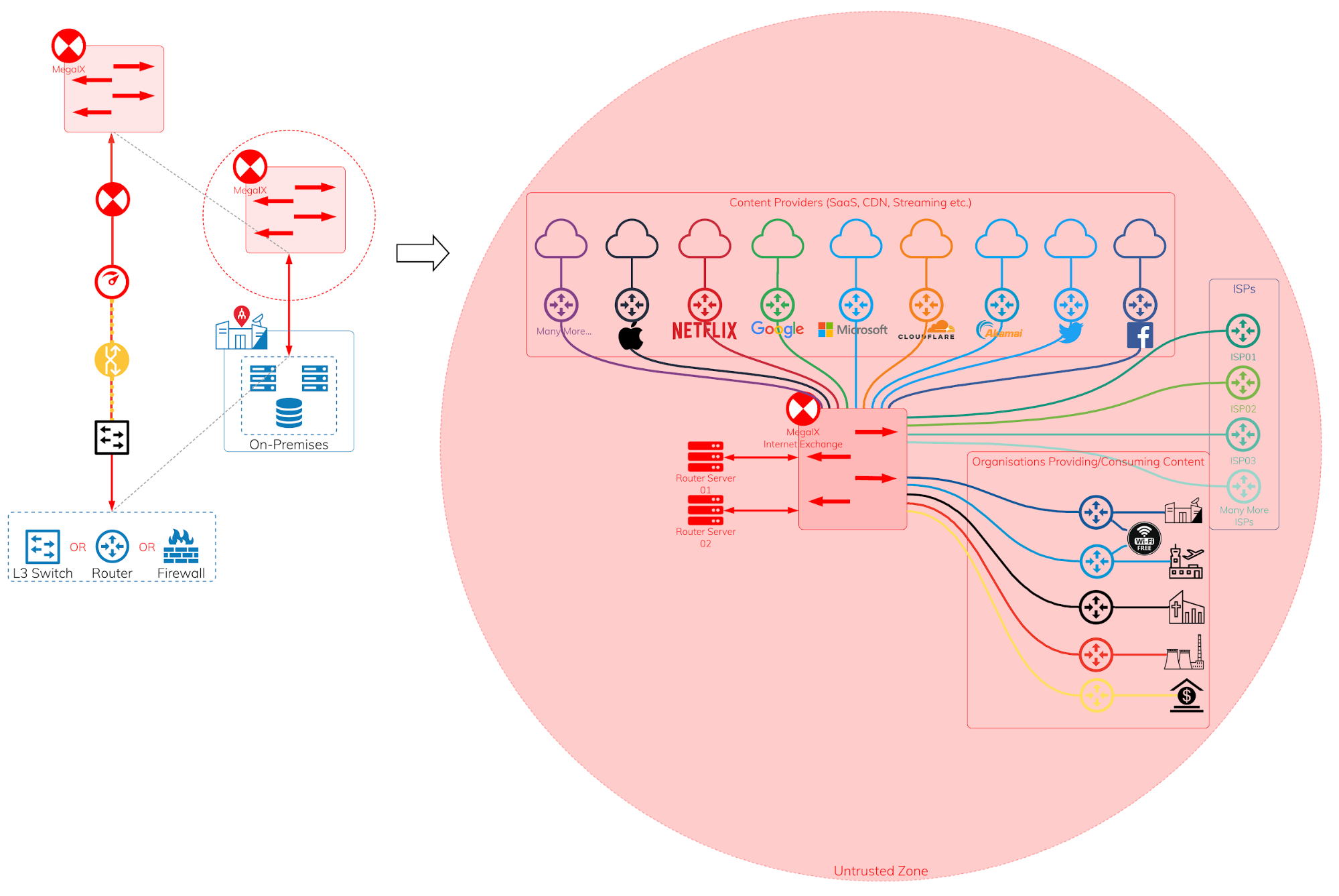
Most will think security is the most important factor, and IX should be simply treated like the internet as an untrusted zone. This is, in fact, true, but it is unlike just sending the network traffic to your next-hop being the internet provider with a single static entry of default route in the route table. In fact, it is likely you will have multiple BGP peering sessions via the IX, and you will need to handle multiple ASNs, tens of thousands of prefixes and apply filters on them as well. In some cases, some firewalls are not able to handle such a large amount of prefixes.
Edge Router + Firewall ✭✭✭✭✭
Firewall ✭✭✭✩✩
Router ✭✭✩✩✩
Example router:
Juniper MX Series or Cisco ASR Series
Of course, In a real world scenario, it is never about a single purpose connectivity but a mixture of workloads and connectivity requirements.
The advantages of using Megaport SDN, multi-purposed port and to leverage the best use of Megaport network for different workloads will look similar to the diagram below.
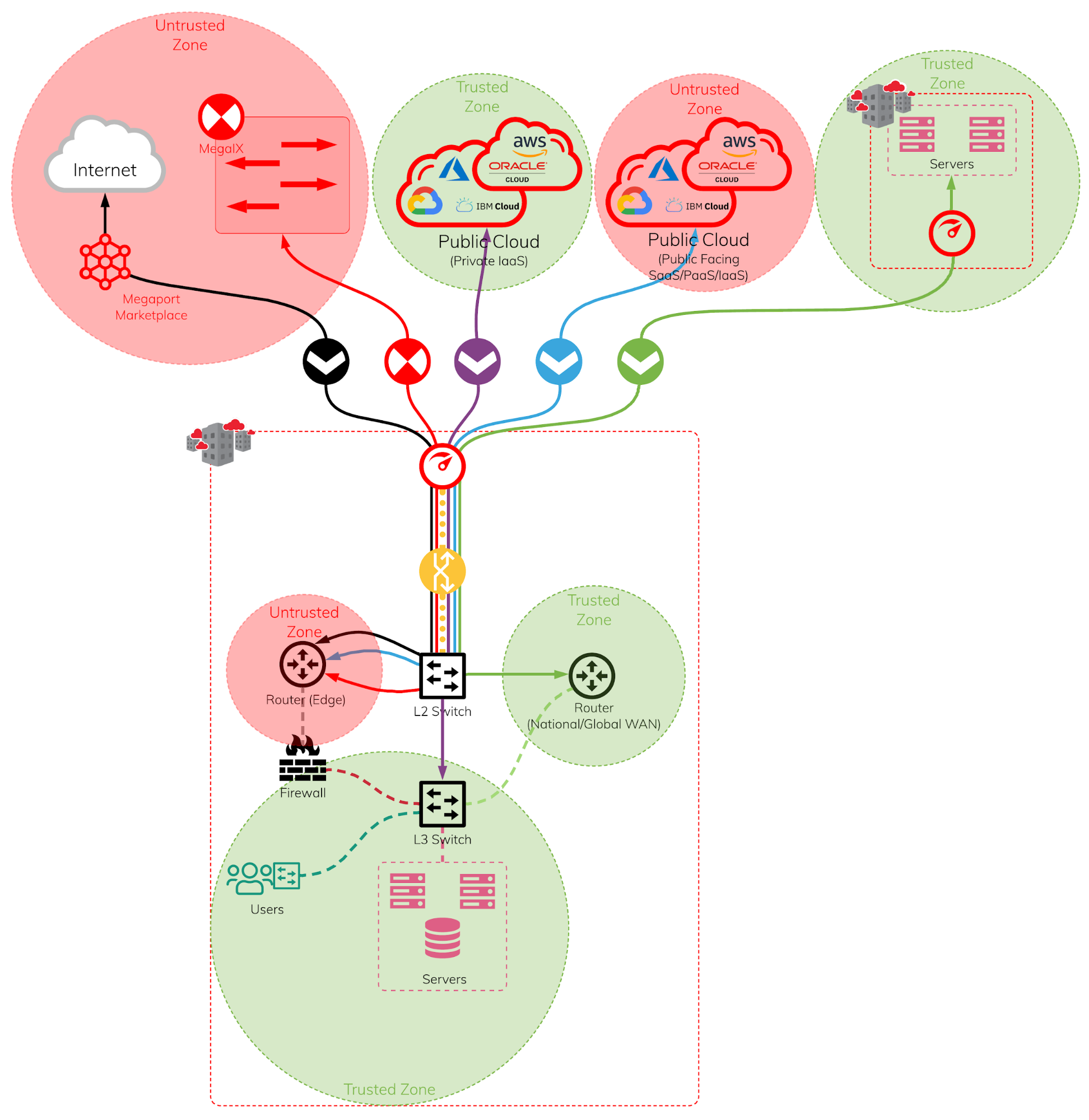
Using a L2/L3 switch to connect to a Megaport and handle all the VXCs to various different routers and firewalls generally is the most cost effective, reliable, and best performance option. The use of routers and firewalls for different types of VXC connections will depend on the organisation’s security requirements.
此内容由惯性聚合(RSS阅读器)自动聚合整理,仅供阅读参考。 原文来自 — 版权归原作者所有。