





Explore the private connectivity options of AWS, Microsoft Azure, and Google Cloud. Learn how each cloud provider's models can boost performance, reduce costs, and improve network stability for your multicloud strategy.
With the fast growing adoption of multicloud strategies, understanding the private connectivity models to these hyperscalers becomes increasingly important. Private connectivity can, in many cases, increase bandwidth throughput, reduce overall network costs, and provide a more predictable and stable network experience when compared to internet connections.
So, whether it is time to spin up private connectivity to a new cloud service provider (CSP), or get rid of your ol’ internet VPN, this article can lend a helping hand in understanding the different connectivity models, vernacular, and components of Amazon Web Services (AWS), Microsoft Azure, and Google Cloud Platform (GCP) private connectivity offerings.
These cloud providers use terminology that is often similar, but sometimes different. Let’s kick things off with some CSP terminology alignment.
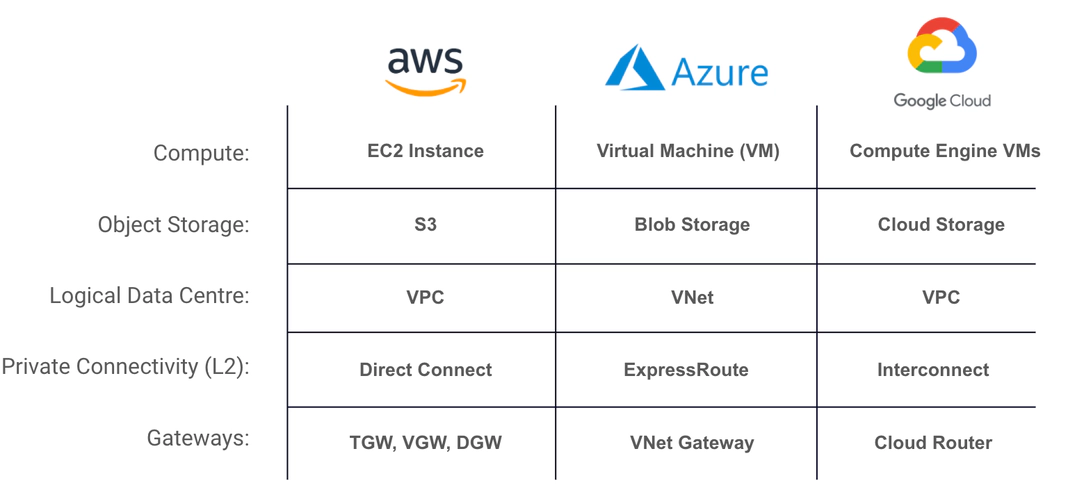
Now that we’ve got a better idea of the CSP terminology, let’s jump into some more of the meat and potatoes. We’ll start with breaking down AWS Direct Connect.
The main ingredients for AWS Direct Connect are the virtual interfaces (VIFs), the Gateways — Virtual Private Gateway (VGW), Direct Connect Gateway (DGW/DXGW), and Transit Gateway (TGW) — and the physical/Direct Connect Circuit.
AWS Direct Connect has varying connectivity models: Dedicated Connections, Hosted Connections, and hosted VIFs. In choosing the best one for your business, it’s important to first understand each of the different models in order to select the one most suitable for your use case.
This is a physical connection requested through the AWS console and associated with a single customer. You take down the LOA-CFA and work with your DC operator or AWS partner to get the cross connect from your equipment to AWS. The available port speeds are 1 Gbps and 10 Gbps.
This is a physical connection that an AWS Direct Connect Partner provisions on behalf of a customer. Customers request a hosted connection by contacting an AWS partner who provisions the connection. The available speeds are 50 Mbps, 100 Mbps, 200 Mbps, 300 Mbps, 400 Mbps, 500 Mbps, 1 Gbps, 2 Gbps, 5 Gbps, and 10 Gbps.
This is a virtual interface provisioned on behalf of a customer by the account that owns a physical Direct Connect circuit. Bandwidth is shared across all VIFs on the parent connection.
This is a logical, fully redundant, distributed edge-routing function that is attached to a VPC to allow traffic to privately route in/out of the VPC.
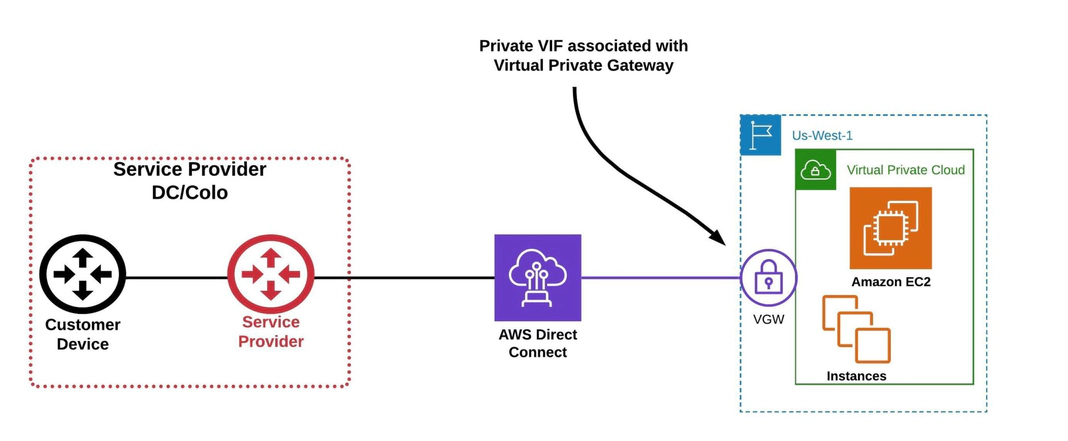
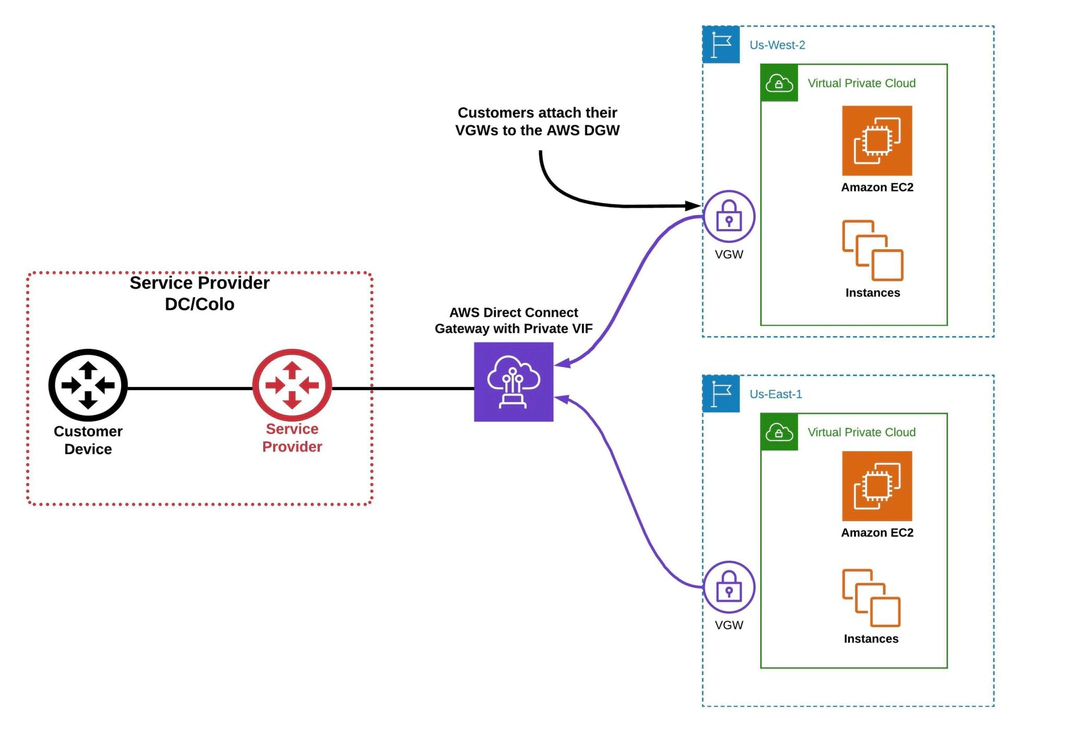
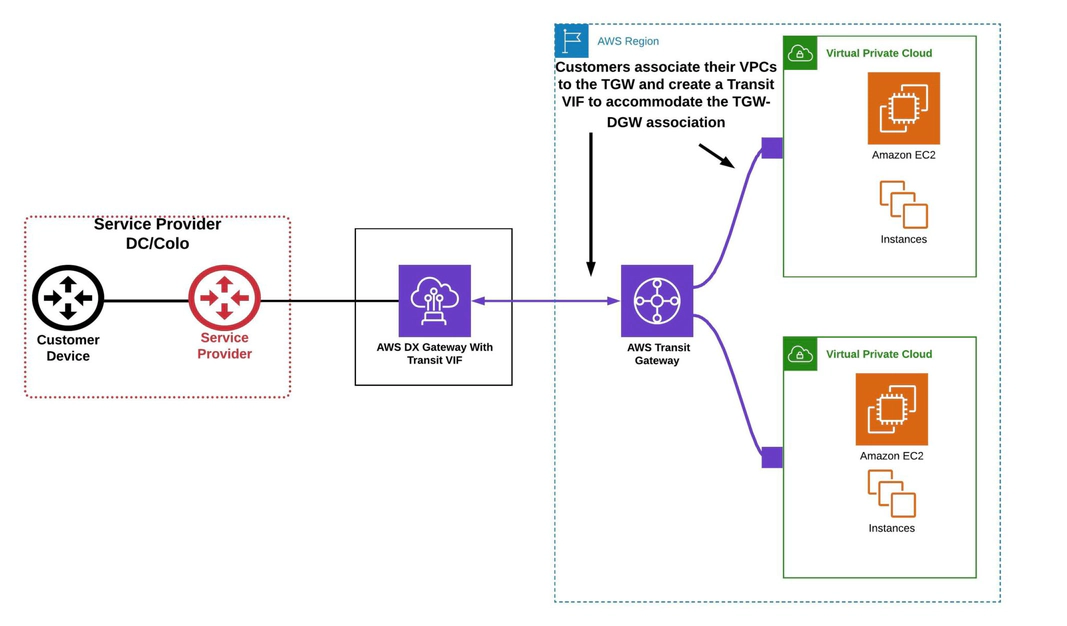
The type of gateway you are using, and what type of public or private resources you ultimately need to reach, will determine the type of VIF you will use.
Let’s dive into the three different VIF types: private, public, and transit.
This is used to access an Amazon VPC using private IP addresses. You can advertise up to 100 prefixes to AWS.
Note: You can attach the Private VIF to a Virtual Private Gateway (VGW) or Direct Connect Gateway (DGW).
A public virtual interface can access all AWS public services using public IP addresses (S3, DynamoDB). You can advertise up to 1,000 prefixes to AWS.
Note: Public VIFs are not associated or attached to any type of gateway.
A transit virtual interface is used to access one or more Amazon VPCs through a Transit Gateway that is associated with a Direct Connect gateway. You can use transit virtual interfaces with 1/2/5/10 Gbps AWS Direct Connect connections, and you can advertise up to 100 prefixes to AWS.
Whether you are using ExpressRoute Direct or the Partner model, the main components remain the same: the peerings (private or Microsoft), VNet Gateways, and the physical ExpressRoute circuit. Unlike the other CSPs, each Azure ExpressRoute comes with two circuits for HA/redundancy and SLA purposes.
Much like the AWS dedicated and hosted models, Azure has its own similar offerings of ExpressRoute Direct and Partner ExpressRoute.
Using Azure ExpressRoute Direct, the customer owns the ExpressRoute port and the LOA CFA is provided by Azure. The fibre cross connects are ordered by the customer in their data centre. The supported port speeds are 10 Gbps or 100 Gbps interfaces.
With the ExpressRoute Partner model, the service provider connects to the ExpressRoute port. The LOA CFA is provided by Azure and given to the service provider or partner. The fibre cross connects are provisioned by the partner. The customer works with the partner to provision ExpressRoute circuits using the connections the partner has already set up; the service provider owns the physical connections to Microsoft. Customers can create ExpressRoutes with the following bandwidth: 50 Mbps, 100 Mbps, 200 Mbps, 500 Mbps, 1 Gbps, 2 Gbps, 5 Gbps, 10 Gbps.
Azure also has a unique connectivity model called Azure ExpressRoute Local. Somewhat of an outlier when stacked up against the other CSPs’ connectivity models, ExpressRoute Local allows Azure customers to connect at a specific Azure peer location. Connecting to one or two local regions associated with the peer provides the added benefit of unlimited data usage. For a more detailed overview of ExpressRoute Local, read our recent blog post: Avoid Cloud Bill Shock with Azure ExpressRoute Local and Megaport.
Azure has two types of peerings that we can directly compare — apples to apples — with AWS’s private VIF and public VIF.
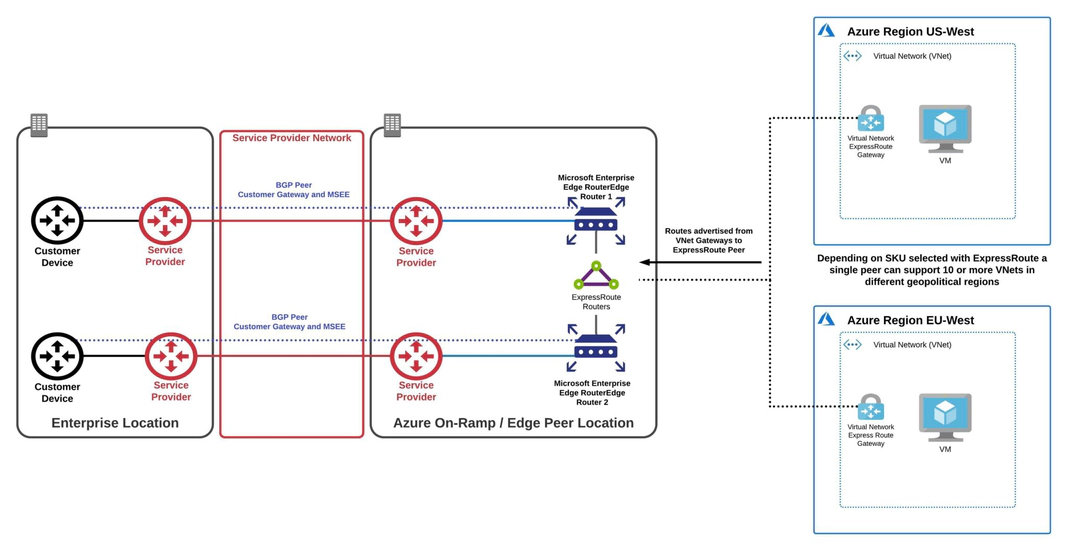
Private peering supports connections from a customer’s on-premises / private data centre to access their Azure Virtual Networks (VNets).
Note: The location of the MSEEs that you will peer with is determined by the peering location that was selected during the provisioning of the ExpressRoute.
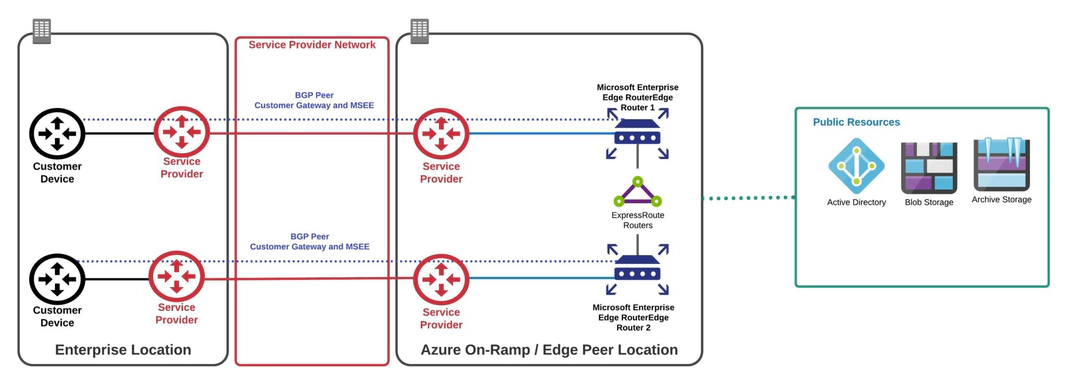
Microsoft peering is used to connect to Azure public resources such as blob storage. Connectivity to Microsoft online services (Office 365 and Azure PaaS services) occurs through Microsoft peering.
With Azure ExpressRoute, there is only one type of gateway: VNet Gateway.
A VNet gateway is a logical routing function similar to AWS’s VGW. ExpressRoute VNet Gateway is used to send network traffic on a private connection, using the gateway type ‘ExpressRoute’. This is also referred to as an ExpressRoute gateway.
With a standard Azure ExpressRoute, multiple VNets can be natively attached to a single ExpressRoute circuit in a hub and spoke model, making it possible to access resources in multiple VNets over a single circuit. In this way the standard Azure ExpressRoute offering is considered comparable to the AWS Direct Connect Gateway model.
The last, but certainly not least, CSP private connectivity that we will cover is GCP Interconnect, often referred to as GCP Direct Connect. Luckily for us, Google Cloud Platform (GCP) keeps its connectivity and components pretty straightforward, making it arguably the simplest of the three cloud service providers (CSPs) to navigate.
Like AWS and Azure, GCP offers two main private connectivity options: Partner Interconnect and Dedicated Interconnect. These provide flexible ways to establish a direct connection between your on-premises network and Google’s global network infrastructure.
GCP Dedicated Interconnect, commonly referred to as Google’s version of Direct Connect, provides a direct, high-speed physical connection between your on-premises network and Google Cloud. This option is ideal for customers who need high-bandwidth, private connectivity with guaranteed performance.
With GCP Direct Connect, you manage the physical connection setup, which involves obtaining a Letter of Authorization/Connecting Facility Assignment (LOA-CFA) from GCP and coordinating with your colocation provider or data center operator for the cross-connect.
Similar to GCP Direct Connect, Partner Interconnect enables private connectivity between your on-premises network and your GCP Virtual Private Cloud (VPC), but it uses a service provider or partner for the connection. This option is perfect for organizations whose data centers are not located near a GCP Direct Connect colocation facility or who don’t require the full capacity of a 10 Gbps connection.
With Partner Interconnect, you can scale your connection to match your needs, using bandwidths that range from 50 Mbps to 10 Gbps, making it a more cost-effective solution for lower-bandwidth applications.
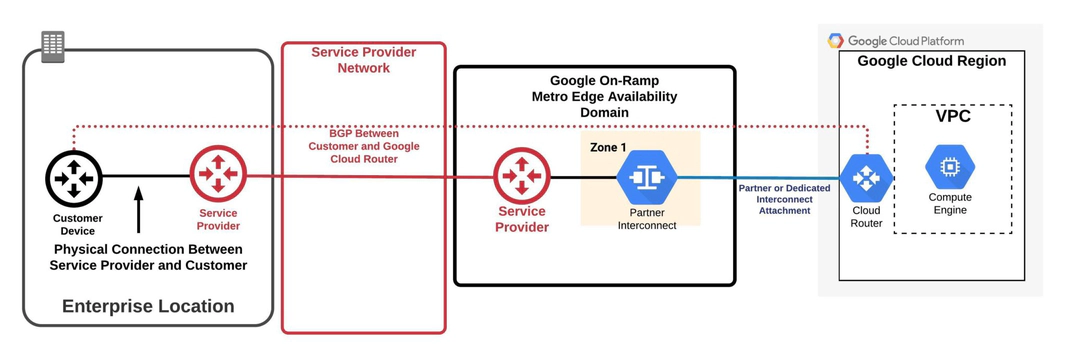
The Google Cloud Router is the main gateway option for GCP Direct Connect and Partner Interconnect. It dynamically exchanges routes between your GCP VPC and your on-premises network using Border Gateway Protocol (BGP). This ensures that your network always has the most current routes, allowing for efficient traffic management.
However, it’s important to note that Google Cloud Router has some limitations:
Also known as interconnect attachments, VLAN attachments are logical connections between your on-premises network and a single region in your GCP VPC. These are used to establish private connectivity between your infrastructure and GCP using GCP Direct Connect or Partner Interconnect.
Unlike AWS and Azure, GCP only offers a private peering option over their interconnect. This means that you can use GCP Direct Connect to access private resources like your VPC, but if you want to connect to Google Cloud’s public services and APIs, you need to configure Private Google Access over your interconnect. However, this only provides access to Google Cloud services like Google Compute Engine or Cloud Storage.
For G Suite connectivity, you would need to set up a peering connection through an internet exchange (IX), or access these services via the public internet.
Let’s wrap things up with some highlights. Hopefully, you can now walk away with some additional insight and a better understanding of the private connectivity options offered by these CSPs.
Direct Connect has multiple types of gateways and connectivity models that can be leveraged to reach public and private resources from your on-premises infrastructure. Whether that takes the form of a Transit Gateway associated with a Direct Connect gateway, or a one-to-one mapping of a private VIF landing on a VGW, will be completely determined by your particular case and future plans.
With Azure ExpressRoute, you can configure both a Microsoft peering (to access public resources) and a private peering over the single logical layer 2 connection. Each ExpressRoute comes with two configurable circuits that are included when you order your ExpressRoute. With the standard ExpressRoute, you can connect multiple VNets within the same geographical region to a single ExpressRoute circuit and can configure a premium SKU (global reach) to allow connectivity from any VNet in the world to the same ExpressRoute circuit.
Over GCPs interconnect, you can only natively access private resources. If connectivity to GCP public resources (such as cloud storage) is required, you can configure private Google access for your on-premises resources. This does not include GCPs SaaS offering, G Suite. In order to reach G Suite, you can always ride the public internet or configure a peering to them using an IX. With the GCP Cloud Router having a 1:1 mapping with a single VPC and region, the peerings (or rather VLAN attachments) are created on top of the Cloud Router. This functionality and model is similar to AWS Direct Connect and creating a VIF directly on a VGW.
Seeing how you made it this far, I’ll end by telling you that Megaport can not only connect you to all three of these CSPs (and many others), but we can also enable cloud-to-cloud connectivity between the providers without the need to back-haul that traffic to your on-premises infrastructure.
So, please feel free to reach out to us. We would love to hear about your cloud journey, the challenges you are facing, and how we can help.
此内容由惯性聚合(RSS阅读器)自动聚合整理,仅供阅读参考。 原文来自 — 版权归原作者所有。