





By Henry Wagner, Chief Marketing Officer
The basics around double-stacked VLAN tagging, otherwise known as Q-in-Q, or by it’s formal IEEE definition, 802.1ad. Part two.
Following our last post where we discussed the concept of stacked VLAN tags (Q-in-Q), in this second part we will focus specifically on Microsoft Azure and the ExpressRoute product offering that brings direct connectivity into the Azure public cloud environment.
If you are looking to implement Microsoft ExpressRoute for Azure and are considering Megaport as your connectivity solution provider, this post will give you some real world examples of customer implementations from small scale development/testing to high availability production workloads.
The following diagram shows the overall process, summarised into a few easy steps:
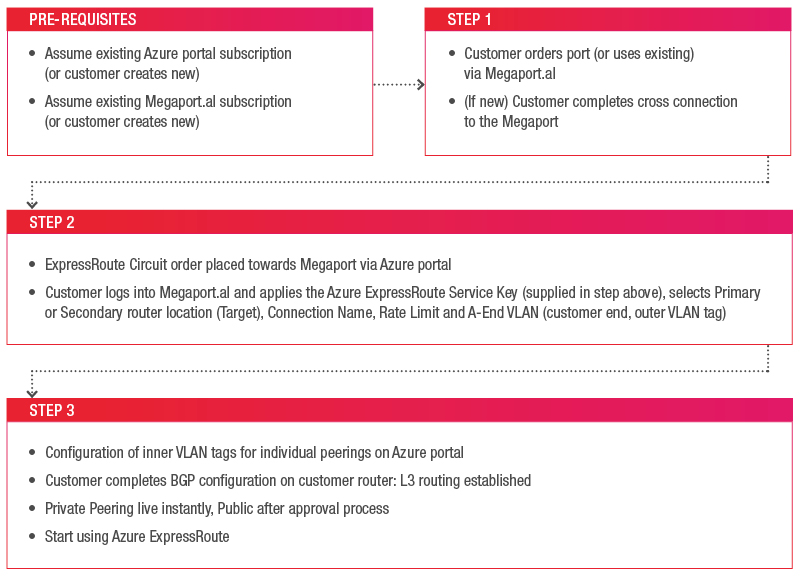
The most recent developments here have been in requesting the Service Key via the Azure Resource Manager (ARM) portal. We have produced a video that details the steps required to request the Service Key here.
If you are wanting to use PowerShell to script or automate some of the functions this can also be achieved by following the Azure documentation at https://azure.microsoft.com/en-us/documentation/articles/expressroute-howto-circuit-arm/, or our video on the setup process for PowerShell (Classic).
Thanks to some recent changes it’s possible to have both ASM (classic) and ARM VNets connected to a single ER circuit – see the steps in the guide https://azure.microsoft.com/en-us/documentation/articles/expressroute-howto-move-arm/ under the ‘Enable an ExpressRoute circuit for both deployment models’ section.
Yes, you can leverage a single ExpressRoute circuit delivered via Megaport with up to 10 subscriptions. Check out https://azure.microsoft.com/en-us/documentation/articles/expressroute-howto-linkvnet-arm/ for more information on how to share ER circuits effectively.
The default limit of VNets for an ExpressRoute circuit that is created as a ‘Standard’ type is 10, however if you are using the Premium SKU option this will depend on the requested circuit size (min 20, see https://azure.microsoft.com/en-us/documentation/articles/azure-subscription-service-limits/#networking-limits). However thanks to some recent changes, known as VNet peering, you are able to connect two or more Virtual Networks in the same region through the Azure backbone network. Once peered, the two Virtual Networks will appear like a single Virtual Network for all connectivity purposes. See https://azure.microsoft.com/en-us/documentation/articles/virtual-networks-create-vnetpeering-arm-portal/ for more information on this confirguration. This is very useful feature since it can help to bypass the default VNet limit placed on ExpressRoute circuits without needing to upgrade to Premium.
Azure connections via Megaport are delivered via a Q-in-Q VLAN to either of the Microsoft Primary or Secondary routers in a given Azure region. Within the single outer tag (S-tag) defined via the Megaport portal there are up to three inner tags (C-tags) that are defined on the Azure portal, these are Azure Private, Azure Public and Microsoft Peering which carries Office 365 traffic. The availability of this third peering type is dependent upon prior approval via Microsoft – see https://support.office.com/en-us/article/Azure-ExpressRoute-for-Office-365-6d2534a2-c19c-4a99-be5e-33a0cee5d3bd for details.
Megaport provides point-to-point Layer 2 connectivity between a customer and Megaport (an Ethernet interface/port provided by Megaport). Layer 3 BGP sessions are established between Azure and Megaport customers directly.
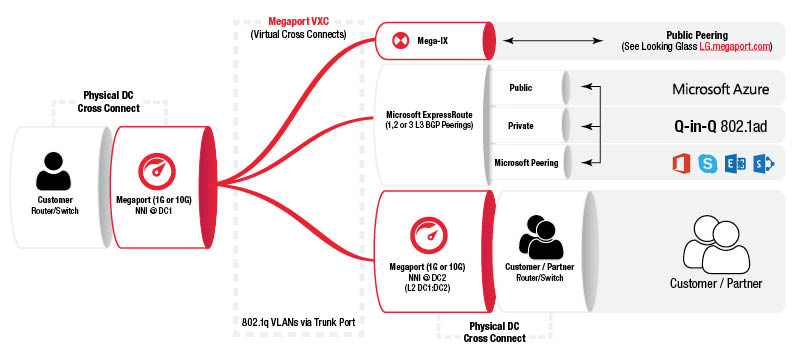
The “A END” VLAN which you need to specify in the Megaportal belongs to your end, not the Microsoft end – this is the “B END” VLAN and is only of relevance between Megaport and Microsoft at the traffic source location (primary/secondary router). This “A END” VLAN ID is represented by the “Outer Tag” in the above diagram.
It is generally best practice to use different VLAN IDs for the Inner (or Customer) Tags. Inner VLAN Tags are requested either via Azure Resource Manager Portal, or via PowerShell once ExpressRoute request has been provisioned.
For example, you may use VLAN 2000 (“Outer tag”) as the Megaport VLAN and then have 20/30/40 setup for public/private/Microsoft VLANs on the Azure portal. Each frame is tagged to you twice with “Inner tag” and “Outer tag”, i.e., Q-in-Q, and your network equipment needs to break out “Inner tags” to remove the 2000 tag (“Outer tag”).
It is possible to request Megaport to remove the outer tag by selecting “Untag this VLAN” when creating the first VXC upon your port, however this will then limit the port to be used only for this single VXC so is not recommended for a long term solution as it is more difficult to then add other services against your port (such as secondary Azure VXC, private VXCs, IX connection or similar).
Technically speaking, you do not need to set the secondary circuit. It is important to note that within the Azure portal you will be required to set IP addressing for both primary and secondary router presentations and this must be matched to the circuit termination that you select when entering your Service Key on the Megaportal. Microsoft does require both the primary and secondary circuits connected with a live BGP session to both to be covered by the ExpressRoute SLA (see https://azure.microsoft.com/en-us/support/legal/sla/expressroute/v1_0/).
Microsoft provides some sample configuration guidance for Cisco and Juniper routers. Please visit the following site https://azure.microsoft.com/en-us/documentation/articles/expressroute-config-samples-routing/.
If your network is located in APAC region, contact Asia Pacific Network Information Centre (APNIC) – https://www.apnic.net/get-ip and APNIC Helpdesk: https://www.apnic.net/get-ip/helpdesk.
If your network is located in North America region, contact American Registry for Internet Numbers (ARIN) – https://www.arin.net/resources/request.html.
If your network is located in European region, contact RIPE Network Coordination Centre (RIPE NCC) – https://www.ripe.net/manage-ips-and-asns/ipv4/request-an-ipv4-22-from-the-last-8 and https://www.ripe.net/manage-ips-and-asns/as-numbers.
Below is an example of a fully diverse ExpressRoute configuration using all three peering types presented across two physical Megaports:
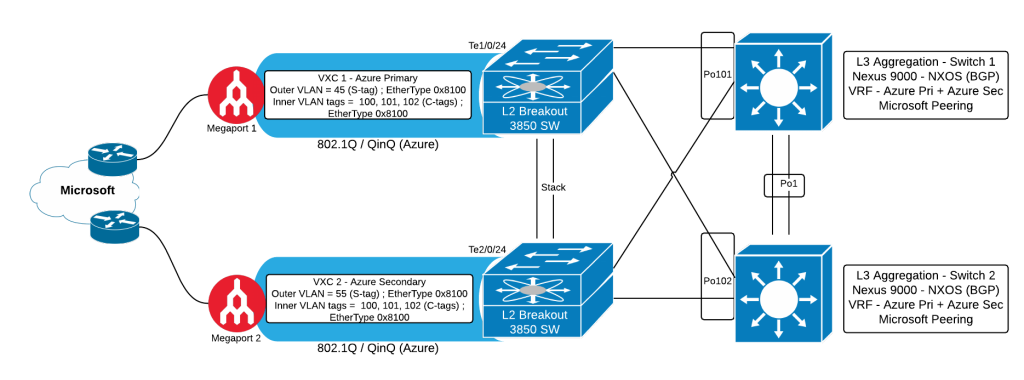
For the configuration of the above scenario, see below (please note, configuration samples are presented as a guide only and can not take into account factors that are specific to your network):
vlan 45
name Megaport_Azure-Pri
vlan 55
name Megaport_Azure-Sec
!
interface TenGigabitEthernet1/0/24
Description Megaport Primary
switchport mode trunk
no cdp enable
!
interface TenGigabitEthernet2/0/24
description Megaport Secondary
switchport mode trunk
no cdp enable
!
interface Port-channel101
switchport access vlan 45
switchport trunk native vlan 45
switchport trunk allowed vlan 45
switchport mode dot1q-tunnel
!
interface Port-channel102
switchport access vlan 55
switchport trunk native vlan 55
switchport trunk allowed vlan 55
switchport mode dot1q-tunnel
!
vlan 100
name AzurePri-Link1
vlan 101
name AzurePub-Link1
vlan 102
name MSFT-Link1
!
interface port-channel101
switchport mode trunk
switchport trunk native vlan 45
!
interface Vlan100
no shutdown
vrf member AzurePriv01 ip address 10.x.x.x/30
!
interface Vlan101
no shutdown
vrf member AzurePublic01 ip address y.y.y.v/30
!
interface Vlan102
no shutdown
vrf member MSFT01 ip address y.y.y.w/30
!
interface port-channel1
switchport mode trunk
switchport trunk allowed vlan {lower-upper}
!
vlan 100
name AzurePri-Link2
vlan 101
name AzurePub-Link2
vlan 102
name MSFT-Link2
!
interface port-channel102
switchport mode trunk
switchport trunk native vlan 55
!
interface Vlan100
no shutdown
vrf member AzurePriv02 ip address 10.x.x.y/30
!
interface Vlan101
no shutdown
vrf member AzurePublic02 ip address y.y.y.x/30
!
interface Vlan102
no shutdown
vrf member MSFT02 ip address y.y.y.y/30
!
interface port-channel1
switchport mode trunk
switchport trunk allowed vlan {lower-upper}
!
此内容由惯性聚合(RSS阅读器)自动聚合整理,仅供阅读参考。 原文来自 — 版权归原作者所有。