






By Henry Wagner, Chief Marketing Officer
When it comes to moving mission-critical workloads into the cloud, backup is your best friend.
Your enterprise business probably operates all day, every day, so continuity and constant uptime are crucial for keeping everything running smoothly. Risking your business on a single link design could mean losing data, customers, and even revenue if your connection goes down.
Implementing a redundancy design for cloud deployments involves setting up multiple links running into independent points of infrastructure. This way, if your primary network fails, your workloads are backed up by the second route and won’t experience any downtime. Using both ‘provider side redundancy’ and ‘customer side redundancy’ will enable you to achieve a full end-to-end back up strategy.
Let’s explore these redundancy options using AWS Direct Connect to transport production workloads between your Amazon Virtual Private Cloud (Amazon VPC) and your on-premises infrastructure with Megaport connectivity.
First and foremost, building out a redundant network means both considering the best practices of ‘customer side redundancy’ as well as following the recommendations of AWS for ‘provider side redundancy’. For their backup plan, many network architects decide to use dual Direct Connect Virtual Circuits that terminate in multiple data centre facilities to reduce any production workload risk that could be associated with a single link design. This is one way to look at redundancy on the provider side and could be a valuable option for your business.
If you’re using the above dual circuits within your network, to achieve full end-to-end redundancy of a given link, we recommend configuring connectivity from a pair of physical Megaport interfaces across two different data centres – and terminating to two separate physical routers that are configured independently. With a Virtual Cross Connect (VXC), you can directly and privately connect each Port to two separate AWS Direct Connect locations. This configuration offers you maximum resilience to failure. By default, our VXCs are already path diverse. This means that, if there’s some unforeseen impact to the primary network path, your traffic will continue to flow.
Active/Active AWS Direct Connect Configuration The default AWS configuration for redundant Direct Connect connections is ‘Active/Active’. BGP multipath is used for load-balancing to multiple Virtual Interfaces (VIF) within the same AWS regional location – traffic load-share between interfaces is based on flow. BGP multipath enables your router to have multiple internal and external BGP paths in their forwarding table, and to automatically load balance across them.
Within AWS, every time the same CIDR prefix is seen advertised via several identical paths in the same location, Equal Cost Multi-Path (ECMP) is performed, and individual traffic flows are, in turn, hashed to one particular connection/VIF.
If you want to have influence over the way traffic flows from AWS to your network, you can use AS_PATH prepending or announce more specific (longer) prefixes. Local Preference and similar options can be used for influencing the traffic flow from your on-premises network to AWS.
AS_PATH is a BGP attribute you can use to make a specific route less ‘attractive’ by adding your ASN (on a Private VIF, you aren’t required to use a Public ASN for AS_PATH prepending) multiple times to the path. AWS will always prefer the shortest path.
For Public Virtual Interfaces, each VIF will have unique peer IP addresses configured to announce the same prefixes from your router. If you need AWS to prefer a specific range of IPs over the other, you may want to influence your standard BGP configuration by either announcing more specific prefixes or by using AS_PATH prepending (if you’re using a public ASN number).
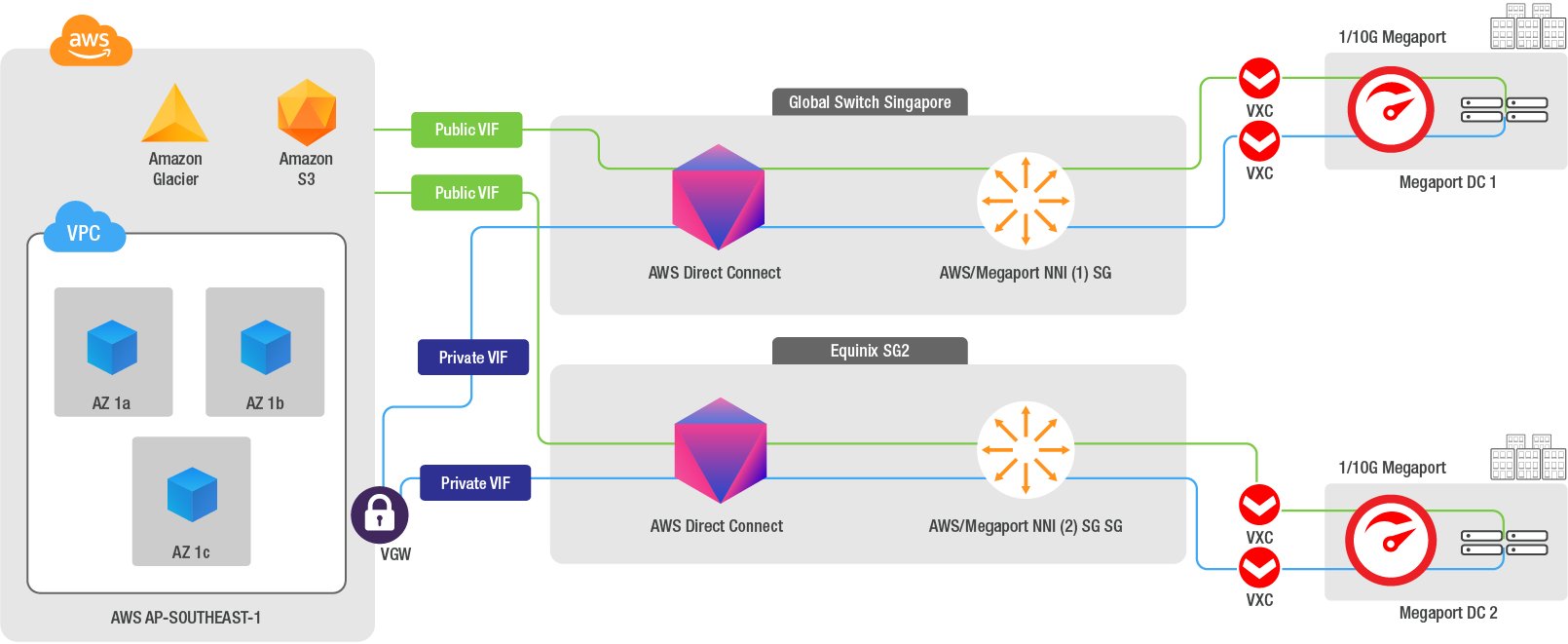
For a solution with an additional level of resilience, you can configure a VPN connection over the public internet that can terminate to the inbuilt AWS IPSec VPN service (Virtual Private Gateway), allowing you to set up another layer of redundancy – a so-called ‘backup of backups’.
A VPN can be seen as a lower-cost backup connection but can also be used for more than a ‘standby’ type of backup. By influencing routing decisions and advertising more specific routes through the VPN, you could use your VPN not only as a backup, but also to carry a specific subset of your traffic.
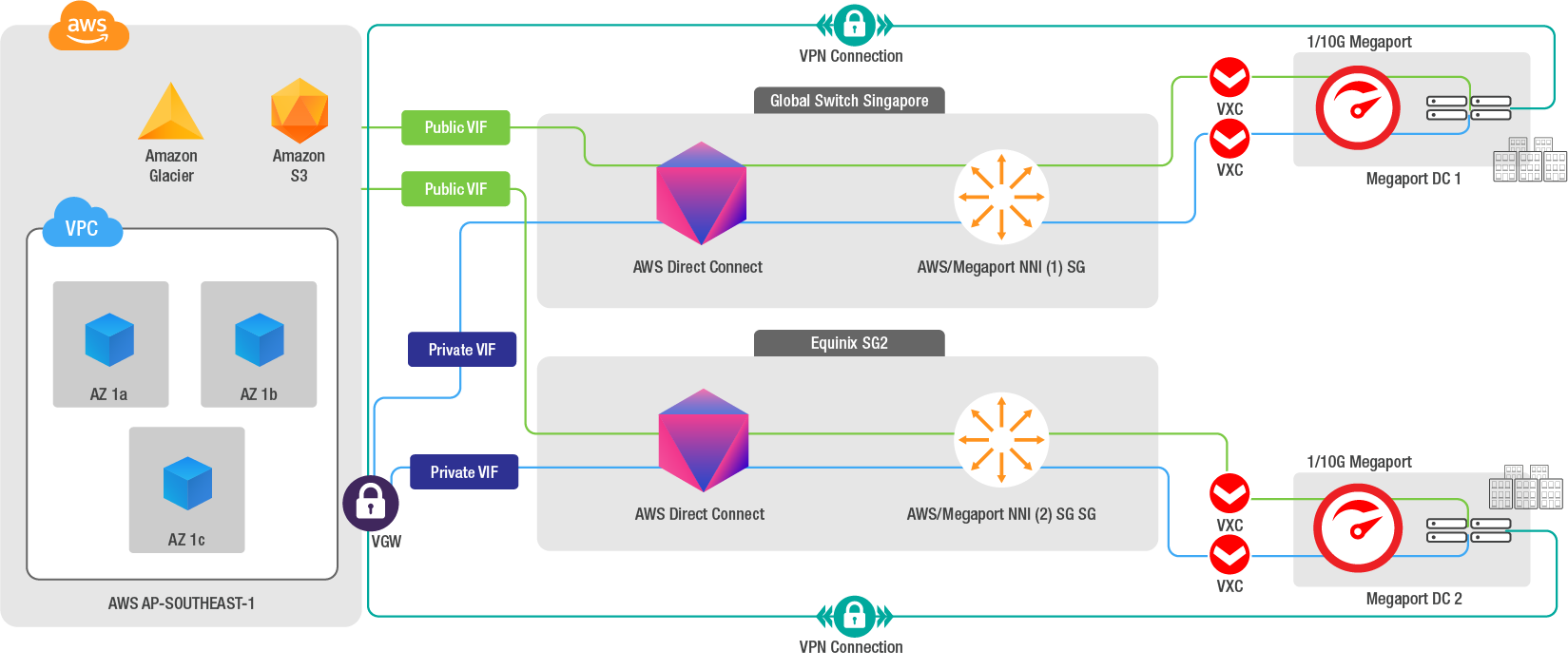
Using Active/Active AWS Direct Connect Virtual Circuits to achieve network redundancy can be easily done with direct Megaport connectivity. With this level of backup, your enterprise business can reduce the risks of SPOF and increase continuity and uptime of your mission-critical workloads. With an effective redundancy strategy, you can ensure your business runs seamlessly no matter what.
For more info on building redundant network connections with us, reach out via Twitter or get in touch here.
此内容由惯性聚合(RSS阅读器)自动聚合整理,仅供阅读参考。 原文来自 — 版权归原作者所有。