







Remove the complexities of connecting your on-premises and public cloud environments with Megaport Cloud Router’s virtual networking capabilities.
Like many other enterprise companies, you have probably made significant investments in your on-premises technologies. But as cloud adoption continues to grow significantly, you might be exploring ways to up your cloud game to stay competitive. It’s time to embrace the benefits of both public and private cloud, and get the two working together. Hybrid cloud is the obvious choice. However, it’s the integration between your on-premises resources and public cloud resources that makes up that critical step to achieving a powerful overall cloud strategy – it’s the part you need to get right.
Most hyperscale cloud providers offer dedicated interconnection services, for example, AWS Direct Connect, Google Cloud Partner Interconnect, Microsoft Azure ExpressRoute, and Oracle FastConnect, etc. These services will enable you with direct access to your cloud environments to reach the resources you need. This makes it easy to establish a connection between your network and a cloud PoP nearby. One key tenet for direct access to hyperscalers is that they require you to run BGP between your network or autonomous system (AS) and their network or AS. This can be a challenge if you have firewalls at the edge of your network that aren’t running BGP (which is common and often a good decision seeing as a firewall’s primary job is to provide security between network zones and not manage a full BGP routing table). With 724,222 IPv4 prefixes and 51,824 IPv6 prefixes in the global internet routing table, your firewall might not be capable of holding this many depending on its memory capacity. In this case, a static route could be configured.
When you’re moving mission-critical workloads to the cloud, the most effective solution is one that fits into your current network architecture without difficulty and scales with your business when you want to increase workloads. Through Megaport Cloud Router (MCR), we’ve created a way to virtualise routing for Layer 3 connections. In doing so, we’ve removed some of the complexities that have typically restricted network operations, and made hybrid cloud connectivity easy. Complexities like managing BGP routing, obtaining a public Autonomous System Number (ASN) and allocation of public IP Address space for cloud connectivity. MCR acts as your BGP speaking virtual router. By combining it with a physical Megaport in your data centre, you can establish a hybrid cloud architecture that takes full advantage of both on-premises technologies and public cloud resources – with or without firewalls at the edge of your network.
There are a few steps involved in setting up a hybrid network architecture using a Megaport and an MCR. You can read more detailed technical information in Megaport Documentation. For now, let’s run through the key points:
If you don’t have one already, order and create a Megaport in any of our global enabled data centre locations.
From your firewall, you’ll get a cross connect to your physical Megaport via your Data Center Operator.
Provision your MCR and create a Virtual Cross Connect (VXC) from your Megaport to your MCR from our Portal.
Create a static route on your firewall pointing at the MCR, and on the MCR, create a static route facing your firewall. This will enable your firewall to MCR connection – pretty simple!
By default, your MCR will redistribute static and connected routes into BGP, so no further configuration is required on your part to make this happen.
You can then provision a VXC from your MCR to the cloud provider of your choice.
Once the Layer 2 portion of the connectivity is up, BGP will come up between the MCR and cloud provider, and BGP will be in an ‘Established’ state.
Connectivity details vary depending on which cloud provider you are connecting to, however, there is no requirement for you to have a publicly registered Autonomous Systems Number (ASN) or publicly routable IP space – we take care of this for you.
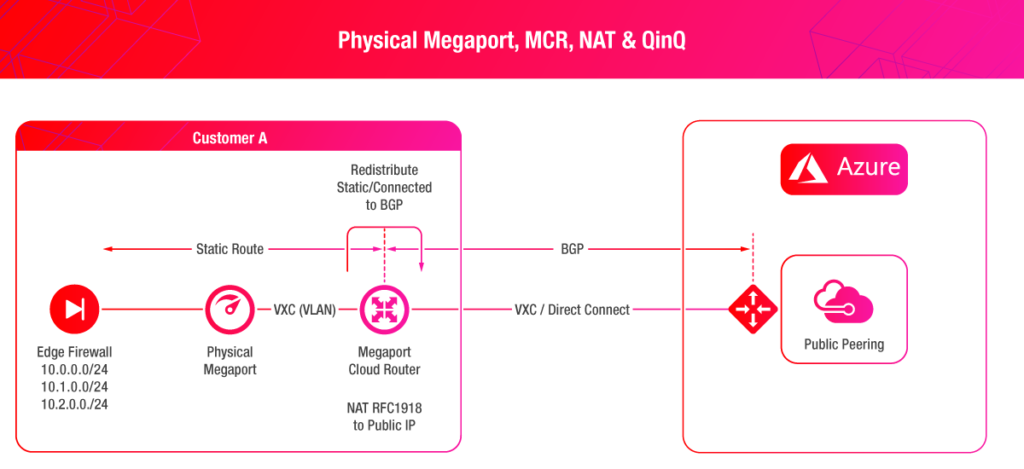
Our connectivity models illustrate how your network could be configured when provisioning an MCR firstly to AWS, and then Azure, on the Megaport Network. In the first model, a firewall with an 802.1q trunk is connecting to a Megaport in one of our enabled locations. An MCR has also been provisioned with a VXC facing the Megaport. Connectivity to AWS is established by provisioning a VXC to your Public Virtual Interface to reach Amazon S3 resources. 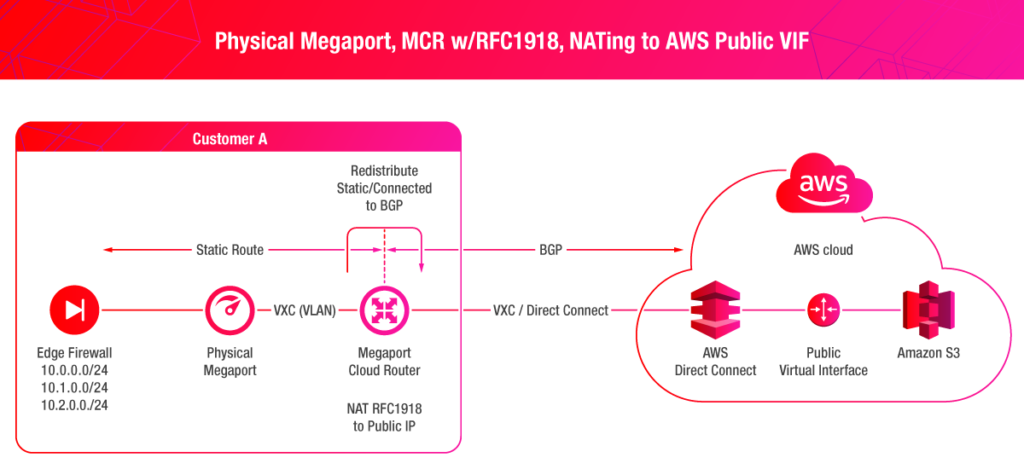 The second model shows a similar connectivity model as above, however, the difference is that Azure supports Q-in-Q via ExpressRoute. The Q-in-Q tunnel terminates on the MCR, giving you the ability to configure your VLANs in your VNets with ease.
  Creating a high-performance hybrid cloud network architecture is key to taking advantage of both on-premises and public cloud resources. Virtual routing can help to overcome some of the challenges you might typically face when setting up your network. For more information, feel free to reach out to me or fill in the form below and we’ll get in touch.
此内容由惯性聚合(RSS阅读器)自动聚合整理,仅供阅读参考。 原文来自 — 版权归原作者所有。