


By Matt Madawi, Solutions Architect
Learn about cloud storage tiers, costs, performance, and security best practices to optimize your cloud storage and reduce egress fees.
Cloud storage comes in several types, each suited to different use cases based on how frequently data is accessed and how it’s organized. The four primary types are object storage, file storage, block storage, and cloud file systems.
For more detailed information on these storage types and when to use each, check out our blog on the four types of cloud storage.
The major cloud providers—AWS, Azure, GCP, and OCI—all offer a tiered structure for their Object Storage services (S3, Blob Storage, Cloud Storage, and Object Storage, respectively). These tiers are designed to help you optimize costs based on how often you access your data, and how quickly you need to retrieve it. Understanding them is crucial for selecting the right storage solution for your business needs.
In cloud computing, the “temperature” of storage—Hot, Warm, Cold, and Archive—refers to how often you need to access your data.
Think of it as a trade-off: the more frequently you need to touch the data, the more you pay for storage but the less you pay for access. Conversely, the less you touch it, the cheaper it is to store, but the more expensive (and slower) it is to access.
Here’s a breakdown of the common tiers you’ll encounter.
The Hot or Standard tier is designed for your frequently accessed data. It’s best suited for active workloads, such as live data or applications that need to retrieve data with low latency. This tier offers the fastest retrieval times, but typically comes with a higher cost compared to other tiers.
Provider | Tier name | Best for | Key characteristics |
AWS | S3 Standard | Active workloads, dynamic websites, content distribution, data lakes, frequently accessed data. | Highest cost per GB, but no retrieval fees and latency of milliseconds. |
Azure | Hot Access Tier | Data in active use, frequent read/write operations. | Highest storage costs, but lowest access and transaction costs (low-latency). |
GCP | Standard Storage | "Hot" data, streaming videos, and mobile applications. | Highest storage cost, but no retrieval fees and latency of milliseconds. |
OCI | Standard Tier | Primary, default storage for high-performance, frequently accessed data. | Highest storage cost, but no retrieval fees. |
For data that is accessed less frequently, the Cool tier provides a more cost-effective solution. While this tier is still accessible when needed, it’s optimized for occasional data retrieval.
Provider | Tier name | Best for | Key characteristics |
AWS | S3 Standard-IA | Disaster recovery files, long-term backups. | Lower storage cost than Standard, but incurs a retrieval fee for data access. Latency of milliseconds. |
Azure | Cool Access Tier | Short-term backups, archives, infrequently accessed business data. | Lower storage costs, but higher access/transaction costs. Minimum 30-day retention. |
GCP | Nearline Storage | Data accessed at most once a month. | Lower storage cost, but incurs a retrieval fee. Minimum 30-day storage duration. |
OCI | Infrequent Access | Data accessed less often than the Standard Tier. | Cheaper storage than Standard, but incurs a retrieval fee. Minimum 31-day retention. |
Data that needs to be stored for long periods but isn’t frequently accessed fits well in the Archive/Cold tier. It offers significant cost savings but slower retrieval times that can take hours.
Provider | Tier Name | Best For | Retrieval Time |
AWS | S3 Glacier Instant Retrieval | Data accessed once a quarter. | Retrieval in milliseconds. |
S3 Glacier Flexible Retrieval | Data accessed 1-2 times per year. | Retrieval options from minutes to hours. | |
S3 Glacier Deep Archive | Long-term digital preservation and regulatory compliance. Lowest cost. | Retrieval in hours (e.g., 12 hours). | |
Azure | Cold Access Tier | Online tier for rarely accessed data. Minimum 90-day retention. | Retrieval in milliseconds. |
Archive Tier | Data rarely accessed, with flexible latency requirements. | Retrieval in hours (must be rehydrated to a hotter tier first). Minimum 180-day retention. | |
GCP | Coldline Storage | Data accessed at most once a quarter. Minimum 90-day storage duration. | Retrieval fee applies. Low latency. |
Archive Storage | Data accessed less than once a year. Lowest cost. Minimum 365-day storage duration. | Retrieval fee applies. Low latency. | |
OCI | Archive Tier | Long-term data retention and compliance archives. Lowest cost. | Data is offline and must be restored (rehydrated) before access. Restoration takes at most an hour. Minimum 90-day retention. |
Providers offer Intelligent or Smart tiering for data that might move between usage patterns over time. These services automatically move data between the Hot and Cool tiers based on actual access patterns, optimizing storage costs.
Examples include:
File, block, and object storage refer to how the data is structured and organized. You can compare this to the storage of physical items: a filing cabinet (file), a set of numbered shipping crates (block), or a massive warehouse where every item has a unique barcode and a description tag (object).
Choosing between file, block, and object storage depends on who (or what) is accessing the data and how fast it needs to be.
File storage is designed for human organization and multiple systems that need to “share” the same folder, e.g. shared office folders, content management or legacy applications (many older applications are hard-coded to look for a specific file path).
Block storage is the “rawest” form of storage. It behaves like a physical hard drive plugged directly into a server, making it ideal for databases, virtual machine (VM) disks, or transactional apps.
Object storage is built for the modern web. It doesn’t care how the data is organized; it cares about IDs and metadata, e.g. public assets, backups and archives (standard for long-term “cold” storage), and data lakes for AI.
Achieving low-latency cloud storage isn’t just about the speed of the storage tier itself. It’s also a balance between two key factors: disk speed (the storage tier you choose) and the network pipe (how the data reaches you).
For example, if you’re using fast, low-latency Hot storage but accessing it over a congested public internet connection, your network can quickly become a performance bottleneck. As traffic competes for bandwidth, it not only slows down your data retrieval but also impacts other applications running on the same connection, resulting in the denial of your own services.
On the other hand, if you use a high-speed private fiber link to access slower Archive-tier storage, your network is essentially “waiting” for the storage to catch up. Even with a fast network connection, the slower retrieval times of the Archive tier will be your limiting factor, creating delays.
To optimize performance, it’s important to consider both your storage tier and network architecture to ensure they work together seamlessly.
Reducing latency when accessing cloud storage involves minimizing both the number of hops and the processing time between your resources. To achieve this, it’s essential to leverage regional cloud services that are close to your compute resources, ensuring that data travels a shorter path.
Additionally, connecting your cloud storage via private connections can further reduce latency. Cloud solutions like Direct Connect (AWS), ExpressRoute (Azure), VLAN Interconnect (GCP), and FastConnect (OCI)—and Network as a Service solutions like Megaport—provide dedicated, high-performance links that bypass the public internet. Used end to end, these links reduce latency and provide more consistent and reliable data access, so going private should be a priority when optimizing your storage performance.
Cloud providers typically offer free incoming data (ingress), but charge for outgoing data (egress) and accessing data in colder storage tiers.
When retrieving data from the cloud, you often pay for two separate fees:
1. Retrieval fee (storage fee)
This fee applies when you access data in Cold or Archive tiers. Providers charge you for the effort of “rehydrating” or reading data that is meant to remain idle.
For example:
2. Egress fee (network fee)
Egress fees are for moving data from the cloud provider’s data center to your location. Most providers offer a free tier for the first 100 GB of egress each month. Beyond that, costs apply.
Cloud storage pricing is often likened to the “Hotel California” model: It’s free to check in your data (ingress), but getting it out—or even accessing it once it’s stored—can become unexpectedly expensive.
These surprise costs are driven by two main factors:
Additionally, unexpected “ghost” bills can appear in the form of:
When transferring data between regions within the same cloud provider (e.g. from Azure East US to Azure West US), staying within the provider’s private backbone typically costs around $0.01 to $0.02 per GB. However, these costs can spike when the data crosses continental borders. For instance, moving data from North America to Asia could cost between $0.08 and $0.12 per GB.
When transferring data between different cloud providers (e.g. from AWS to Azure), the cost is treated as internet egress. The standard rates for this type of transfer generally range from $0.08 to $0.12 per GB after the first 100 GB (which most providers now offer for free).
For example, if you replicate a 10TB database from AWS to Google Cloud every month, you could face egress fees of around $800 to $900 just for the data transfer – and you still need to factor in the storage costs on your destination cloud.
Understanding these cross-region and cross-cloud transfer fees is essential for managing costs and avoiding unexpected expenses when moving large amounts of data.
To reduce excessive egress fees, private egress is a highly effective solution. Using private connectivity options like Direct Connect (AWS), ExpressRoute (Azure), VLAN Interconnect (GCP), and FastConnect (OCI) can save you up to 70% compared to standard internet-based egress.
Megaport optimizes this by providing private connectivity between clouds, helping you take advantage of these significant savings. Megaport Cloud Router (MCR) enables seamless cloud-to-cloud communication and allows dynamic routing via Border Gateway Protocol (BGP). This lets you efficiently manage and advertise your routes, helping you reduce egress costs.
Below is a best-practice “cloud only” design, but we also have other reference diagrams to meet any use case.
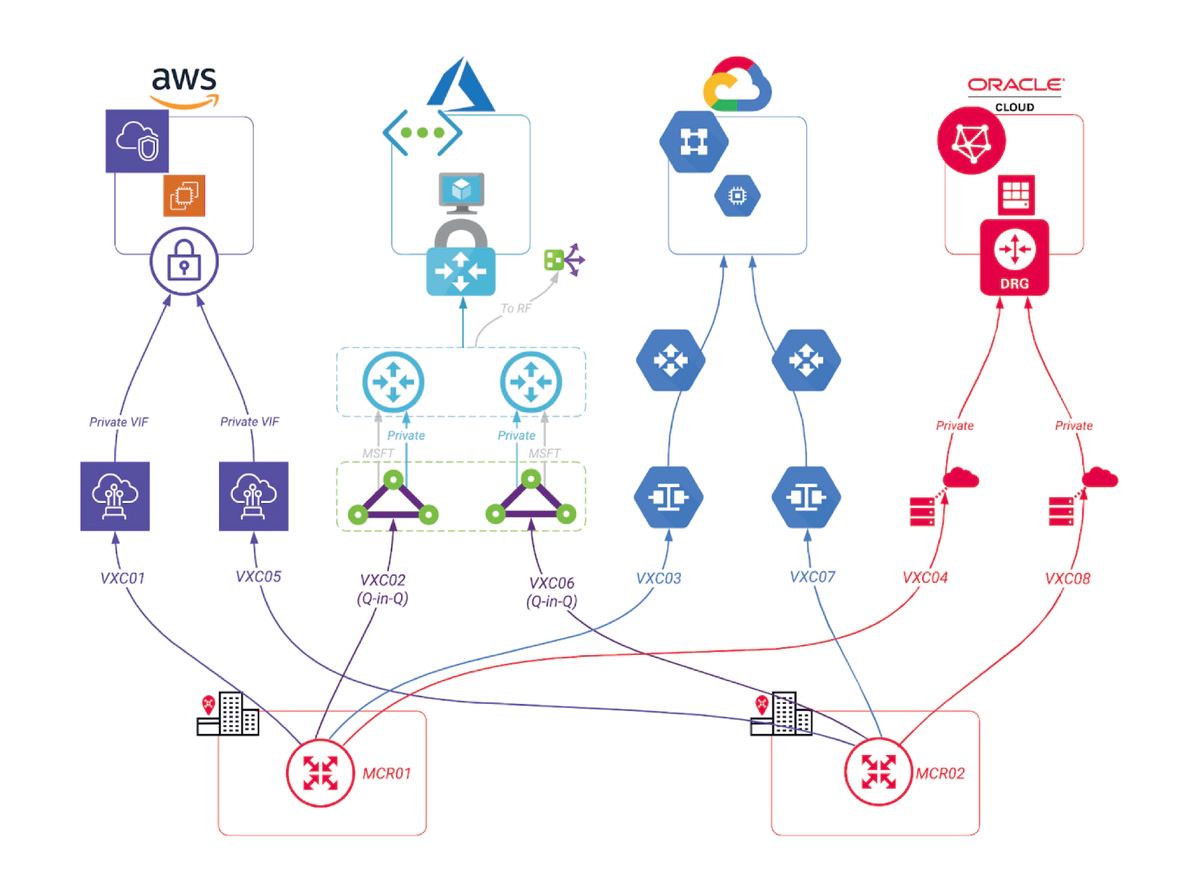
Cloud storage presents a broad range of security risks, from basic user errors (like unintentionally making a private repository public) to more complex identity-based attacks targeting overprivileged accounts or unmanaged machine identities.
To protect against these threats, businesses should adopt a Zero Trust security model. This approach enforces multi-factor authentication and adheres to the principle of least privilege, ensuring that users and systems only have access to the resources they absolutely need, minimizing exposure in the event of a breach.
In addition to access controls, organizations should encrypt all data end to end (in transit and at rest) to protect it from unauthorized access. Lastly, maintaining immutable backups is crucial, as they act as a last line of defense against accidental deletions and the rising threat of cloud-specific ransomware.
By implementing these security practices, businesses can significantly reduce the risks associated with cloud storage and ensure their data remains protected.
Choosing between cold and hot storage involves balancing accessibility with long-term data integrity. While both storage types typically use standard AES-256 encryption, they each come with unique security implications.
Hot storage offers quick access to your data but may expose it to more frequent access risks, including the potential loss of encryption keys as can happen with AES-256. Cold storage, on the other hand, enhances security through “rehydration” latency – the time it takes to move data from cold storage to a hotter tier. This delay, which can span hours, provides a natural buffer that can help security teams detect and prevent unauthorized data exfiltration before it happens.
Thus, while hot storage prioritizes faster access, cold storage offers additional time for monitoring and defense, making them a more secure option for long-term, infrequently accessed data.
Private connectivity enhances cloud storage security by removing your resources from the public internet. This effectively reduces the risk of accidental exposure due to misconfigurations, and protects against internet-based threats like botnets or DDoS attacks.
By assigning your storage a private IP address within your virtual network, you can enforce granular access controls to prevent unauthorized data access and exfiltration. This isolation keeps your sensitive data in a controlled environment, making it easier to comply with regulatory requirements and protecting long-term data integrity.
Architecting your cloud storage with private connectivity not only strengthens security but also significantly improves performance. By routing data through dedicated, isolated paths, you reduce latency and avoid the congestion of the public internet, resulting in a more efficient network.
This setup also gives you more consistent, immediate access to your data, while private endpoints allow you to enforce granular security policies and prevent unauthorized data movement. Plus, by keeping your sensitive data off the public internet, private connectivity simplifies compliance and protects your data integrity.
Megaport makes managing cloud storage easier, faster, and more secure. Our private connectivity solutions reduce latency, lower egress costs, and keep your data safe by keeping it off the public internet.
Our platform lets you quickly set up secure, dedicated connections across our massive global ecosystem on demand, ensuring your storage performs at its best while reducing costs.
此内容由惯性聚合(RSS阅读器)自动聚合整理,仅供阅读参考。 原文来自 — 版权归原作者所有。