










By Jason Bordujenko, Global Head of Solutions Architects
We Answer the Top Five Questions from our Recent AWS Hosted Connection Webinar Series
We recently presented a webinar series on Megaport’s capabilities connecting to Amazon Web Services. This series focused on AWS Hosted Connection (HC), which can facilitate 1:1, diverse, uncontended capacity into AWS regions worldwide, including support for the new Transit Virtual Interface (VIF) type for native connection to AWS Transit Gateways (TGW).
As an Advanced Technology Partner, Megaport helps enterprise customers across four continents connect rapidly and privately to AWS. We have more AWS Direct Connect locations than any other provider worldwide. We were pleased to bring these sessions to life using the distributed talents of our global Solution Architecture teams.
Our customers tell us they overwhelmingly loved the series — in fact, we had over 650 customers attend these sessions held in multiple time zones and multiple languages. One of the best things about these sessions was the insights into what our customers wanted to hear about, and we are pleased to bring to you a compendium of the most frequently asked questions and their answers from the collective wisdom of the global Megaport Solution Architecture team.
Given the great insights we have been given into customer journeys in building out their solutions to AWS using Hosted Connection (both with and without direct Transit Gateway attachments), we have taken the opportunity to consolidate the top five questions and answers from the webinar series across all regions. Enjoy!
Hosted Connections to AWS can be provisioned starting from 50 Mbps up to a full, uncontended 10 Gbps of bandwidth in a single Megaport VXC. A Hosted Connection with a capacity of 500 Mbps or less can support one private or public virtual interface. When provisioned at a capacity of 1 Gbps or more, the Hosted Connection can support one private, public, or transit virtual interface.
Key features include:
A1: This is a very commonly asked question! The pace of change with cloud can sometimes be hard to keep up with, and that’s one of the key reasons that Megaport is way out in front of the pack keeping our sales and technical teams up to speed on new innovations.
Transit Gateway in itself isn’t new. We have previously written about its availability in our blog post, The Enterprise’s Guide to AWS Direct Connect and Transit Gateway. The concept of connectivity options for AWS Direct Connect customers has previously been predicated on the differences between Private and Public peering types. Customers who required routed access to their Transit Gateways had to implement a workaround of IPsec VPN tunnels across Public peering paths on Hosted VIF. Now, with Hosted Connection as an option, Private and Public peering VIFs remain available for all bandwidths, however Transit VIFs become available only on Hosted Connection VXCs that are 1Gbps or larger.
Let’s take a quick look at the gateway types that are available within AWS, how you get there, and what their functions are before we get to the Q&A from the webinar series.
First, it’s important to note there are three primary gateway types to understand:
If you have an established AWS account, you probably already have one or more of these gateway types already deployed.
The most commonly used gateway type is the VGW, which is also commonly referred to as a VPN Gateway — you can access it by logging into your AWS account using the following link: https://console.aws.amazon.com/vpc/home?VpnGateways=&#VpnGateways. Bear in mind that the menu structure you will need to traverse to access these gateways is between VPC/gateways and under AWS Direct Connect menus (for DXGW type).
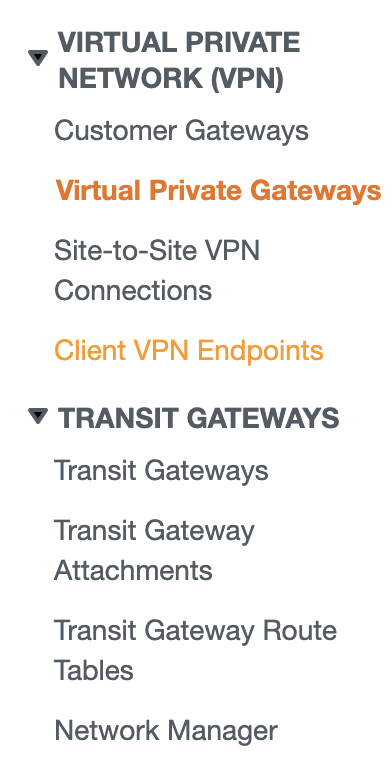
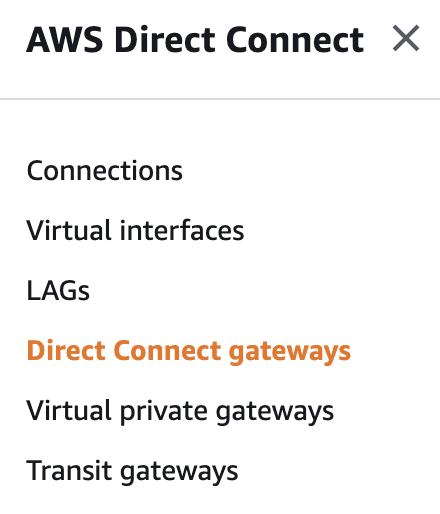
A good primer on the different gateway types appears in our earlier blog post at AWS VGW vs DGW vs TGW: Exploring the evolution of the AWS network gateway and choosing the best option for your business. In terms of this Q&A, it should suffice to say you will be needing to cascade these three gateway types to access a VPC via an AWS Direct Connect Transit VIF on Hosted Connection.
Current AWS side limits dictate that you may have up to 5 Transit Gateways per account, and a maximum of 5 Transit Gateway attachments per VPC. There’s also a limit of 20 Direct Connect gateways per AWS Transit Gateway, and keep in mind that if you are using IPsec VPN endpoints in the PaaS domain, these will be capped at 1.25 Gbps each. There’s some good news though! That is, by the very nature (and definition) by deploying a Transit Gateway, you gain access to the networking holy grail of transitive VPC peering combined with DX route propagation. What does that mean? Essentially you can go from having a complex and manually defined inter-VPC peering structure that can be difficult to maintain at scale to a routing mesh that you can define once, deploy redundantly (easily) and scale up/out as needed. Also those bandwidth limits can be overcome as Transit Gateway allows equal-cost multi-path routing (ECMP), which helps treat multiple single lane paths as a single aggregated data highway. Easy!
For more information on scaling tunnels, or using NVA within a VPC, see Scaling VPN throughput using AWS Transit Gateway.
A2: Yes, the Transit Gateway construct supports inter-region peering across multiple AWS locations. This capability was launched late 2019 (AWS Transit Gateway now supports Inter-Region Peering) and updated for availability across greater regions in April 2020, AWS Transit Gateway now Supports Inter-Region Peering in 11 additional regions. As of the time of publishing, the functionality is available natively in multiple AWS Regions across the globe, though it is possible to use the combination of Megaport and the AWS global backbone for connectivity wherever your AWS Hosted Connection edge location is connected via Megaport, even in AWS regions that Megaport does not serve directly with VXC connectivity. Martin Beeby (AWS) has published a very useful blog post on the topic and what you may achieve with it at AWS Transit Gateway Adds Multicast and Inter-Regional Peering.
A3: For AWS Hosted Connections, we are building out a completely new highly available architecture with consideration of potential single points of failure (SPOF) when designing cloud connections. One of the best references is the AWS Direct Connect ‘Resiliency Recommendations’ page, AWS Direct Connect Resiliency Recommendations, that defines some of the core principles to deploying Direct Connect with your cloud workload(s). Prior to the introduction of Hosted Connection, the Hosted VIF model was in use that provided shared (port group) capacity at a given data centre, and diversity was best achieved using multiple VXCs to different physical AWS locations. Now with Hosted Connection, it is possible to achieve port diversity by building a VXC to two locations within a single data centre, avoiding single points of failure other than full DC unavailability, or to build to the ‘Maximum Resiliency for Critical Workloads’ standard by deploying two VXCs to two separate data centre locations as AWS region edge location.
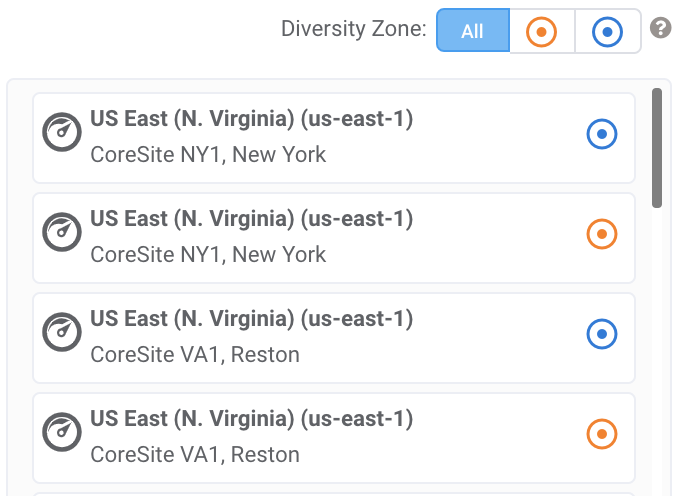
It’s possible to see an example of how this separation would occur by logging into Megaport’s Portal at https://portal.megaport.com and selecting a new Hosted Connection target. For the example below, we can see that for the region ‘us-east-1’ there are two (diverse) target endpoints available, denoted by the orange and blue diversity zone identifiers at CoreSite NY1, and a further ‘us-east-1’ target locations (again diverse) at CoreSite VA1.
For designing maximum resilience with Direct Connect, AWS strongly recommend the following:
You can rest assured that Megaport is taking care at the highest levels of availability to get your data the protection it deserves as customers move more and more critical workloads to the cloud.
A4: Once a Hosted Connection has been deployed via a Virtual Cross Connect (VXC) through the Megaport portal (or API), the bandwidth assigned between the A-end and B-end is fixed and cannot be modified without tearing down the VXC and creating a new connection. This answer suffices in most cases where bandwidths are known or perhaps a circuit speed change is appropriate when you have started with a too-small/too-large connection initially when in development and changed after a service is almost ready for prime time production. This generally doesn’t pose too much of an issue when the VXC is deployed where the A and B ends of the connection are in the same metropolitan area for billing purposes.
Of course, Megaport has a solution for you when the connection may be long-hauled across our network, and that is Hosted Connection works fantastically well when combined with Megaport Cloud Router (MCR).
A customer with a Megaport that is physically connected on one side of the continent may be consuming resources from an AWS region on the other side of the continent. By specifying and locating an MCR within the metropolitan zone of the AWS destination for the Hosted Connection, you may deploy a port-to-MCR VXC and a MCR-to-cloud VXC. The long-haul port-to-MCR VXC would retain full flexibility with minute-to-minute speed changes possible at the per megabit per second level, and the MCR-to-cloud VXC would be our fixed-tier metropolitan pricing construct for the Hosted Connection itself. Additionally, if you are using public peering as an option for your VIF, you may use the Megaport public IP space for peering with AWS and also have us provide NAT back across your port-to-MCR VXC leg, all at no additional cost above the MCR price itself. This is perfect for access to S3 storage and other public AWS offerings, especially where traffic and workloads may be bursty across a day/week/month.
A5: One primary design fundamental is to ensure that your CIDR (subnet ranges) are kept unique across all VPCs that will be connecting to the Transit Gateway, as AWS do not support routing between Amazon VPCs where there are overlapping CIDRs — the attachment routes will simply fail to propagate. Use a tool such as VPC Design Studio to design your VPC CIDR ranges with consideration for the regions and availability zones you wish your VPCs to be mapped to.
Also use a separate subnet for each transit gateway VPC attachment. For each subnet, use a small CIDR block (such as a /28), keeping the space available for EC2 resources. When separate subnets are in use, you may configure access control lists (NACLs) independently; best practice dictates keeping NACLs associated with the transit gateway subnets open and secure NACLs tied to your workload subnets based on inbound/outbound traffic flows. Use a common route table for all subnets associated with a transit gateway, unless your network design requires multiple VPC route tables (for example, a middle-box VPC that routes traffic through multiple NAT gateways).
Lastly, make sure you remember to enable route propagation! And don’t forget, there is no need to specify multiple transit gateways for high availability (HA) as transit gateways are highly available constructs by design. Ensure that you build HA from the customer ports all the way to the cloud provider edge locations, and build in pairs of circuits with different diversity zones.
One thing our customers made clear was the desire to hear more from our Solution Architects on other topics such as connectivity into other cloud service providers as well as our internet exchange offering, MegaIX. Make sure you are subscribed to Megaport updates to be informed of our upcoming information sessions.
You can view the webinar, AWS Hosted Connection and Transit Gateway, on our website.
此内容由惯性聚合(RSS阅读器)自动聚合整理,仅供阅读参考。 原文来自 — 版权归原作者所有。