惯性聚合 高效追踪和阅读你感兴趣的博客、新闻、科技资讯
阅读原文 在惯性聚合中打开

推荐订阅源

F
Full Disclosure
Recorded Future
Recorded Future
T
Tenable Blog
S
Securelist
C
CERT Recently Published Vulnerability Notes
T
Threatpost
S
Schneier on Security
A
Arctic Wolf
The Hacker News
The Hacker News
C
CXSECURITY Database RSS Feed - CXSecurity.com
Know Your Adversary
Know Your Adversary
P
Privacy International News Feed
Threat Intelligence Blog | Flashpoint
The Register - Security
Cisco Talos Blog
Cisco Talos Blog
AWS News Blog
AWS News Blog
K
Kaspersky official blog
T
True Tiger Recordings
T
Threat Research - Cisco Blogs
V
Vulnerabilities – Threatpost
P
Palo Alto Networks Blog
T
The Exploit Database - CXSecurity.com
小众软件
小众软件
B
Blog
Cyber Security Advisories - MS-ISAC
Microsoft Azure Blog
Cyberwarzone
Cyberwarzone
C
Cybersecurity and Infrastructure Security Agency CISA
T
Tor Project blog
Spread Privacy
Spread Privacy
Malwarebytes
Malwarebytes
P
Proofpoint News Feed
F
Fox-IT International blog
F
Fortinet All Blogs
P
Privacy & Cybersecurity Law Blog
G
GRAHAM CLULEY
量子位
Latest news
Latest news
OSCHINA 社区最新新闻
OSCHINA 社区最新新闻
博客园 - 叶小钗
Project Zero
Project Zero
T
Tailwind CSS Blog
N
Netflix TechBlog - Medium
Martin Fowler
Martin Fowler
IntelliJ IDEA : IntelliJ IDEA – the Leading IDE for Professional Development in Java and Kotlin | The JetBrains Blog
I
Intezer
博客园_首页
腾讯CDC
H
Hackread – Cybersecurity News, Data Breaches, AI and More
D
Darknet – Hacking Tools, Hacker News & Cyber Security

Megaport Blog

Early Warning Signs Your Network Needs a Refresh Introducing Megaport DDoS Protection A Guide to 400G Connectivity A Guide to NAT Gateway A Guide to Cloud Storage How the Data Center Is Evolving in 2026 What to Expect When Attending Your First Network Operator Group (NOG) Nine Ways to Connect to Cloud Using Private Connectivity Migrate Your On-premises to the Cloud: A Step-by-Step Guide How to Lower Your Egress Fees in 2026 How to Achieve Data Sovereignty in Europe Redefining the Edge with Cisco and Megaport How to Reduce Latency in Your Multicloud Environment Introducing Megaport High-Speed Cross-Cloud Encryption Are Businesses Leaving the Cloud? Using Meraki and Megaport Virtual Edge for Multicloud Networking Equinix Metal® is Going Away: Here’s What You Can Do Introducing Megaport On-ramp as a Service Megaport’s Full Solution Portfolio Is Coming to India New Bare-metal GPU Instance Now Available with NVIDIA RTX Pro 6000 A Look Back at 2025: Megaport's Biggest Updates Megaport Expands Into India With Extreme IX Your 2026 Predictions From AWS re:Invent 2025 Top NaaS Trends for 2026 What is IPsec? When to Move From Public Internet to Private Connectivity Megaport and Latitude.sh: Bringing Compute and Connectivity Together Improve Your Microsoft ExpressRoute Resilience with Megaport Comparing Ways to Connect to AWS What is API-First Networking? The Hidden Cost of Running Cloud-Hosted SD-WAN for IaaS Overcoming NaaS Integration Challenges Introducing SCION with Anapaya and Megaport How to Use Network as a Service to Future-Proof Your Network Introducing 400G Ports All the As-a-services, Compared Introducing Megaport IPsec Tunnels High Score: Megaport Hits 1,000 Locations A Guide to Colocation Data Centers Maximizing Peering Through Flow Analysis Build Resilient Networks for AI Production Workloads Introducing Packet Filtering on Megaport Cloud Router Building Resilient Government IT: Strategies for Secure, Compliant, and Scalable Connectivity Future-Proofing Government IT Telstra Programmable Network Is Being Discontinued. Here’s How to Migrate The Future of WAN Design Depends on Network as a Service (NaaS) Cisco Webex Edge Connect Launches on Megaport Voice and Video Exchange How to Prepare for APRA CPS 230 Comparing the SD-WAN Licensing Needs of Major Vendors A Guide to Improving Network Performance How Latitude.sh, Wasabi, and Megaport Unlock Cost-Effective Multicloud Four Ways to Connect Your Clouds SD-WAN and MPLS: Weighing the Similarities, Differences, and Benefits A Guide to Network as a Service (NaaS) How to Arrange Bilateral Peering Sessions Comparing Major SD-WAN Vendors Software Defined Networking in Healthcare Deploying A Global Network in Minutes With Megaport AWS Direct Connect Gateway (DGW) Data Transfer Outbound Rules Bilateral and Multilateral Peering: What’s the Difference? Multi-Region SD-WAN: Why Megaport SDCI is the Right Choice Microsoft Azure is Going Secure by Default. Are You Ready? How Megaport and Vultr Are Solving the Enterprise AI Challenge Introducing Megaport NAT Gateway A Guide to AWS Security Tools How to Deploy Amazon Bedrock Using AWS Direct Connect and Megaport Azure Private Link, Explained Introducing 100G MCRs Simplifying Hybrid and Multicloud Network Connectivity How to Fix Poor AWS Latency A Look Back at 2024: Megaport’s Biggest Updates Your 2025 Predictions From AWS re:Invent 2024 Six Ways to Get a More Resilient Network in 2025 Multicloud Security: Challenges and Solutions The Real Cost of High Network Latency Why Brazil is Your Key to Unlocking Business Growth in Latin America Why You Need Integrated Network Security Six Key Differences Between Major Cloud Providers Why Italy is Europe’s Next Cloud Expansion Hotspot How to Lower Your Cloud Costs Peering: How Local Is Local? Introducing Megaport AI Exchange Two Scenarios for Hybrid Multicloud Deployment With IBM Cloud and Microsoft Azure How to Connect Equinix and Digital Realty Megaport Enables Microsoft Azure ExpressRoute Metro for More Resilient Network Connectivity Executives, Here’s What Your Network Team Wants You to Know Easy Ways to Interconnect Your Network The Role of the Data Center in Your Network 100G VXC Expansion: Now Available From 597 Data Centers Worldwide Top 10 How-To Guides To Improve Your Network Comparing Encryption in Transit Options Comparing Generative AI Offerings From Major Cloud Providers A Sustainable Business Strategy Starts With Your Network Solutions to Common API Issues With Megaport Transforming Financial Connectivity: Introducing Megaport Financial Services Exchange (FSX) Megaport Enhancing Connectivity in Adelaide Megaport’s Latest Portal Features and Functionalities Automate Your Network Deployments With The New Megaport Terraform Provider A Recap of the Megaport World Tour 2024 Top 5 Cloud and Networking Announcements From Cisco Live 2024
How to Automate Your Megaport Infrastructure With APIs
2024-10-21 · via Megaport Blog

By Todd Wenzel, Solutions Architect

Learn how to transform your network efficiency and interoperability, all from a single interface.

As networks expand and automation becomes the norm, API usage has exploded; in today’s digital landscape, 90% of developers are now utilizing APIs. APIs are no longer just technical constructs, confined to the dark corners of software engineers – they’re now the lifeblood of many companies.

API tools allow you to connect to diverse data sources, supporting interoperability and innovation. For example, with APIs you can:
  • integrate external data into your systems and processes to boost efficiency
  • scale rapidly by connecting data and services that streamline and improve customer experience
  • enhance security protocols and minimize attack surfaces
  • integrate with other companies’ or third-party software to allow them to communicate with each other.

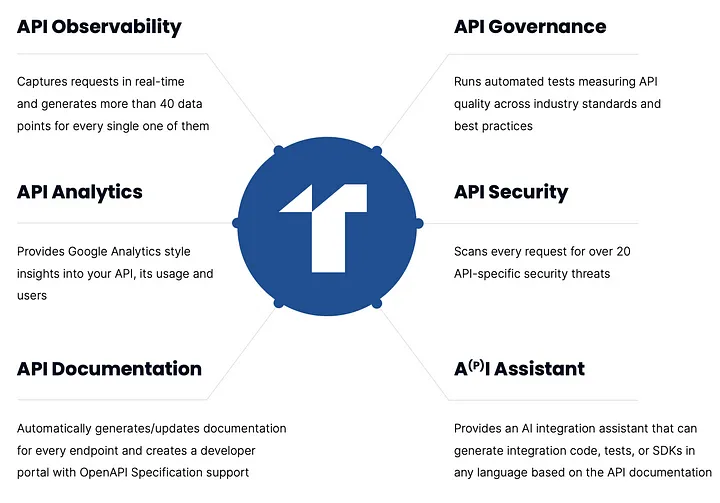
API features

An example of the many features offered by APIs. Source: Treble via Medium

In this blog, we’ll walk you through how you can start using the Megaport API to automate your infrastructure, achieving all these use cases and more.

About the Megaport API

Megaport offers a public API for access to all Megaport services available through the Megaport Portal. This API can be used to automate your Megaport provisioning through a single source to save time and simplify the process.

The Megaport API is based upon REST; it has predictable URLs, accepts form-encoded bodies, returns JSON-encoded responses, and uses standard HTTP response codes.

Our API will allow you to:

  • deploy Ports, MCRs, MVEs, and VXCs
  • connect to to AWS, Azure, GCP, Oracle and all other major Cloud Service Providers
  • connect to the MegaIX platform and Megaport Internet
  • access service status, maintenance and outage events, MCR Looking Glass, pricing, invoices, and product inventory.

Megaport offers two server environments which can be accessed using different URLs:

  • https://api.megaport.com/: This is the live Production environment. You will be liable for any services ordered in this system.
  • https://api-staging.megaport.com/: This is a test Staging environment. You can test any action in this environment and the API calls and responses will mirror the production system, but the services will not be deployed and you will not be billed for any activity. The staging environment is reset to match the production environment every 24 hours.

Get our how-to- guide for solving common API issues with Megaport.

How to set up the Megaport API

Prerequisites

Before you get started with the Megaport Collection in Postman:

To set up the Megaport Collection in Postman:
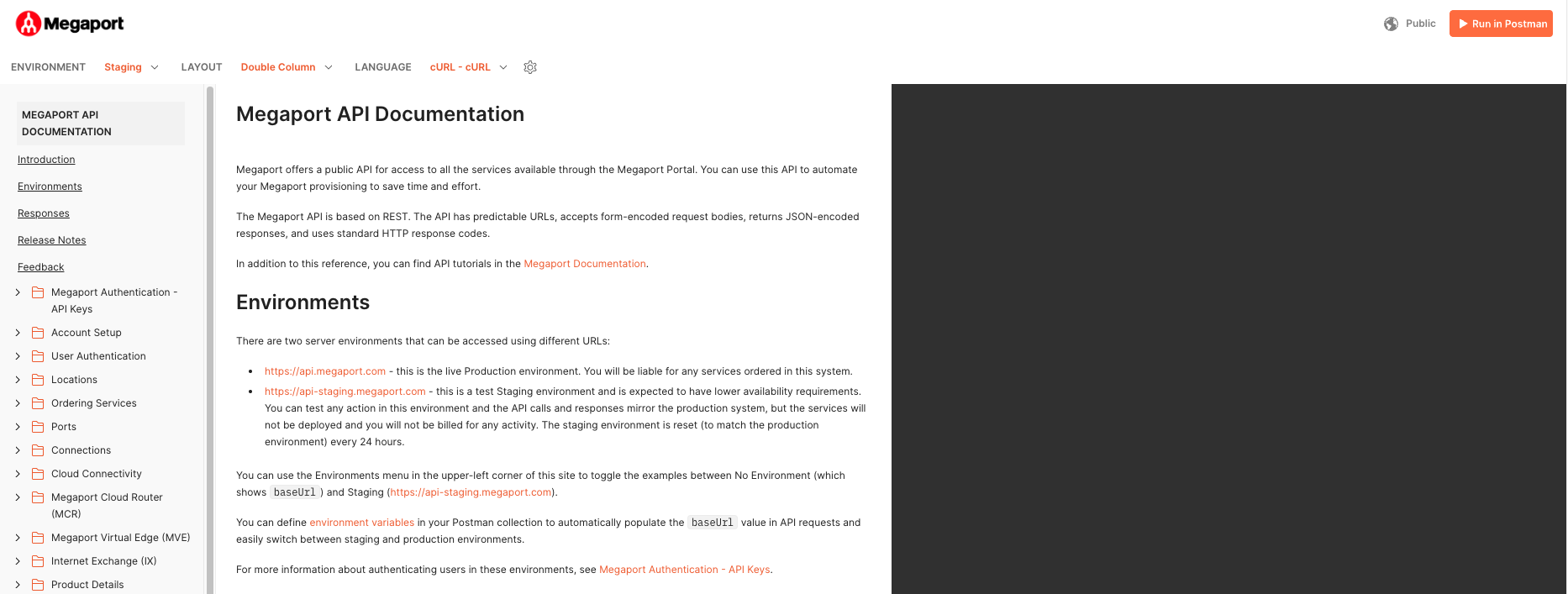
  1. Download the postman API collection from dev.megaport.com.
  2. Click the Run In Postman button in the top right corner of the linked page:

API screenshot 1

API screenshot 2

Set up authentication

The first step in preparing for API deployment is setting up Megaport Authentication. Megaport API calls require an access token and an access service key. These credentials will be created in your Megaport Portal account. To do this:

  1. Log in to your Megaport Portal Account.
  2. Select Tools > API Key Generator.
  3. Select Generate API Keys > Select Name > Role.
  4. Select Generate Key.

API screenshot 3

Once the API key is generated, the output will include an API Key and an API Secret Key. As shown below, you can only view your secret key after it’s been created.

Once you close out the API key selection, you will no longer be able to source the API Secret key so be sure to save in a safe place. If you do misplace your secret key, you can always start over by creating a new API key.
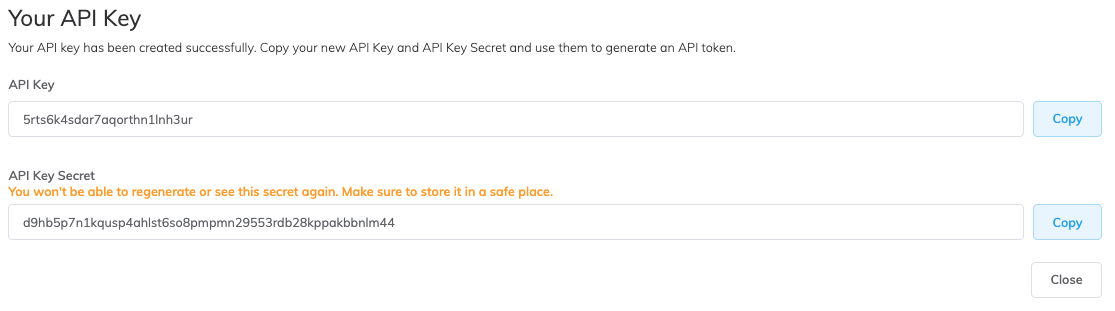
API screenshot 4

Build an access token

Now you have your API keys, you can build an access token in your Postman environment.
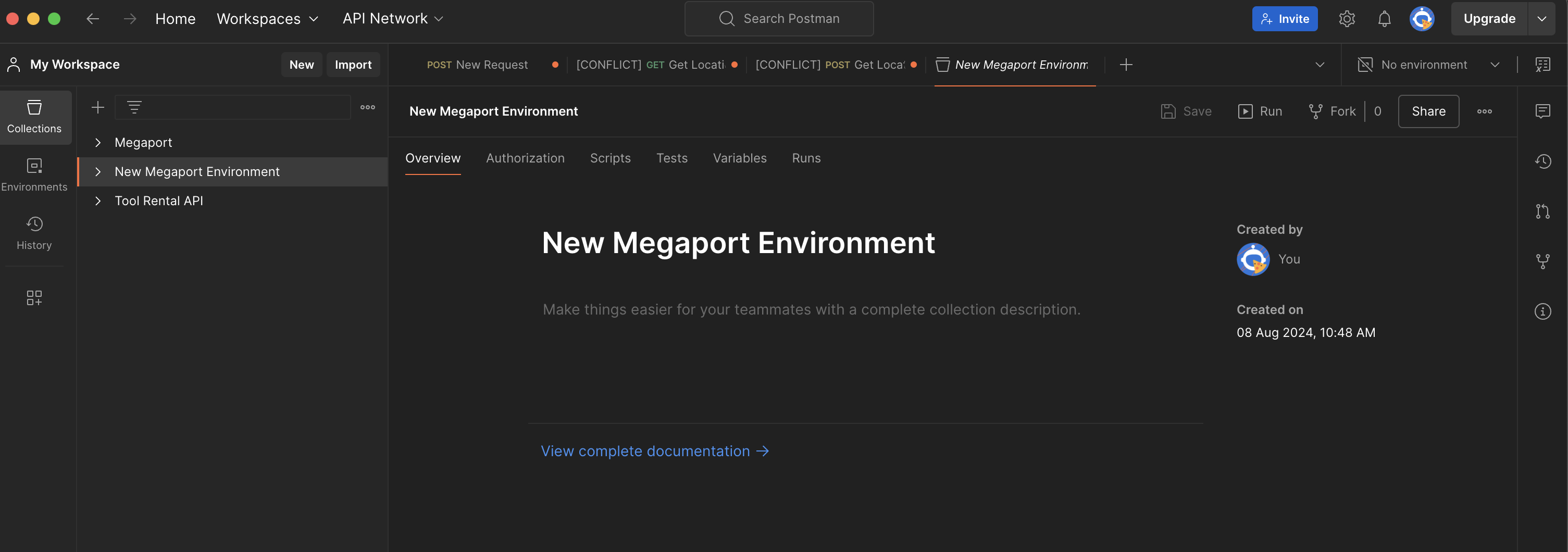
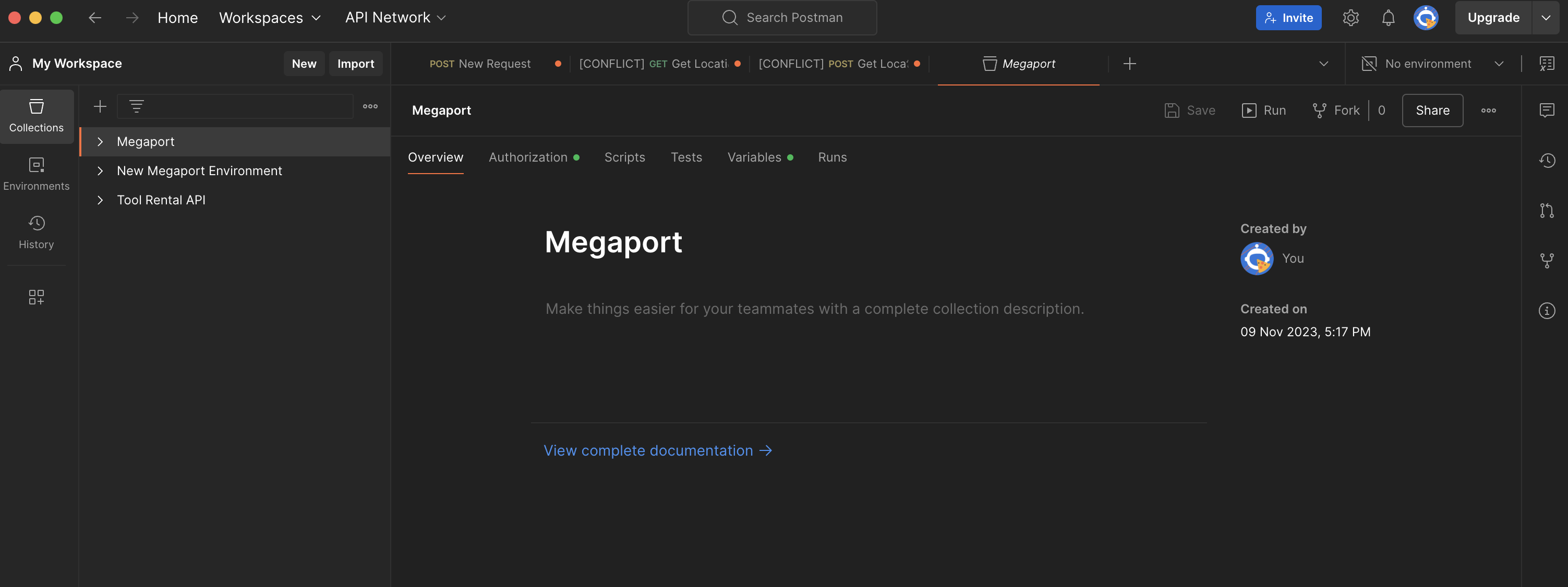
  1. Create a new collection: New Megaport Environment.
  2. Add a request by selecting Add a request under “My new collection”.

API screenshot 5

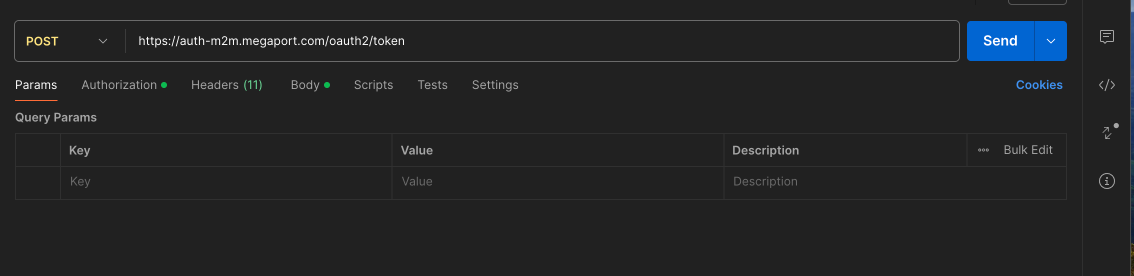
3. In order to generate an access token, add https://auth-m2m.megaport.com/oauth2/token in the URL field. Use the POST request method.
API screenshot 6

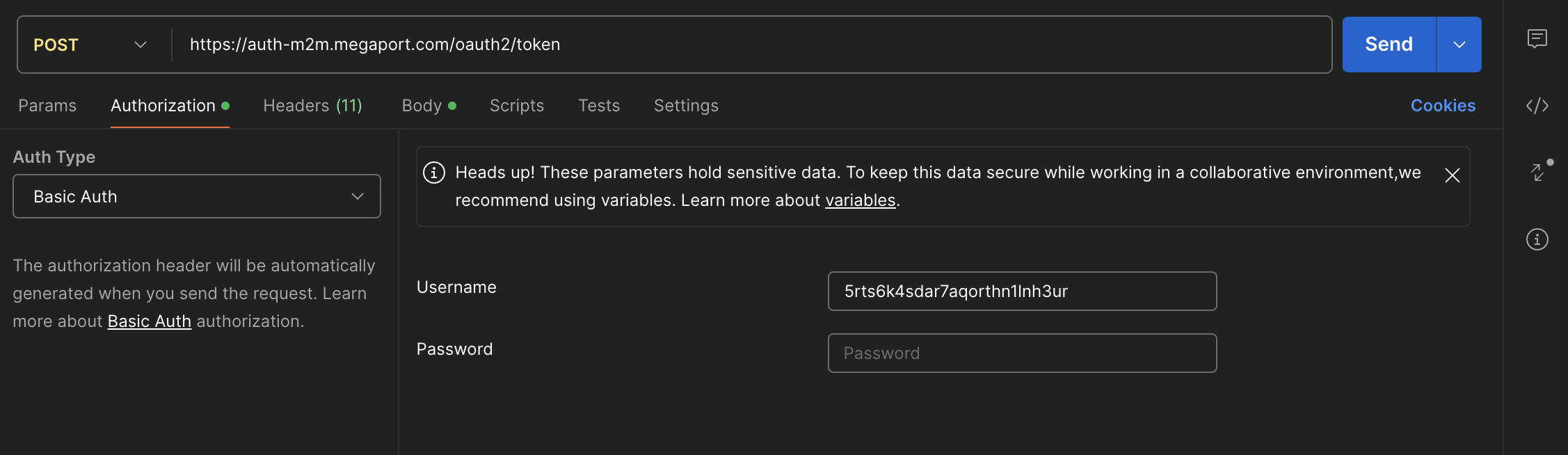
4. Select the Authorization tab.
5. Under Auth Type, select Basic Auth.
6. Enter username: API Key from the Megaport Portal, and password: API Secret Key from the Megaport Portal. Hit Save. (You also have the ability to use the “Variables” option to hold sensitive data like your username and password.)
API screenshot 7

7. Select the Body tab.
8. Select x-www-form-urlencoded.
9. Enter the new key: grant_type and set value: client_credentials.
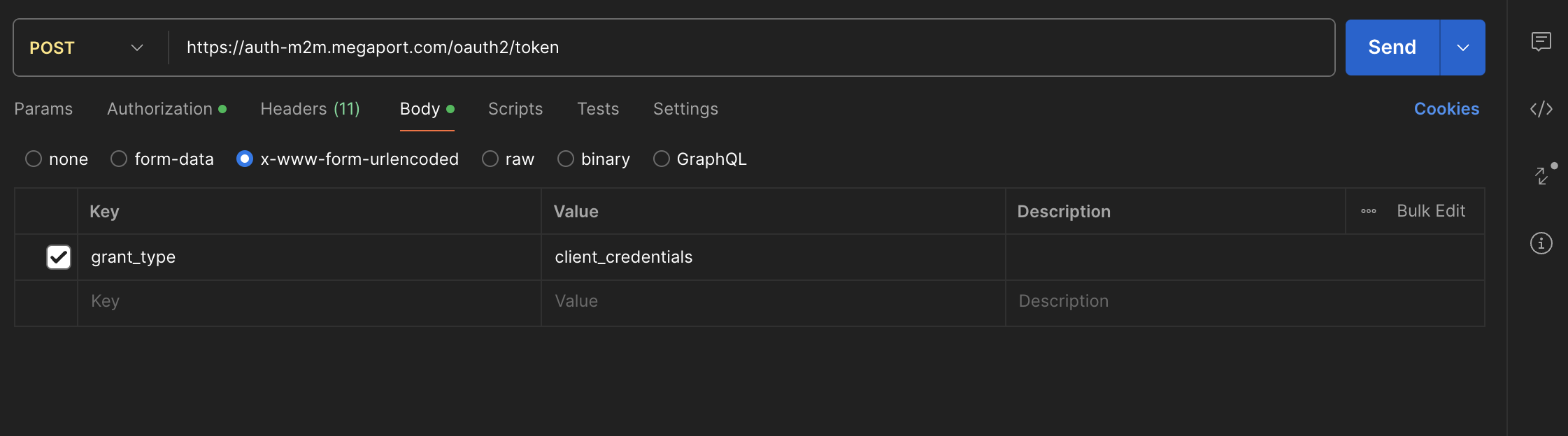
API screenshot 8

10. Hit Send (if everything is appropriately configured, an access token will be generated under the body of the POST request).
11. Copy the access token between the “xxxxxxxxxx”.
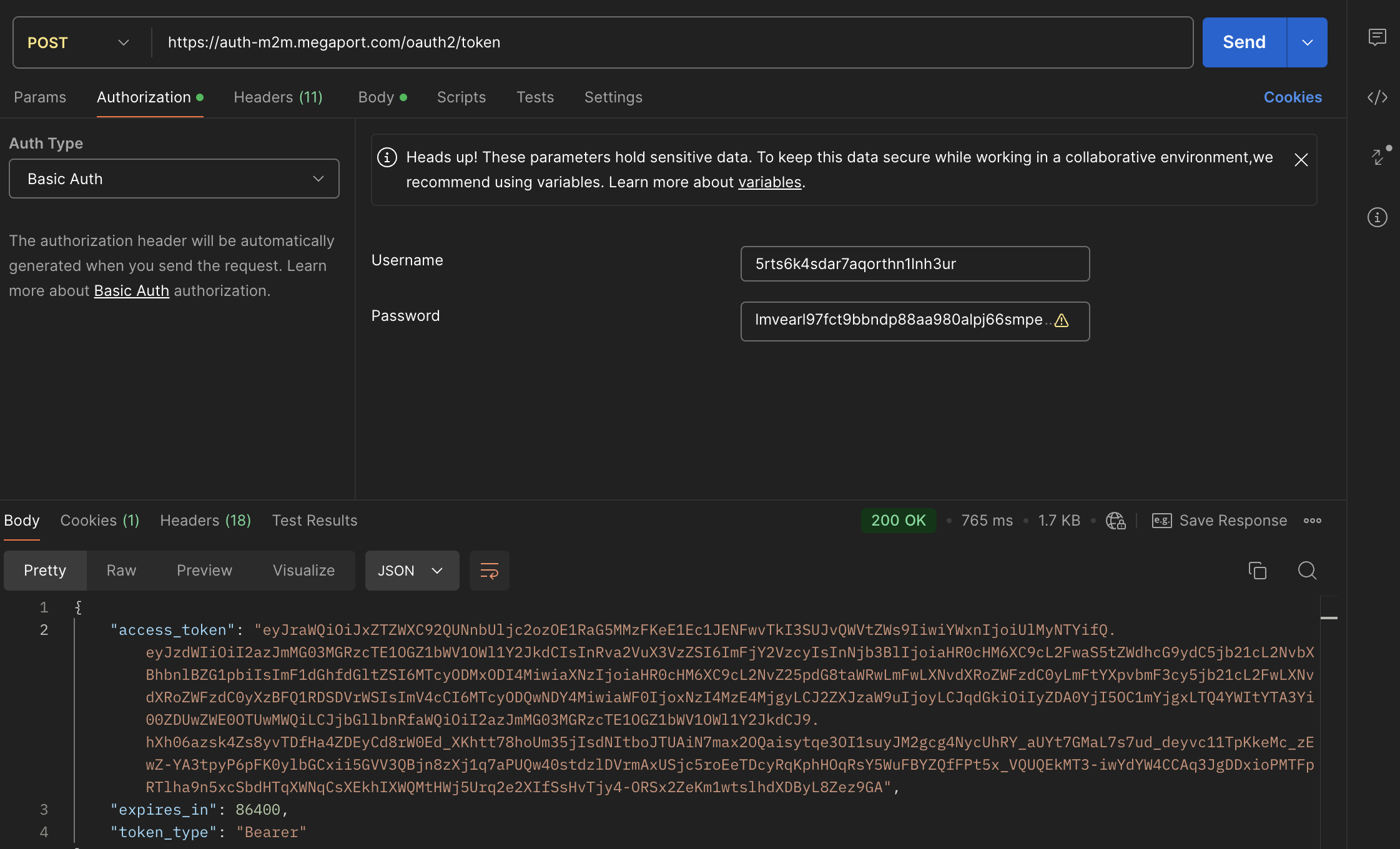
API screenshot 9

12. Under the Authorization tab, change the Auth Type to Bearer Token, paste the access token in the Token field, and hit Save.
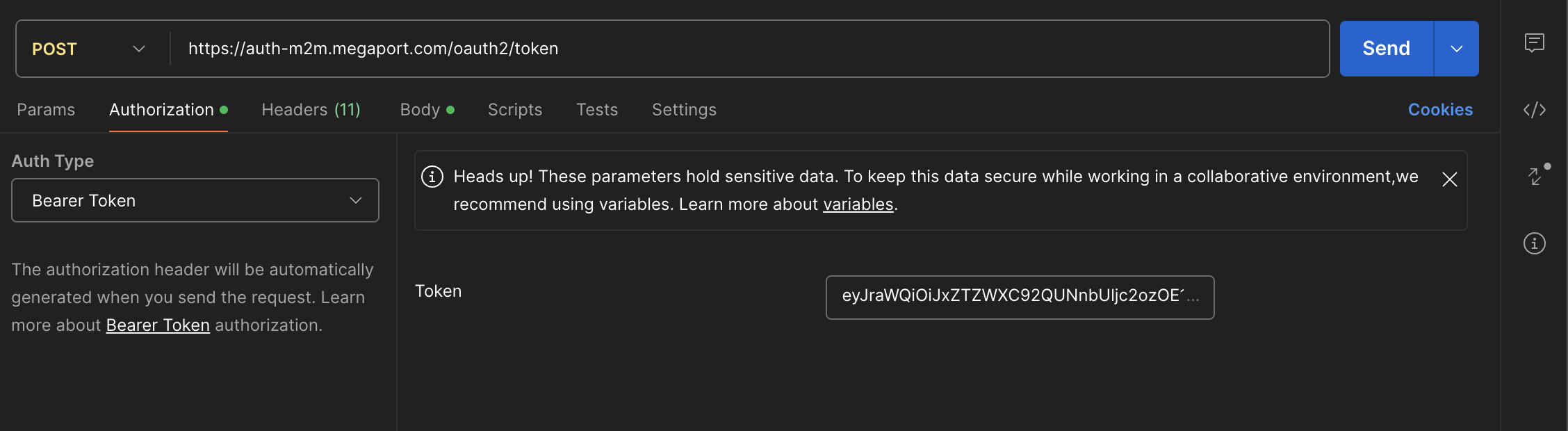
API screenshot 10

You’re now ready to start ordering Megaport services via the Megaport API.

The dev.megaport.com URL will provide you with many links to help you create the environment you want to deploy via the Megaport API.

View the Megaport ecosystem

To view locations on the Megaport Network, you can:

  • select locations on dev.megaport.com
  • post a GET request with the URL: https://api.megaport.com/v2/locations?locationStatuses={status}&metro={metro}
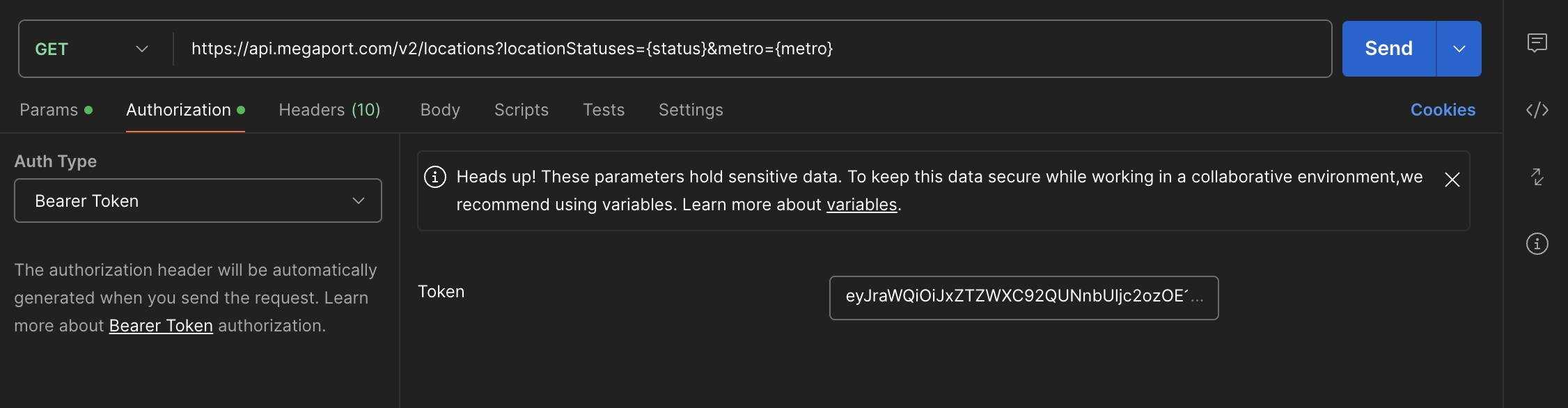
API screenshot 11

Make sure the Basic Auth and Bearer Token are present in your GET request.
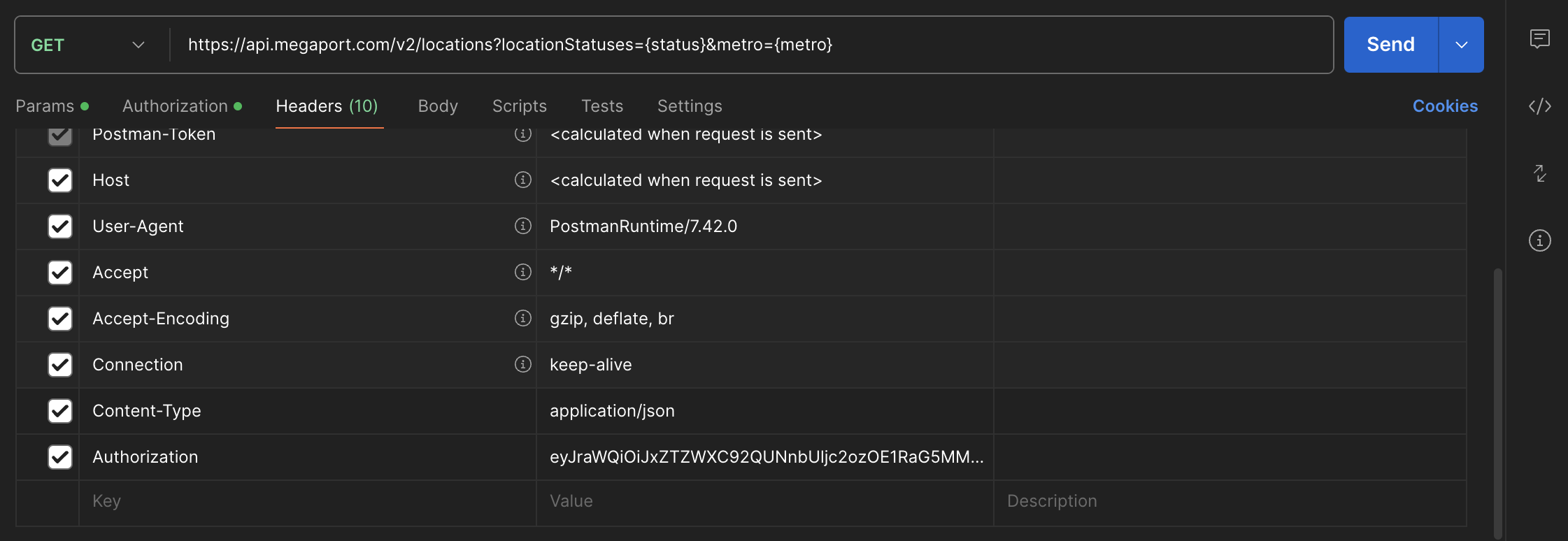
  1. Under the Headers tab, select Add > Content-Type > application/json.
  2. Under the Headers tab, add your authorization, bearer, and access token.

API screenshot 12

3. Select Save and and set the name “Locations”.

Under Collections, you’ll see the “GET Locations” folder.
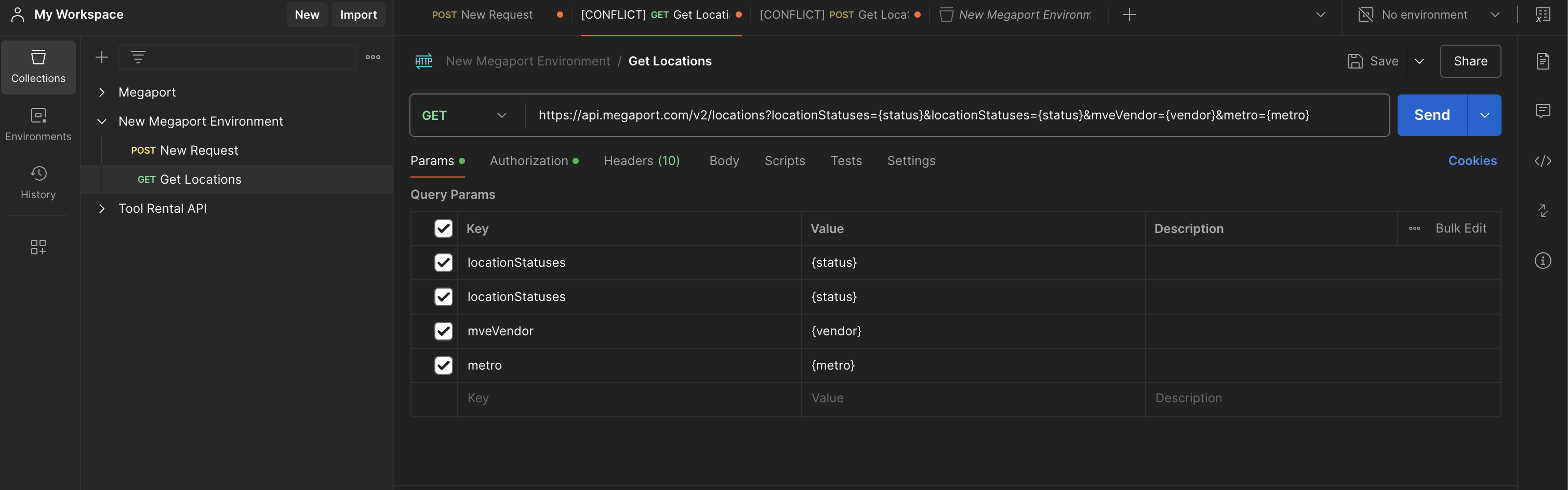
API screenshot 13

4. Under the Params tab, customers have the ability to add additional Query Params, for example, locationStatuses {status} or mveVendor {vendor}.
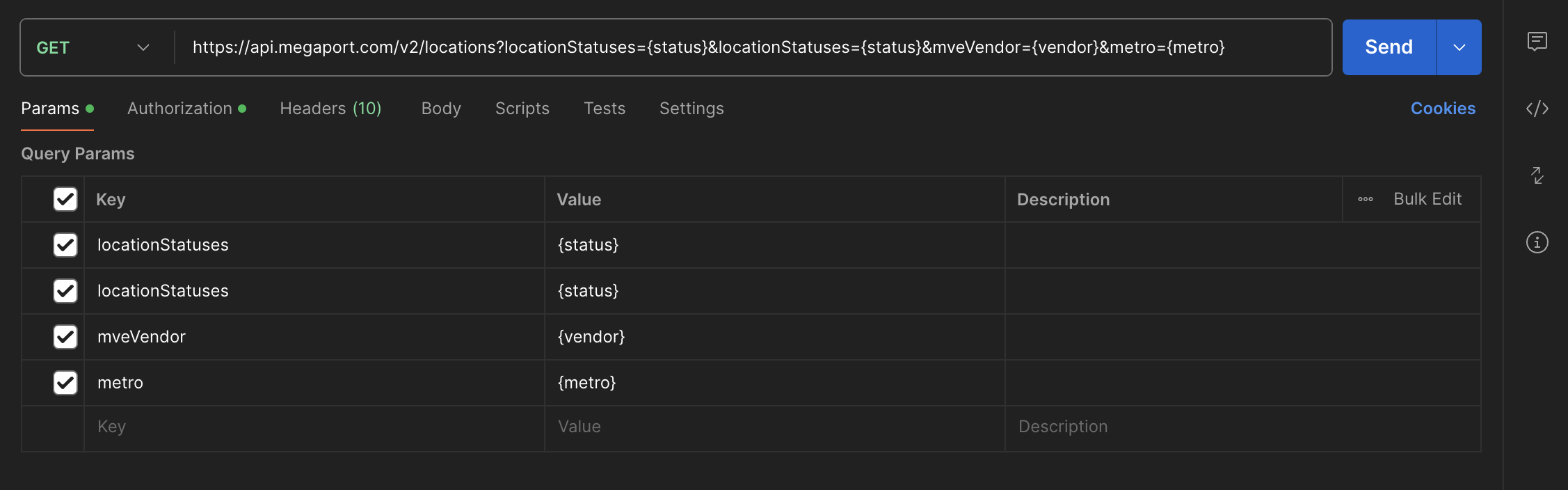
API screenshot 14

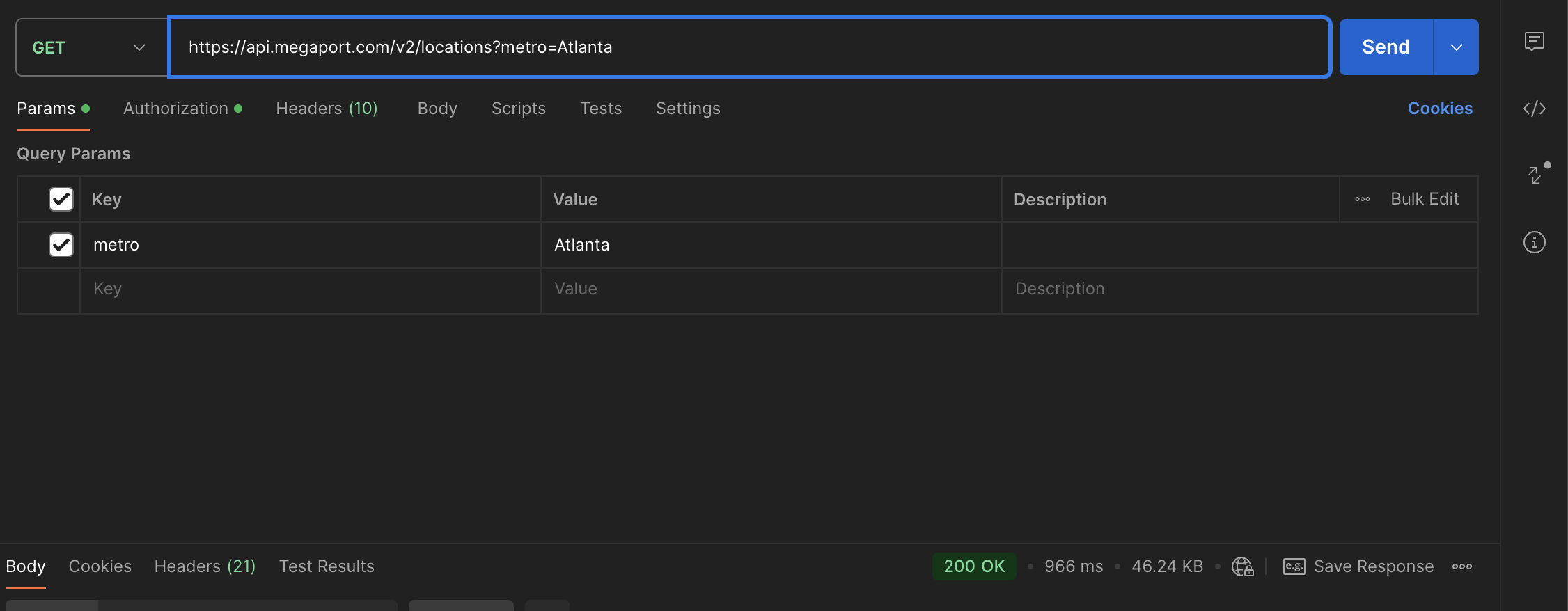
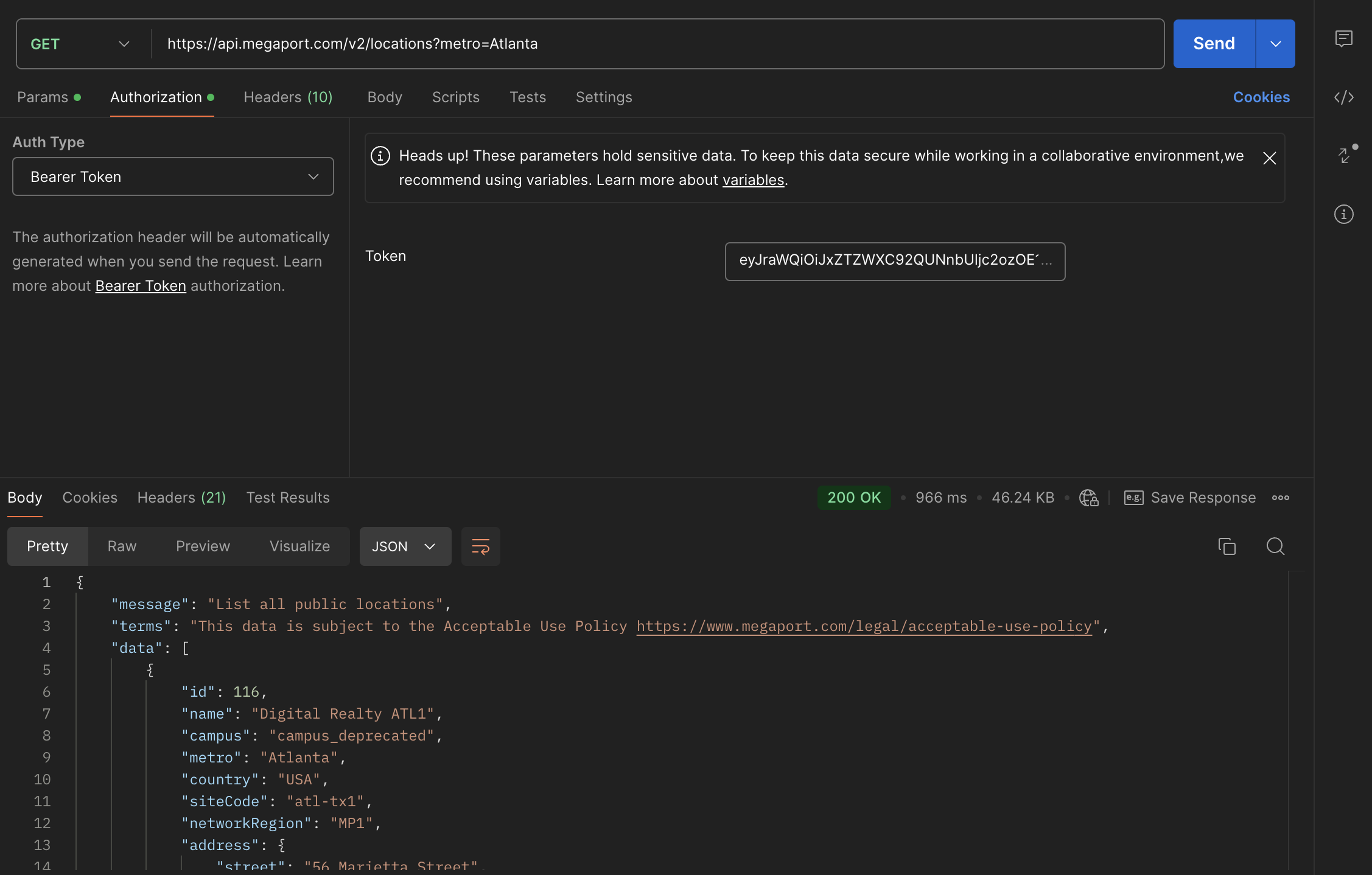
In this example, we’ll add Atlanta to the Metro Value and hit Send. Deselect the checkmarks for those params you don’t want to search.
API screenshot 15

In some cases, you may get an error for a bad session token. If this happens, go back to Authorization > Bearer Token, copy the bearer token, clear the Token field, and re-add.

5. You should receive a resulting status of “200 OK”. Now, our Megaport Atlanta locations should appear in the body. Please note the “id” field. For example, if a customer wants to order a Megaport at Digital Realty ATL, the “id” of 116 will be used in the JSON Body.
API screenshot 16

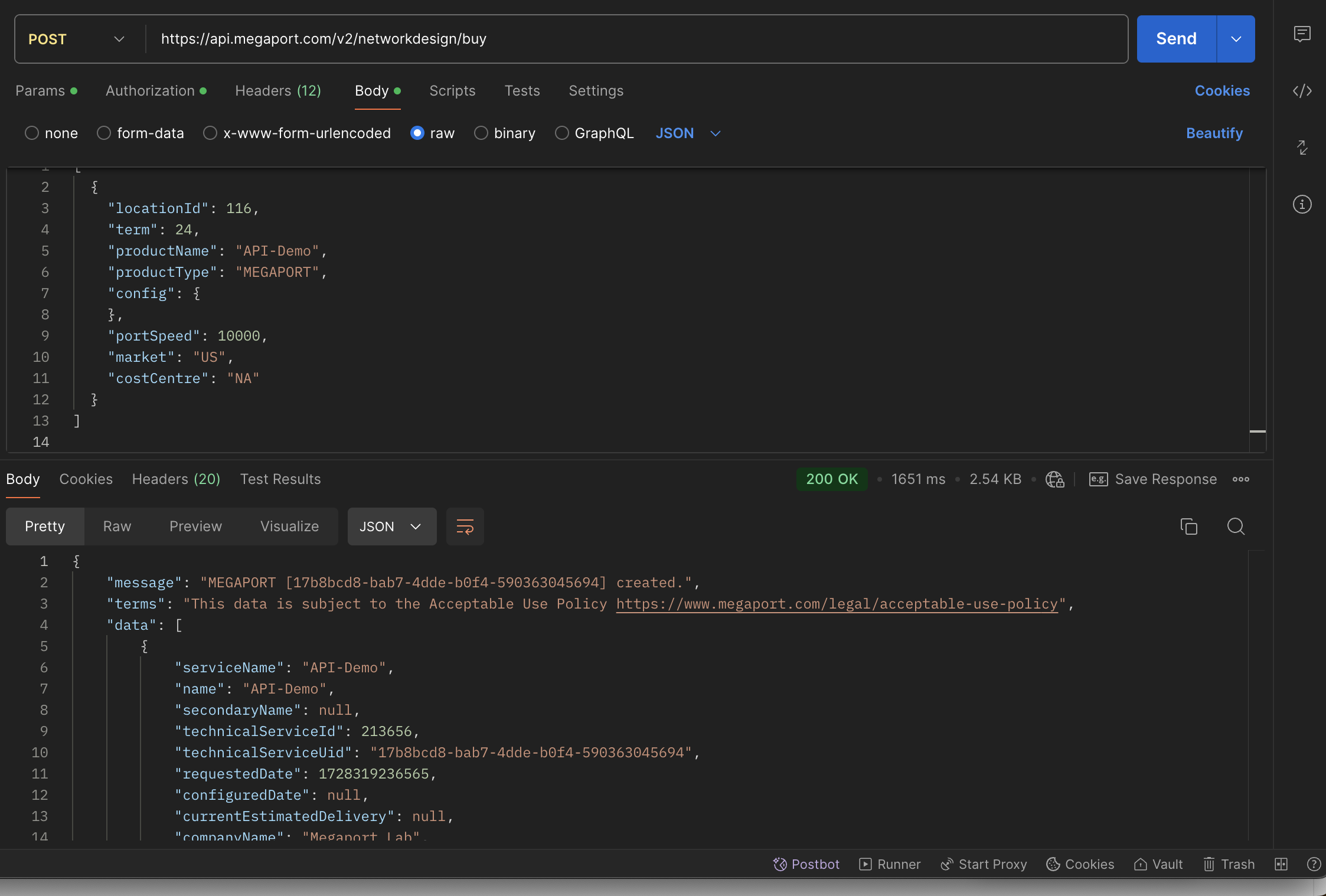
An example of that JSON body using the above “id” would look like this:

[
  {
    "locationId": 116,
    "term": 24,
    "productName": "API-Demo",
    "productType": "MEGAPORT",
    "config": {
    },
    "portSpeed": 10000,
    "market": "US",
    "costCentre": "NA"
  }
]
How to order a Megaport via the API

Let’s use what we’ve reviewed to order a Megaport via the API.

  1. On dev.megaport.com, select Ports > Buy Port (v3).
  2. Create a new request in Postman.
  3. Choose POST and paste https://api.megaport.com/v2/networkdesign/buy in the URL field.
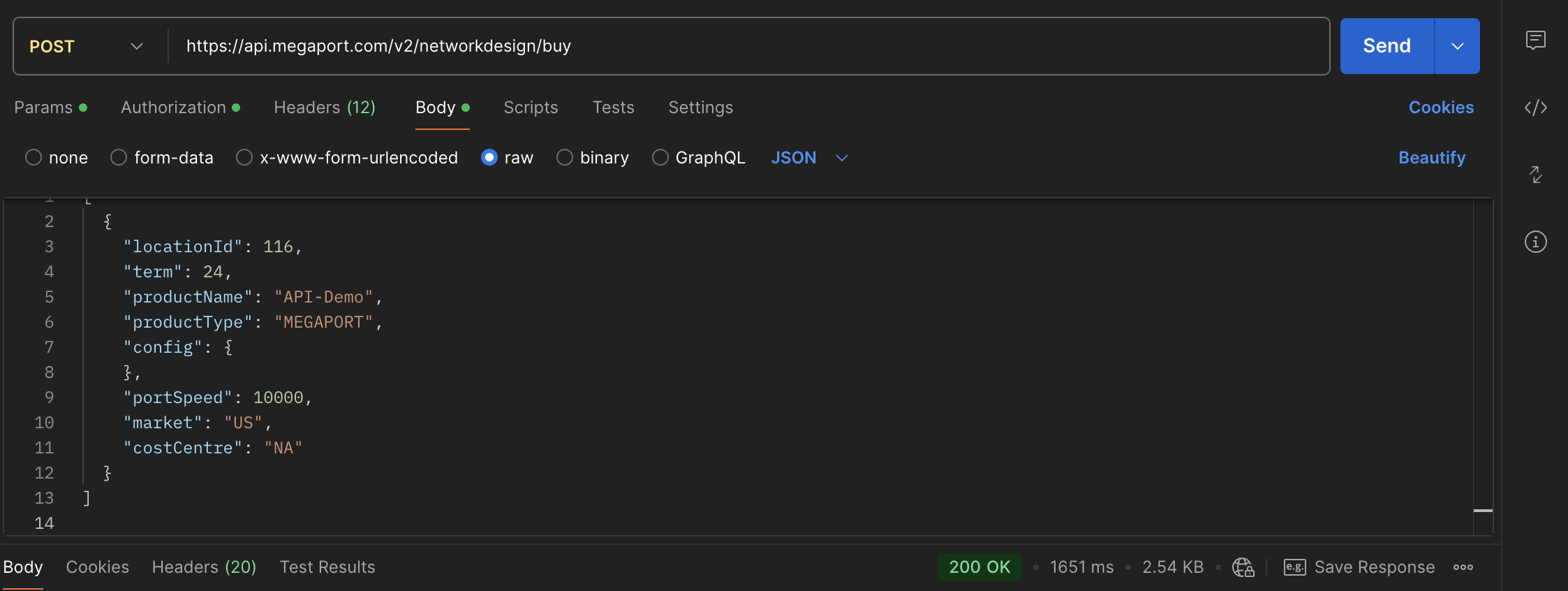
  4. Make sure the Basic Auth and Bearer Token keys are listed under the Authorization tab.
  5. Under the Headers Tab, ensure you have Content-Type/application/json and Authorization/Bearer Tokens. If these aren’t present, add them to the Headers tab.
  6. Paste the JSON under the Body Tab/raw.

API screenshot 17

7. Hit Send.

API screenshot 18

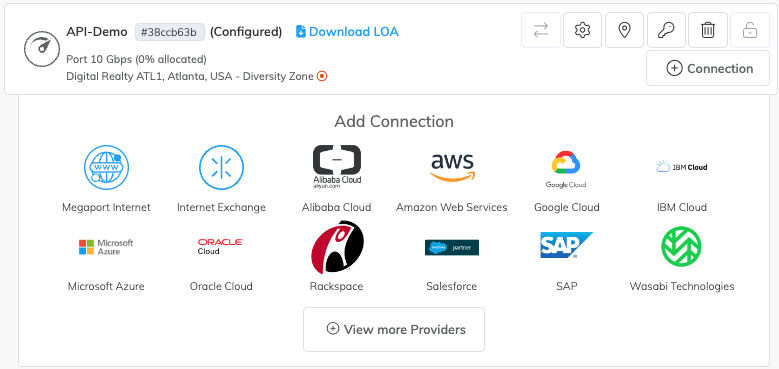
In this example, we can see the API request has been sent to the Megaport Portal in 1651 ms and the Port has been created in the Megaport Portal.
API screenshot 19

Conclusion

APIs have become essential tools for streamlining infrastructure and driving innovation. By using Megaport’s API you can automate your network provisioning, improve network efficiency, and integrate with leading cloud platforms, all from a single interface.

Learn more about Megaport APIs.