Azure Private Link is Microsoft’s ultimate offering to get secure, scalable connectivity for your services. Here’s everything you need to know about it.
Whether you’re working with a hybrid cloud environment, multi-region deployments, or simply looking to secure access to Microsoft Azure’s platform services, this hyperscaler provides a variety of connectivity options tailored to different needs.
Azure’s flexible and scalable solutions allow businesses to connect their on-premises environments, remote offices, or other cloud platforms to Azure in a way that suits their security, performance, and compliance requirements. These options range from traditional site-to-site VPNs to more sophisticated and dedicated connections like ExpressRoute and Azure Virtual WAN. But the option we’re looking at today is one of the most popular: Azure Private Link.
Read on to learn everything you could want to know about Azure Private Link in this complete guide.
Table of Contents
What is Azure Private Link?
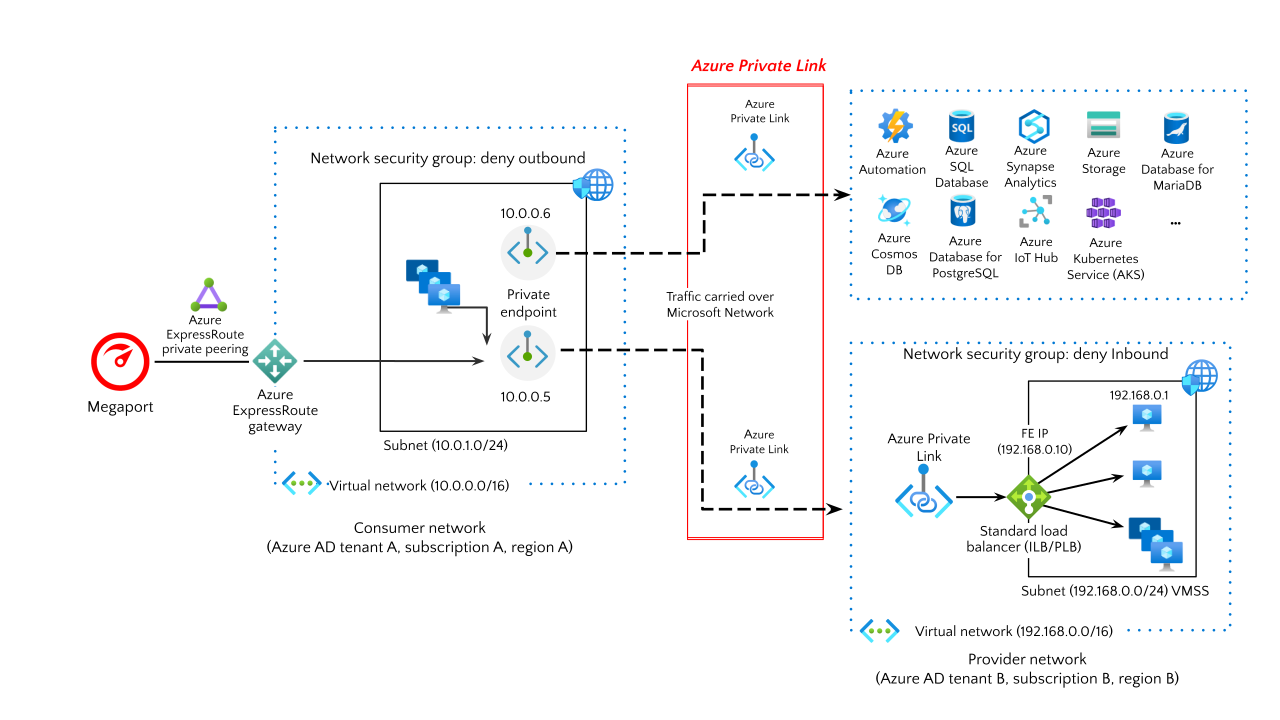
Azure Private Link enables private, secure, and direct connectivity between your Virtual Network (VNet) and Azure platform services, customer-owned services, or third-party services. This is done without needing to route traffic over the public internet.
Instead, traffic flows entirely within Azure’s private backbone network, boosting security and reducing exposure to the public internet.
In essence, Azure Private Link allows you to access Azure services or any supported services privately using private IPs, eliminating the need for public IP addresses. It works by creating private endpoints within your VNet, which are essentially network interfaces with private IP addresses that securely connect to the target service.
Azure Private Link.
Benefits of using Azure Private Link
Enhanced security
Private traffic: With Azure Private Link, traffic between your on-premises network and Azure services remains isolated from the public internet. This reduces the attack surface and minimizes the risk of data interception or unauthorized access.
Access control: You can tightly control access to Azure services by using private IPs within your VNet. This ensures that only authorized resources in your VNet can access services.
No need for public IPs: Private Link enables you to access Azure services using private IP addresses within your VNet, eliminating the need for public IPs, VPNs, or complicated routing configurations.
Easier management: Since the connection is private and uses standard VNet services, it reduces complexity in your network setup and ongoing management.
Improved performance and latency
Low latency: Azure Private Link ensures that traffic stays within Azure’s private backbone network, offering lower latency and more reliable performance compared to public internet connections.
Consistent throughput: Because the traffic doesn’t rely on the variable speeds of the public internet, performance is more predictable which is critical for latency-sensitive applications.
Better compliance and data privacy
Data residency: With Azure Private Link, all traffic between your VNet and Azure services stays within the Azure region and private IP space, which is essential for meeting data residency and data sovereignty regulations.
Simplified compliance: By ensuring that all traffic is routed over private connections, Azure Private Link helps organizations meet stringent compliance requirements, especially for industries dealing with sensitive data (e.g. finance, healthcare).
Scalability and flexibility
Seamless connectivity: Azure Private Link supports private access to Azure PaaS services, customer-owned services, and third-party services (via the Azure Marketplace), making it highly flexible for various business needs.
Hybrid and multicloud scenarios: It’s perfect for hybrid cloud environments, enabling secure connections between on-premises networks using Megaport and Azure, as well as other cloud platforms.
Improved security posture with Network Security Groups (NSGs)
NSG and private endpoint configurations: Ensure only trusted resources within your network have access to specific Azure services, allowing for fine-grained access control over who can communicate with your cloud resources.
Custom services: You can also use Private Link to securely connect to custom services or third-party services hosted in Azure, further extending its value.
Azure Private Link pricing
Pricing for Azure Private Link is covered in more detail on Azure’s website.
In summary, Azure does not charge for the Private Link service but does charge a fee per hour for each private endpoint. Inbound and outbound data is also charged per GB.
Azure Private Link and private endpoints
Azure Private Link provides a framework for private connectivity, while private endpoints are the actual network interfaces that facilitate these private connections to Azure services.
So a private endpoint is simply a network interface that uses a private IP address from your VNet.
This network interface then connects you privately and securely to a service that’s powered by Azure Private Link. By enabling a private endpoint, you’re bringing the service into your VNet.
Private endpoint connections
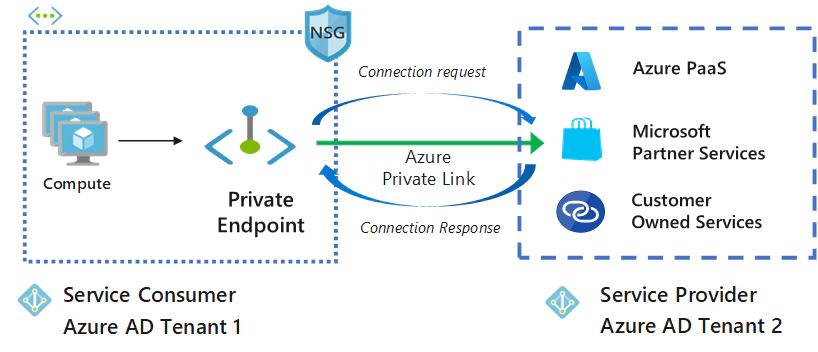
Private Link works on an approval model where the Private Link consumer can request a connection to the service provider for consuming the service.
The service provider can then decide whether to allow the consumer to connect or not. Private Link enables service providers to manage the private endpoint connection on their resources.
Azure Private Link connection.
Service endpoints vs private endpoints
Service endpoints were introduced by Azure in 2017 as a way to enable secure access to Azure services (e.g. Azure Storage, SQL Database) over the Azure backbone network. They extended a VNet to these services by allowing traffic from VNets to flow securely within the Azure network while still using public IP addresses for the services.
Private endpoints, on the other hand, were introduced later, in 2019, as a more secure and private solution. With private endpoints, traffic flows entirely over your private VNet, using a private IP address with no public IP addresses exposed, providing more isolation and security for accessing Azure services.
Common use cases for Azure Private Link
Azure Private Link is incredibly versatile and can be used across a wide range of scenarios.
Here are some of the most common use cases:
Secure access to Azure PaaS services
Many Azure services like Azure Blob Storage, Azure SQL Database, and Azure Key Vault are now accessible over Private Link. This allows you to keep your service traffic private, ensuring that sensitive data never leaves Azure’s secure network. It also helps prevent unauthorized access to your resources by bypassing public IPs entirely.
Connecting across VNets
When dealing with multiple VNets, whether within the same region or across different regions, Azure Private Link provides a secure and simplified method of connecting services between VNets. By using private endpoints, you can create seamless, private connections between different Azure networks without exposing traffic to the internet.
Private connectivity to Azure Marketplace services
Azure Marketplace offers a wide variety of third-party services and solutions that you can access via Private Link. By using private endpoints, you can securely connect to these services without using public IPs to enhance security and performance.
Hybrid cloud architectures
In hybrid cloud environments where on-premises infrastructure needs to connect with Azure resources, Azure Private Link allows for private, secure communication between your on-premises environments and cloud services. For example, you can connect a data center to an Azure database without relying on public IPs or complex network configurations.
B2B connectivity
Azure Private Link enables businesses to share resources securely with external partners, customers, or other organizations. For instance, if you offer a custom service that is hosted in Azure, you can expose it via Private Link to allow authorized clients to access it privately.
Azure Private Link vs VNet peering
Private Link and VNet peering are both used to connect resources securely within Azure, but the methods and use cases are quite different.
Azure VNet peering allows you to connect two or more VNets within the same or different regions. This creates a private connection between theVNets, enabling resources in one network to communicate with resources in the other.
Azure Private Link, on the other hand, is a networking feature that allows you to connect your Azure VNets to Azure services and partner services over a private endpoint.
Azure Private Link
Purpose: Secures and simplifies connectivity to Azure services or partner services within your VNet.
How it works: Creates a private endpoint within your VNet that connects directly to the target service, bypassing the public internet.
Key benefits
Enhanced security: Reduces exposure to potential threats by eliminating public internet access.
Purpose: Connects two or more VNets within the same or different regions.
How it works: Establishes a direct connection between the VNets, allowing resources in one network to communicate with resources in the other.
Key benefits
Seamless communication: Enables resources in different VNets to interact as if they were in the same network.
Efficient resource sharing: Allows sharing of resources like storage accounts or virtual machines across VNets.
Centralized management: Simplifies network management by treating peered networks as a single logical network.
When to use which
Use Azure Private Link when:
you need to connect to Azure services like Storage, SQL Database, or third-party services
you want to improve security by isolating your resources from the public internet
you want to simplify network configuration and reduce management overhead.
Use Azure VNet Peering when:
you need to connect two or more VNets within your Azure subscription
you want to share resources between VNets
you want to create a more complex network topology, such as a hub-and-spoke architecture.
Azure Private Link vs Virtual Network Gateway
A Virtual Network Gateway(VNG) in Azure is a resource that enables secure communication between your Azure VNet and other networks, such as on-premises environments or other VNets.
Within the VNG you then have two choices for deployment – a VPN Gateway or an ExpressRoute Gateway.
A VPN Gateway is a specific type of VNG. It is used to send encrypted traffic across the public internet. Site-to-site, point-to-site, and VNet-to-VNet connections all use a VPN gateway.
ExpressRoute Gateway is also a specific type of VNG. It sends network traffic on a dedicated private connection when configuring Azure ExpressRoute.
In contrast, Private Link provides private connectivity to Azure PaaS services (e.g. Storage, SQL Database, etc.) and other Azure resources within a VNet.
Private Link and the VNG offer different approaches to connectivity in Azure, each with distinct characteristics and use cases.
Connectivity type
Private Link provides private access to Azure PaaS services and customer-owned/partner services within your VNet using private endpoints.
VNG enables secure connections between on-premises networks and VNets privately as well as over the public internet.
Network path
Private Link keeps traffic on the Microsoft backbone network, eliminating exposure to the public internet.
VNG routes encrypted traffic over the public internet as one option, but also provides the option for private traffic routing via your on-premises network using an ExpressRoute.
Scope of access
Private Link offers granular control, allowing access to specific resources within a VNet.
VNG provides access to entire networks rather than specific resources.
IP addressing
Private Link uses private IP addresses for connectivity, reducing the attack surface.
VNG requires a public IP address for the VPN gateway element.
Cross-region connectivity
Private Link supports connectivity to services across different Azure regions.
VNG is typically limited to resources within the same region as the gateway.
Use cases
Use Private Link when:
you want to securely connect to Azure PaaS services or other Azure resources within your VNet
you need to reduce latency and improve security.
Use VNG when:
you need to connect your on-premises network to your Azure VNet
you need to provide remote access to your VNet resources.
Virtual Network Gateway vs VNet peering
In addition to the details above for both the VNG and VNet peering, it’s worth highlighting the key differences between each connectivity option below.
Types of connections
VNG
Site-to-site VPN: Connects on-premises networks to Azure VNets.
VNet-to-VNet: Connects two Azure VNets using VPN or ExpressRoute.
ExpressRoute: Provides dedicated private connections between on-premises infrastructure and Azure.
VNet Peering
Intra-region peering: Peers two VNets within the same Azure region.
Global VNet peering: Peers VNets in different regions, enabling cross-region connectivity.
Security and encryption
VNG supports end-to-end encryption (IPsec) for VPN connections and uses private circuits for ExpressRoute. Ensures secure communication over potentially untrusted networks like the internet.
VNet peering communication is unencrypted by default since it uses Azure’s backbone network, but it remains secure and isolated from the public internet.
Routing and traffic flow
VNG
Dynamic routing (via BGP) and static routing, supported for managing traffic flow across connected networks, as well as transitive routing when BGP is enabled.
Connect on-premises and Azure resources, or multiple VNets (via VPN or ExpressRoute).
VNet peering
Simple, flat routing removes the need for VPN tunnels or encryption. VNet peering allows seamless communication between resources in peered VNets using their private IP addresses.
Automatic traffic routing means no complex configurations, making it simpler than using a VNG.
VNet peering does not support transitive routing by default.
Complexity
VNG
A more complex setup requires configuration of VPN gateways, IP address ranges, route tables, and possibly custom configurations for BGP.
VNG can be used for hybrid networking (on-premises to Azure), adding more complexity compared to VNet peering.
VNet peering
Peering two VNets is a straightforward process, requiring minimal configuration – just enable peering between the VNets and manage routing tables if needed.
Azure Private Link vs Azure ExpressRoute
Azure ExpressRoute and Azure Private Link are two distinct networking services in Azure, each with unique characteristics and use cases.
Connectivity
ExpressRoute establishes a dedicated, private connection between on-premises infrastructure and Azure using physical connections like MPLS or Ethernet.
Private Link enables private access to Azure PaaS services and customer-owned/partner services within Azure VNets using private endpoints.
Architecture
ExpressRoute uses dedicated physical connections, bypassing the public internet entirely.
Private Link keeps traffic on the Microsoft backbone network, eliminating exposure to the public internet.
Performance
ExpressRoute offers high bandwidth and low latency due to dedicated physical connections.
Private Link provides consistent performance by using Microsoft’s internal network.
Security
ExpressRoute provides a secure, private connection without traversing the public internet.
Private Link offers enhanced security by keeping data on the Microsoft network and protecting against data exfiltration.
Cost
ExpressRoute has generally higher costs due to its dedicated physical connections.
Private Link is more cost-effective, with pricing based on private endpoint resource hours and data processed.
Setup complexity
ExpressRoute is more complex to set up and requires coordination with a network service provider.
Private Link is simpler to configure and managed entirely within Azure.
Use cases
Private Link is:
best for accessing Azure PaaS services privately and protecting against data exfiltration
ideal for organizations needing secure access to specific Azure services, protecting against data leakage and simplifying network architecture.s
ExpressRoute is:
ideal for enterprises requiring high-bandwidth, low-latency connections between on-premises and Azure resources
suitable for large enterprises with high-bandwidth requirements and the need for consistent, low-latency connections.
Private Link availability
Private Link is now generally available. Both private endpoint and Private Link services (services behind standard load balancer) are also generally available.
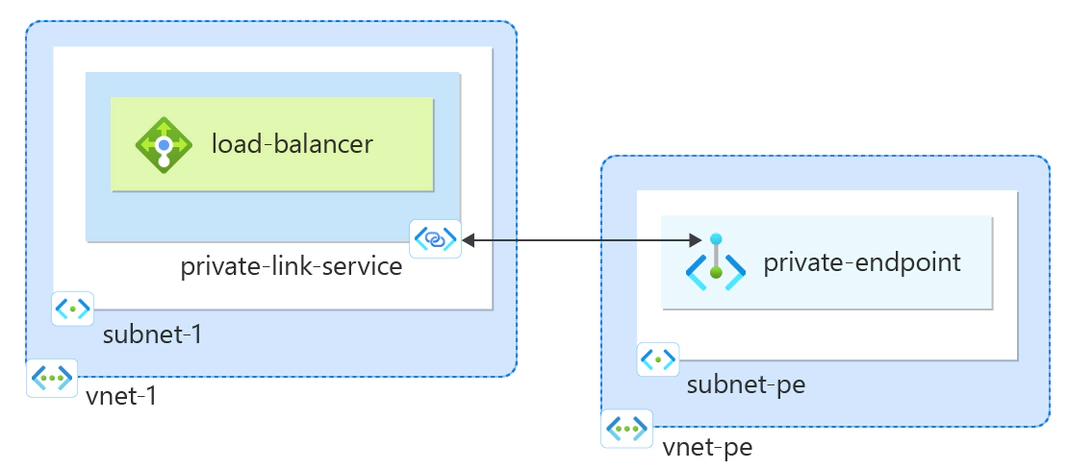
1. Create a Private Link service that refers to your service. Give Private Link access to your service or resource deployed behind an Azure Standard Load Balancer. Users of your service have private access from their virtual network.
Azure Private Link service.
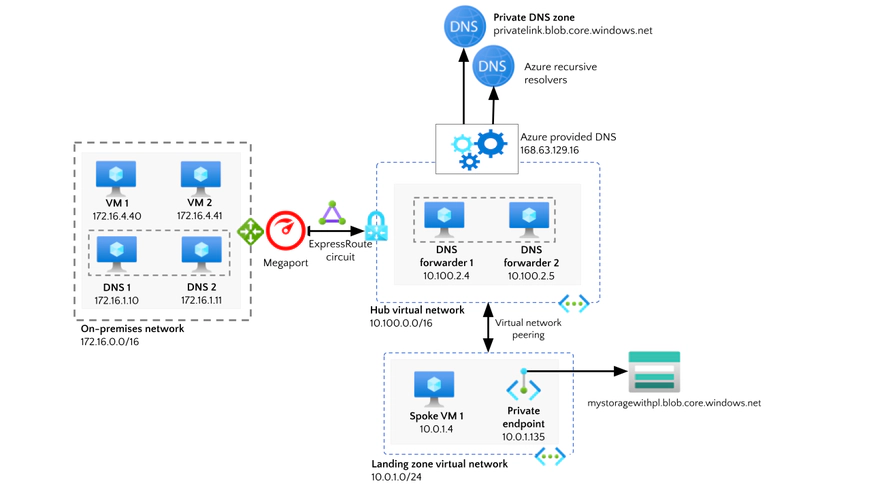
2. Create a private endpoint. As the consumer, you create a private endpoint in your VNet that points to the service you want to connect to. This endpoint will have a private IP address and be mapped to the service.
A virtual network with a subnet. A private endpoint is created within the subnet, pointing to a target resource (like a storage account, for example).
3. Configure network security. Security groups and Network Security Groups (NSGs) must be configured to control traffic to and from the private endpoint. You can define fine-grained access policies to ensure only authorized resources can access the service.
4. Verify the connection. Once everything is configured, verify that your VNet is connected to the service via the private endpoint. You can use tools like Azure Network Watcher to ensure the connection is properly established.
Conclusion
Azure Private Link offers numerous benefits, making it an essential tool for organizations that require private, secure, and high-performance connectivity to Azure services.
Whether you’re looking to improve security, simplify network management, or meet compliance requirements, Azure Private Link delivers a flexible and scalable solution that enhances the security and performance of your cloud-based infrastructure.
By using private endpoints and ensuring traffic stays within Azure’s backbone network, Azure Private Link not only improves network security but also provides you with better control over your cloud architecture. It’s an ideal solution for businesses seeking a secure, low-latency connection to critical Azure services while maintaining control and compliance.