


By Brian Bowman, Senior Solutions Architect
We explain why you should connect the leading two cloud providers, the options available, and which one is right for your business.
Hybrid cloud and multicloud architectures have become common for enterprise IT departments seeking greater network reliability, security, and cost-efficiency in support of optimal application performance.
As more and more enterprise workloads migrate to the cloud, it’s only natural that organizations seek ways to connect Amazon Web Services (AWS) and Microsoft Azure, two leading hyperscalers, to future-proof their network and ensure the lowest latency between workloads.
Having multiple cloud providers alone isn’t enough to future-proof your business. And in an era of remote workforces, rampant cybercrime, and impatient customers, it’s never been more important to optimize your cloud suite. The simplest (and best) way is to privately interconnect your clouds – in other words, adopt cloud-to-cloud routing.
Interconnecting your cloud suite brings a range of benefits and unlocks new use cases: It mitigates risks by introducing data redundancy and disaster recovery, improves network performance, reduces latency and hops (by decreasing the distance that data needs to travel by creating direct clear paths between clouds), and allows for flexibility and “best-of-breed” choice – all of which will also improve your business’s reputation with your customers.
We explain more in our blog, Three Reasons You Should Interconnect Your Clouds.
Cross-cloud is a new way to think of multicloud infrastructure and an especially compelling case for connecting your cloud environments. It specifically refers to using multiple cloud platforms or services, in this case, AWS and Azure, to run a single application or workload, therefore reducing overhead. This is different to multicloud which simply refers to using multiple clouds.
As VMware’s Dave Wolpert explains, “With cross-cloud, application development takes on a new life. SaaS providers can build applications on top of a cloud data platform and, by nature, access and use data from any public cloud.”
This resolves two issues: Data ownership, and time to deploy. These solutions allow for enhanced freedom and flexibility across these two clouds. This fairly new framework is still evolving and the key players are continuing to develop their cross-cloud capabilities, but it’s a great strategic goal to have in mind once you’ve connected your clouds and determined the core applications and SaaS products your business and branches need to run smoothly.
Okay, but back to the mission at hand: Connecting your two cloud workloads. Let’s say you’re like one of our customers, a global retail brand that hosts its e-commerce presence with AWS and Azure, currently deploying mirror applications in both clouds.
To comply with your security policy, you backhaul some of your traffic to your data center where that policy is applied – but not all of your traffic needs to be subject to the security policy. To save network resources in your data center, you want to keep the remaining traffic at the edge of each cloud, decreasing latency between AWS and Azure.
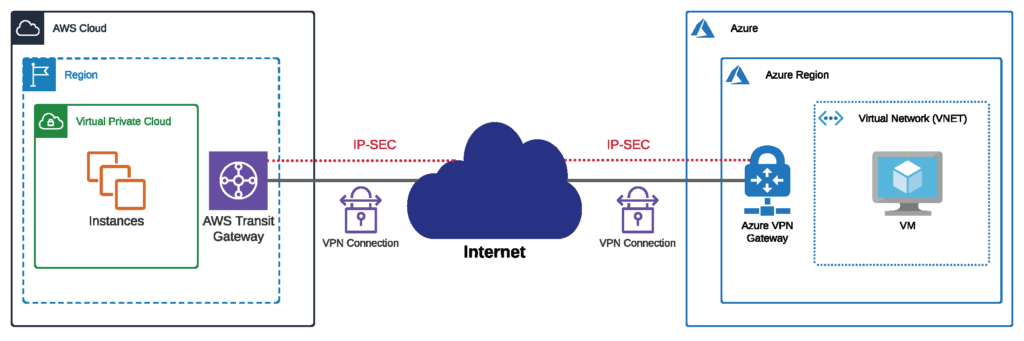
In this case, there are three ways to connect an AWS environment to a Microsoft Azure one, each with its pros and cons. One method, the VPN tunnel, is far and away the most common, but as you might have guessed if you read our blog regularly, we don’t think it’s the best one.
There are plenty of resources online about how you can set up a VPN tunnel over a public internet connection between AWS and Microsoft Azure. It’s a tried and true traditional method of connecting between clouds, but there are many disadvantages to connecting your cloud environments this way:
While using VPN tunnels can prove a more affordable and easy solution for businesses performing small, low-risk activities in the cloud, it’s not recommended for bandwidth-heavy workloads or businesses dealing with sensitive information that could be subject to compromise, particularly those in the financial services or government sector.
The second way you can connect your AWS and Azure environments is to build private lines to the two hyperscalers by buying dedicated circuits from your telco provider. These circuits will give you a private connection to the cloud providers with traffic that isn’t routed over the unpredictable, vulnerable public internet.
But there are also many disadvantages to this approach. Firstly, it’s more costly as it subjects you to long-term contracts. Your telco will likely lock you into 18-24 month contracts for your dedicated circuits, with 45-90 day installation windows. So if you’re looking to increase bandwidth capacity, it might take you months. If you’re looking to decrease bandwidth capacity, you’ll have to live with unused circuits because of those long-term contracts.
In the end, building private lines is likely the most costly option to connect between AWS and Microsoft Azure.
Latency is still an issue due to backhaul traffic. Even with private circuits to each cloud, you’ll still need to backhaul traffic to your data center or on-premises routing equipment. In other words, your data will still need to go out of AWS through your private connection back to your on-premises or colocation environment, only to shoot back through your other private connection to your Microsoft Azure environment, if you want the workloads in both environments to exchange data.
Consequently, latency will still be an issue even if your private circuits to AWS and Microsoft Azure will likely offer you more reliability than a VPN tunnel. Even with your own private connections to the hyperscalers, you’ll continue to need on-premises infrastructure or a significant colocation presence. And this, of course, means more capex to account for in your annual budget.
Benefits, however, of building private lines include strengthened security and more agile network performance in comparison to sending data over the public internet, and reduced management complexity for you.
While the most common way to connect workloads to different cloud environments is to use a VPN tunnel, a way that’s becoming increasingly common is to set up private connectivity with a virtual router like Megaport Cloud Router (MCR). These provide private connectivity and the security, reliability, and lower costs that come with not having to send data through the public internet. Plus, you won’t have to:
If you want to scale your bandwidth needs, you can do it in a few clicks with Megaport’s global, on-demand Network as a Service (NaaS), or you can even automate changes to your capacity needs through our API.
The MCR is set up in the physical location where the AWS and Microsoft Azure edges reside. In some cases, MCR and both cloud service providers are available on the same data center campus.
Let’s say you’re our customer again – that global retail brand. Your e-commerce store is hosted with AWS US-East (Northern Virginia) with applications in US-East with Azure. You want to route directly between the two clouds but also retain the ability to manage a primary and secondary peer back to your data center in the Washington DC area to manage your security policy.
MCR simplifies this traffic routing back to the data center for the security check; you’re able to maintain a single peer between your data center and the MCR. As additional cloud links are added, additional peers aren’t required at the data center because you can easily manage these peers on your MCRs.
Furthermore, the latency between the two cloud environments, privately connected via our virtual router, is just a three-to-four-millisecond round trip. This lowest-latency path between AWS and Azure, enabled by the MCR’s direct connection, means optimal application performance.
Using a virtual router like MCR is the best way to ensure smooth sailing when connecting multiple cloud workloads like those held in AWS and Azure. It’s private and protected, boosts performance (meaning fewer interruptions for not only you, but also your customers), and can cut costs by bringing your clouds and applications closer to you and each other.
Did you know that you can take it a step further and connect the cloud providers’ dedicated private connections, AWS’s Direct Connect and Azure’s ExpressRoute, to each other?
A dedicated connection is a private connection created by the CSP to connect a single business’s network to its cloud. Both Direct Connect and ExpressRoute enable customers to connect to their cloud workloads over a private connection not shared with any other providers or customers. This then provides a path for your business-critical data that does not route through the public internet. There are numerous benefits: security, cost savings, greater oversight and control, and stable performance.
AWS Direct Connect is the “shortest path to your AWS resources.” With Direct Connect, your network traffic remains on AWS’ global network and therefore never touches the public internet, reducing the chances of bottlenecking or latency. Azure ExpressRoute acts similarly and allows you to create private connections between Azure data centers and your own data centers or on-premises infrastructure.
Connecting via ExpressRoute can be useful for companies heavily relying on Microsoft’s cloud for services such as virtual compute, database service, or cloud storage, as is also the case with AWS cloud products.
Both Direct Connect and ExpressRoute allow you to transfer data into their cloud for free, but data coming out (egress) is charged by the gigabyte, with pricing depending on region and destination (see our ExpressRoute pricing explanation for more information). Connectivity speeds offered are also similar, ranging from 50Mbps to 100Gbps. Both cloud providers require layer 3 routing with eBGP for sharing route prefixes.
There are a handful of everyday use cases for connecting the two dedicated cloud connectivity paths. This means that a customer’s ExpressRoute can communicate directly to their Direct Connect path, rather than just connecting their entire AWS and Azure clouds. These include:
There are three recommended ways you can connect your Direct Connect and ExpressRoute workloads for better performance and compatibility:
Each of these connection methods can prove beneficial for your enterprise, depending on how you intend to design and take advantage of your multicloud network.
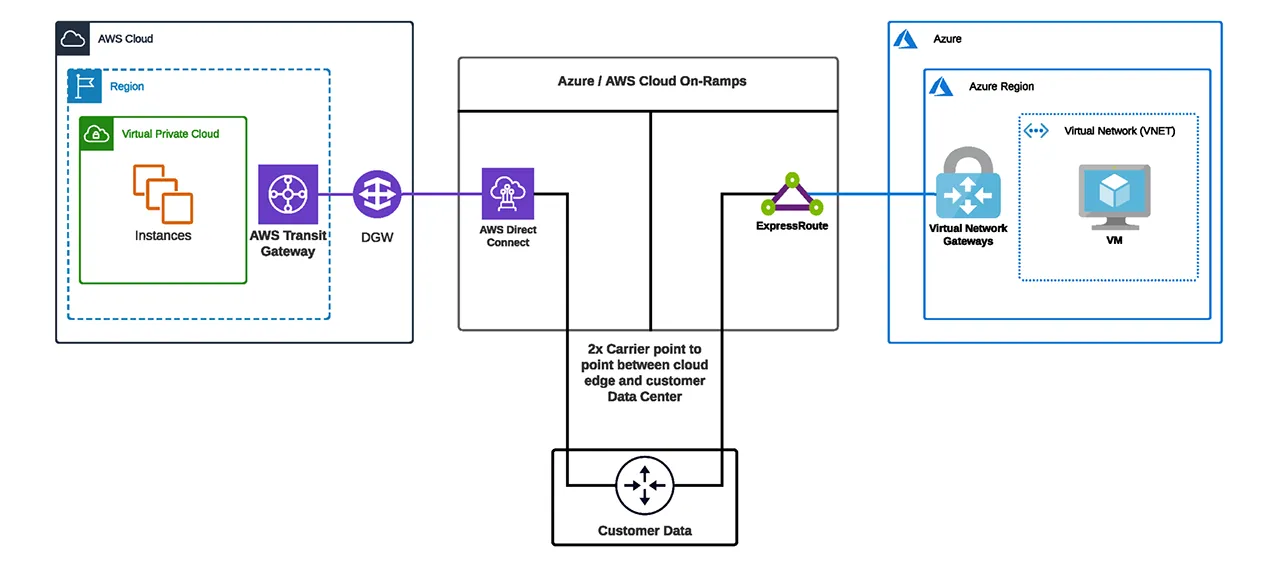
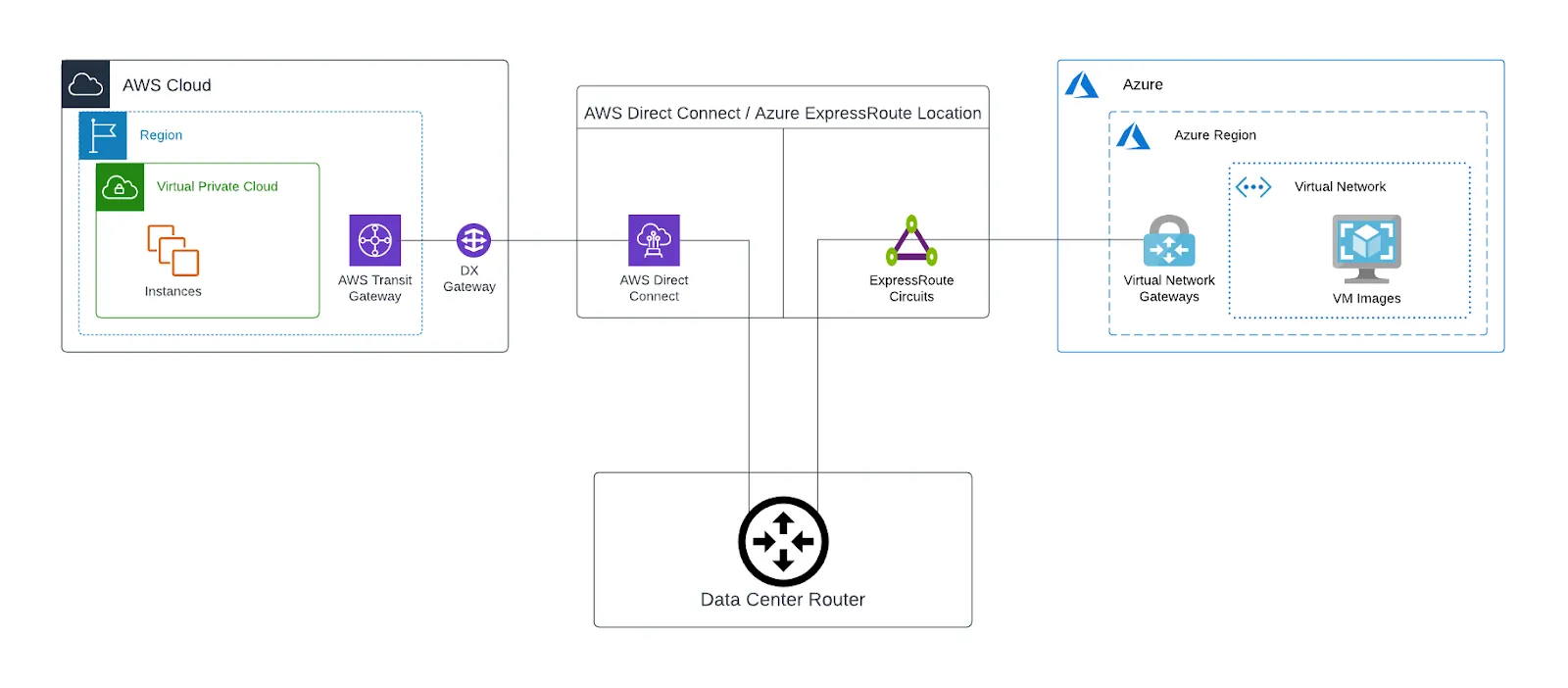
By utilizing one of your existing data centers and establishing two point-to-point circuits from a network service provider (one to AWS Direct Connect and the second to Azure ExpressRoute), you can effectively connect your two workloads. Establish a connection by terminating on a new or existing layer 3 endpoint and use your data center as the hybrid multicloud node between AWS and Azure.
The below diagram shows how this architecture would look. Once complete, you will have established a private data path between AWS and Azure through your data center. The Direct Connect and ExpressRoute locations shown will be chosen based on the cloud provider region and data center location (this is often the same location for both cloud providers, but it may also be different locations).
Once BGP is established between the data center router and each cloud provider edge, traffic can then pass between Azure and AWS.
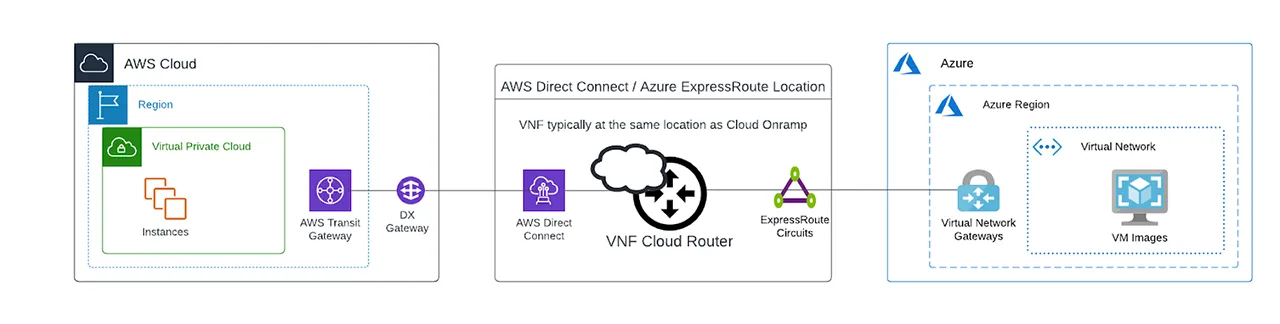
This virtual network device can become your Layer 3 endpoint to exchange traffic between AWS and Azure. Network as a Service (NaaS) providers like Megaport offer cloud-based solutions that allow you to easily connect your dedicated connections. While offerings vary by provider, you can typically order a pre-packaged solution that includes licensing and route functionality.
One thing to consider is whether the NaaS provider is also a Direct Connect and ExpressRoute partner. This will become important as you can then more seamlessly build these virtual cross connects (VXCs) from your VNF to the respective cloud providers. The VNF solution gives you the flexibility to either just deploy a simple router between the two CSPs, create a firewall to implement security policies, or to fully integrate with your SD-WAN solution already in place.
In the below diagram, the router instance is brought closer to the cloud in comparison to the data solution. The data path between Azure and AWS will typically traverse less physical distance. BGP will now terminate between cloud providers and the VNF instance establishing the data paths between the two clouds. Megaport offers two VNF solutions: Megaport Cloud Router (MCR), and Megaport Virtual Edge (MVE).
As some network carriers are also AWS and Azure partners, they can provide connectivity from their Private IP-VPN (Internet Protocol Virtual Private Network) solution. IP-VPNs use multiprotocol label switching (MPLS) technology to avoid connecting via public gateways.
This technology has similar benefits to other private solutions including bolstered security, high availability, and improved performance. If your current carrier already provides this type of service to you, it may be worth looking into to accomplish this connectivity need.
The below diagram shows how an IP-VPN network can be used to connect Direct Connect to Microsoft ExpressRoute. With this architecture, the traffic between the two cloud providers will now traverse through your IP-VPN Provider Edge (PE) Router. Unlike the prior solutions discussed, this device is not physically or virtually managed by you.
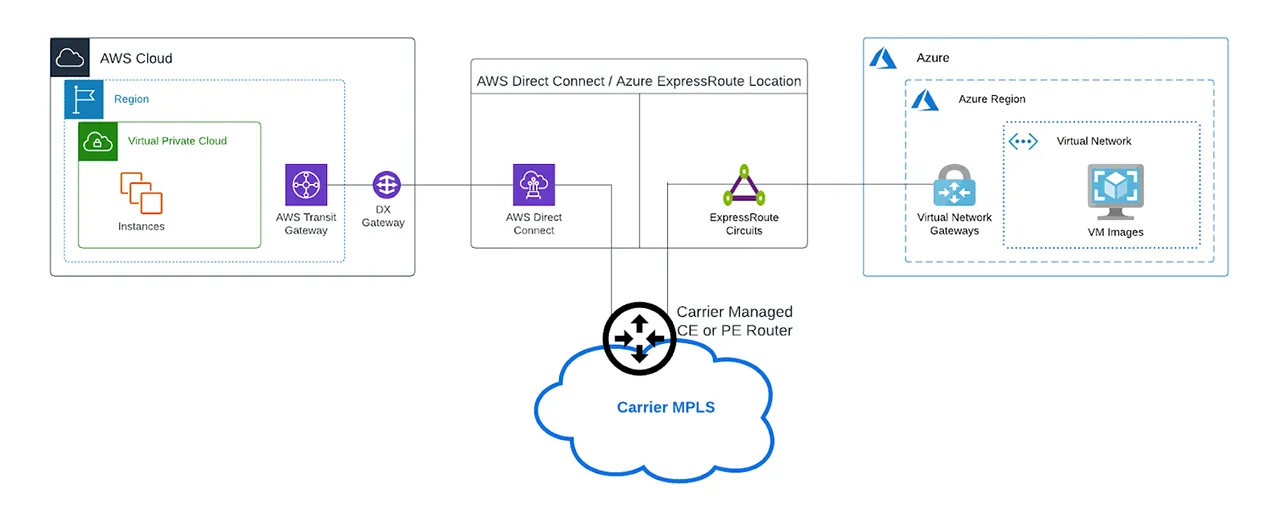
The most suitable AWS to Azure connection method for your business will depend on several factors, from your budget, to the type of applications involved, to network performance, speed, and bandwidth requirements. Using your data center as the hybrid or multicloud network node can be beneficial to enterprises that have an existing data center and want to more seamlessly connect their workloads. This solution also provides greater oversight and visibility over data migration.
Virtual Network Function (VNF), on the other hand, works best for networks wanting a quick connection solution, as you can deploy the virtual network devices using your NaaS provider’s portal interface or API within minutes. And as it’s placed closer to the workload’s cloud region, you can enjoy higher network performance.
With Megaport, interconnecting your clouds for cloud-to-cloud has never been easier. Megaport Cloud Router’s virtual network function capabilities allow you to connect at Layer 3 in an instant, taking the complexity out of setup.
There’s no need to learn the ins and outs of network engineering: Simply log in to your Megaport account and start building your virtual network in a few clicks. MCR supports multicloud and allows you to privately peer between leading cloud providers such as AWS and Azure.
Megaport Virtual Edge (MVE) allows you to spin up new connections between your clouds, without having to deploy hardware. If your enterprise wishes to leverage existing MPLSs, the carrier-managed MPLS option can be beneficial for connectivity that requires less management by your enterprise, leaving it to the experts.
This all adds up to simplified, supercharged cloud-to-cloud connectivity, where your suite of applications and their workloads can live and run across your suite of clouds, whether it’s AWS and Azure or any number and combination of the 365+ service providers we support. No matter your unique needs, Megaport has scalable and flexible solutions ready to help.
Did we mention that this private cloud-to-cloud architecture can be deployed before you finish a cup of coffee?
此内容由惯性聚合(RSS阅读器)自动聚合整理,仅供阅读参考。 原文来自 — 版权归原作者所有。