












By David Sloan, Solutions Architect
Find out how to reduce your latency and get better network performance from the leading cloud service provider.
In the modern business world, AWS is everywhere. According to HG Insights, the leading hyperscaler has over 50% market share, with 2.38 million businesses worldwide using AWS cloud services in 2024.
One of the top questions we hear AWS users ask is how they can make their AWS connection faster. This is hardly surprising; with an increasing need for businesses to support distributed workforces and incorporate AI, high-performing cloud networks are becoming more difficult to achieve. Thankfully for AWS users, there are a number of tools you can use to improve your AWS network.
With a redundant network comprising a huge number of connectivity points, architecting your AWS connections for super-low latency isn’t only possible, it’s encouraged. Here’s our guide to fixing poor AWS network latency, including a list of AWS tools and features to help you achieve your fastest network yet.
Want to reduce your AWS costs too? Check out our handy guide.
When data moves from point A to point B, the journey it takes is complex. Point A has to make a request; point B has to respond. Encryption tools, firewalls, and any number of other security tools may be at play to protect the data on its travels. And different network paths and routers have to carry the data packets to their destination.
This means there could be a number of factors impacting your AWS network performance:
If you want to learn more about how latency is measured, AWS goes into more detail in this blog.
If you’ve already audited these factors and want to further optimize your network performance, AWS also has some great tools that can streamline your traffic and supercharge your network speeds.
With Global Accelerator, AWS promises up to a massive 60 percent improvement in the performance of your network traffic and applications. Thanks to its ability to offer such consistent throughput, this tool is especially useful if your business offers applications in gaming, media, mobile, or finance.
AWS Global Accelerator works by provisioning global static public IPs, which provide you with constantly available entry points. You can then add or remove any other AWS application endpoints, from Application Load Balancers to EC2 instances, on the back end of these IPs.
With this setup, AWS Global Accelerator can route your traffic to your closest AWS edge location, then route it to your closest regional endpoint using the AWS global network.
Improving your AWS network availability and opening up your routing options is how Global Accelerator delivers latency, throughput, and jitter reductions of up to 60 percent. However, it’s worth noting that this reduction is in the context of the connections Global Accelerator serves, which are usually public and internet-based.
If you go one step further and use private connectivity, you’ll unlock plenty of other possibilities for improving your AWS connection speed.
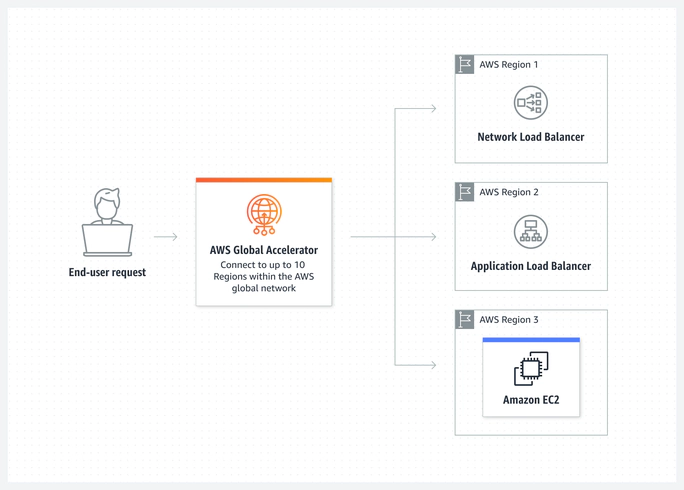
Source: AWS
AWS Direct Connect offers an alternative to using the public internet to connect to AWS, instead providing a private network connection between your on-prem networks and any AWS service you need to access.
Along with reduced costs and better security, Direct Connect improves the reliability of your AWS connections for consistently low latency, with the availability of dedicated connections up to 400 Gbps.
There are two types of Direct Connect connections:
To get started with Direct Connect, you’ll need to connect via a location (often referred to as an on-ramp), which is the secure midpoint between you and your AWS services. AWS recommends you use more than one location for better availability.
Learn more about connecting to AWS using Direct Connect locations.
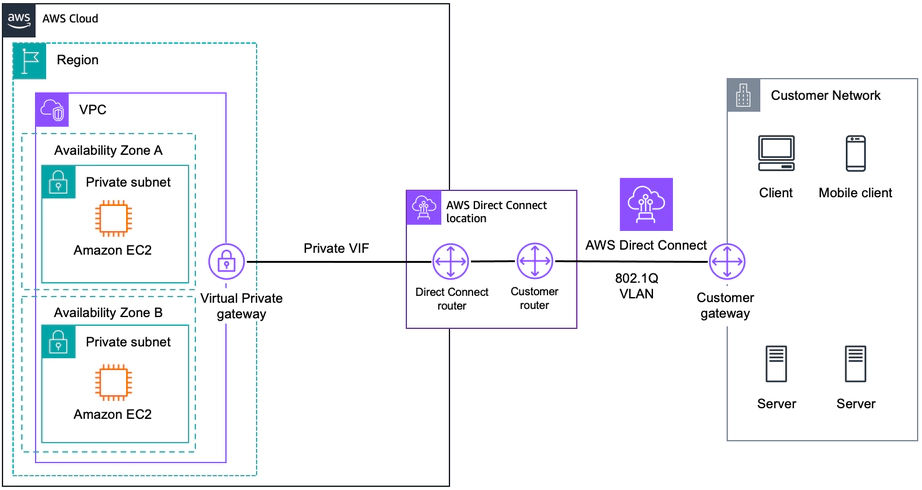
Source: AWS
Is website or content delivery a core component of your business operations? Amazon CloudFront is a low-latency Content Delivery Network that reduces website and application delivery time, including for dynamic, static, streaming, and interactive content.
Amazon CloudFront uses cache control headers to discern static and dynamic content and cache this content close to your end users, leveraging over 600 global Points of Presence (PoPs) for super-fast data delivery. Over 600 embedded PoPs are also available, which are deployed in the last mile of ISP networks to enable highly scaled capacity in peak traffic events.
Helping you optimize performance across an entire website or application, Amazon CloudFront also easily integrates with other AWS services and offers a pay-as-you-go setup to simplify adoption.
To get started using Amazon CloudFront, you’ll want to store the definitive versions of your files in “origin” servers, like an Amazon S3 bucket or Amazon EC2 instance, then register your origin servers with Amazon CloudFront using their API to receive a CloudFront.net domain name you can use for distributing your content from your servers.
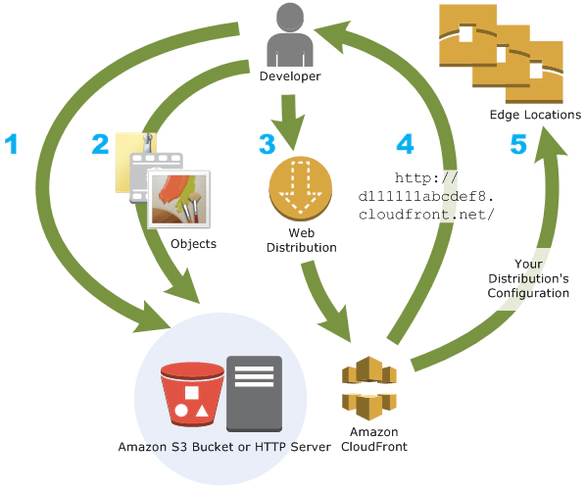
Source: AWS
Local Zones, in the words of AWS, “are a type of infrastructure deployment that places compute, storage, database, and other select AWS services close to a large population and industry centers. You can deliver innovative applications requiring low latency closer to end users and on-premises installations.”
Essentially, a Local Zone extends an AWS region to your end users and workloads for faster AWS connectivity. Local Zones also support AWS Direct Connect. Using a Local Zone removes the need for you to host new AWS-managed equipment, including via AWS Outposts, for your ultra-low-latency applications.
To use a Local Zone, you’ll need to enable it via the Amazon EC2 console or a command line interface. Then, create a subnet in the Local Zone to launch resources in the Local Zone subnet.
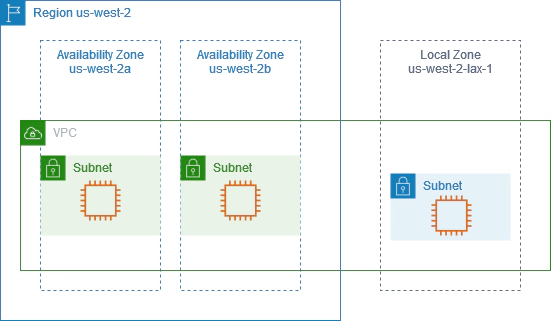
Source: AWS
With the right connectivity method, these AWS tools will have a far greater impact on your network latency.
Using the public internet leaves your network at the mercy of traffic fluctuations which can severely impact speed and performance. Meanwhile, traditional telco providers can be a problematic alternative, forcing customers to lock into contracts where bandwidth can’t be scaled up to support peak demand periods. The result is slow, unreliable network performance regardless of which cloud provider tools you use.
Using a flexible private connectivity method like Network as a Service (NaaS) bypasses the public internet, switching you to a private network path you can deploy on-demand on the provider’s network.
Most providers offer features that won’t just improve your AWS latency, but will transform your entire network. For example, when you provision connectivity with Megaport, you’ll benefit from:
Find out more about how NaaS works with our exclusive webinar.
Use one, or use them all; with AWS, you can leverage any combination of these tools to reduce your network latency. When underpinned by elastic private connectivity, you’ll benefit from a faster network from end to end for a more productive business – and a more profitable bottom line.
此内容由惯性聚合(RSS阅读器)自动聚合整理,仅供阅读参考。 原文来自 — 版权归原作者所有。