

惯性聚合 高效追踪和阅读你感兴趣的博客、新闻、科技资讯
阅读原文 在惯性聚合中打开

推荐订阅源

酷 壳 – CoolShell
酷 壳 – CoolShell
H
Hacker News: Front Page
P
Palo Alto Networks Blog
T
ThreatConnect
Apple Machine Learning Research
博客园_首页
T
True Tiger Recordings
P
Privacy & Cybersecurity Law Blog
B
Blog
IT之家
IT之家
Last Week in AI
Last Week in AI
F
Full Disclosure
Hacker News: Ask HN
Hacker News: Ask HN
C
Comments on: Blog
Microsoft Azure Blog
C
Cybersecurity and Infrastructure Security Agency CISA
Microsoft Security Blog
博客园 - 【当耐特】
N
News and Events Feed by Topic
NISL@THU
NISL@THU
腾讯CDC
雷峰网
雷峰网
Security Latest
Security Latest
李成银的技术随笔
M
Microsoft Research Blog - Microsoft Research
L
LangChain Blog
L
Lohrmann on Cybersecurity
cs.CL updates on arXiv.org
C
Check Point Blog
Y
Y Combinator Blog
Recent Announcements
博客园 - Franky
N
News | PayPal Newsroom
V
V2EX
A
About on SuperTechFans
The Register - Security
月光博客
月光博客
奇客Solidot–传递最新科技情报
奇客Solidot–传递最新科技情报
Google Online Security Blog
MyScale Blog
MyScale Blog
Cisco Talos Blog
Cisco Talos Blog
Vercel News
Vercel News
WordPress大学
WordPress大学
C
Cyber Attacks, Cyber Crime and Cyber Security
The Hacker News
The Hacker News
IntelliJ IDEA : IntelliJ IDEA – the Leading IDE for Professional Development in Java and Kotlin | The JetBrains Blog
爱范儿
爱范儿
A
Arctic Wolf
L
LINUX DO - 最新话题
freeCodeCamp Programming Tutorials: Python, JavaScript, Git & More

Megaport Blog

Early Warning Signs Your Network Needs a Refresh Introducing Megaport DDoS Protection A Guide to 400G Connectivity A Guide to NAT Gateway A Guide to Cloud Storage How the Data Center Is Evolving in 2026 What to Expect When Attending Your First Network Operator Group (NOG) Nine Ways to Connect to Cloud Using Private Connectivity Migrate Your On-premises to the Cloud: A Step-by-Step Guide How to Lower Your Egress Fees in 2026 How to Achieve Data Sovereignty in Europe Redefining the Edge with Cisco and Megaport How to Reduce Latency in Your Multicloud Environment Introducing Megaport High-Speed Cross-Cloud Encryption Are Businesses Leaving the Cloud? Using Meraki and Megaport Virtual Edge for Multicloud Networking Equinix Metal® is Going Away: Here’s What You Can Do Introducing Megaport On-ramp as a Service Megaport’s Full Solution Portfolio Is Coming to India New Bare-metal GPU Instance Now Available with NVIDIA RTX Pro 6000 A Look Back at 2025: Megaport's Biggest Updates Megaport Expands Into India With Extreme IX Your 2026 Predictions From AWS re:Invent 2025 Top NaaS Trends for 2026 What is IPsec? When to Move From Public Internet to Private Connectivity Megaport and Latitude.sh: Bringing Compute and Connectivity Together Improve Your Microsoft ExpressRoute Resilience with Megaport Comparing Ways to Connect to AWS What is API-First Networking? The Hidden Cost of Running Cloud-Hosted SD-WAN for IaaS Overcoming NaaS Integration Challenges Introducing SCION with Anapaya and Megaport How to Use Network as a Service to Future-Proof Your Network Introducing 400G Ports All the As-a-services, Compared Introducing Megaport IPsec Tunnels High Score: Megaport Hits 1,000 Locations A Guide to Colocation Data Centers Maximizing Peering Through Flow Analysis Build Resilient Networks for AI Production Workloads Introducing Packet Filtering on Megaport Cloud Router Building Resilient Government IT: Strategies for Secure, Compliant, and Scalable Connectivity Future-Proofing Government IT Telstra Programmable Network Is Being Discontinued. Here’s How to Migrate The Future of WAN Design Depends on Network as a Service (NaaS) Cisco Webex Edge Connect Launches on Megaport Voice and Video Exchange How to Prepare for APRA CPS 230 Comparing the SD-WAN Licensing Needs of Major Vendors A Guide to Improving Network Performance How Latitude.sh, Wasabi, and Megaport Unlock Cost-Effective Multicloud Four Ways to Connect Your Clouds SD-WAN and MPLS: Weighing the Similarities, Differences, and Benefits A Guide to Network as a Service (NaaS) How to Arrange Bilateral Peering Sessions Comparing Major SD-WAN Vendors Software Defined Networking in Healthcare Deploying A Global Network in Minutes With Megaport AWS Direct Connect Gateway (DGW) Data Transfer Outbound Rules Bilateral and Multilateral Peering: What’s the Difference? Multi-Region SD-WAN: Why Megaport SDCI is the Right Choice Microsoft Azure is Going Secure by Default. Are You Ready? How Megaport and Vultr Are Solving the Enterprise AI Challenge Introducing Megaport NAT Gateway A Guide to AWS Security Tools How to Deploy Amazon Bedrock Using AWS Direct Connect and Megaport Azure Private Link, Explained Introducing 100G MCRs Simplifying Hybrid and Multicloud Network Connectivity How to Fix Poor AWS Latency A Look Back at 2024: Megaport’s Biggest Updates Your 2025 Predictions From AWS re:Invent 2024 Six Ways to Get a More Resilient Network in 2025 Multicloud Security: Challenges and Solutions The Real Cost of High Network Latency Why Brazil is Your Key to Unlocking Business Growth in Latin America Why You Need Integrated Network Security Six Key Differences Between Major Cloud Providers How to Automate Your Megaport Infrastructure With APIs Why Italy is Europe’s Next Cloud Expansion Hotspot How to Lower Your Cloud Costs Peering: How Local Is Local? Introducing Megaport AI Exchange Two Scenarios for Hybrid Multicloud Deployment With IBM Cloud and Microsoft Azure How to Connect Equinix and Digital Realty Megaport Enables Microsoft Azure ExpressRoute Metro for More Resilient Network Connectivity Executives, Here’s What Your Network Team Wants You to Know Easy Ways to Interconnect Your Network The Role of the Data Center in Your Network 100G VXC Expansion: Now Available From 597 Data Centers Worldwide Top 10 How-To Guides To Improve Your Network Comparing Encryption in Transit Options Comparing Generative AI Offerings From Major Cloud Providers A Sustainable Business Strategy Starts With Your Network Solutions to Common API Issues With Megaport Transforming Financial Connectivity: Introducing Megaport Financial Services Exchange (FSX) Megaport Enhancing Connectivity in Adelaide Megaport’s Latest Portal Features and Functionalities Automate Your Network Deployments With The New Megaport Terraform Provider A Recap of the Megaport World Tour 2024
How to Load Balance Traffic Across Multiple VXCs
2019-07-22 · via Megaport Blog

For those wanting to maximise the use of multiple network connections for redundancy and optimised performance.

Load balancing traffic across your network connections allows you to maximise the use of multiple network paths when routing to the same destination networks. This strategy allows for increased throughput and redundancy. We’ll talk you through the process of setting up load balancing using a Megaport-connected network architecture.

When there are multiple paths available to reach the same network, BGP uses a best path selection process to choose the optimum path based on a range of criteria, mark the chosen path as ‘active’, and install the next hop in the forwarding table. This results in traffic to a given destination flowing only over one connection despite having ‘active/active’ BGP sessions. The desired behavior of spreading traffic across both BGP sessions is called Equal Cost Multi-Path (ECMP).

Take the scenario below into account: we have a router connected to Megaport in the Tierpoint Chicago data centre in Franklin Park, Illinois. We have two VXCs connected to AWS at diverse edge nodes for redundancy. Both VXCs are connected to the same Direct Connect Gateway (DGW) to access our VPC in US-East-2.
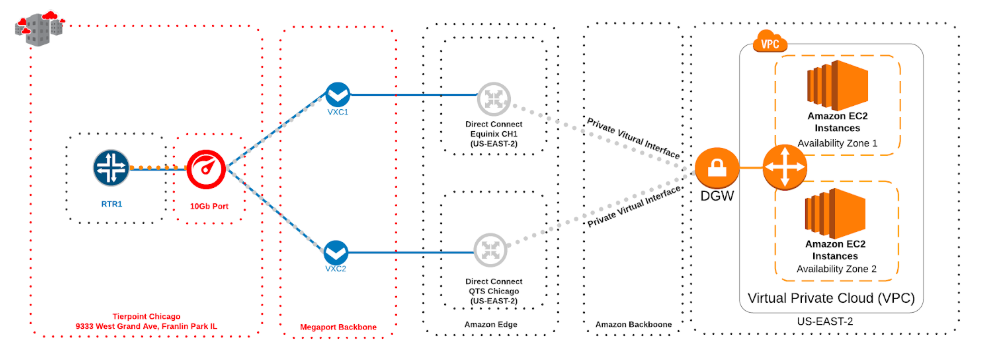
In this scenario, we’re going to step through configuring this on a Juniper MX router running Junos 18.3R1.9. Similar capabilities are also available from Cisco, Arista, Palo Alto, and others. Each networking vendor has slight nuances in how they handle best path selection, as well as configure multipath to install multiple entries in the forwarding table for a given network. Before starting the process yourself, make sure you reference the vendor documentation for your particular router.

When we look at just the BGP relationship between the various components, we can simplify the topology.
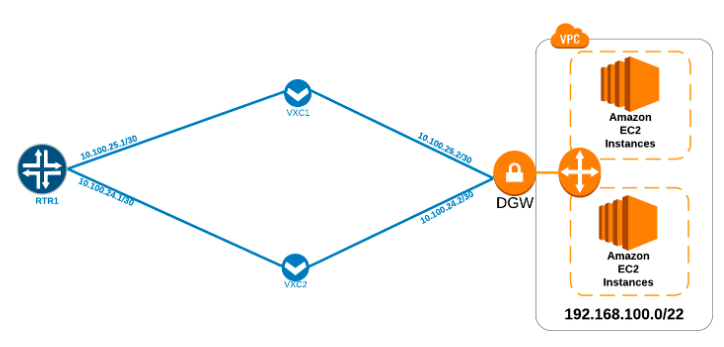
We have RTR1 with two VXCs. The first VXC has an IP address of 10.100.25.1/30 with its BGP peer, AWS, as 10.100.25.2. The second VXC has an IP address of 10.100.24.1/30 and its BGP peer as 10.100.24.2. The VPC is advertising the same prefix of 192.168.100.0/22 over both BGP sessions.

When we look at the route table of the RTR1, we’re learning the route for 192.168.100.0/22 from two different BGP peers, 10.100.25.2 and 10.100.24.2.
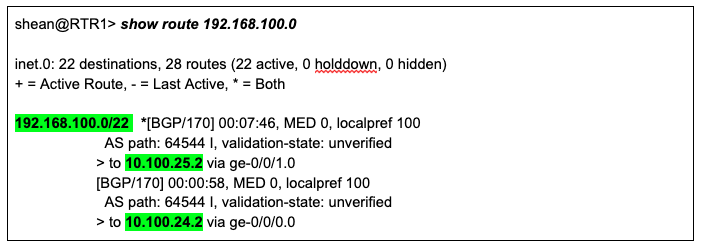
However, the BGP best path selection process chooses only one of these as the best path, marking the route ‘active’ and putting it in the forwarding table. If we take another look at the output of show route 192.168.100.0, we see that the route being learned from 10.100.25.2 is marked as ‘active’.
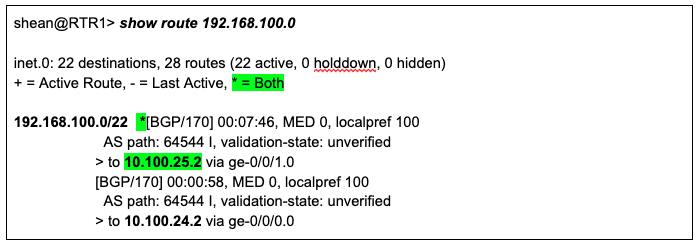
We can then verify this by looking in the forwarding table of the router to see exactly where packets destined for 192.168.100.0/22 are being sent.
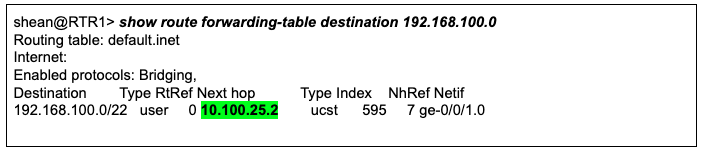
Here we verify that the router is sending all packets destined for 192.168.100.0/22 across VXC1 only without load balancing across both VXCs. We’re going to use both VXCs by leveraging BGP multipath. If you aren’t familiar with BGP multipath, we encourage you to read Juniper’s docs for a more in-depth understanding prior to implementation: Understanding BGP Multipath

The first step is to configure a load balancing policy which will then be applied to the router. We’re going to call this policy ecmp; you can name it anything you like.

With Juniper, the syntax can be a little counterintuitive as the configuration is titled ‘load-balance per-packet’ however, the functionality is similar to other vendors’ per-flow load balancing based on source and destination IP address. We have configured the policy to load balance across both paths for any networks being received. Refer to Juniper’s documentation for applying a policy that targets more specific networks.

The next step will be to apply the policy to the router. This is done under the ‘routing options’ stanza.

Now that we have the load balancing policy applied, we need to enable multipath for BGP. There are a few ways in which this can be done, the first is to apply the configuration at the protocol hierarchy which would be applicable to all BGP peers on the router. The second is to specifically target a BGP group or neighbor. We’re going to configure multipath on our BGP group connecting us to AWS at AS64544.

First, we look at the existing BGP configuration:
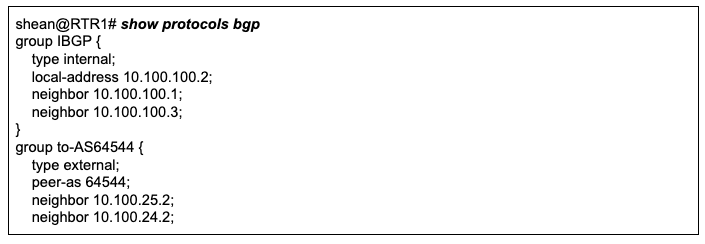
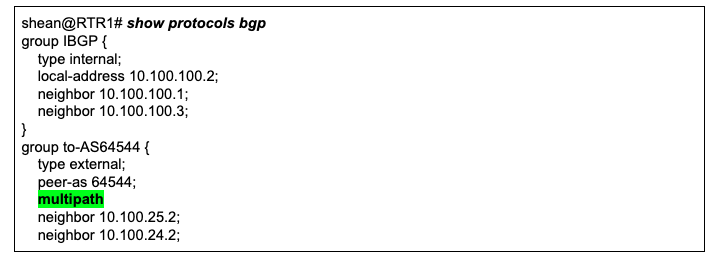
Now, we’ll configure multipath under the BGP group to-AS64544

Now that we have added the configuration, we see the keyword ‘multipath’
.
Once we have performed a commit on the configuration, we can check the forwarding table again. 
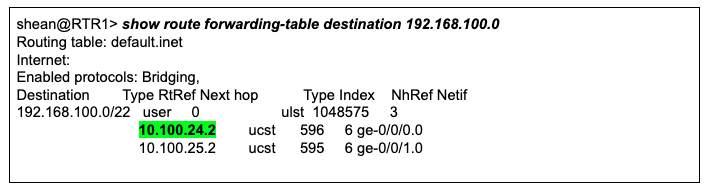
The router is now forwarding packets destined to the VPC in AWS across both VXCs. We’ve successfully enabled BGP multipath. Microsoft Azure and Google Cloud also both support ECMP by default. In addition, if you want the router to take TCP ports in to account for a more granular ECMP algorithm, you can do that too. Please reference the section on ‘hash-key’ on Juniper’s Per Packet Load Balancing configuration guide.

Cisco has a great explanation of the BGP best path selection process available:  [https://www.cisco.com/c/en/us/support/docs/ip/border-gateway-protocol-bgp/13753-25.html

](https://www.cisco.com/c/en/us/support/docs/ip/border-gateway-protocol-bgp/13753-25.html)If you need to understand how to implement BGP multipath on a Cisco router, this is done via the maximum-paths command. You can search maximum-paths in their configuration guide or get a more in-depth look here.

If you’d like to know more about load balancing on a Megaport-connected network architecture, feel free to reach out to our team.