



惯性聚合 高效追踪和阅读你感兴趣的博客、新闻、科技资讯
阅读原文 在惯性聚合中打开

推荐订阅源

酷 壳 – CoolShell
酷 壳 – CoolShell
H
Hacker News: Front Page
P
Palo Alto Networks Blog
T
ThreatConnect
Apple Machine Learning Research
博客园_首页
T
True Tiger Recordings
P
Privacy & Cybersecurity Law Blog
B
Blog
IT之家
IT之家
Last Week in AI
Last Week in AI
F
Full Disclosure
Hacker News: Ask HN
Hacker News: Ask HN
C
Comments on: Blog
Microsoft Azure Blog
C
Cybersecurity and Infrastructure Security Agency CISA
Microsoft Security Blog
博客园 - 【当耐特】
N
News and Events Feed by Topic
NISL@THU
NISL@THU
腾讯CDC
雷峰网
雷峰网
Security Latest
Security Latest
李成银的技术随笔
M
Microsoft Research Blog - Microsoft Research
L
LangChain Blog
L
Lohrmann on Cybersecurity
cs.CL updates on arXiv.org
C
Check Point Blog
Y
Y Combinator Blog
Recent Announcements
博客园 - Franky
N
News | PayPal Newsroom
V
V2EX
A
About on SuperTechFans
The Register - Security
月光博客
月光博客
奇客Solidot–传递最新科技情报
奇客Solidot–传递最新科技情报
Google Online Security Blog
MyScale Blog
MyScale Blog
Cisco Talos Blog
Cisco Talos Blog
Vercel News
Vercel News
WordPress大学
WordPress大学
C
Cyber Attacks, Cyber Crime and Cyber Security
The Hacker News
The Hacker News
IntelliJ IDEA : IntelliJ IDEA – the Leading IDE for Professional Development in Java and Kotlin | The JetBrains Blog
爱范儿
爱范儿
A
Arctic Wolf
L
LINUX DO - 最新话题
freeCodeCamp Programming Tutorials: Python, JavaScript, Git & More

Megaport Blog

Early Warning Signs Your Network Needs a Refresh Introducing Megaport DDoS Protection A Guide to 400G Connectivity A Guide to NAT Gateway A Guide to Cloud Storage How the Data Center Is Evolving in 2026 What to Expect When Attending Your First Network Operator Group (NOG) Nine Ways to Connect to Cloud Using Private Connectivity Migrate Your On-premises to the Cloud: A Step-by-Step Guide How to Lower Your Egress Fees in 2026 How to Achieve Data Sovereignty in Europe Redefining the Edge with Cisco and Megaport How to Reduce Latency in Your Multicloud Environment Introducing Megaport High-Speed Cross-Cloud Encryption Are Businesses Leaving the Cloud? Using Meraki and Megaport Virtual Edge for Multicloud Networking Equinix Metal® is Going Away: Here’s What You Can Do Introducing Megaport On-ramp as a Service Megaport’s Full Solution Portfolio Is Coming to India New Bare-metal GPU Instance Now Available with NVIDIA RTX Pro 6000 A Look Back at 2025: Megaport's Biggest Updates Megaport Expands Into India With Extreme IX Your 2026 Predictions From AWS re:Invent 2025 Top NaaS Trends for 2026 What is IPsec? When to Move From Public Internet to Private Connectivity Megaport and Latitude.sh: Bringing Compute and Connectivity Together Improve Your Microsoft ExpressRoute Resilience with Megaport Comparing Ways to Connect to AWS What is API-First Networking? The Hidden Cost of Running Cloud-Hosted SD-WAN for IaaS Overcoming NaaS Integration Challenges Introducing SCION with Anapaya and Megaport How to Use Network as a Service to Future-Proof Your Network Introducing 400G Ports All the As-a-services, Compared Introducing Megaport IPsec Tunnels High Score: Megaport Hits 1,000 Locations A Guide to Colocation Data Centers Maximizing Peering Through Flow Analysis Build Resilient Networks for AI Production Workloads Introducing Packet Filtering on Megaport Cloud Router Building Resilient Government IT: Strategies for Secure, Compliant, and Scalable Connectivity Future-Proofing Government IT Telstra Programmable Network Is Being Discontinued. Here’s How to Migrate The Future of WAN Design Depends on Network as a Service (NaaS) Cisco Webex Edge Connect Launches on Megaport Voice and Video Exchange How to Prepare for APRA CPS 230 Comparing the SD-WAN Licensing Needs of Major Vendors A Guide to Improving Network Performance How Latitude.sh, Wasabi, and Megaport Unlock Cost-Effective Multicloud Four Ways to Connect Your Clouds SD-WAN and MPLS: Weighing the Similarities, Differences, and Benefits A Guide to Network as a Service (NaaS) How to Arrange Bilateral Peering Sessions Comparing Major SD-WAN Vendors Software Defined Networking in Healthcare Deploying A Global Network in Minutes With Megaport AWS Direct Connect Gateway (DGW) Data Transfer Outbound Rules Bilateral and Multilateral Peering: What’s the Difference? Multi-Region SD-WAN: Why Megaport SDCI is the Right Choice Microsoft Azure is Going Secure by Default. Are You Ready? How Megaport and Vultr Are Solving the Enterprise AI Challenge Introducing Megaport NAT Gateway A Guide to AWS Security Tools How to Deploy Amazon Bedrock Using AWS Direct Connect and Megaport Azure Private Link, Explained Introducing 100G MCRs Simplifying Hybrid and Multicloud Network Connectivity How to Fix Poor AWS Latency A Look Back at 2024: Megaport’s Biggest Updates Your 2025 Predictions From AWS re:Invent 2024 Six Ways to Get a More Resilient Network in 2025 Multicloud Security: Challenges and Solutions The Real Cost of High Network Latency Why Brazil is Your Key to Unlocking Business Growth in Latin America Why You Need Integrated Network Security Six Key Differences Between Major Cloud Providers How to Automate Your Megaport Infrastructure With APIs Why Italy is Europe’s Next Cloud Expansion Hotspot How to Lower Your Cloud Costs Peering: How Local Is Local? Introducing Megaport AI Exchange Two Scenarios for Hybrid Multicloud Deployment With IBM Cloud and Microsoft Azure How to Connect Equinix and Digital Realty Megaport Enables Microsoft Azure ExpressRoute Metro for More Resilient Network Connectivity Executives, Here’s What Your Network Team Wants You to Know Easy Ways to Interconnect Your Network The Role of the Data Center in Your Network 100G VXC Expansion: Now Available From 597 Data Centers Worldwide Top 10 How-To Guides To Improve Your Network Comparing Encryption in Transit Options Comparing Generative AI Offerings From Major Cloud Providers A Sustainable Business Strategy Starts With Your Network Solutions to Common API Issues With Megaport Transforming Financial Connectivity: Introducing Megaport Financial Services Exchange (FSX) Megaport Enhancing Connectivity in Adelaide Megaport’s Latest Portal Features and Functionalities Automate Your Network Deployments With The New Megaport Terraform Provider A Recap of the Megaport World Tour 2024
Automate Your Multicloud with the Megaport Terraform Provider
2021-04-19 · via Megaport Blog

With Megaport’s Terraform Provider, you can now easily automate the provisioning and management of your Megaport resources, lowering deployment costs and reducing provisioning time by using Infrastructure as Code (IaC).

Many organizations on the cloud infrastructure journey quickly discover the need for tools to automate resources they create and manage. These tools make it easy to record the state of systems, maintain audit trails, and rapidly create consistent environments for testing or deployment purposes.

Amongst those tools, Terraform stands out. It’s highly successful in the multi-vendor cloud automation space. Its parent company, Hashicorp, has a solid reputation for delivering quality solutions and is often preferred over vendors’ own automation tools, which are an afterthought for most cloud services.

Megaport is proud to have its own Terraform module. You can use it right now to manage Megaport resources in the same way you manage compute and storage from the big cloud players.

If you’re not using Terraform yet, but are considering automating your cloud infrastructure, we recommend it. The IaC tool is widely adopted, easy to use, and has a great community for professional support. It has support for hundreds of popular service providers. And best of all, it’s free and open source.

Get a quick run-through of Megaport’s Terraform Provider.

What can you do with Megaport’s Terraform Provider?

Megaport has an independent global network with PoPs in nearly 400 physical locations. This includes on-ramps to all the major cloud brands and many other service providers. Connections between these providers and locations can be created in minutes, and with no lock-in, you can modify them to suit your demands. Megaport Cloud Router can be configured to create advanced network topologies, such as hybrid cloud solutions that connect multiple, distinct virtual networks together. Connecting AWS to Azure would be an example of this topology.

The Megaport Terraform Provider supports the resources required to configure these networks. And to make it even easier, Megaport has published example Terraform templates that create everything from simple data center connections right up to a hybrid cloud with AWS, Google, and Microsoft Azure networks all connected together.

How it works

Under the hood of the Megaport Terraform Provider, the cloud automation tool uses the same API that the Megaport Portal uses. The Megaport API documentation is available for clients who wish to customize Terraform or write their own bespoke integration.

Megaport publishes the code for our Terraform Provider on GitHub, and clients can interact with our DevOps team to report bugs or push their own code improvements for inclusion in the IaC tool.

To communicate with the Megaport API, the provider uses a library written in Go. This abstract’s functionality is customized for Megaport based on the standard Terraform behaviors and makes working on changes easier. The megaportgo library is also on GitHub.

The provider sits outside of the Megaport network and is not part of the paid Megaport product, so we strongly recommend referring to the documentation for support. We also have our short video demonstrating the tool in use.
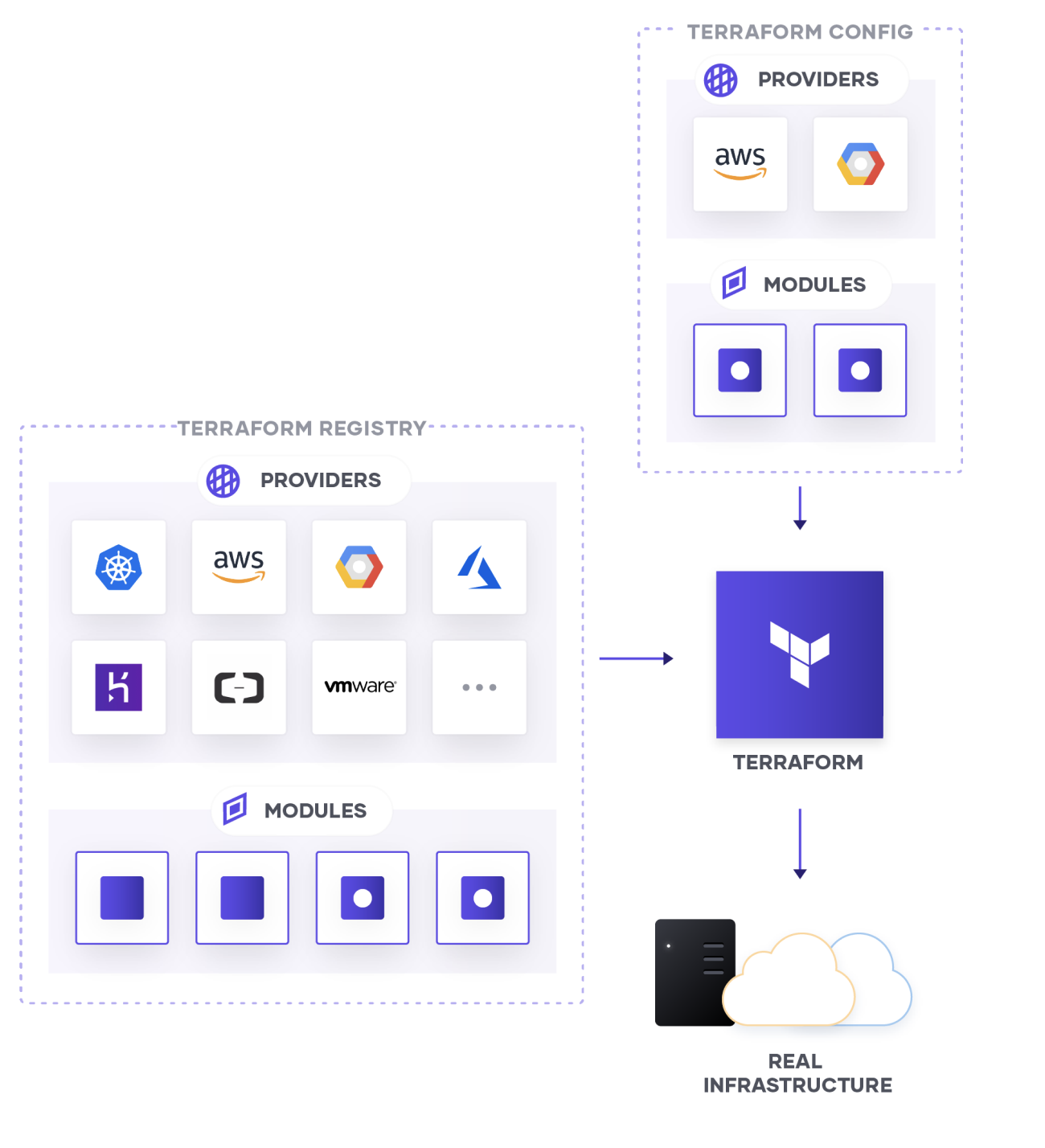
Megaport and Terraform capabilities

Our Terraform Provider gives you the ability to manage your multicloud infrastructure including Megaport Ports, VXCs, and MCRs.

Getting started with Terraform

Whether you’re using Megaport by itself or with other cloud service providers, Terraform is easy to use. The official website has simple instructions for installing Terraform on your operating system of choice, and there are many tutorials and examples online.

There are only a few basic concepts for new users. The first is that you detail the desired infrastructure in a text file. The format of these is Terraform-specific and looks similar to JSON. The online documentation is clear with specific modules for each cloud provider. Once you get started, you’ll see the naming conventions closely align with the terms you would normally expect to use.

This short example shows the Terraform code you need in order to look up a Megaport location and provision a single network port there:

data megaport_location ndc_b1 {
name = NextDC B1
has_mcr = false
}

resource megaport_port tf_test {
port_name = Test Port
port_speed = 10000
location_id = data.megaport_location.ndc_b1.id
}

If you’ve used Megaport before, these fields will look familiar to you. The location represents a Megaport Enabled Location, which can be in one of hundreds of points of presence worldwide with many different data centre providers.

The other fields are “name” (the user can enter anything here that makes sense to them), and “port speed” in Mbps.

Once you have your file, Terraform can do the rest. As well as creating resources that match your specifications, it can check for differences between the file and the deployed resources, and if you approve, it will safely remove these differences.

Using Terraform

Once Terraform is up and running, it works from the command line of your operating system, giving advanced users the ability to include it within other scripts such as Continuous Deployment tools.

Initially, there are just three commands to remember:

terraform init  
terraform apply  
terraform destroy

All the commands need to be run in the same directory as your text file which describes the infrastructure. Terraform init will determine which provider modules are required to deploy your code and ensure they’re present.

Terraform apply is the launch button. This clever command determines the required sequence of deployment and makes those changes. As a safety precaution, it informs the user of any intended changes and asks for confirmation before proceeding.

When you’re done, terraform destroy will clean up the resources you created.

For advanced users, there are further possible commands and options based on feedback from millions of users. Whatever your use case, chances are somebody has already solved it.

If you aren’t using the Megaport Terraform Provider, give it a try. For more information, visit our Terraform Registry page, or to view our support forum, visit our GitHub.


Stay Updated

Keep up to date on Megaport in the news by following us on social media at:

Twitter: @megaportnetwork

LinkedIn: @megaport

Facebook: @megaportnetworks