










How to connect your virtualised compute, storage, and networking infrastructure with Megaport.
Virtualisation is the new normal for IT infrastructure as digital transformation drives industry-wide changes to enterprise businesses and operations. Innovation and growth are the key factors behind these changes, making it clear that when it comes to digitisation, you’re either in or you’re gone. It’s less about competitive differentiation now and more about remaining relevant in a landscape that has evolved beyond the traditional. So, when it comes to virtualising elements of your network architecture, the best approach is make sure both the connectivity and cloud services you’re using are optimised for your strategy.
VMWare and Virtualisation
VMWare is a market leader in data centre virtualisation which allows for standard compute, storage, and networking infrastructure to be virtualised and delivered as a service. It’s called a Software Defined Data Centre (SDDC) – where the deployment, configuration, and provisioning and operation of these data centre components are implemented through software.
What is VMware Cloud on AWS?
VMWare Cloud on AWS is an out-of-the-box service that allows you to spin up a VMware SDDC within the AWS cloud. It’s an integrated cloud offering where you can seamlessly migrate and extend your on-premises VMWare environments into AWS while retaining the features and functionalities of your existing setup.
What are the benefits for an enterprise using VMware Cloud?
VMware Cloud on AWS gives you with a multitude of benefits including the ability to take a slow and low-risk approach to cloud adoption. An existing on-premises infrastructure can be augmented with cloud resources in order to grow and scale. This solution curbs the need for new capital expenditures on equipment while providing the ability to increase or reduce workloads in the cloud. It also allows you to take full advantage of your existing equipment and infrastructure while it’s still in a productive and usable state if you were contemplating an eventual full migration to the cloud.
AWS has segmented portions of their physical data centre spaces in order to accommodate the VMware infrastructure. VMware software is implemented directly on AWS bare metal. Support and management functions, such as patching and upgrades to the software, are performed by VMware personnel while management of the physical devices is handled by AWS staff. You are then in control of your VMs and you have delegated access to vSphere which enables you to run, manage, connect and secure your applications in a common operating environment across the hybrid cloud.
You can find a full list of features and benefits here.
What does the architecture look like?
AWS has simplified the connectivity model using AWS Direct Connect to reach VMware Cloud. Using Megaport as your Network as a Service provider, you can seamlessly deploy Virtual Interfaces (VIF) to AWS Direct Connect for VMware consumption, from your on-premises data centre infrastructure.
The following example showcases the components associated with a customer’s on-premises environment connecting to Megaport to reach VMware Cloud on AWS along with the available AWS cloud services.
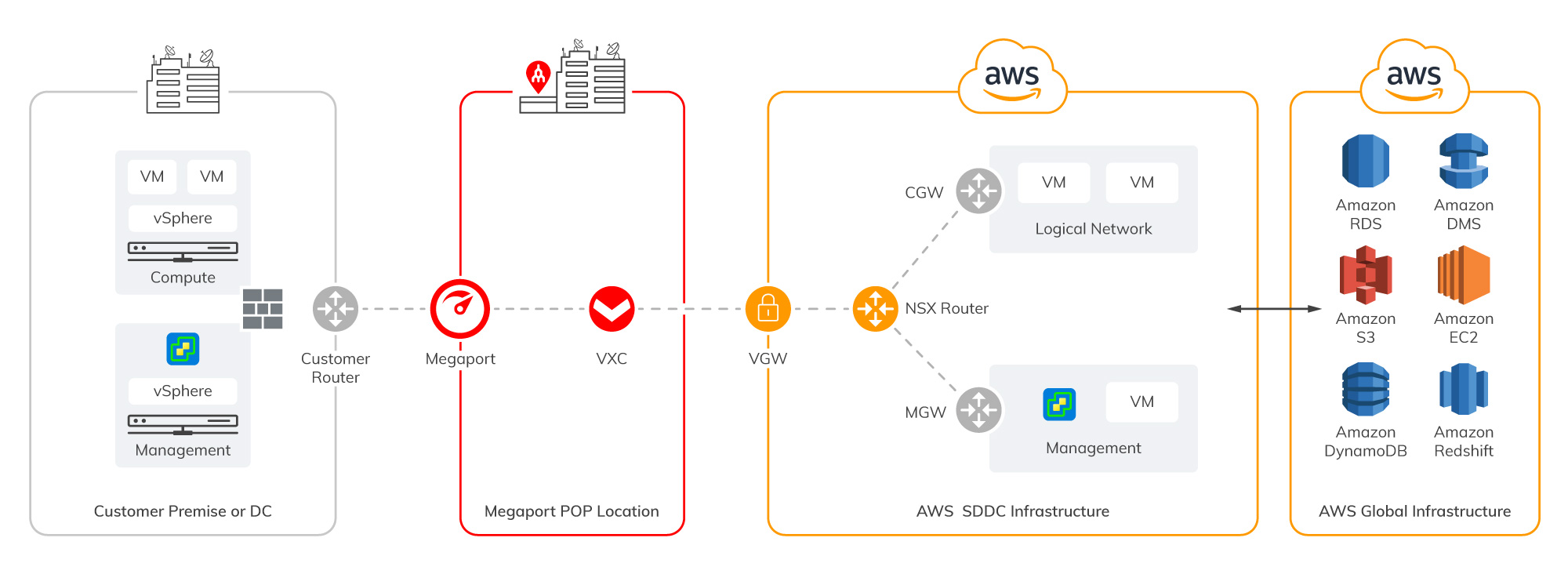
Note that within this architecture, you won’t have root or SSH access to vSphere. Also, 3rd party VIBs or Plugins cannot be installed. It’s best to check with your VMware representative if any of these are required for your solution.
When networking functions are provided by the NSX-T, management traffic, cold migration and hot migration (using vMotion) traffic, and compute gateway traffic can all be transported across Direct Connect. This is an upgrade from the previous version of NSX that didn’t support all traffic types. Also, NSX-T is not a requirement in the on-premises infrastructure in order for this solution to work. An NSX stand-alone client can be downloaded into the on-premises environment for operational use.
Another key thing to remember is that, when deploying vMotion between a VMkernel source and destination, a minimum bandwidth of 250Mbps is required with a maximum round trip latency of 150ms. You can read the VMWare docs here for more information.
Infrastructure details are subject to AWS announcement changes for compute, storage, hypervisor, and technology features. Here’s the best place to find releases and updates. Alternatively, you can check with your VMWare account team.
How do I configure?
For a full walk-through on how to configure VMWare on AWS – and integrate Megaport connectivity – see Megaport Documentation.
Where is VMware Cloud available?
VMware Cloud on AWS is currently available in US East (N. Virginia), US East (Ohio), US West (N. California), US West (Oregon), Asia Pacific (Sydney), Asia Pacific (Tokyo), Europe (Frankfurt), Europe (Ireland), Europe (London), and AWS GovCloud (US). Additional regions are pending. Check the AWS website for updated information.
As one of the world’s most popular data centre virtualisation services, VMWare could be key to driving your digital strategy in AWS cloud environments. With easy, scalable, and cost-effective connectivity to the required services, Megaport could help you simplify the whole process so that it suits your business.
For more information on connecting to VMWare on AWS with Megaport, feel free to get in touch with our team.
此内容由惯性聚合(RSS阅读器)自动聚合整理,仅供阅读参考。 原文来自 — 版权归原作者所有。