





需求简述:
当Sharepoint中的文档库或列表库系统可用列(Field)不能满足我们的显示或数据存储需求时,需要自定义扩展Field的类型和显示方式...
 ...............
实现套路:
本示例中演示一个'姓/名'显示的自定义Field
1. 新建一个Webapplication Project或者Web Site Project,在项目中添加一个customfieldcontrol.ascx控件文件,这个
ascx文件的功能就是:在我们添加列表项时,关于该自定义Field的设定界面.文件中主要包括一个SharePoint:RenderingTemplate控件:
 <%@ Control Language="C#" %><%@ Assembly Name="Microsoft.SharePoint, Version=12.0.0.0, Culture=neutral, PublicKeyToken=71e9bce111e9429c" %><%@ Register TagPrefix="SharePoint" Assembly="Microsoft.SharePoint, Version=12.0.0.0, Culture=neutral, PublicKeyToken=71e9bce111e9429c" Namespace="Microsoft.SharePoint.WebControls" %><SharePoint:RenderingTemplate ID="CustomFieldRendering" runat="server"> <Template> <asp:TextBox runat="server" ID="txtFirstName"></asp:TextBox><asp:TextBox runat="server" ID="txtLastName"></asp:TextBox> </Template></SharePoint:RenderingTemplate>
2. 新建一个Class Library项目,在项目中添加一个customfieldcontrol.cs文件,其实这个cs文件可以理解为刚刚创建的ascx控件的后置代码文件.这个类继承自Microsoft.SharePoint.WebControls.BaseFieldControl,我们在定义的时候要重写基类的一些方法.DefaultTemplateName属性重写将指定与
Controls中定义的SharePoint:RenderingTemplate ID; Value属性重写返回我们想要的预期结果值和设定控件的当前值;CreateChildControls方法判断不同的列表显示模式下控件的输出方式.
using System;
using System.Collections.Generic;
using System.Web.UI.WebControls;
using System.Text;
using Microsoft.SharePoint;
using Microsoft.SharePoint.WebControls;namespace CustomControl
{
public class customfieldcontrol : BaseFieldControl
{
protected TextBox txtFirstName;
protected TextBox txtLastName;//返回默认控件模板的名字--与Controls中定义的SharePoint:RenderingTemplate ID要一致
protected override string DefaultTemplateName
{
get
{
return "CustomFieldRendering";
}
}public override object Value
{
get
{
EnsureChildControls();
return txtFirstName.Text + "%" + txtLastName.Text;
}
set
{
txtFirstName.Text = value.ToString().Split('%')[0];
txtLastName.Text = value.ToString().Split('%')[1];
}
}public override void Focus()
{
EnsureChildControls();
txtFirstName.Focus();
}protected override void CreateChildControls()
{
if (Field == null)
{ return; }
base.CreateChildControls();if (ControlMode == SPControlMode.Display) return;
txtFirstName
= (TextBox)TemplateContainer.FindControl("txtFirstName");txtLastName
= (TextBox)TemplateContainer.FindControl("txtLastName");if (txtFirstName == null) throw new NullReferenceException("txtFirstName is null");if (txtLastName == null) throw new NullReferenceException("txtLastName is null");if (ControlMode == Microsoft.SharePoint.WebControls.SPControlMode.New)txtFirstName.Text
= "";txtLastName.Text
= "";}
}
}
}
3. 在Class Library中再新建一个CustomField.cs类文件,该类可继承自SPField中定义的各个类型(SPFieldText,SPFieldMultiColumn,SPFieldChoice...),本例中从SPFieldText中继承,在这个类中,我们将定义哪个控件类要作为模板加载和显示,和在列表中显示时的值.
using System;
using System.Collections.Generic;
using System.Linq;
using System.Text;
using Microsoft.SharePoint;
using Microsoft.SharePoint.WebControls;namespace CustomControl
{
public class CustomField: SPFieldText
{
public CustomField(SPFieldCollection fields, string fieldName)
: base(fields, fieldName)
{ }public CustomField(SPFieldCollection fields, string fieldName, string displayName)
: base(fields, fieldName, displayName)
{ }public override BaseFieldControl FieldRenderingControl
{
get
{
BaseFieldControl fieldControl = new customfieldcontrol();
fieldControl.FieldName = this.InternalName;
return fieldControl;
}
}public override string GetValidatedString(object value)
{
return value.ToString().Split('%')[1].ToUpper() + " " + value.ToString().Split('%')[0];
}
}
}
4. 最后,创建一个自定义Field的xml规范文件(文件命名要以fldtypes_打头),其主要功能是将我们上面定义的自定义Field添加到Sharepoint系统中去.
<?xml version="1.0" encoding="utf-8" ?>
<FieldTypes>
<FieldType>
<Field Name="TypeName">CustomField</Field>
<Field Name="ParentType">Text</Field>
<Field Name="TypeDisplayName">Custom Name Field</Field>
<Field Name="TypeShortDescription">Custom Name Text Field</Field>
<Field Name="UserCreatable">TRUE</Field>
<Field Name="ShowOnListCreate">TRUE</Field>
<Field Name="ShowOnSurveyCreate">TRUE</Field>
<Field Name="ShowOnDocumentLibrary">TRUE</Field>
<Field Name="ShowOnColumnTemplateCreate">TRUE</Field>
<Field Name="Sortable">TRUE</Field>
<Field Name="Filterable">TRUE</Field>
<Field Name="FieldTypeClass">CustomControl.CustomField, CustomControl, Version=1.0.0.0, Culture=neutral, PublicKeyToken=7eed7044d24c75b7</Field>
<Field Name="SQLType">nvarchar</Field>
</FieldType>
</FieldTypes>
5. 上面所说的Code步骤已经完成,接下来就是将Field部署到Sharepoint中去,首先为第二步的Class Library项目创建强名称程序集,可以用Reflector等反编译工具获取程序集信息,然后修改fldtypes_xxx.xml中的FieldTypeClass节点内容为程序集信息
将编译好的
Class Library项目dll,注册到系统GAC中:C:\WINDOWS\assembly(可直接拖动到该文件下)将.ascx控件复制到: C:\Program Files\Common Files\Microsoft Shared\web server extensions\12\TEMPLATE\CONTROLTEMPLATES目录中
将.xml文件复制到: C:\Program Files\Common Files\Microsoft Shared\web server extensions\12\TEMPLATE\XML 目录中
最后,run--> iisreset ,重启后就可以登录到sharepoint中,查看实验成果了!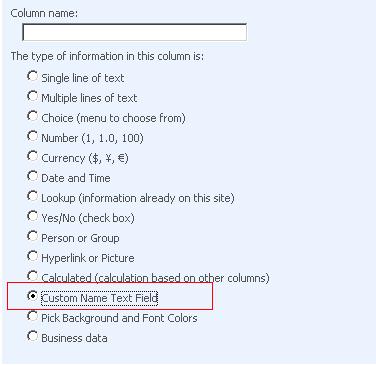
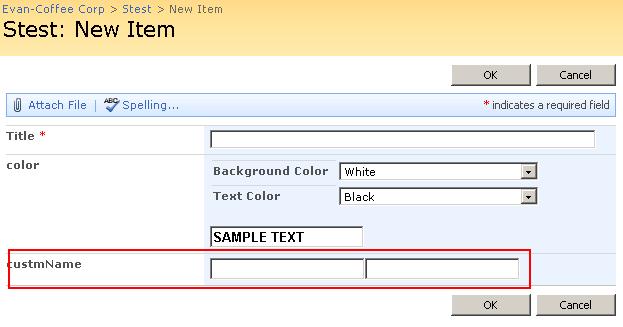
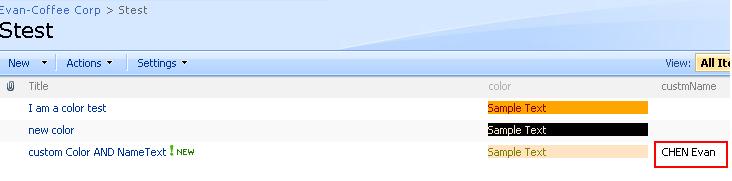
本示例实现了一个SPFieldText形式的自定义Field,
那其它的SPField类型当然也是可以支持扩展的,比如上图中的一个带颜色(背景和前景)的自定义Field... :)此内容由惯性聚合(RSS阅读器)自动聚合整理,仅供阅读参考。 原文来自 — 版权归原作者所有。