惯性聚合 高效追踪和阅读你感兴趣的博客、新闻、科技资讯
阅读原文 在惯性聚合中打开

推荐订阅源

K
Kaspersky official blog
Martin Fowler
Martin Fowler
CTFtime.org: upcoming CTF events
V
Visual Studio Blog
博客园_首页
Engineering at Meta
Engineering at Meta
The Cloudflare Blog
MongoDB | Blog
MongoDB | Blog
Blog — PlanetScale
Blog — PlanetScale
T
The Blog of Author Tim Ferriss
雷峰网
雷峰网
D
Docker
博客园 - 司徒正美
S
SegmentFault 最新的问题
M
MIT News - Artificial intelligence
博客园 - 叶小钗
博客园 - 三生石上(FineUI控件)
U
Unit 42
J
Java Code Geeks
A
About on SuperTechFans
N
Netflix TechBlog - Medium
freeCodeCamp Programming Tutorials: Python, JavaScript, Git & More
S
Security Affairs
I
Intezer
Cisco Talos Blog
Cisco Talos Blog
C
Cyber Attacks, Cyber Crime and Cyber Security
Threat Intelligence Blog | Flashpoint
B
Blog RSS Feed
P
Privacy & Cybersecurity Law Blog
T
Tenable Blog
T
Threatpost
H
Hacker News: Front Page
G
Google Developers Blog
博客园 - 【当耐特】
Hugging Face - Blog
Hugging Face - Blog
Apple Machine Learning Research
L
Lohrmann on Cybersecurity
大猫的无限游戏
大猫的无限游戏
Google DeepMind News
A
Arctic Wolf
S
Secure Thoughts
GbyAI
GbyAI
NISL@THU
NISL@THU
S
Security @ Cisco Blogs
Exploit-DB.com RSS Feed
Webroot Blog
Webroot Blog
C
CXSECURITY Database RSS Feed - CXSecurity.com
O
OpenAI News
Spread Privacy
Spread Privacy
Application and Cybersecurity Blog

博客园 - Steven Xiao

asp.net接收API Post Json数据为空要注意的事项 解决Asp.net 程序在 IIS 5.1 上运行不支持转换Decimal类型小数点的问题 - Steven Xiao 把XML 文件转换为 String 字符串 - Steven Xiao C#语言规范 3.0 版 分享DotNetBar控件制作office 2007风格界面的视频教程(winform office 2007 风格) XMLHttpRequest对象 SQL 2005实现单表分页的查询语句 分享实现web用户控件调用.aspx页面里的方法(从而达到访问母页面中控件的目的) 软件开发者面试百问 分享一个DotNetBar做的三层架构的winForm程序 分享一个不错的js提示信息代码(tooltips) - Steven Xiao - 博客园 dropdownlist实现树型结构的栏目信息 asp.net 2.0实现多语言(二) 一个封装的在后台弹出JS Alert消息和JS confirm信息以及跳转到指定的页面 一个小小的WEB程序源代码 網絡收藏: 弹出窗口总结 - Steven Xiao gridview 实现全选和反选--补充 收藏的 sql经典语句 ---来自网上 ASP.NET button控件样式
asp.net 2.0实现多语言(一)
Steven Xiao · 2008-07-12 · via 博客园 - Steven Xiao

1.新建一个asp.net web应用程序

2.创建的项目如下图所示
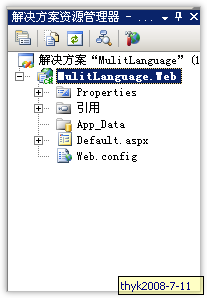
3.右击web项目名称,添加一个全局资源文件夹"app_GlobalResources" ,这个是asp.net 2.0特有的

4.右击"app_GlobalResources"文件夹,添加两个资源文件: language.resx(简体资源文件)  和language.en-us.resx (英文的资源文件)
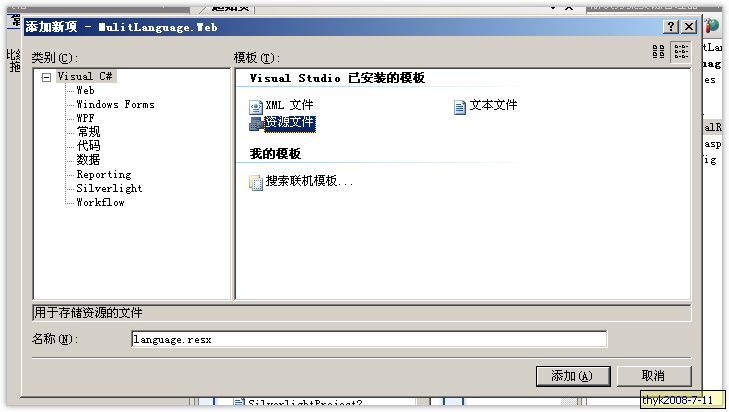
5.打开两个资源文件,添加相应的资源信息,如下图所示

6.打开default.aspx文件,输入如下代码:

<body>
    <form id="form1" runat="server">
    <center>
        <div style="margin: 20px; padding: 10px; height: 200px; width: 200px; border: solid 1px #C0C0C0;
            text-align: center;">
            <br />
            <a href="?curlanguage=zh-cn">中文</a> &nbsp;
             <a href="?curlanguage=en-us">英文</a>
            <br />
            <br />
            国家:&nbsp;<asp:Literal ID="ltlcountry" runat="server"></asp:Literal>
            <br />
            城市:&nbsp;<asp:Literal ID="ltlcity" runat="server"></asp:Literal>
           
             <br />
            <br />
            国家2:&nbsp;<asp:Literal ID="ltlcountry2" runat="server"></asp:Literal>
            <br />
            城市2:&nbsp;<asp:Literal ID="ltlcity2" runat="server"></asp:Literal>
        </div>
    </center>
    </form>
</body>

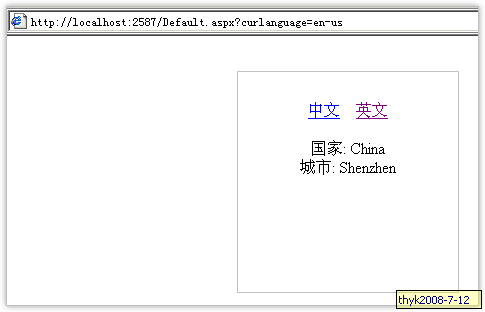
预览如下图所示:

7.打开

Default.aspx.cs文件,输入如下代码:

//这段代码很重要 
protected override void InitializeCulture()
        {
            string culture = Request.QueryString["curlanguage"];
            if (!String.IsNullOrEmpty(culture))
            {
                System.Threading.Thread.CurrentThread.CurrentUICulture = new System.Globalization.CultureInfo(culture);
                System.Threading.Thread.CurrentThread.CurrentCulture = System.Globalization.CultureInfo.CreateSpecificCulture(culture);
            }
        }

        protected void Page_Load(object sender, EventArgs e)
        {
            if (!IsPostBack)
            {
                ltlcountry.Text = Resources.language.country.ToString();
                ltlcity.Text = Resources.language.city.ToString();

                ltlcountry2.Text =(string)GetGlobalResourceObject("language", "country");
                ltlcity2.Text=(string)GetGlobalResourceObject("language", "city");

            }
        }

8. build下整个项目,按F5浏览: 点击下图中的  "中文" 和 "英文" 链接就可以查看我们所要的效果了